
Angle 4
What Angle 4 is
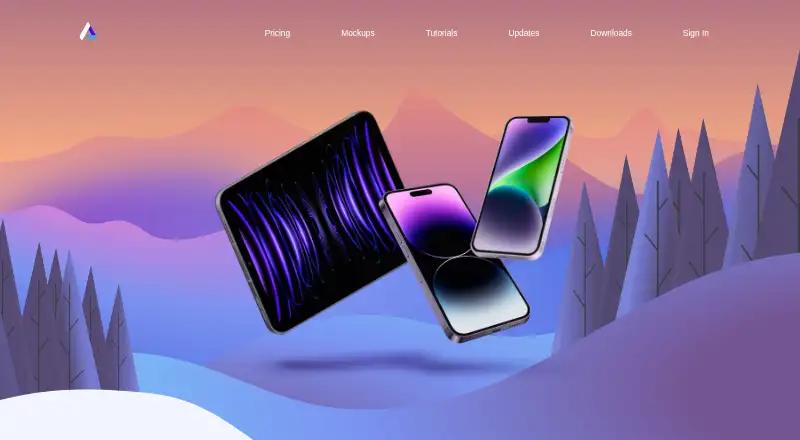
Angle provides vector device mockups for Sketch, Figma, and Adobe XD. Its collections cover iOS, Android, and desktop devices, including categories such as iPad, MacBook, iMac, and Pro Display XDR. The mockups are layered vector files that can be resized. Figma users can add them by dragging and dropping a .fig file, while the Sketch download includes the mockup library and an exclusive plugin. The site offers 50 free mockups to try with its plugin and lists 1000 assets overall. The Free plan is for personal use only. Commercial use is allowed with the Full Library plan, which costs 79.00 USD once and includes 1000+ mockups and upgrades for one full year. Lifetime costs 149.00 USD once and includes unlimited upgrades. A license covers one user, and Angle’s assets cannot be redistributed or resold. Teams are directed to contact support about team licenses. Angle is operated by Shadowness Inc. and is based in Terrebonne, Quebec, Canada.
Who it suits
Angle suits designers working in Sketch, Figma, or Adobe XD who need device mockups for app or desktop designs. The Free plan is for personal use; commercial projects require a plan that allows commercial use.
What it does well
- Mockups cover iOS, Android, and desktop devices.
- Layered vector files can be resized.
- Works with Sketch, Figma, and Adobe XD.
- 50 free mockups are available to try.
- Full Library permits commercial use.
What to know first
- Free plan is limited to personal use.
- A license is for one user.
- Assets cannot be redistributed or resold.
- Full Library upgrades last one full year.
Limits
The Free plan includes sample mockups for personal use only. Full Library costs 79.00 USD once and includes upgrades for one full year; Lifetime costs 149.00 USD once and includes unlimited upgrades.
Plans
| Plan | Billed and limits | Price |
|---|---|---|
| Free | Sample mockups · personal use only · Figma, Sketch and XD plugins | Free |
| Lifetime | Everything from Full Library · unlimited upgrades · early supporter limited plan | $149, paid once |
| Full Library | 1000+ mockups · upgrades for one full year · commercial use allowed · Figma, Sketch and XD plugins | $79, paid once |
As angle.sh lists them, read 29 Sept 2026. The maker's own page has the final word.
Getting started
- Visit https://angle.sh/ to access Angle.
- Choose the free plan or a paid library plan.
- Use the Figma plugin by dragging a .fig file into Figma.
- Download the Sketch library to use its included plugin.
- Use the mockup files with Sketch, Figma, or Adobe XD.
Angle is a device-mockup library for designers who build in Sketch, Figma or Adobe XD. It is most compelling when editable vector assets across phones, tablets and desktop devices matter; its one-user license makes team use a key limitation.
Overview
Angle provides 1,000 mockup assets spanning iOS, Android and desktop categories, including iPad, MacBook, iMac and Pro Display XDR. The files are layered vectors that can be resized without losing sharpness, which suits layouts that need to adapt to different sizes while keeping the mockup editable.
The workflow is tied to the supported design tools. Figma mockups can be added by dragging in a .fig file, and the Sketch download bundles the mockup library with an exclusive plugin. A set of 50 free mockups is available to try with the plugin, giving personal projects a way to explore the collection before purchase.
Key features
- Layered vector files: Infinite resizing is useful for changing output dimensions without pixelation. The editable format is a better fit than static images when device framing needs to remain part of the design.
- Sketch, Figma and Adobe XD support: Designers using any of these three tools can work with Angle’s files and plugins. The .fig drag-and-drop route is straightforward for Figma, while Sketch users receive an exclusive plugin with the library download.
- Broad device coverage: The collection spans phones, tablets, laptops and desktop displays, giving product and interface work a range of device contexts. The 50 free mockups offer a limited sample rather than the full 1,000-asset library.
Pricing
| Plan | Price | What it includes |
|---|---|---|
| Free | free | Sample mockups, personal use only, and Figma, Sketch and XD plugins |
| Full Library | $79, paid once | 1,000+ mockups, upgrades for one full year, commercial use allowed, and plugins for all three tools |
| Lifetime | $149, paid once | Everything in Full Library and unlimited upgrades; a limited plan for early supporters |
The Free plan is suitable for personal exploration, but its personal-use restriction rules it out for commercial deliverables. Full Library is the practical choice for a solo designer who needs commercial rights: the one-time price includes one year of upgrades, rather than ongoing upgrades. Lifetime costs more upfront but removes that upgrade window, making it relevant to buyers who value unlimited upgrades and can access the limited early-supporter plan.
Each license covers one user, and Angle assets cannot be redistributed or resold. That makes the plans a poor fit for sharing a library across a team; teams are directed to contact [email protected] about team licenses. Credit cards and PayPal are accepted.
Platforms
Angle is listed for macOS, Windows and the web. Its mockup files and plugins support Sketch, Figma and Adobe XD.
Who it's for
Angle suits individual designers who want editable device mockups inside Sketch, Figma or Adobe XD, especially when their work ranges across mobile, tablet and desktop presentations. The paid plans fit solo commercial work, while the free sample can serve personal projects or an initial look at the assets. Teams should settle licensing before relying on the library, since a standard license is for one user.
Pros and cons
- Pro — Resizable, layered vectors: They retain sharpness across output sizes and stay editable within design compositions.
- Pro — Three supported design tools: Sketch, Figma and XD coverage accommodates designers already working in those environments, with a bundled exclusive plugin for Sketch.
- Pro — Commercial rights on the Full Library and Lifetime plans: Solo users can use the assets commercially without a recurring subscription price.
- Con — Free is personal use only: The sample plan cannot cover commercial projects.
- Con — One-user license: Teams need to arrange a team license, and redistribution or resale is prohibited.
- Con — Full Library upgrades last one year: Buyers who want ongoing upgrades must pay more for the limited Lifetime plan.
Alternatives
Mockup Libraries is a useful starting point for comparing the broader category. Choose Mockuuups Studio instead if a larger 5,300+ mockup collection and a $12 a month Professional plan suit you better; its free collection is limited and requires attribution.
Mediamodifier Mockup Generator is worth considering when web and mobile access, templates and integrated fonts matter more than Angle’s design-tool library workflow. The Mock House may suit users who prefer a monthly allowance: its free tier caps output at 3 mockups per month and adds a watermark, while its Creator plan is $29 a month.
Artboard Studio offers a web and extension-based alternative, with a free plan and paid Lite and Pro plans billed annually. Mockups Design is an option for downloadable Photoshop PSD mockups, including free smaller-resolution versions.
Polymock is another option, with a free community license that allows unlimited renders and end products but requires attribution. Presenta and LS Graphics are also alternatives to consider.
Verdict
Choose Angle if you are a solo designer who wants a substantial, editable vector mockup library integrated with Sketch, Figma or XD, and needs commercial rights through a one-time purchase. Look elsewhere if your team needs shared seats under a standard license, or if personal-use free access is not enough for your work.
Verdict
Angle offers vector mockups and plugins across three design tools, with a free personal-use option and paid commercial-use plans. Review the one-user license and redistribution restrictions before using its assets in a team workflow.
Questions
Is Angle free?
Yes. The Free plan costs nothing and includes sample mockups for personal use, plus Figma, Sketch, and XD plugins.
How much do the paid plans cost?
Full Library costs 79.00 USD once. Lifetime costs 149.00 USD once.
Can I use Angle assets commercially?
Commercial use is allowed with the Full Library plan. The Free plan is for personal use only.
Which design tools does Angle support?
Angle's mockup files and plugins work with Sketch, Figma, and Adobe XD.
Can a license be shared or assets resold?
One license is for one user. Angle assets may not be redistributed or resold.
Who operates Angle?
Angle's terms identify Shadowness Inc. as the operator of angle.sh.
Facts from Angle 4's own pages
- Commercial use
- The Full Library plan allows commercial use, while the Free plan is for personal use only. · angle.sh, 29 Sept 2026
- Design tool support
- Angle’s mockup files and plugins work with Sketch, Figma and Adobe XD. · angle.sh, 29 Sept 2026
- Device categories
- The mockup collections cover iOS, Android and desktop devices. · angle.sh, 29 Sept 2026
- Figma workflow
- The Figma mockups can be added by dragging and dropping a .fig file. · angle.sh, 29 Sept 2026
- Free sample
- The site offers 50 free mockups to try with its plugin. · angle.sh, 29 Sept 2026
- Headquarters
- Terrebonne, Quebec, Canada · angle.sh, 28 Sept 2026
- License limits
- The pricing FAQ says one license is for one user and Angle assets may not be redistributed or resold. · angle.sh, 29 Sept 2026
- Maker
- Angle’s terms identify Shadowness Inc. as the operator of angle.sh. · angle.sh, 29 Sept 2026
- Payment
- The pricing FAQ says Angle accepts credit cards and PayPal. · angle.sh, 29 Sept 2026
- Privacy and security
- The privacy policy says it may use passwords, encryption, firewalls or restricted employee access, and does not guarantee absolute security. · angle.sh, 29 Sept 2026
- Sketch plugin
- The Sketch download includes the mockup library and an exclusive Sketch plugin. · angle.sh, 29 Sept 2026
- Support
- The tutorials page directs users needing help to [email protected]. · angle.sh, 29 Sept 2026
- Team licenses
- Teams are asked to contact [email protected] about team licenses. · angle.sh, 29 Sept 2026
- Vector assets
- The mockups are fully layered vector files that can be resized infinitely. · angle.sh, 29 Sept 2026
- What it does
- Angle provides vector device mockups for Sketch, Figma and XD. · angle.sh, 29 Sept 2026
Where Angle 4 stands on Freedom251
- Mockup Libraries#1 of 27