Mockups Design
What Mockups Design is
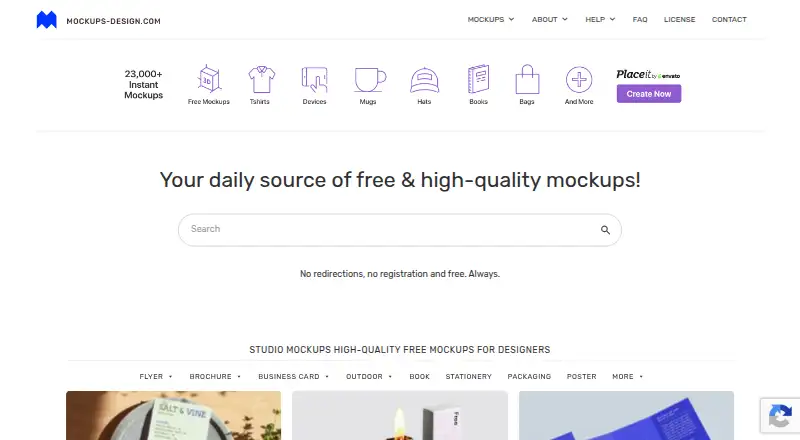
Mockups Design is a web catalog of downloadable mockups for presenting graphic and design work. It covers categories such as packaging, flyers, books, posters, apparel, branding items, stationery, devices, and outdoor advertising. Device scenes include phones, MacBooks, tablets, and monitors for showing screenshots, interfaces, web designs, dashboards, portfolios, and case studies. Downloads are PSD files; device mockups use layers and Smart Objects so artwork can be replaced in Photoshop. The maker says Photoshop CS6 is enough for many files, although some may need a newer version. Downloads are available without registration, login, or personal data. Free smaller-resolution versions retain the editable elements of full-resolution files, which are intended for large-format use or extra pixel density. Private and commercial work, including client projects and advertising, is permitted without added fees. Redistribution as open PSD or TIF files and selling or distributing files on stock sites are prohibited. The free plan costs nothing; paid pricing is noted from $5. A full-resolution packaging pack is listed without a price.
Who it suits
It suits designers and other creators who need PSD scenes to present visual work, including client projects and advertising. Users should be comfortable editing in Photoshop and observing the redistribution restrictions.
What it does well
- Downloads do not require registration or login.
- Device PSDs include Smart Objects for artwork replacement.
- Commercial and private use is permitted without added fees.
- Smaller free versions retain editable elements.
What to know first
- Some mockups may require the latest Photoshop version.
- Open PSD or TIF redistribution is prohibited.
- Listed download limit is 1 downloads/mo.
Limits
The listed free plan includes smaller-resolution mockups. Full-resolution files are intended for large-format work or extra pixel density; a full-resolution packaging pack is sold through Gumroad, with no price listed.
Plans
| Plan | Billed and limits | Price |
|---|---|---|
| Free mockups | Free downloadable mockups; Photoshop PSD files; smaller resolution versions | Free |
| Full-resolution packaging mockup pack | 5,400+ packaging mockups; full-resolution files; sold via Gumroad | On request |
As mockups-design.com lists them, read 4 Oct 2026. The maker's own page has the final word.
Getting started
- Open https://mockups-design.com/.
- Browse the mockup categories and choose a scene.
- Download a free mockup without registering.
- Open its PSD in Photoshop; the maker says Photoshop CS6 works for many files.
- For device mockups, replace the artwork through the Smart Object layer.
Mockups Design is a web library of downloadable PSD scenes for presenting graphic and design work across packaging, print, branding, outdoor advertising, and devices. It suits designers who need editable presentation assets without creating an account, particularly for client-facing or commercial work. The strongest case is its broad catalogue and permissive finished-work licence; the main cautions are Photoshop dependence, mixed file-version requirements, and a ban on redistributing source files.
Overview
The catalogue spans flyers, packaging, books, posters, apparel, branding items, stickers, labels, stationery, devices, and outdoor advertising. Downloads come directly from the maker’s servers without login or personal data, so occasional users can obtain assets quickly. The site’s advertising-supported model keeps many files free.
Free smaller versions retain the same editable elements as full-resolution files. They should cover ordinary digital presentations, while large-format output or work requiring higher pixel density is better served by the full-resolution packaging collection. Commercial and private use, including client projects and advertising, is allowed without an additional fee. Redistribution is not: users cannot share or sell the mockups as open PSD or TIF files or distribute them through stock or microstock sites.
Key features
Layered device scenes
Phone, MacBook, tablet, and monitor scenes are layered PSDs with Smart Objects. Replacing the artwork in Photoshop lets designers present screenshots, interfaces, websites, dashboards, portfolios, and case studies in a device context without rebuilding the scene. The workflow is useful for polished presentations, but it is not a browser-based editor or a documented software integration.
Broad scene categories
Beyond devices, the library covers packaging, stationery, posters, apparel, labels, stickers, books, flyers, branding objects, and outdoor placements. That range makes it a practical source for agencies and freelancers presenting multiple kinds of work, rather than a specialist device-only collection.
Photoshop requirements and support
The maker says Photoshop CS6 is sufficient for many mockups, although some files may require the latest Photoshop version. Compatibility therefore needs checking before a deadline. Problems and feedback can be sent to [email protected] with the affected mockup link and relevant software or browser details. Support does not include customizing a mockup for a project, and graphic-design services are no longer offered.
Pricing
Free mockups — free: downloadable mockups, Photoshop PSD files, and smaller-resolution versions. This is the natural starting point for students, freelancers, and teams needing occasional presentation scenes, with a stated limit of 1 download per month.
Full-resolution packaging mockup pack — custom pricing: more than 5,400 packaging mockups in full-resolution files, sold through Gumroad. It is aimed at users who need substantial packaging coverage or extra pixel density; the price is not published, so budgeting requires checking the offer before purchase.
There is no free trial. Commercial use is included for the mockups, but the redistribution restriction applies regardless of plan.
Platforms
Mockups Design is delivered through the web. Editing the downloadable PSD files requires Photoshop; many work with CS6, while some need a newer release.
Who it's for
Choose it for graphic designers, UI and web designers, agencies, and freelancers who need scene-based presentations for client work, advertising, portfolios, or case studies. It is especially suitable when no-signup downloads and commercial permission matter. Look elsewhere if you need in-browser editing, non-Photoshop workflows, project customization help, or permission to redistribute source assets.
Pros and cons
- Pro: A wide mix of print, packaging, branding, outdoor, and device scenes supports varied presentation needs.
- Pro: Smart Objects make screenshot and interface replacement efficient inside layered PSDs.
- Pro: Free downloads require no registration or personal data, and commercial client and advertising use is permitted.
- Con: The free tier is limited to one download per month and uses smaller-resolution files.
- Con: Photoshop is required, and file compatibility ranges from CS6 to the latest version.
- Con: Open PSD/TIF redistribution and stock or microstock distribution are prohibited.
- Con: Support does not include project-specific customization.
Alternatives
Mockup Libraries is the broader directory choice when you want to compare multiple mockup sources rather than use one catalogue.
Mediamodifier Mockup Generator fits users who prefer a web service available on Android, iOS, and the web, with free templates, fonts, and Unsplash and GIPHY integration.
Mockuuups Studio is a better fit for users wanting desktop and web coverage, a free trial, and a paid library of more than 5,300 mockups.
The Mock House suits creators seeking mobile and web access with a free tier that includes three mockups per month but adds watermarks and personal-use limits.
Angle 4 is worth choosing when Figma, Sketch, or XD plugins and macOS, Windows, or web access are priorities.
Mockit is an alternative for browser exports with no signup or watermark and output up to 1200px.
Mockup Hunt is a free listing service when you want links to mockups hosted on their source websites.
Polymock is the alternative for unlimited renders and end products under a community licence, with attribution required.
Presenta suits users seeking a browser and API studio with PNG, JPG, and WebP export and a free plan.
Verdict
Mockups Design is a strong choice for designers who want a broad, commercially usable PSD library without registration fees, especially when Smart Object device scenes and varied packaging or print contexts are valuable. Look elsewhere if one-download-per-month free access, Photoshop version constraints, or the prohibition on redistributing source files conflicts with your workflow.
Verdict
Mockups Design offers a broad set of PSD presentation scenes, including device mockups with editable Smart Objects. Its free downloads can be used commercially, but redistribution is restricted and some files may need a newer Photoshop version.
Questions
Is there a free plan?
Yes. Free mockups are listed as free, and downloads are available without registration.
What does paid pricing start at?
The pricing note says paid options start from $5. The full-resolution packaging pack has no listed price.
Which platform does it support?
The listed platform is web.
Can I use the mockups commercially?
Yes. Private and commercial use, including client work and advertising, is allowed without additional fees. Redistribution as open PSD or TIF files and stock site distribution are prohibited.
What software opens the PSD files?
The maker says Photoshop CS6 is sufficient for many mockups, while some may require the latest Photoshop version.
How can I contact support?
Send problem reports or feedback to [email protected]. Include the affected mockup link and relevant software or browser details.
Facts from Mockups Design's own pages
- Business model
- The maker says advertising covers site operating costs and enables the free mockup downloads. · mockups-design.com, 4 Oct 2026
- Commercial use
- Mockups may be used in private and commercial work without additional fees, including client work and advertising. · mockups-design.com, 4 Oct 2026
- Device mockups
- Device scenes include phones, MacBooks, tablets, and monitors for presenting screenshots, UI, web design, dashboards, portfolios, and case studies. · mockups-design.com, 4 Oct 2026
- Downloads
- The maker says downloads are free without registration, and the site describes direct downloads from its own servers without requiring login or personal data. · mockups-design.com, 4 Oct 2026
- Editing software
- The maker says Photoshop CS6 is sufficient for many mockups, while some mockups may require the latest Photoshop version. · mockups-design.com, 4 Oct 2026
- Integrations
- The usage guide explains replacing artwork through a Photoshop Smart Object layer; it does not describe software integrations. · mockups-design.com, 4 Oct 2026
- License restriction
- Users may not redistribute the mockups as open PSD or TIF files or sell or distribute them on stock or microstock sites. · mockups-design.com, 4 Oct 2026
- Mockup format
- Downloads include PSD files, and device mockups are layered PSDs with Smart Objects for inserting screenshots and interface designs. · mockups-design.com, 4 Oct 2026
- Resolution limits
- The maker says free smaller versions contain the same editable elements as full-resolution versions, which are intended for large-format work or users wanting extra pixel density. · mockups-design.com, 4 Oct 2026
- Security and compliance
- The pages opened describe downloads without login or personal data; they do not state security certifications or compliance standards. · mockups-design.com, 4 Oct 2026
- Support
- Users can report problems or send feedback to [email protected], and the FAQ asks them to include the affected mockup link and relevant software or browser details. · mockups-design.com, 4 Oct 2026
- Support limits
- The maker says he cannot help users customize mockups for their projects and no longer offers graphic design services. · mockups-design.com, 4 Oct 2026
- What it provides
- The site offers downloadable mockups for presenting graphic and design work, including studio, packaging, outdoor, and device mockups. · mockups-design.com, 4 Oct 2026
Where Mockups Design stands on Freedom251
- Mockup Libraries#14 of 27