
Presenta
What Presenta is
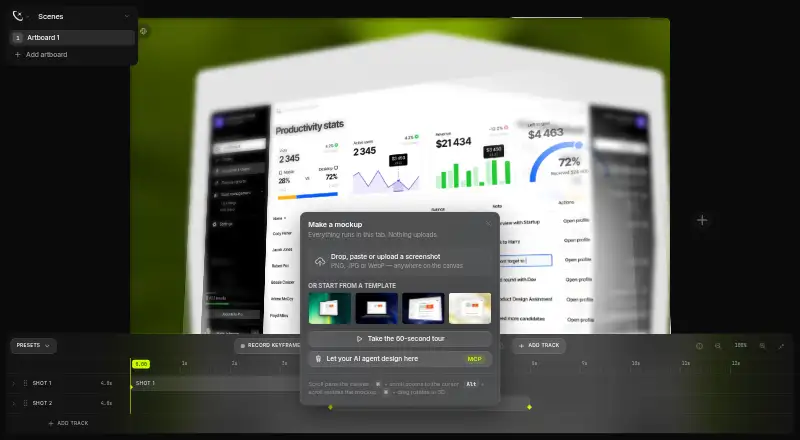
Presenta is a browser-based mockup studio for framing screenshots and exporting finished images. It can place screenshots in more than 35 device and browser frames, including phones, tablets, laptops, and watches. Editing tools include backgrounds, shadows, 3D transforms, depth of field, effects, text and image layers, and artboards. Export finished images as PNG, JPG, or WebP at up to 4×. The free plan includes the studio, timeline authoring, and image export; it costs $0 forever. The site says work stays in the browser tab and nothing uploads, and that no account or installation is needed. One AI Site Shots collection can be tried free, with five artboards made from live desktop and mobile captures. Pro adds Site Shots by URL, WebM video export, background removal, transparent canvas, and Pro templates for $8 per month. The site also documents an MCP server and a JSON bridge for MCP clients, including Claude Code, Codex CLI, and Cursor.
Who it suits
Presenta suits people who need to frame screenshots as device mockups and export images from a browser. Its free plan covers the studio and image exports; users needing URL-based Site Shots, WebM export, background removal, transparent canvas, or Pro templates can consider the $8 per month Pro plan.
What it does well
- Frames screenshots in more than 35 devices and browsers.
- Exports PNG, JPG, and WebP images up to 4×.
- Free plan includes the studio and timeline authoring.
- No account or installation is required, according to the site.
- Background removal processes uploaded screenshots on-device.
What to know first
- Site Shots by URL is a Pro feature.
- WebM video export is a Pro feature.
- Pro costs $8 per month.
- The free Site Shots tryout is one collection.
Limits
The Free plan includes the studio, timeline authoring, and PNG, JPG, and WebP export. Site Shots by URL, WebM video export, background removal, transparent canvas, and Pro templates require Pro, which costs $8 a month.
Plans
| Plan | Billed and limits | Price |
|---|---|---|
| Free | $0 forever · Whole studio · PNG/JPG/WebP export | Free |
| Pro | $20 lifetime · Site Shots by URL · WebM video export · background removal · transparent canvas · Pro templates | $20, paid once |
| Pro | $8 per month · Site Shots by URL · WebM video export · background removal · transparent canvas · Pro templates | $8 a month |
As presenta.design lists them, read 30 Sept 2026. The maker's own page has the final word.
Getting started
- Open https://presenta.design/ in a browser.
- Use the studio without installing software or creating an account.
- Add screenshots to device or browser frames and edit them with the studio tools.
- Export finished images as PNG, JPG, or WebP.
- Choose Pro for Site Shots by URL, WebM video export, background removal, transparent canvas, or Pro templates.
Verdict
Presenta combines screenshot framing, image editing, and export in a browser-based studio, with a free plan for core tools. Check the Pro feature list if you need URL-based Site Shots, WebM export, or transparent canvas.
Questions
Is Presenta free?
Yes. The Free plan is billed at $0 forever and includes the studio and PNG, JPG, and WebP export. One AI Site Shots collection is also free to try.
How much does Pro cost?
Pro costs $8 a month. It includes Site Shots by URL, WebM video export, background removal, transparent canvas, and Pro templates.
What platforms does Presenta support?
The listed platforms are web and API. The studio runs in a browser, and Presenta documents an MCP server and JSON bridge for MCP clients.
Do I need an account or installation?
No. The site says Presenta requires neither an account nor an installation.
What file formats can I export?
The studio exports PNG, JPG, and WebP images at up to 4×. Pro adds WebM video export.
Who makes Presenta?
The site identifies Deny Shepovalov as the maker and names Craftwork Design.
Facts from Presenta's own pages
- Account and install
- The site says Presenta requires no installation and no account. · presenta.design, 30 Sept 2026
- Agent security
- Presenta says agent calls are validated and rate-limited, image sources are restricted to safe schemes, and text layers remain plain text. · presenta.design, 30 Sept 2026
- Editing
- The studio includes backgrounds, shadows, 3D transforms, depth of field, effects, text and image layers, and artboards. · presenta.design, 30 Sept 2026
- Exports
- Presenta exports PNG, JPG, and WebP images up to 4×. · presenta.design, 30 Sept 2026
- Free Site Shots tryout
- The release log says one AI Site Shots collection is free to try; a collection contains five artboards from live desktop and mobile captures. · presenta.design, 30 Sept 2026
- Free tier
- The free tier includes the studio, timeline authoring, and PNG/JPG/WebP export. · presenta.design, 30 Sept 2026
- Headquarters
- Yerevan, Armenia · presenta.design, 28 Sept 2026
- Integrations
- The site documents an official MCP server and a JSON bridge for Claude Code, Codex CLI, Cursor, and other MCP clients. · presenta.design, 30 Sept 2026
- Local processing
- Background removal uses on-device machine learning for uploaded screenshots, which the release log says do not leave the browser. · presenta.design, 30 Sept 2026
- Maker
- The site identifies Presenta as made by Deny Shepovalov and from Craftwork Design. · presenta.design, 30 Sept 2026
- Mockup features
- It can frame screenshots in more than 35 devices, including phones, tablets, laptops, browsers, and watches. · presenta.design, 30 Sept 2026
- Privacy
- The site says everything runs in the browser tab and nothing uploads. · presenta.design, 30 Sept 2026
- Product
- Presenta is a mockup studio that runs in the browser and exports finished images. · presenta.design, 30 Sept 2026
- Pro limits
- Site Shots by URL, WebM video export, background removal, transparent canvas, and Pro templates are listed as Pro features. · presenta.design, 30 Sept 2026
- Support
- The site lists [email protected] as its contact email. · presenta.design, 30 Sept 2026
Where Presenta stands on Freedom251
- Mockup Libraries#16 of 27
- Mockup Generator Software#16 of 24