
Monkr
What Monkr is
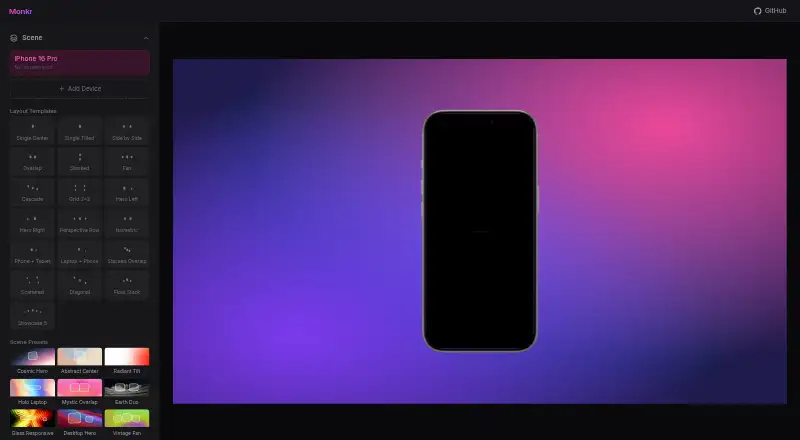
Monkr is a free, open-source mockup generator that runs entirely in a browser. It creates still and video mockups for categories including iPhone, Android, iPad, Mac, desktop, Apple Watch, Apple TV, TV, and browser. Layout templates include Single Center, Side by Side, Grid 2x2, Isometric, and Phone + Tablet; scene presets include Cosmic Hero, Abstract Center, Holo Laptop, and Full Responsive. Device choices include iPhone models, Pixel 7 Pro, and Nothing Phone.
Canvas modes cover General, Social, App Store, and Play Store, with landscape 16:9, portrait 9:16, square 1:1, ultrawide, and Studio Display formats. Controls adjust position, scale, rotation, 3D tilt, shadow, and edge glow; backgrounds, scenes, text overlays, and animations are customizable. It supports App Store screenshot workflows and animated exports via FFmpeg WASM. Work in the browser or with .monkr project files, and export PNG, JPG, MP4, MOV, or WebM. The maker identifies Blaine Miller, a senior software engineer, as its creator.
Who it suits
Monkr suits people who need customizable device mockups or App Store screenshot workflows in a browser. Its still-image and video options can serve those preparing different layouts and canvas formats.
What it does well
- Runs entirely in the browser
- Supports still and video mockups
- Includes App Store and Play Store canvas modes
- Exports PNG, JPG, MP4, MOV, and WebM
- Open source
What to know first
- No paid plan or plan limits are stated
- The maker says it works across iPhone, iPad, Mac, and more, without listing every device
Plans
| Plan | Billed and limits | Price |
|---|---|---|
| Free | No paid price or plan limits stated | Free |
As monkr.wemiller.com lists them, read 7 Oct 2026. The maker's own page has the final word.
Getting started
- Open https://monkr.wemiller.com/ in a browser.
- Choose a canvas mode and format.
- Select a device category, device model, layout, and scene.
- Adjust the background, text, animation, and editing controls.
- Export an image or video, or save the project as a .monkr file.
Verdict
Monkr combines configurable device scenes, multiple canvas formats, and still or animated exports in a browser-based tool. It is a fit for users who want those editing options without a stated paid plan.
Questions
How much does Monkr cost?
Its Free plan is listed as free.
Is Monkr open source?
Yes. The maker describes Monkr as open source.
Which platforms does Monkr support?
The listed platform is web, and the maker says it runs entirely in a browser.
What can Monkr export?
Exports include PNG, JPG, MP4, MOV, and WebM. Animated exports use FFmpeg WASM.
Can Monkr create video mockups?
Yes. Video mockups and animated exports are supported.
Who makes Monkr?
The maker page identifies Blaine Miller, a senior software engineer, and lists Monkr among his projects.
Facts from Monkr's own pages
- Animated exports
- It supports animated exports via FFmpeg WASM. · wemiller.com, 7 Oct 2026
- Canvas
- The app page offers General, Social, App Store, and Play Store canvas modes, with Landscape 16:9, Portrait 9:16, Square 1:1, Ultrawide, and Studio Display formats. · monkr.wemiller.com, 7 Oct 2026
- Customization
- It creates device mockups with customizable backgrounds, scenes, text overlays, and animations. · wemiller.com, 7 Oct 2026
- Device models
- The app page lists iPhone models, Pixel 7 Pro, and Nothing Phone among its device choices. · monkr.wemiller.com, 7 Oct 2026
- Devices
- The maker says Monkr works across iPhone, iPad, Mac, and more. · wemiller.com, 7 Oct 2026
- Editing controls
- The app page exposes position, scale, rotation, 3D tilt, shadow, and edge glow controls. · monkr.wemiller.com, 7 Oct 2026
- Layouts
- The app page lists layout templates including Single Center, Side by Side, Grid 2x2, Isometric, and Phone + Tablet. · monkr.wemiller.com, 7 Oct 2026
- Maker
- The maker page identifies Blaine Miller as a senior software engineer and lists Monkr among his projects. · wemiller.com, 7 Oct 2026
- Purpose
- Monkr is a free, open-source mockup generator that runs entirely in a browser. · wemiller.com, 7 Oct 2026
- Scene presets
- The app page lists scene presets including Cosmic Hero, Abstract Center, Holo Laptop, and Full Responsive. · monkr.wemiller.com, 7 Oct 2026
- Screenshot workflows
- It supports App Store screenshot workflows. · wemiller.com, 7 Oct 2026
- Security
- The maker says the tool runs entirely in the browser. · wemiller.com, 7 Oct 2026
- Source availability
- The maker describes Monkr as open source. · wemiller.com, 7 Oct 2026
Where Monkr stands on Freedom251
- Mockup Libraries#18 of 27