
Mockuuups Studio
What Mockuuups Studio is
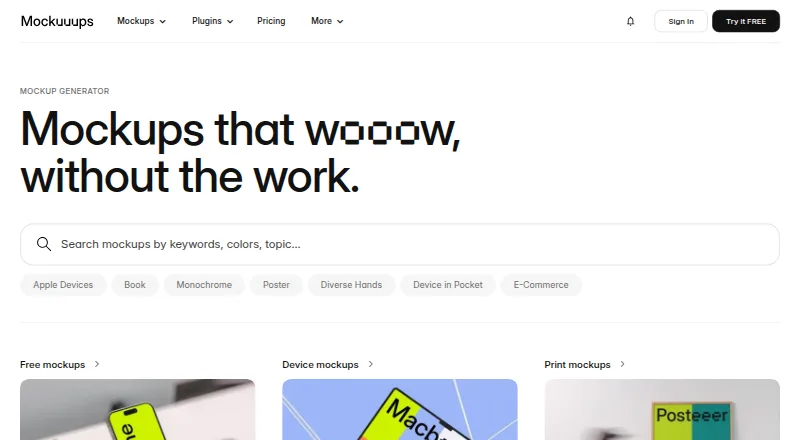
Mockuuups Studio places designs and screenshots into scenes featuring devices and printed materials. Its library contains more than 5,300 mockups, with regular additions, across categories such as phones, tablets, laptops, desktops, smartwatches, televisions, business cards, posters, books, and paper. You can use the product in a browser, with desktop apps for macOS, Windows, and Linux, or through integrations for Figma, Sketch, Adobe Express, Penpot, and Frontify. The Figma plugin lets you preview a design in different mockups and adjust its background, artwork position, and crop. The free collection includes a limited selection and requires attribution. Professional costs $12 a month, is licensed to one person, and includes a commercial-use license and unlimited high-quality exports up to 4K. Paid plans cover client and marketing work; free-trial exports are for evaluation and personal preview. Team is billed per user per month and adds team management, SAML single sign-on, unified billing, and priority support. During normal use, imported designs are processed on the user’s device. Transit uses TLS 1.2 or higher, and stored account data is encrypted at rest.
Who it suits
Mockuuups Studio suits designers who want to place artwork or screenshots into device and print scenes, with browser, desktop, and design-tool options. Its Professional plan is positioned for commercial projects, while Team is aimed at agencies and startups needing team management and SAML single sign-on.
What it does well
- More than 5,300 mockups, with regular additions
- Available in browser and on macOS, Windows, and Linux
- Integrates with Figma, Sketch, Adobe Express, Penpot, and Frontify
- Professional includes unlimited high-quality exports up to 4K
- Paid plans include a commercial-use license
What to know first
- The free collection is limited and requires attribution
- Professional is licensed to one person
- Team and single-export prices are not exposed
Limits
The free collection offers limited mockups and requires attribution. Professional costs $12 a month and is licensed to one person; Team pricing is billed per user per month, with the exact price not exposed.
Plans
| Plan | Billed and limits | Price |
|---|---|---|
| Free | Limited free collection · Attribution required · Personal use only | Free |
| Free collection | Limited mockups · attribution required | Free |
| API Growth | Per month · API credits · High-resolution up to 8K · Website screenshots · CDN delivery · Team members | $100 a month |
| API Scale | Per month · API credits · High-resolution up to 8K · Website screenshots · CDN delivery · No-code integrations · Team members | $1,000 a month |
| Professional | per month · 5300+ mockups · unlimited 4K exports · one person · commercial license | $12 a month |
| Professional annual | Billed $144 per year · 5300+ mockups · Unlimited 4K exports · Commercial license · Advanced editor · Figma plugin · Adobe Express add-on · Shareable links · Website screenshots · 1 person | $144 a year |
| Professional monthly | Billed per month · 5300+ mockups · Unlimited 4K exports · Commercial license · Advanced editor · Figma plugin · Adobe Express add-on · Shareable links · Website screenshots · 1 person | $20 a month |
| Team annual | Billed $216 per user, per year · Everything in Professional · Team management · SAML SSO · Unified billing · Invoice/bank transfer · Priority support | $216 a year |
The first 8 of 13 plans, as mockuuups.studio lists them, read 15 Oct 2026. The maker's own page has the final word. Every plan
Getting started
- Open mockuuups.studio in a browser or choose a desktop app for macOS, Windows, or Linux
- Use the browser version or connect through Figma, Sketch, Adobe Express, Penpot, or Frontify
- Choose the free collection, start a free trial, or select Professional at $12 a month
- Place a design or screenshot in a mockup scene and adjust the background, artwork position, or crop in the Figma plugin
- Export a mockup in PNG, JPG, or WebP
Overview
Mockuuups Studio places designs and screenshots into device and print mockup scenes, with more than 5,300 mockups and regular library additions. It suits designers who want to move between browser, desktop, and design-tool workflows; its strongest case is breadth, while commercial use requires a paid license.
Key features
Mockups across device and print
The library covers phones, tablets, laptops, desktop computers, smartwatches, televisions, business cards, posters, books, and paper. That range is useful for presenting screen designs and print materials in one place. PNG, JPG, and WebP are supported editable formats.
Flexible design workflows
The Figma plugin previews a design across mockups and lets users adjust the background, artwork position, and crop. Browser access and integrations for Sketch, Adobe Express, Penpot, and Frontify provide alternatives to the Figma route. A desktop app is available for macOS, Windows, and Linux, making the product accessible across the listed major desktop platforms.
Exports, licensing, and privacy
Professional provides unlimited high-quality exports up to 4K and a commercial-use license for client and marketing work. Free-trial exports are for evaluation and personal preview only; the free collection is limited, requires attribution, and is positioned for personal projects and trying the product. During normal use, imported designs are processed on the user's device. Transit is protected with TLS 1.2 or higher, and stored account data is encrypted at rest.
Pricing
| Plan | Price | What it includes |
|---|---|---|
| Free collection | free | Limited mockups; attribution required. |
| Professional | $12 a month, billed per month | 5,300+ mockups, unlimited 4K exports, one-person license, and commercial license. |
| Team | Custom pricing; billed per user, per month | Everything in Professional, plus team management, SAML single sign-on, unified billing, and priority support. |
| Single mockup export | Custom pricing; prepaid one-time purchase | One high-resolution mockup export in the desktop app. |
The free collection is a practical way to try the product or make personal work, but its limited selection and attribution requirement make it a poor fit for unrestricted commercial output. Professional is the clear choice for an individual producing client or marketing materials: it removes export quotas and grants commercial rights, but covers one person only. Agencies and startups that need team management, SAML SSO, unified billing, or priority support can choose Team, with a per-user monthly charge. The single-export option suits an occasional desktop export rather than recurring production, though its custom pricing makes the cost comparison unclear.
Platforms
Mockuuups Studio is available on the web and as a desktop app for macOS, Windows, and Linux. Design-tool integrations cover Figma, Sketch, Adobe Express, Penpot, and Frontify. This breadth gives users room to choose a workflow, though the Figma plugin is the integration with described preview and editing controls.
Who it's for
Mockuuups Studio is best suited to individual designers who need a substantial mix of device and print scenes and want to preview Figma designs across them. Professional also fits freelancers and other solo creators doing commercial client or marketing work. Teams at agencies and startups have a dedicated plan with administrative and support features. It is less suitable for someone who needs a fully unrestricted free collection or a team subscription with a known fixed price.
Pros and cons
- Pros: More than 5,300 mockups across device and print categories gives users a broad range without separating those asset types.
- Pros: Browser, desktop, and multiple design-tool integrations support varied workflows; Figma users can preview designs across scenes and adjust background, placement, and crop.
- Pros: Professional combines unlimited exports up to 4K with a commercial-use license, useful for sustained client and marketing work.
- Cons: The free collection is limited and requires attribution, so it is not an unrestricted source for personal or commercial production.
- Cons: Professional is for one person; teams must move to per-user Team pricing, which is custom.
- Cons: The single-export option is prepaid and priced custom, limiting its usefulness for buyers who need a predictable cost before purchasing.
Alternatives
Mediamodifier Mockup Generator is worth considering for users who want a free browser-based option with free mockup templates, more than 100 design templates, more than 1,300 fonts, and Unsplash and GIPHY integration; it also supports downloading or embedding designs.
The Mock House may suit users who prefer a mobile-accessible service and can work within its free tier of three mockups per month, 2K downloads, five saves, watermarking, and personal-use-only terms.
Angle 4 is another option for users seeking sample mockups for personal use with Figma, Sketch, and XD plugins.
Mockit may appeal to users looking for a free web-based option with unlimited exports up to 1200px, no signup, and no watermark.
Mockup Hunt is a free web-based directory of downloadable mockups linked to their source websites.
Mockups Design is an alternative for users who want free downloadable Photoshop PSD mockups, including smaller-resolution versions.
Polymock offers unlimited renders and end products under a free community license, with attribution required.
Presenta is another freemium web option with a free tier that exports PNG, JPG, and WebP.
For more options, browse Mockup Libraries or Mockup Generator Software.
Verdict
Choose Mockuuups Studio if you need a broad, regularly expanded library and want to work across browser, desktop, or design-tool workflows. Its individual Professional plan makes commercial exports straightforward with unlimited 4K output and a commercial license. Look elsewhere if you need an unrestricted free collection or a team plan with a fixed published price.
Verdict
Choose Mockuuups Studio if you need a broad mockup library and want browser, desktop, or design-tool workflows. Professional is the listed paid option for one person and commercial work. Look elsewhere if you need a team plan with a published price or an unrestricted free collection.
Questions
Is there a free plan?
Yes. The Free collection costs nothing and includes limited mockups with attribution required.
How much does Professional cost?
Professional costs $12 a month, billed monthly.
What does Professional include?
It includes access to 5,300+ mockups, unlimited 4K exports, a commercial license, and use by one person.
Which platforms and integrations are available?
Mockuuups Studio is available in a browser and as desktop apps for macOS, Windows, and Linux. Integrations include Figma, Sketch, Adobe Express, Penpot, and Frontify.
Can I use exports for client work?
Paid plans include a commercial-use license for client and marketing work. Free-trial exports are for evaluation and personal preview only.
What does Team add?
Team adds team management, SAML single sign-on, unified billing, and priority support. It is billed per user per month.
Facts from Mockuuups Studio's own pages
- API availability
- The Mockuuups API exposes REST endpoints over HTTPS and can be called from any language able to make HTTPS requests. · mockuuups.studio, 15 Oct 2026
- API credits
- API usage is credit-based; one render normally costs one credit, while high-resolution output and website screenshots each add one credit. · mockuuups.studio, 15 Oct 2026
- API free allowance
- The API offers 50 free credits without requiring a credit card. · mockuuups.studio, 15 Oct 2026
- API integrations
- The API has documented no-code integrations with Zapier and Make.com. · mockuuups.studio, 15 Oct 2026
- API limitation
- When credits are exhausted, render requests return HTTP 402 Payment Required until the account upgrades or renews. · mockuuups.studio, 15 Oct 2026
- API rendering
- API requests can render uploaded images or URL screenshots into static device mockups and return a hosted result URL. · mockuuups.studio, 15 Oct 2026
- Commercial use
- Paid plans include a commercial-use license for client and marketing work, while free-trial exports are for evaluation and personal preview only. · mockuuups.studio, 29 Sept 2026
- Company location
- The company’s own story says it shoots and processes scenes in its Prague studio. · mockuuups.studio, 15 Oct 2026
- Company size
- LinkedIn lists Mockuuups Studio as privately held with 2–10 employees. · linkedin.com, 15 Oct 2026
- Custom scenes
- The editor lets users mix devices, diverse hands and backgrounds including transparent, solid-color, gradient and Unsplash options. · mockuuups.studio, 15 Oct 2026
- Data deletion
- The company says account data is deleted within 30 days of termination or request under its DPA, while billing records may be retained as legally required. · mockuuups.studio, 15 Oct 2026
- Desktop platforms
- The desktop app is offered for macOS, Windows, and Linux. · mockuuups.studio, 29 Sept 2026
- Documentation
- The help center contains articles for the product, plugins, imports, library, licensing, API, teams, billing, troubleshooting and security. · mockuuups.studio, 15 Oct 2026
- Editor
- The Figma plugin lets users preview a design across mockups and adjust backgrounds, artwork position, and crop. · mockuuups.studio, 29 Sept 2026
- Exports
- The Professional plan includes unlimited mockup exports in high quality up to 4K. · mockuuups.studio, 29 Sept 2026
- Founded
- LinkedIn lists the company as founded in 2014. · linkedin.com, 15 Oct 2026
- Free collection limits
- The free collection is limited and requires attribution; the pricing page describes it as suited to personal projects and trying the product. · mockuuups.studio, 29 Sept 2026
- Funding and ownership
- Mockuuups says it is 100% self-funded, profitable and operated full-time by its two co-founders. · mockuuups.studio, 15 Oct 2026
- Independent comparison
- Screenshot Bro describes Mockuuups as strongest for photoreal device scenes and workflow use inside Figma or Sketch. · screenshotbro.app, 15 Oct 2026
- Independent comparison limit
- Mokkit’s comparison says Mockuuups focuses on static images and lacks video or animated-loop export. · mokkit.co, 15 Oct 2026
- Independent comparison praise
- Mokkit’s comparison highlights Mockuuups’ large lifestyle-scene library, including phones in hands and laptops on desks. · mokkit.co, 15 Oct 2026
- Instant preview
- Imported designs are automatically inserted and scaled into many scene previews for quick selection and export. · mockuuups.studio, 15 Oct 2026
- Integrations
- Official integrations include Figma, Sketch, Adobe Express, Penpot and Frontify; Framer and Webflow are listed as coming soon. · mockuuups.studio, 15 Oct 2026
- Library
- The site advertises a library of more than 5,300 mockups with regular additions. · mockuuups.studio, 29 Sept 2026
Where Mockuuups Studio stands on Freedom251
- Mockup Libraries#5 of 27
- Mockup Generator Software#6 of 24
- Figma Plugins#6 of 14