Freedom251 › Mockup Generator Software

Artboard Studio
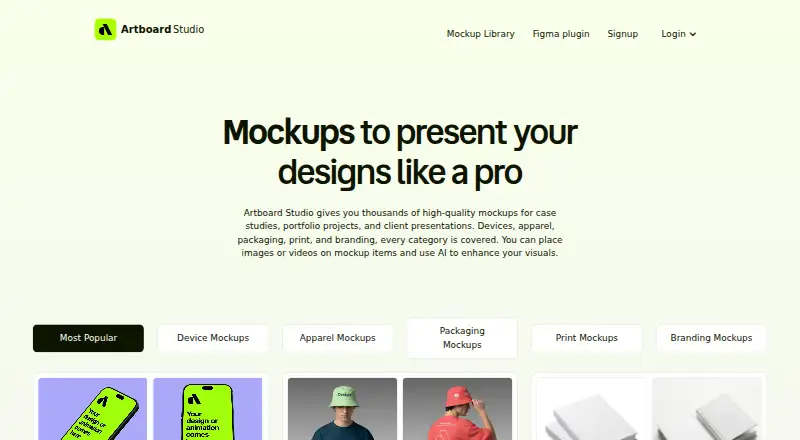
What Artboard Studio is
Artboard Studio is a browser-based mockup editor and generator for designers. Its library has more than 5,000 mockups across device, apparel, packaging, print, branding, and out-of-home categories. In the online editor, users can apply images or videos to mockup surfaces, change backgrounds, and export high-resolution images. Image exports include PNG, JPEG, and WEBP; video exports include MP4 and WEBM. An AI generator can create a mockup from a text prompt and selected style. The Artboard Mockups plugin brings the library, 3D models, and animations into Figma, and an Adobe Express plugin is also listed. The browser editor requires no software installation. Artboard Studio describes the mockups as useful for case studies, portfolio projects, and client presentations. A free plan is available; paid plans start at $9/mo (annual). Listed options include Lite at $108 a year, Pro at $228 a year, and Lifetime Mockup at 129.00 USD once, with no recurring payments.
Who it suits
It suits designers preparing mockups for case studies, portfolio projects, or client presentations. The Figma plugin may suit users who want library access, 3D models, and animations inside Figma.
What it does well
- More than 5,000 mockups across six categories.
- Exports images and videos in listed formats.
- Prompt-based AI mockup generator.
- Browser editor needs no software installation.
- Free plan available.
What to know first
- Pro costs $228 a year.
- Lifetime Mockup costs 129.00 USD once.
Plans
| Plan | Billed and limits | Price |
|---|---|---|
| Free | Start for free | Free |
| Lite Plan | $108.00 per year (= $9.00/month, billed annually) | $108 a year |
| Lifetime Mockup | no recurring payments | $129, paid once |
| Pro Plan | $228.00 per year (= $19.00/month, billed annually) · Unlimited image and video exports | $228 a year |
As artboard.studio lists them, read 3 Oct 2026. The maker's own page has the final word.
Getting started
- Open the Artboard Studio website in a browser.
- Start with the Free plan, or choose a listed paid plan.
- Use the online editor to apply a design to a mockup.
- Use the Artboard Mockups plugin in Figma, or the Adobe Express plugin, if preferred.
Overview
Artboard Studio is a browser-based mockup editor for designers presenting work across digital and physical-looking surfaces. It is best suited to portfolio, case-study and client-presentation work that calls for varied mockup types. Its broad library and Figma access are appealing; the key trade-off is that only the Pro plan explicitly promises unlimited image and video exports.
Key features
More than 5,000 mockups span devices, apparel, packaging, print, branding and out-of-home formats. That range helps designers keep varied presentation work in one tool, rather than limiting them to device scenes. Users can upload designs, place images or videos on mockup surfaces, adjust backgrounds and export high-resolution images. PNG, JPEG and WEBP cover stills, while MP4 and WEBM support video presentations.
The prompt-based AI generator creates a mockup from a text prompt and chosen style, offering an alternate starting point to browsing the library. The Artboard Mockups plugin brings the library, 3D models and animations into Figma; an Adobe Express plugin is another way to use the service. The main editor runs in a browser without a software installation. Support is available through the chat in the bottom-right corner.
Pricing
Lite costs $108 a year, equivalent to $9.00/month billed annually.
Lifetime Mockup costs $129, paid once, with no recurring payments. Pro costs $228 a year, equivalent to $19.00/month billed annually, and explicitly includes unlimited image and video exports. It is the clearest fit for ongoing or export-heavy work. Annual billing applies to Lite and Pro; no trial length or renewal terms are stated.
Platforms
Artboard Studio is available on the web and as an extension. Its browser editor needs no software installation, and the Figma and Adobe Express plugins offer routes into those design tools.
Who it's for
Choose Artboard Studio if you regularly prepare case studies, portfolio pieces or client presentations and want mockups beyond device imagery, including apparel, packaging and out-of-home settings. It is less compelling for someone who needs a defined export quota on a lower-cost tier or does not need its range of mockup categories.
Pros and cons
- Pros: More than 5,000 mockups across six broad categories make it useful for varied presentation work.
- Pros: Image and video placement, several export formats, and a Figma plugin with 3D models and animations support different ways of presenting designs.
- Pros: A free plan and a one-time purchase option give users alternatives to annual subscriptions.
- Cons: Unlimited image and video exports are explicitly included only with Pro, so frequent exporting points toward the $228 a year tier.
- Cons: Lite and Lifetime Mockup have no stated export terms here, making them harder to assess for production workloads.
Alternatives
For a broader set of mockup options, browse Mockup Generator Software, Mockup Libraries or AI Mockup Generators.
Mediamodifier Mockup Generator is worth considering if you want web, mobile and API platforms alongside free templates, design templates, fonts, and Unsplash and GIPHY integration.
Mockuuups Studio is an alternative if you need desktop options on Linux, macOS or Windows as well as web access; its free collection is limited and requires attribution, while Professional costs $12 a month.
The Mock House may suit a mobile-first workflow across Android, iOS and web. Its free plan allows 3 mockups per month and adds a watermark, with personal use only.
Cleanmock is a web alternative with a free plan that uses watermarks, limits downloads and provides 1x standard resolution.
Dynamic Mockups is a web and API option if you want a credit-based workflow: its free plan starts with 50 credits, one catalog, three saved templates and batch export of up to five variations.
Mockup Wish offers a free web plan with five design mockups per month, three alpha and clipart mockups, one brand kit, and a logo and watermark.
Mockupgenerator.ai is another web option; its free account offers unlimited free mockup downloads and high-resolution exports.
MockUPhone is a free, open-source web tool for wrapping app screenshots in device mockups.
Verdict
Artboard Studio is a strong choice for designers who need a wide range of mockup subjects, browser editing and a path into Figma. The library and video support are its central advantages; look elsewhere if you need clearly stated export limits at a lower price, or if device mockups alone would cover your work.
Verdict
Artboard Studio combines a large mockup library with browser editing, AI generation, and design-tool plugins. Its free plan offers a way to start; paid tiers include annual subscriptions and a one-time option.
Questions
Is there a free plan?
Yes. Artboard Studio lists a Free plan at no cost.
How much do the paid plans cost?
The Lite Plan is $108.00 per year, the Pro Plan is $228.00 per year, and Lifetime Mockup is $129.00 once. The pricing note gives a paid starting price of $9/mo (annual).
Which platforms does Artboard Studio support?
The listed platforms are web and extension. The editor runs in a browser without software installation.
What can I export?
Images can be exported as PNG, JPEG, or WEBP, and videos as MP4 or WEBM.
Does it integrate with Figma or Adobe Express?
Yes. The Artboard Mockups plugin provides access to the library, 3D models, and animations inside Figma. An Adobe Express plugin is also listed.
Can I use the mockups commercially?
Yes. Commercial use is supported.
Facts from Artboard Studio's own pages
- Adobe Express integration
- The site lists an Adobe Express plugin as an optional way to use Artboard Studio. · artboard.studio, 3 Oct 2026
- AI feature
- The AI mockup generator creates a mockup from a text prompt and chosen style. · artboard.studio, 3 Oct 2026
- Figma integration
- An Artboard Mockups plugin provides access to the mockup library, 3D models, and animations inside Figma. · artboard.studio, 3 Oct 2026
- Image and video mockups
- Users can place images or videos on mockup surfaces and export images as PNG, JPEG, or WEBP and videos as MP4 or WEBM. · artboard.studio, 3 Oct 2026
- Installation
- The online editor runs in a browser and does not require installing software. · artboard.studio, 3 Oct 2026
- Intended users
- The site describes the mockups as useful for case studies, portfolio projects, and client presentations. · artboard.studio, 3 Oct 2026
- Mockup library
- The service offers more than 5,000 mockups across device, apparel, packaging, print, and branding categories. · artboard.studio, 3 Oct 2026
- Online editor
- The browser editor lets users apply designs to mockups, adjust backgrounds, and export high-resolution images. · artboard.studio, 3 Oct 2026
- Product
- Artboard Studio is an online mockup generator and editor for designers that runs in a browser. · artboard.studio, 3 Oct 2026
- Support
- The site says users can contact support through the chat in the bottom right corner. · artboard.studio, 3 Oct 2026
Where Artboard Studio stands on Freedom251
- Mockup Generator Software#2 of 24
- Mockup Libraries#3 of 27
- AI Mockup Generators#6 of 31