Freedom251 › Mockup Generator Software

Cleanmock
What Cleanmock is
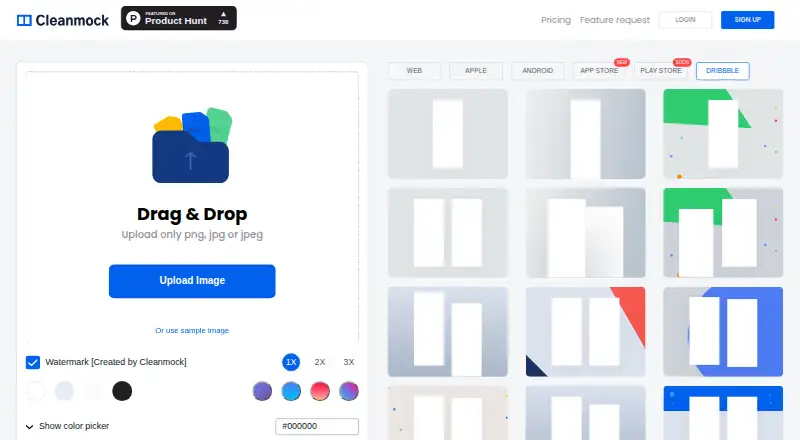
Cleanmock is a browser-based tool for creating mobile and web app device mockups. Users can upload PNG, JPG or JPEG images, or start with a sample image. The editor offers Web, Apple, Android, App Store, Play Store and Dribbble categories, with color, transparent, popular-color and gradient backgrounds. The product page describes device frames for the latest devices and website mockups that support all devices. It lists output at 1600 × 1200 and image generation in 30 seconds or less. Suggested uses include portfolios, app landing pages, social posts, presentations, customer support and product documentation. The Free plan costs nothing and has limited downloads, a watermark and standard 1x resolution. Premium costs $4 a month, billed as $48 yearly, and includes no watermark, 3x Ultra HD output, unlimited downloads, exclusive mockups, custom background colors and priority support. Custom background images and App Store assets are marked as upcoming. The site offers sign-in through Twitter, Dribbble, Facebook, Google or email.
Who it suits
Cleanmock suits people preparing app or website visuals for portfolios, presentations, social media or documentation. Its browser-based editor accepts common image uploads and includes a sample image.
What it does well
- Accepts PNG, JPG and JPEG uploads.
- Offers transparent and gradient backgrounds.
- Premium includes unlimited downloads.
- Premium exports at 3x Ultra HD resolution.
What to know first
- Free downloads are limited.
- Free exports have a watermark.
- Free output is standard 1x resolution.
- Custom background images are marked upcoming.
Limits
The Free plan has limited downloads, a watermark, and standard 1x resolution. It does not include exclusive mockups, custom background colors, or priority support.
Plans
| Plan | Billed and limits | Price |
|---|---|---|
| Free | watermark · 1x standard resolution · limited downloads · no exclusive mockups · no custom background colors · no priority support | Free |
| Premium | $48 yearly · no watermark · 3x Ultra HD · unlimited downloads · exclusive mockups · custom background colors · priority support | $4 a month |
As cleanmock.com lists them, read 15 Oct 2026. The maker's own page has the final word.
Getting started
- Open https://cleanmock.com/ in a web browser.
- Sign in with Twitter, Dribbble, Facebook, Google, or email.
- Upload a PNG, JPG, or JPEG, or use the sample image.
- Choose a mockup category and background.
- Use the Free plan or choose Premium for its listed export features.
Cleanmock is a browser-based editor for creating device, website and app-store mockups from images. It is best suited to people preparing product visuals and promotional materials who want several mockup categories in one tool. Its free plan can serve occasional drafts, but the watermark and limited downloads make Premium the more practical option for finished work.
Overview
Upload a PNG, JPG or JPEG, or begin with the sample image, then choose a Web, Apple, Android, App Store, Play Store or Dribbble category. Cleanmock also supports transparent export, useful when a mockup needs to sit on a slide or page with its own design rather than a solid backdrop.
The product describes output at 1600 × 1200 and image generation in 30 seconds or less. Device frames cover the latest devices, while website mockups support all devices. Color, transparent, popular-color and gradient backgrounds give users several ways to compose a scene without supplying a custom background image.
Cleanmock’s suggested uses include portfolios, app landing pages, social posts, Medium covers, presentations, customer support and product documentation. That range makes it suitable for everyday presentation work, but users needing custom background images or App Store assets should note that those options are marked as upcoming.
Key features
- Multiple mockup categories: Web, Apple, Android, App Store, Play Store and Dribbble cover common product-preview and promotional formats. The breadth is useful when one project needs both device and web visuals.
- Flexible image input and export: PNG, JPG and JPEG uploads plus a sample image give users a choice of starting points, and transparent export helps fit a mockup into an existing layout.
- Background choices: Color, transparent, popular-color and gradient backgrounds allow basic scene styling. Premium adds custom background colors, but custom background images are not yet available.
- Premium finishing: Premium removes the watermark, raises output to 3x [Ultra HD], allows unlimited downloads and adds exclusive mockups, custom background colors and priority support. Promotion for designs is also included, though the product does not define its mechanics.
Pricing
Cleanmock is freemium. The Free plan costs nothing and includes standard 1x resolution, but downloads are limited and exports carry a watermark. It also excludes exclusive mockups, custom background colors and priority support. That makes it a reasonable way to try the editor or create occasional drafts, not an ideal fit for regular client-facing output.
Premium costs $4 a month, billed as $48 yearly. It removes the watermark and download cap, provides 3x [Ultra HD] images, exclusive mockups, custom background colors and priority support. It is the better fit for ongoing use where clean, high-resolution exports matter; the annual billing is the key commitment to weigh against the low monthly equivalent.
Platforms
Cleanmock runs on the web, so it suits users who want a browser-based workflow. Sign-in is available through Twitter, Dribbble, Facebook, Google or email.
Who it's for
Cleanmock is a good match for app makers, designers and teams assembling product previews, presentations or social graphics from their own screenshots. The browser editor and category range are convenient for varied mockup needs, while the free plan leaves room for occasional experimentation. People who need unlimited downloads, watermark-free output or higher resolution should budget for Premium; users who need custom background imagery or App Store assets now should look elsewhere.
Pros and cons
- Pro: Six categories span web, device and store-oriented mockups, reducing the need to switch tools for common presentation assets.
- Pro: Transparent export and several built-in background styles help adapt mockups to existing layouts.
- Pro: Premium removes the watermark and download limit while upgrading output to 3x resolution.
- Con: Free exports are watermarked, limited in number and restricted to standard 1x resolution, so the free tier is constrained for finished or frequent work.
- Con: Custom background images and App Store assets are marked as upcoming, limiting users who need those specific capabilities.
Alternatives
Mockup Generator Software is a broader category directory for comparing tools. Choose Mediamodifier Mockup Generator instead if you want its free templates, 100+ free design templates, 1300+ free fonts, Unsplash and GIPHY integration, or download and embed options.
Mockuuups Studio is worth considering if you want a free collection with limited mockups and attribution, or a Professional plan priced at $12 a month with 5300+ mockups. The Mock House may suit creators who prefer a quota-based free plan: it allows 3 mockups per month, 2K downloads and 5 saves, with watermarking and personal-use limits.
Artboard Studio is another freemium option, with a Lite Plan at $108 a year and a Lifetime Mockup plan at $129, paid once. Consider Dynamic Mockups if an API-oriented workflow is more relevant; its free plan starts with 50 credits, one catalog, three saved templates and watermarked API access.
Mockup Wish offers a free allowance of 5 design mockups per month, 3 alpha and clipart mockups, and 1 brand kit, with logo and watermark. Mockupgenerator.ai may be preferable if unlimited free downloads and high-resolution exports matter, since its Free Account includes those. MockUPhone is a free, open-source alternative that wraps app screenshots in device mockups.
Verdict
Choose Cleanmock if you need a browser-based way to turn screenshots into several kinds of device, web and store mockups, and Premium’s no-watermark, unlimited-download output suits your workflow. Its range and straightforward image inputs are compelling for presentation work, but the free plan’s caps and the wait for custom background images or App Store assets are good reasons to compare alternatives before committing.
Verdict
Cleanmock provides browser-based mockups across web, device and store categories. Its free plan has download, watermark and resolution limits; Premium removes those limits and adds templates and custom background colors.
Questions
Is Cleanmock free?
Yes. Its Free plan costs nothing and includes limited downloads with a watermark and standard 1x resolution.
How much does Premium cost?
Premium is $4.00 per month, billed as $48 yearly. It includes no watermark, 3x Ultra HD, unlimited downloads, exclusive mockups, custom background colors, and priority support.
What platforms does Cleanmock support?
Cleanmock is available on the web.
What file types can I upload?
The editor accepts PNG, JPG, and JPEG files, and also offers a sample image.
Can I export with a transparent background?
Yes. Transparent backgrounds are among the listed background options, and transparent export is supported.
How can I sign in?
The site offers sign-in with Twitter, Dribbble, Facebook, Google, or email.
Facts from Cleanmock's own pages
- Analytics integration
- The privacy policy identifies Google Analytics as a service used to monitor site usage. · cleanmock.com, 15 Oct 2026
- Authentication
- Account login options shown on the site include Twitter, Dribbble, Facebook, Google and email. · cleanmock.com, 15 Oct 2026
- Background colors
- Users can apply transparent backgrounds, popular colors and custom background colors on Premium. · cleanmock.com, 15 Oct 2026
- Backgrounds
- The product page lists color, transparent, popular-color, and gradient backgrounds. · cleanmock.com, 30 Sept 2026
- Data location
- The privacy policy states personal information is stored and processed in the United States or locations used by its providers. · cleanmock.com, 15 Oct 2026
- Developer extensibility
- The opened official pages describe a browser editor but provide no public API, SDK or self-hosting instructions. · cleanmock.com, 15 Oct 2026
- Device frames
- The product offers device frames described as covering the latest devices. · cleanmock.com, 15 Oct 2026
- Devices
- The product page says it provides device frames for the latest devices and website mockups that support all devices. · cleanmock.com, 30 Sept 2026
- Email integration
- The privacy policy says MailChimp may be used for opted-in user emails. · cleanmock.com, 15 Oct 2026
- Founded
- Product Hunt lists Cleanmock as launched in 2019. · producthunt.com, 15 Oct 2026
- Generation speed
- The site claims image generation can complete in 30 seconds or less. · cleanmock.com, 15 Oct 2026
- Gradient backgrounds
- The feature list includes preset gradient backgrounds. · cleanmock.com, 15 Oct 2026
- Image generation
- The product page describes high-resolution 1600 × 1200 output and image generation in 30 seconds or less. · cleanmock.com, 30 Sept 2026
- Image input
- The editor accepts PNG, JPG, or JPEG uploads and also offers a sample image. · cleanmock.com, 30 Sept 2026
- Image uploads
- The editor accepts PNG, JPG and JPEG files through drag-and-drop upload. · cleanmock.com, 15 Oct 2026
- Independent description
- Toolbase says the product combines drag-and-drop uploading with ready-made templates for web, iPhone, Android, App Store, Play Store and Dribbble. · toolbase.io, 15 Oct 2026
- Independent how-to result
- Lifehacker Japan reported that users can upload up to two images, choose a phone mockup including iPhone X, adjust background color and download the result. · lifehacker.jp, 15 Oct 2026
- Integrations
- The site offers sign-in with Twitter, Dribbble, Facebook, Google, or email. · cleanmock.com, 30 Sept 2026
- License terms
- The terms grant only a temporary personal, non-commercial viewing license and prohibit copying, modification, commercial use and reverse engineering. · cleanmock.com, 15 Oct 2026
- Limit: asset pricing oversight
- A Product Hunt commenter objected that a black-hand mockup required payment while a white-hand version was free; the maker said this was an oversight and fixed it. · producthunt.com, 15 Oct 2026
- Limit: branding concern
- A Product Hunt commenter said Cleanmock's logo looked too similar to Trello's, and the makers acknowledged the concern. · producthunt.com, 15 Oct 2026
- Limit: free tier
- A Product Hunt commenter considered the free model too limited for a new product and viewed the upgrade path as aggressive. · producthunt.com, 15 Oct 2026
- Limit: missing hand variant
- At launch, a commenter reported that a hand-held mockup variant was unavailable; the maker replied that it would be added later. · producthunt.com, 15 Oct 2026
- Maker
- The official footer credits Tekeste Kidanu and Johny Vino as the makers. · cleanmock.com, 15 Oct 2026
Where Cleanmock stands on Freedom251
- Mockup Generator Software#4 of 24