Google Play Games on PC
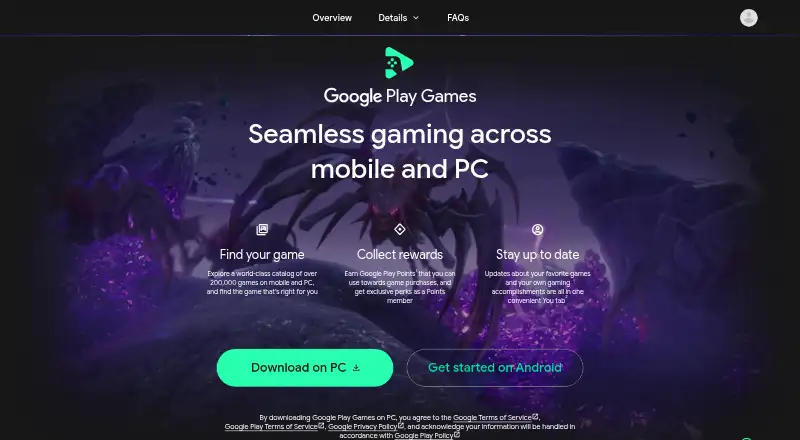
What Google Play Games on PC is
Google Play Games on PC lets users play mobile games on Windows computers, with keyboard and mouse controls and improved graphics. Google describes its catalog as containing over 200,000 games across mobile and PC. For select games on compatible devices, players can sync their library and progress between mobile and PC; some paid titles use one purchase to unlock both versions. A gamer profile shared across mobile and PC can track stats, streaks, progress, and achievements. Players can earn Google Play Points and use points and rewards for discounts and in-game items. Play Games Sidekick with Gemini Live provides access to stats, achievements, tips, and conversational guidance while playing games downloaded from Play. The software costs nothing to use, though games or in-game items may cost extra. A PC needs Windows 10 version 2004, an SSD with 10 GB available, 8 GB RAM, four physical CPU cores, compatible graphics, an admin account, and hardware virtualization. Availability is limited to supported regions and requires a personal Google Account set to one.
Who it suits
It suits people who want to play mobile games on a Windows PC and meet the stated hardware and regional requirements. It may also suit players who want to sync progress for select games across mobile and PC.
What it does well
- Keyboard and mouse controls on Windows PCs.
- Catalog contains over 200,000 games across mobile and PC.
- Select games sync library and progress.
- Shared profile tracks stats and achievements.
- Play Games Sidekick offers in-game guidance.
What to know first
- Games and in-game items may cost extra.
- Requires Windows 10 version 2004 or later.
- Available only in supported countries and regions.
- Only the first installer can play on that PC.
Limits
The software is free, but games and in-game items may cost extra. Cross-device library and progress syncing applies to select games on compatible devices, and only the first installer can play games on a given PC.
Plans
| Plan | Billed and limits | Price |
|---|---|---|
| Google Play Games on PC | No charge to use; games or in-game items may cost extra | Free |
As play.google.com lists them, read 4 Oct 2026. The maker's own page has the final word.
Getting started
- Check that your country or region is supported and your personal Google Account uses a supported Play country.
- Confirm the PC meets the Windows, storage, memory, CPU, graphics, administrator, and virtualization requirements.
- Open the Google Play Games on PC website and install the software.
- Use the first user account that installed it to open the app and play games.
- Choose games from the catalog; account for any game or in-game item costs.
Google Play Games on PC brings mobile games to Windows, with PC controls and select links to play on mobile. It is best for players who want to continue supported Google Play titles on a computer. The software costs nothing, but hardware, regional eligibility, and a one-installer-per-PC rule may make it a poor fit for shared computers or unsupported setups.
Overview
Google describes its catalog as containing more than 200,000 games across mobile and PC. A gamer profile shared across mobile and PC can track stats, streaks, progress, and achievements; cloud saves support compatible games. That breadth and continuity are useful, but syncing and shared purchases apply only to select titles, so the catalog’s size alone does not guarantee a particular game will work the way you want.
Key features
Mobile games adapted for Windows
Improved graphics and keyboard and mouse controls make mobile games playable on a Windows PC. This suits players who prefer desktop controls or a larger screen, though the PC must meet the system requirements and the title must be supported.
Cross-device play and purchases
For select games on compatible devices, players can sync their library and progress between mobile and PC. Some paid titles also let one purchase unlock both versions. Those features reward players already invested in Google Play, but they are not universal; check a game’s support before relying on a shared save or avoiding a second purchase.
Points and in-game guidance
Players can earn Google Play Points and use points and rewards for discounts and in-game items. Play Games Sidekick with Gemini Live can provide stats, achievements, tips, and conversational guidance while playing games downloaded from Play. These additions may help players who want context or advice without leaving a game, while the core appeal remains access to mobile titles on PC.
Security
Google says Google Play runs more than 10,000 safety checks on every game it offers. That is a stated screening measure, not a reason to assume every title is risk-free.
Pricing
Google Play Games on PC is free: the plan costs nothing, with no charge to use the software. Games or in-game items may cost extra, so free access to the platform does not mean every purchase is free.
There is no paid software tier to choose between. The trade-off is that game and item costs remain separate, and the cross-device benefits vary by title.
Platforms
The service supports Windows PCs and Android devices. Windows minimum requirements include Windows 10 version 2004, an SSD with 10 GB of available space, 8 GB of RAM, four physical CPU cores, compatible graphics, a Windows administrator account, and hardware virtualization. These are meaningful prerequisites: a PC that misses one may not be a practical option.
Google Play Games on PC is available only in supported countries and regions. A personal Google Account with its Play country set to a supported region is required. On a computer with multiple users, only the first person who installed the software can open it and play games, a significant restriction for shared PCs.
Who it's for
Choose it if you already play supported Google Play games and want Windows controls, a shared profile, or the chance to continue progress across compatible mobile and PC versions. It is less suitable if you need a game-agnostic Android environment, share one PC with other players, or cannot meet the virtualization and hardware requirements.
Google provides installation troubleshooting, a feedback option, a Help Center contact route, and a help community. Those support paths are useful if setup or compatibility causes trouble.
Pros and cons
- Pros: Free to use, with no software subscription charge.
- Pros: Select games can sync progress across mobile and PC, and some paid titles use one purchase for both versions.
- Pros: Keyboard and mouse controls, points and rewards, and a shared gamer profile add practical benefits for Google Play players.
- Cons: Cross-device support and shared purchases cover only select games and compatible devices.
- Cons: The Windows requirements include hardware virtualization, an SSD, and 8 GB of RAM, which exclude some PCs.
- Cons: Only the first installer can use the software on a PC, limiting shared-computer use.
- Cons: Country eligibility depends on supported regions and the Google Account’s Play country.
Alternatives
Android Emulators for PC is a useful category to compare if you want to consider other ways to run Android apps on a computer. For a broader launcher comparison, see PC Game Launchers; for options beyond PC, browse Android emulators.
- Genymotion Desktop suits users seeking an emulator across Linux, macOS, and Windows; its free plan is limited to personal use, and an Educational plan costs $49 a year.
- BlueStacks App Player is another freemium option for macOS and Windows. Its core experience is free, with BlueStacks Prime priced at $7.99 a month.
- GameLoop is a free Windows PC emulator for mobile games and apps, and is worth considering if that is the setup you want.
- Android-x86 is a free, open-source option for Linux or self-hosting, rather than a Windows service.
- LDPlayer is a Windows emulator with keyboard and mouse controls and multi-instance support on its free plan; LD Premium is also offered.
- MEmu Play is free Windows software supported by advertisements.
- NovaPlay is a free Windows option for Windows 10 or 11 (64-bit) that requires hardware virtualization.
- NoxPlayer is a free emulator for Windows and Mac with keyboard and mouse mapping and multiple emulator instances.
Verdict
Google Play Games on PC is a strong fit for eligible players who want supported Google Play titles on Windows and value shared progress or purchases. Its free access and PC controls are compelling, but choose another route if you need broad emulator flexibility, use a shared computer, or cannot meet its regional and hardware requirements.
Verdict
Google Play Games on PC brings mobile games to Windows with shared profiles and select cross-device features. Check the PC requirements, regional availability, and first-installer restriction before setting it up.
Questions
How much does Google Play Games on PC cost?
The software is free to use. Games or in-game items may cost extra.
Which platforms does it support?
It supports Windows PCs and Android devices for select cross-device features.
Can I sync progress between mobile and PC?
Yes, for select games on compatible devices. Some paid titles also use one purchase to unlock both versions.
What does a PC need to run it?
Minimum requirements include Windows 10 version 2004, an SSD with 10 GB available, 8 GB RAM, four physical CPU cores, compatible graphics, a Windows admin account, and hardware virtualization.
Can anyone in any country use it?
It is available in supported countries and regions, and requires a personal Google Account whose Play country is set to a supported region.
Facts from Google Play Games on PC's own pages
- Availability
- Google Play Games on PC is available in supported countries and regions, and requires a personal Google Account with its Play country set to a supported region. · support.google.com, 4 Oct 2026
- Catalog
- Google describes its catalog as containing over 200,000 games across mobile and PC. · play.google.com, 4 Oct 2026
- Cross-device progress
- For select games on compatible devices, players can sync their game library and progress between mobile and PC. · play.google.com, 4 Oct 2026
- Free plan
- Yes · play.google.com, 19 Sept 2026
- Gamer profile
- A single gamer profile across mobile and PC can track stats, streaks, progress, and achievements. · play.google.com, 4 Oct 2026
- Gemini companion
- Play Games Sidekick with Gemini Live provides access to stats, achievements, tips, and conversational guidance while playing games downloaded from Play. · play.google.com, 4 Oct 2026
- Purpose
- Google Play Games lets users play mobile games on Windows PCs, with improved graphics and keyboard and mouse controls. · support.google.com, 4 Oct 2026
- Rewards
- Players can earn Google Play Points and use points and rewards for discounts and in-game items. · play.google.com, 4 Oct 2026
- Security
- Google says Google Play runs over 10,000 safety checks on every game it offers. · play.google.com, 4 Oct 2026
- Setup limitation
- Only the first user who installed Google Play Games on PC can open it and play games on that PC. · support.google.com, 4 Oct 2026
- Single purchase
- For select paid titles, one purchase unlocks both the mobile and PC versions. · play.google.com, 4 Oct 2026
- Support
- Google provides installation troubleshooting, a feedback option, a Help Center contact route, and a help community. · support.google.com, 4 Oct 2026
- Windows requirements
- The minimum PC requirements include Windows 10 version 2004, an SSD with 10 GB available, 8 GB RAM, four physical CPU cores, compatible graphics, a Windows admin account, and hardware virtualization. · support.google.com, 4 Oct 2026
Where Google Play Games on PC stands on Freedom251
- App Store#4 of 19
- PC Game Launchers#7 of 21
- Game launchers#30 of 68
- Android Emulators for PC#6 of 11
- Android emulators#15 of 19