EA app
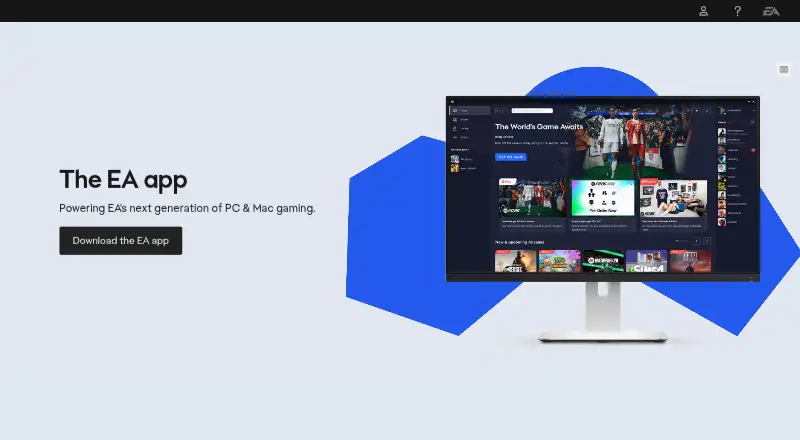
What EA app is
The EA app is Electronic Arts’ platform for playing games on Windows and Mac, and EA says it replaced Origin on those systems. It lets users add games to a collection, see what friends are playing and find new EA releases. Linking an EA Account with gaming platforms can import friends lists and support playing together. The app is required to play EA games on PC launched through Steam or Epic. Login requires an EA Account ID and password, and the app automatically updates at login unless it is already running when an update launches. Linking Discord adds Rich Presence with status, game-mode details, party size and EA membership status. Windows requires a 64-bit PC running Windows 10 or 11; Mac requires macOS 10.15.8 or later, and other operating systems are not supported. The app has a free plan. EA Play is listed at $5.99 a month and EA Play Pro at $16.99 a month. EA Play includes a game collection, select new-release trials up to 10 hours, monthly rewards and a 10% digital-purchase discount; Pro includes premium editions of select new games on day 1 and a premium-edition collection.
Who it suits
The EA app suits players using Windows or Mac to access EA games and connect gaming accounts. Its EA Play options may suit players interested in the listed game collections, trials or rewards.
What it does well
- Free plan is available.
- Can import friends lists from linked platforms.
- Discord linking adds Rich Presence details.
- Supports Windows and Mac.
- EA Play includes select new-release trials up to 10 hours.
What to know first
- Requires Windows 10 or 11, or macOS 10.15.8 or later.
- Other operating systems are not supported.
- Login requires an EA Account ID and password.
- EA games launched through Steam or Epic require the app.
Plans
| Plan | Billed and limits | Price |
|---|---|---|
| EA Play Pro | annually, automatically renewed · premium editions · select releases before launch · 10% EA digital discount · member rewards | $119.99 a year |
| EA Play Pro | monthly, automatically renewed · premium editions · select releases before launch · 10% EA digital discount · member rewards | $16.99 a month |
| EA Play | annually, automatically renewed · one platform · game library · up to 10-hour trials · 10% EA digital discount · member rewards | $39.99 a year |
| EA Play | monthly, automatically renewed · one platform · game library · up to 10-hour trials · 10% EA digital discount · member rewards | $5.99 a month |
As ea.com lists them, read 15 Oct 2026. The maker's own page has the final word.
Getting started
- Visit the EA app website.
- Choose the Windows or Mac version for a supported operating system.
- Sign in with an EA Account ID and password.
- Link gaming platforms or services to connect friends and enable Discord Rich Presence.
- Choose the free app or an EA Play subscription if you want its catalog and membership benefits.
EA app is Electronic Arts’ game launcher for Windows and Mac, best suited to players whose libraries and friends are already tied to EA. It combines access to EA games with discovery and account connections, but it is also a required PC companion for EA games launched through Steam or Epic.
Overview
The app brings your EA collection, new-release discovery and friends’ activity into one place. Seeing what friends are playing and adding games to your collection can make it a useful hub for regular EA players; it is less compelling if you want one launcher for a broader range of games and devices. EA says its optimized platform reduces the time and clicks needed to download and play, though that benefit is framed around EA games.
EA replaced Origin with this app on PC and Mac. It updates automatically when you log in, unless it is already running when an update launches. Access requires an EA Account ID and password. Cloud saves and offline mode are supported.
Key features
Friends and linked accounts
EA Account linking covers PlayStation, Xbox, Nintendo Switch, Steam, Epic Games, Discord, Twitch, YouTube, Amazon Prime Gaming and Amazon Luna. Importing friends lists and checking their activity helps connect play across those services. Discord linking adds Rich Presence with your status, game mode, party size and EA membership status, giving friends more context before they join.
Subscriptions and game access
The app includes a subscription catalog and third-party game import. Its role is particularly hard to avoid on PC: EA games launched through Steam or Epic still require the EA app. That makes it a practical companion for those titles, not simply an optional alternative storefront.
Privacy and support
EA’s privacy policy says it uses analytics, advertising, anti-cheat and anti-fraud technologies, and may collect device, IP-address, gameplay and account information. EA directs installation troubleshooting to its customer support team through EA Help. Players concerned about the data categories involved should review those practices before linking accounts.
Pricing
The EA app is free, with subscriptions for players who want broader catalog access or added benefits. EA Play costs $5.99 a month, billed monthly. It includes an EA game collection, select new-release trials of up to 10 hours, monthly rewards and a 10% digital-purchase discount. The timed trials make this the more cautious option for trying select releases; access is not the same as receiving premium editions on launch day.
EA Play Pro costs $16.99 a month, billed monthly. It includes premium editions of select new games on day one, a premium-edition game collection and the same 10% digital-purchase discount. It is the better fit for players who value those premium editions and want access to them at launch. EA Play costs less, but gives up those Pro inclusions in favor of select trials and monthly rewards.
Platforms
The app runs on Windows and macOS only; devices using other operating systems cannot use it. Windows requires a 64-bit PC running Windows 10 or Windows 11. On Mac, it requires macOS 10.15.8 or later, also known as macOS Catalina or newer. The two desktop options cover many EA players, but rule out Linux, mobile and web use.
Who it's for
EA app makes the most sense for people who play EA games on a supported computer, especially those who want friends’ activity and EA releases alongside their collection. It is also necessary for PC players launching EA games through Steam or Epic. It is a poor fit for someone seeking a launcher usable across operating systems or uninterested in EA’s catalog and account ecosystem.
Pros and cons
- Pros: Friends lists and activity across linked services make the launcher more useful for coordinating play than a collection view alone.
- Pros: EA Play offers select new-release trials up to 10 hours, while EA Play Pro adds premium editions of select new games on day one.
- Cons: Windows and macOS are the only supported operating systems, with specific minimum versions required.
- Cons: PC players launching EA games through Steam or Epic still need the EA app, even if they prefer those storefronts.
- Cons: Account linking and EA’s use of analytics, advertising, anti-cheat and anti-fraud technologies may not suit players seeking to minimize connected services or data collection.
Alternatives
For a wider choice of game subscription services, compare catalogs and platform needs before committing to an EA plan. Readers looking for a broader set of PC game launchers can compare launcher options, though EA games on PC launched through Steam or Epic still require EA app. Game distribution platforms and game launcher software are also useful categories to explore if EA’s Windows-and-Mac focus does not fit. Those concerned specifically with anti-cheat can browse game anti-cheat software.
RuneScape Membership is a freemium alternative spanning Android, iOS, Linux, Mac, web and Windows, with membership benefits including the full map, exclusive quests and skills. EVE Online Omega has a free plan and supports Mac and Windows; its listed one-month plan costs $20 a month and includes Omega time and bonus items. World of Warcraft Subscription is another option for Mac and Windows, with a free trial and subscription access to World of Warcraft and WoW Classic.
Antstream Arcade offers subscription access to a cloud gaming service across Android, iOS, Linux, Mac, web and Windows. Xbox Cloud Gaming has a free trial, supports Android, iOS, Mac, web and Windows, and its Game Pass Premium plan includes more than 50 games. Sago Mini World is a freemium option for Windows, iOS and Android. FINAL FANTASY XIV Online Subscription has a free trial with a level cap of 80 and 18 jobs, alongside restrictions on in-game features. Rocksmith+ is a freemium Windows option for music-learning content.
Verdict
Choose EA app if EA games are central to your PC or Mac library, or if you need it to launch EA titles through Steam or Epic. Its linked friends, discovery and subscription choices add useful context around that access. Look elsewhere for a launcher that works beyond Windows and Mac, or if EA’s account ecosystem and data practices are not for you.
Verdict
The EA app combines EA game access with friends, discovery and account linking on Windows and Mac. Check the operating-system requirements and subscription inclusions if considering EA Play or EA Play Pro.
Questions
Is EA app free?
Yes. EA app has a free plan. EA Play costs $5.99 a month, and EA Play Pro costs $16.99 a month.
What does EA Play include?
EA Play includes a game collection, select new-release trials up to 10 hours, monthly rewards, and a 10% digital-purchase discount.
What does EA Play Pro include?
EA Play Pro includes premium editions of select new games on day 1, a premium-edition game collection, and a 10% digital-purchase discount.
Which computers can run EA app?
The Windows app requires a 64-bit PC running Windows 10 or Windows 11. The Mac app supports macOS 10.15.8 or later.
Can I use EA app with Steam or Epic?
The EA app is required to play EA games on PC launched through Steam or Epic.
Which services can I link?
EA Account linking supports PlayStation, Xbox, Nintendo Switch, Steam, Epic Games, Discord, Twitch, YouTube, Amazon Prime Gaming, and Amazon Luna.
Facts from EA app's own pages
- Account login
- Logging in requires an EA Account ID and password. · ea.com, 30 Sept 2026
- API and SDKs
- The official EA app and developer-facing pages opened provide no public EA app API, SDK or self-hosting instructions. · ea.com, 15 Oct 2026
- Automatic updates
- The client updates itself at login unless automatic updates have been disabled; restarting a running client starts an available update. · help.ea.com, 15 Oct 2026
- Background downloads
- Games and updates can continue downloading in the background while the client is closed. · help.ea.com, 15 Oct 2026
- Company
- Electronic Arts says it was founded in 1982 and has its global headquarters in Redwood City, California. · ea.com, 15 Oct 2026
- Company size
- LinkedIn lists Electronic Arts as a public company with more than 10,001 employees and a Redwood City headquarters. · ea.linkedin.com, 15 Oct 2026
- Discord integration
- Linking Discord through the EA app adds Rich Presence showing status, game-mode details, party size, and EA membership status. · help.ea.com, 30 Sept 2026
- Discovery
- The app shows what friends are playing, highlights new EA releases, and lets users add games to their collection. · ea.com, 30 Sept 2026
- DLC and controllers
- EA app supports downloadable-content management and commonly auto-detects modern Xbox and PlayStation controllers. · help.ea.com, 15 Oct 2026
- Documentation depth
- EA Help supplies installation, update, connection and error-code procedures, including named installer errors and port 3216 troubleshooting. · help.ea.com, 15 Oct 2026
- EA Play benefits
- EA Play includes a game-and-add-on library, trials of selected new releases for up to 10 hours, 10% off EA digital purchases and member rewards. · ea.com, 15 Oct 2026
- EA Play Pro benefits
- EA Play Pro adds unlimited access to premium editions and selected new releases before launch. · ea.com, 15 Oct 2026
- Founded
- 1982 · ea.com, 28 Sept 2026
- Friends and platforms
- EA app can link gaming-platform accounts to import friends lists and play together. · ea.com, 15 Oct 2026
- Game discovery
- The client surfaces friends' activity, new releases and lets users add games to a personal collection. · ea.com, 15 Oct 2026
- Game Hub
- Each game has a Game Hub containing details such as its system requirements and launch options. · help.ea.com, 15 Oct 2026
- Headquarters
- Redwood City, California · ea.com, 28 Sept 2026
- Install activation limit
- A game can be installed on no more than five computers in a rolling 24-hour period, with virtual-machine or hardware changes also counting. · help.ea.com, 15 Oct 2026
- Integrations
- EA Account linking supports platforms and services including PlayStation, Xbox, Nintendo Switch, Steam, Epic Games, Discord, Twitch, YouTube, Amazon Prime Gaming, and Amazon Luna. · help.ea.com, 30 Sept 2026
- Interface
- EA describes the client as streamlined and optimized to get players into games with fewer steps. · ea.com, 15 Oct 2026
- Library handling
- The library can include EA purchases made outside the app, including qualifying physical-copy entitlements, while digital purchases are added automatically. · help.ea.com, 15 Oct 2026
- Licence
- EA's user agreement licenses the EA app and services rather than selling them, and restricts copying, modification, distribution, reverse engineering and source extraction. · ea.com, 15 Oct 2026
- Limit: Android companion app
- Google Play reviewers of EA Connect report black screens or infinite login spinners, preset-only messaging and the app dimming until restarted. · play.google.com, 15 Oct 2026
- Limit: customer support
- Trustpilot reviewers repeatedly describe automated support bots, difficulty reaching agents, unanswered refund requests and account-recovery failures. · trustpilot.com, 15 Oct 2026
Where EA app stands on Freedom251
- Free iPad Games#1 of 90
- Free Android Games#2 of 99
- PC Games#2 of 97
- Console Games#1 of 35
- Game Launcher Software#2 of 24
- Game Subscription Services#2 of 23
- Game Anti-Cheat Software#4 of 22
- PC Game Launchers#4 of 21
- Game Distribution Platforms#3 of 14
- Game launchers#32 of 68