
GOG Galaxy
What GOG Galaxy is
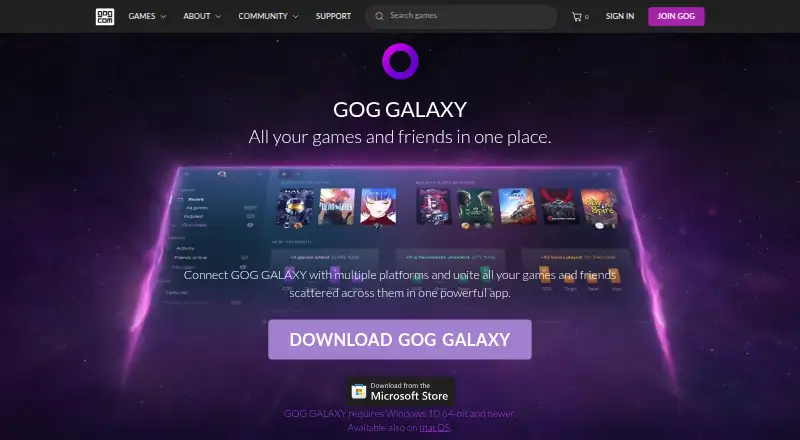
GOG GALAXY combines game libraries and friends from multiple gaming platforms in one app for Windows and macOS. It can import games from PC and console platforms into a master collection, including games that are not installed, and track achievements, play time, and owned games across connected platforms. Users can install and launch PC games owned on different platforms. Library tools include filters, sorting, tags, custom visuals, saved views, and editable game details. GALAXY also brings together friends lists, online status, activity, and cross-platform chat. Games can be imported through official or community-created integrations, or added manually; community integrations are open source. For GOG games, the client includes auto-updates, cloud saves, multiplayer and matchmaking, and rollbacks to prior versions. Other gaming clients must be installed for platform-specific functions such as installing or auto-updating games and cloud saves. GOG says imported information is removed from its servers after a platform is disconnected and is not shared with third parties. The app is free and requires a free GOG account.
Who it suits
It suits players whose games and friends are spread across different launchers and platforms. Users who want platform-specific features for other services should have the relevant gaming client installed.
What it does well
- Combines PC and console game libraries.
- Tracks achievements, play time, and owned games.
- Offers cross-platform chat and friends activity.
- Community-created integrations are open source.
- Library changes sync between devices.
What to know first
- A free GOG account is required.
- Other gaming clients are needed for some platform-specific features.
- Available for Windows and macOS.
Limits
The GOG GALAXY plan is free and requires a free GOG account. Some platform-specific features require the relevant gaming client to be installed.
Plans
| Plan | Billed and limits | Price |
|---|---|---|
| GOG GALAXY | requires a free GOG account · Windows and macOS desktop client | Free |
As gog.com lists them, read 15 Oct 2026. The maker's own page has the final word.
Getting started
- Create a free GOG account.
- Install GOG Galaxy for macOS or Windows.
- Connect gaming platforms using available official or community-created integrations.
- Add individual games manually if needed.
- Install the relevant gaming client for platform-specific features.
Overview
GOG Galaxy is a game library manager and launcher for Windows and macOS. It suits players whose games and friends are spread across services, especially those who want one organized collection without paying for the app. Its breadth is appealing, but it complements other gaming clients rather than replacing them.
Key features
A collection you can organize
Galaxy can bring games from PC and console platforms into one library, including titles that are not installed. It tracks owned games, achievements and play time across connected platforms, and can install and launch PC games owned elsewhere. That makes it useful both as a catalog and a launch point, though it is not a universal substitute for the clients behind those games.
Filters, sorting, tags, custom visuals, editable metadata and saved views give players practical ways to shape a large collection. Library changes sync between devices through the cloud. Games can come in through official or community-created integrations, or be added manually. The open-source community integrations and GOG’s creation documentation offer flexibility for technically minded users, without ensuring every service will be covered.
Friends and GOG-specific features
Galaxy combines friends lists, online status and activity, with cross-platform chat. For GOG games, it also provides auto-updates, cloud saves, multiplayer and matchmaking, plus rollbacks to earlier versions. Other platforms’ gaming clients must be installed for platform-specific functions such as installing or auto-updating games and cloud saves, so the convenience varies with the services a player uses.
Privacy and support
GOG says Galaxy imports information from connected platforms, does not share personal data with third parties, and removes imported data from its servers when a platform is disconnected. Users can report bugs or send feedback through the app’s settings.
Pricing
GOG GALAXY: free. A free GOG account is required, and some platform-specific features require the relevant gaming client to be installed. There is no free trial because the plan is free. Galaxy includes cloud saves, offline mode and third-party game import, but no subscription catalog. For players seeking a unified library and GOG game features, the free plan avoids an app fee; it does not remove the need for other clients to access their platform-specific functions.
Platforms
Galaxy runs on Windows and macOS. Its cloud-synced library customizations can follow users between devices, while connected-platform features depend in part on the relevant gaming clients being installed.
Who it's for
Galaxy is a strong fit for players with games and gaming friends divided among multiple launchers who want a single place to browse, organize and chat. It is less suitable as a stand-alone replacement for those launchers, or for anyone who expects every platform’s features to work without its own client.
Pros and cons
- Pros: Imports installed and uninstalled games across PC and console platforms, making a scattered collection easier to browse.
- Pros: Detailed library customization, saved views and cloud sync support personal organization across devices.
- Pros: GOG games get auto-updates, cloud saves, multiplayer and matchmaking, and version rollbacks at no app charge.
- Cons: Other platforms’ clients must be installed for functions such as installation, auto-updates and cloud saves.
- Cons: Community integrations broaden the options, but the integration model does not ensure coverage for every platform.
Alternatives
Game Library Managers is the relevant category for comparing other ways to organize a collection; PC Game Launchers and Game Launcher Software cover launcher-focused options. For storefront and distribution choices, see Game Distribution Platforms. Readers comparing gaming activity tools can browse Game Leaderboard Software.
Choose Steam instead if you need an option with Android, iOS and Linux support as well as Windows and macOS. Battle.net pairs a Windows and Mac desktop app with mobile apps for iOS and Android. Choose itch app if open-source app software is a priority; its project is open source on GitHub, and it runs on Linux, macOS and Windows. Unreal Editor for Fortnite is a free Windows option requiring an Epic Games account and Epic Games Launcher. GamersGate is a paid alternative. DMM Games offers a free plan and a GAME 遊び放題 subscription at ¥980 a month, billed 30日間. Game Jolt is a free option available on Android, iOS, Linux, web and Windows. IndieGala has a free plan and supports Linux, macOS, web and Windows.
Verdict
Choose GOG Galaxy if you want a free, customizable hub for a multi-platform game collection, friends and activity, with useful extras for GOG games. Look elsewhere if your priority is replacing other launchers outright: their own clients remain necessary for some platform-specific features.
Verdict
GOG GALAXY brings game collections, activity, and friends together, with library tools and GOG-specific game features. It is free, but some functions for other platforms depend on having their gaming clients installed.
Questions
How much does GOG Galaxy cost?
The GOG GALAXY plan is free.
Is there a free plan or trial?
Galaxy has a free plan and no free trial. A free GOG account is required.
Which platforms does it support?
GOG Galaxy is available for macOS and Windows.
Can it import games from other platforms?
Yes. It can import PC and console games through official or community-created integrations, and games can also be added manually.
Are community integrations open source?
Yes. Community-created integrations are open source, and GOG links to documentation for creating them.
Do I need other gaming clients?
Some platform-specific features, including installing or auto-updating games and cloud saves, require the relevant gaming client.
Facts from GOG Galaxy's own pages
- Activity feed
- The activity feed displays friends’ achievements, playtime milestones and recently played games. · gog.com, 15 Oct 2026
- Auto-updates
- The GOG client automatically keeps GOG.COM games updated. · gog.com, 15 Oct 2026
- Changelog system
- Developers publish game changelogs independently, immediately or on a schedule, and users can read them on GOG.com or in Galaxy. · docs.gog.com, 15 Oct 2026
- Chat
- Galaxy provides chat for its users independently of in-game chat. · docs.gog.com, 15 Oct 2026
- Cloud saves
- Supported game saves are backed up to cloud storage and synchronized between computers. · gog.com, 15 Oct 2026
- Community integrations
- GOG publishes open-source integration tooling so community developers can add gaming platforms. · support.gog.com, 15 Oct 2026
- Cross-device sync
- Library customizations and changes are stored in the cloud and synchronized between devices. · gog.com, 15 Oct 2026
- Documentation depth
- Developer documentation covers release workflows, a developer portal, builds, pipeline tools, SDK integration, client features, FAQs and changelog management. · docs.gog.com, 15 Oct 2026
- Engine support
- GOG documents C++ libraries, a C# wrapper, a Unity package and an Unreal Engine 4 plugin, with additional community wrappers for other engines. · docs.gog.com, 15 Oct 2026
- Founded
- 2008 · gog.com, 23 Sept 2026
- Friends and chat
- It brings together friends lists, shows online status and activity, and supports cross-platform chat. · gog.com, 30 Sept 2026
- Friends list
- Galaxy aggregates friends from connected platforms and shows their online status. · gog.com, 15 Oct 2026
- Game discovery
- The client shows upcoming releases and games popular with friends and the wider community. · gog.com, 15 Oct 2026
- Game launcher
- Users can install and launch PC games they own through connected platforms. · gog.com, 15 Oct 2026
- Game-server API
- The SDK includes a game-server API for lightweight dedicated servers that do not require the Galaxy client. · docs.gog.com, 15 Oct 2026
- Game statistics
- The client combines achievements, playtime and owned-game information across connected platforms. · gog.com, 15 Oct 2026
- Game stats
- It tracks achievements, play time, and games owned across connected platforms. · gog.com, 30 Sept 2026
- GOG client features
- For GOG games, the client includes auto-updates, cloud saves, multiplayer and matchmaking, and rollbacks to prior versions. · gog.com, 30 Sept 2026
- Headquarters
- Warsaw, Poland · gog.com, 23 Sept 2026
- Integration API
- The public Python integration API runs each platform integration as a separate process and supports game import, installation, launching, achievements, playtime, friends, chat and caching. · github.com, 15 Oct 2026
- Integration licence
- The GOG community integrations Python repository is public on GitHub and marked MIT licensed. · github.com, 15 Oct 2026
- Integrations
- Games can be imported through official and community-created integrations, and individual games can also be added manually. · gog.com, 30 Sept 2026
- Launcher
- It can install and launch PC games owned on different platforms. · gog.com, 30 Sept 2026
- Leaderboards
- Users can compare collection, completion and playtime achievements with friends. · gog.com, 15 Oct 2026
Where GOG Galaxy stands on Freedom251
- App Store#2 of 19
- PC Game Launchers#3 of 21
- Game Launcher Software#4 of 24
- Game Leaderboard Software#8 of 37
- Game Library Managers#9 of 40
- Game Distribution Platforms#4 of 14
- Game launchers#21 of 68