Freedom251 › Game Distribution Platforms

Battle.net
What Battle.net is
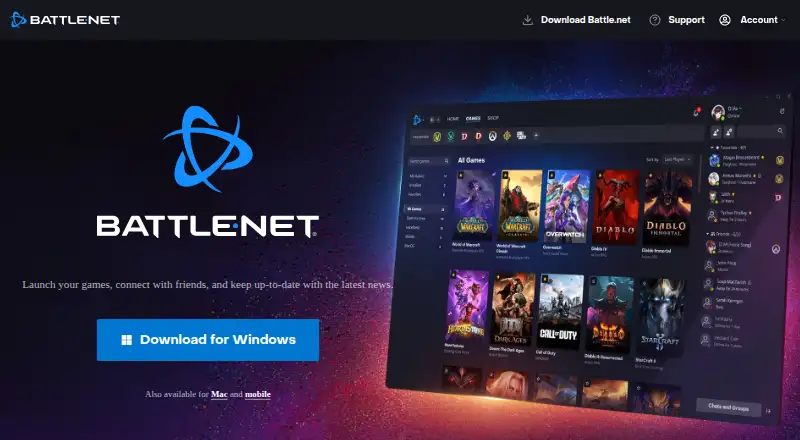
Battle.net is a game launcher and companion app for Windows, macOS, Android, and iOS. Its desktop app brings games together, launches them, installs games and patches, and can keep them updated while running. Players can browse a store for games and expansions, send digital gifts, and find free-to-play titles such as Overwatch 2 and Call of Duty: Warzone. Social tools include friend connections, messaging, voice chat, and real-time updates. The app also presents news such as sales, trailers, and patch notes. On mobile, Battle.net supports shopping, social features, news, and account safety, including chat, friend presence, and friend requests. Users can enable two-factor authentication. World of Warcraft versions and game modes are installed through the desktop app. Offline use is limited to select games: downloads and updates require an internet connection, and social features and matchmaking are unavailable offline. The free plan covers the desktop and mobile apps; games and some in-game purchases may cost extra.
Who it suits
Battle.net suits players who want a single app for launching games, managing updates, shopping, and connecting with friends. Its mobile app is useful for keeping up with chat and friend activity away from the desktop.
What it does well
- Free desktop and mobile apps.
- Combines game launching, updates, store, and social features.
- Offers access to free-to-play games.
- Two-factor authentication can add account security.
What to know first
- Downloads and updates require an internet connection.
- Offline mode is limited to select games.
- Social features and matchmaking are unavailable offline.
- Games and some in-game purchases may cost extra.
Limits
Offline mode is available only in selected games. Game downloads and updates require an internet connection, and social features and matchmaking are unavailable offline. Games and some in-game purchases may cost extra.
Plans
| Plan | Billed and limits | Price |
|---|---|---|
| Battle.net desktop app and mobile app | Desktop app for Windows and Mac · mobile app for iOS and Android · games and some in-game purchases may cost extra | Free |
| Battle.net desktop/mobile app | Launcher and account app; games, expansions and digital goods are sold through the shop | Free |
As download.battle.net lists them, read 30 Sept 2026. The maker's own page has the final word.
Getting started
- Visit the Battle.net desktop app website.
- Download the desktop app for Windows or macOS.
- Install and launch games through the desktop app.
- Install the mobile app on Android or iOS for shopping, news, and social features.
- Enable two-factor authentication if you want the additional account security option.
Battle.net is Blizzard’s desktop game launcher and mobile companion, best suited to players who want Blizzard titles, updates, purchases, and friends’ chat in one place. Its broad utility depends on an internet connection for downloads and patches, and offline play is limited to select games.
Overview
Founded in 1991, Battle.net brings a game library, store, news, and social tools together across desktop and mobile. Free-to-play games such as Overwatch 2 and Call of Duty: Warzone make the library accessible without an upfront app cost, though games and some in-game purchases may cost extra. It is most compelling for players already invested in Blizzard’s catalog, rather than as a universal launcher for every publisher.
Key features
Library, installation, and updates
The desktop app launches games, installs them and their patches, and can keep them automatically up to date while running. For World of Warcraft players it is a required route: all versions and game modes are installed through Battle.net. That makes it a useful central hub for Blizzard games, but less flexible for anyone who wants to avoid a publisher-specific launcher.
Store, news, and social tools
Players can shop for games and expansions and send digital gifts. Sales, trailers, and patch notes keep the app useful between play sessions. Messaging, voice chat, friend connections, and real-time updates help players keep in touch and coordinate; those social features, along with matchmaking, are unavailable offline.
Mobile and account security
The iOS and Android app extends shopping, chat, friend presence, friend requests, news, and account-safety features to a phone. Users can enable two-factor authentication, and Blizzard recommends an authenticator as an added account safeguard. The mobile app is a companion rather than a replacement for the desktop installation and update workflow.
Pricing
The Battle.net desktop app and mobile app plan costs nothing. It includes the desktop app for Windows and Mac and the mobile app for iOS and Android, with access to games and some in-game purchases that may cost extra. There is no free trial because the apps are free to use; the meaningful cost is in the games and purchases a player chooses. Battle.net is a sensible starting point for anyone who wants its free-to-play titles or Blizzard’s game hub, but it is not a promise that every game or item in the store is free.
Platforms
The desktop app is for Windows and macOS, while the companion app is available on Android and iOS. Downloads and updates require an internet connection. Offline mode works only in select games, so players who need dependable offline access should not assume the launcher will provide it across the library.
Who it's for
Battle.net is the clear fit for Blizzard players who want one place to launch games, manage patches, follow news, shop, and connect with friends. World of Warcraft players in particular need it to install every version and game mode. It is a weaker choice for players looking for a publisher-neutral library, or for those who expect social play, matchmaking, downloads, and updates to work offline. Blizzard Support also provides help with account access, authenticators, phone numbers, parental controls, and payments.
Pros and cons
- Pros: One app combines game launching, installation, patching, and automatic updates while running, reducing the need to manage Blizzard titles separately.
- Pros: Messaging, voice chat, friend connections, mobile chat, and friend presence make it practical for staying connected across desktop and phone.
- Pros: Free-to-play games and a free app offer a low-cost way to enter the ecosystem.
- Cons: Some games and in-game purchases cost extra, so free access to the app does not mean the whole catalog is free.
- Cons: Downloads and updates need internet access, while offline availability varies by game and excludes social features and matchmaking.
- Cons: Its strongest value is tied to Blizzard’s catalog, limiting its appeal as a general-purpose launcher.
Alternatives
Steam is a better fit for someone seeking a free launcher across Windows, macOS, Linux, iOS, and Android rather than a Blizzard-centered app; game and content prices vary, and some subscriptions may be free. itch app is worth considering for players who want a free app whose project is open source, on Windows, macOS, or Linux. GOG Galaxy is another free option for Windows and macOS, though it requires a free GOG account and some platform-specific features require the relevant gaming client. GamersGate is a paid alternative. DMM Games offers a freemium service with a free plan and a trial; its GAME 遊び放題 plan costs ¥980 a month, billed every 30 days. Game Jolt is a free option across Android, iOS, Linux, web, and Windows. IndieGala is a freemium option for Linux, macOS, web, and Windows. EA app is a freemium alternative on macOS and Windows, with EA Play at $5.99 a month and EA Play Pro at $16.99 a month.
For broader discovery, browse Game Distribution Platforms or PC Game Launchers.
Verdict
Choose Battle.net if Blizzard games are central to your library and you want their installation, updates, store, news, and player connections together. Its mobile companion and free-to-use apps add useful reach, but extra purchase costs and limited offline support are good reasons to look elsewhere if your priority is a broader or more reliable offline launcher.
Verdict
Battle.net brings game access, updates, shopping, news, and social features into one desktop app, with companion features on mobile. Its offline limits and extra costs for some games and purchases are worth noting.
Questions
Does Battle.net cost anything?
The desktop and mobile apps are free. Games and some in-game purchases may cost extra.
Which platforms does Battle.net support?
The desktop app is available for Windows and macOS. The mobile app is available for Android and iOS.
Can I use Battle.net offline?
Offline mode is available only in selected games. Downloads and updates need an internet connection, and social features and matchmaking are unavailable offline.
What can I do in the mobile app?
The mobile app supports shopping, social features, news, and account safety. Its social features include chat, friend presence, and friend requests.
Can I install World of Warcraft through Battle.net?
Yes. World of Warcraft versions and game modes are installed through the Battle.net desktop app.
Does Battle.net have account security features?
Users can enable two-factor authentication. Blizzard also recommends adding an authenticator.
Facts from Battle.net's own pages
- Account security
- Blizzard recommends adding an authenticator and says two-step verification makes unauthorized account access extremely difficult. · us.support.blizzard.com, 30 Sept 2026
- API authentication
- The Battle.net OAuth API provides client-credentials access for game data and authorization-code access for player profiles, with regional endpoints. · apis.io, 15 Oct 2026
- API coverage
- The documented ecosystem includes World of Warcraft, Diablo III, Hearthstone and StarCraft II game or community APIs. · github.com, 15 Oct 2026
- API limitation
- API Evangelist reports that Battle.net exposes REST and OAuth request-response APIs but no documented WebSocket, server-sent-events, GraphQL subscription, gRPC or webhook streaming surface. · github.com, 15 Oct 2026
- Apple privacy disclosure
- Apple says identifiers may track users and that purchases, contact information, user content, identifiers, usage data and diagnostics may be linked to identity. · apps.apple.com, 15 Oct 2026
- Company founders
- Crunchbase lists Allen Adham, Frank Pearce and Michael Morhaime as founders. · crunchbase.com, 15 Oct 2026
- Company founding
- Trustpilot's company information states Blizzard Entertainment was founded February 8, 1991 as Silicon & Synapse. · trustpilot.com, 15 Oct 2026
- Company headquarters and size
- LinkedIn lists Irvine, California headquarters and a 1,001–5,000 employee company size. · linkedin.com, 15 Oct 2026
- Company legal name
- Crunchbase lists the legal name as Blizzard Entertainment, Inc. · crunchbase.com, 15 Oct 2026
- Founded
- 1991 · download.battle.net, 28 Sept 2026
- Free access
- The download page advertises free games such as Overwatch 2 and Call of Duty: Warzone 2.0 plus trials of other titles. · download.battle.net, 15 Oct 2026
- Game installation
- Blizzard Support says all World of Warcraft versions and game modes are installed through the Battle.net desktop app. · us.support.blizzard.com, 30 Sept 2026
- Game launcher
- The desktop app launches games, connects players with friends, and provides news and updates. · download.battle.net, 30 Sept 2026
- Game library
- The app brings games together in one place and offers access to free-to-play games such as Overwatch 2 and Call of Duty: Warzone. · download.battle.net, 30 Sept 2026
- Game updates
- The desktop app can install games and patches and keep them automatically up to date while running. · news.blizzard.com, 30 Sept 2026
- Google Play privacy
- Google Play says the app may share personal information, app activity and app-performance data, encrypts data in transit and supports deletion requests. · play.google.com, 15 Oct 2026
- Integration: Xbox and third-party games
- Windows Central reports that Battle.net added Xbox first-party titles and The Witcher 3 as its first third-party game. · windowscentral.com, 15 Oct 2026
- iOS availability
- Apple lists Battle.net as a free iPhone entertainment app requiring iOS 26.0 or later. · apps.apple.com, 15 Oct 2026
- iOS release features
- Recent iOS releases added in-app video, faster social navigation, Apple Pay checkout, game news and patch-note tabs, Xbox Game Pass views and Overwatch hero statistics. · apps.apple.com, 15 Oct 2026
- Limit: launcher overhead
- PC Gamer criticizes Battle.net as one of many unwanted launchers that can hang or crash and require task-manager termination. · pcgamer.com, 15 Oct 2026
- Limit: mobile reconnecting
- Apple reviewers report the app can remain stuck reconnecting after switching apps or waking the phone and may require force-closing. · apps.apple.com, 15 Oct 2026
- Limit: support and account access
- Trustpilot reviewers repeatedly describe slow or automated support, account suspensions, authenticator lockouts and difficulty recovering compromised accounts. · trustpilot.com, 15 Oct 2026
- Limit: Warcraft 3 Legacy
- Windows Central reports the Legacy 1.29 client is offline/LAN only, remains affected by old issues and uses 32-bit code that excludes Macs. · windowscentral.com, 15 Oct 2026
- Mobile app
- The Battle.net mobile app supports shopping, social features, news, and account safety while on the go. · download.battle.net, 30 Sept 2026
Where Battle.net stands on Freedom251
- Game Distribution Platforms#1 of 14
- PC Game Launchers#2 of 21
- Game launchers#12 of 68