
itch app
What itch app is
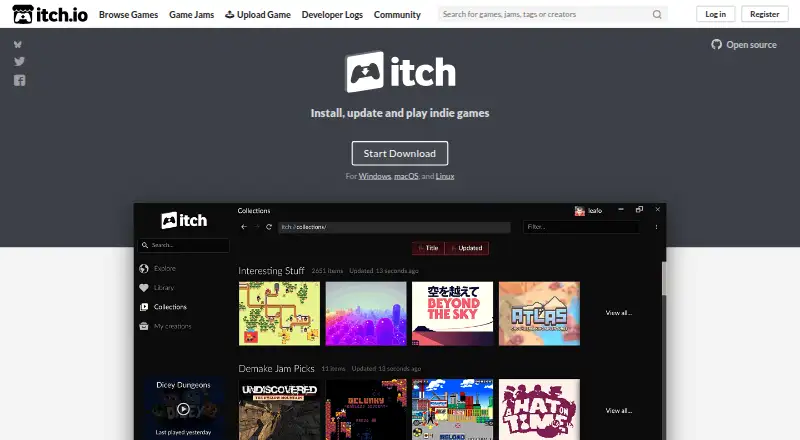
The itch app is a desktop client for downloading and running games and software from itch.io. Its built-in browser lets users visit creator pages and install titles, while its library keeps downloads together and automatically updates installed games. Users can also access their collections, bundles, purchases, and installed games in the app. Browser-based games can be synced for offline play, and games that use itch.io command-line tools can receive delta patches containing only changed data. The app is available for Windows, macOS, and Linux, and its project is open source. It supports more than 20 languages. Creators can provide an app manifest to set launch targets and integrate with the app API. The client registers itch:// and itchio:// links and can create Steam library shortcuts for installed games. Its sandbox limits file access, with isolated home directories for Linux games and less-privileged execution for Windows games. Windows 7 or newer is required; compatibility issues can still arise, especially on Linux when games do not follow best practices.
Who it suits
It suits people who download or manage itch.io games and software across Windows, macOS, or Linux. Offline play for synced browser games may be useful to players who want to launch those games without a connection.
What it does well
- Free desktop app for three platforms.
- Library updates installed games automatically.
- Synced browser games support offline play.
- Open-source project available in over 20 languages.
- Sandbox limits game file access.
What to know first
- Windows 7 or newer required.
- Compatibility issues can occur, especially on Linux.
- Linux updates require package-manager use or redownloading.
Plans
| Plan | Billed and limits | Price |
|---|---|---|
| itch app | Downloads and runs itch.io games and software · Windows, macOS, Linux | Free |
As itch.io lists them, read 2 Oct 2026. The maker's own page has the final word.
Getting started
- Visit https://itch.io/app.
- Choose the app version for Windows, Linux, or macOS.
- On Windows, use Windows 7 or newer.
- Install the app and browse creator pages in its built-in browser.
- Sign in to access your collections and purchases.
Overview
itch app is a free desktop client for people who get games or software from itch.io and want to browse, install and manage them from one place. It is most compelling for players with an itch.io collection to maintain; its narrow focus and uneven Linux compatibility make it a less certain fit as a primary launcher across a mixed game library.
Key features
The built-in browser links creator pages to installation, while the library brings together owned games, purchases, collections, bundles and installed titles. Automatic updates take routine maintenance off the player’s hands. Games built with itch.io’s command-line tools can receive delta patches that download only changed data, but that benefit depends on the game using those tools.
Browser-based games can be synced for offline play, extending access beyond times when a connection is available. The app also handles itch:// and itchio:// links and can create Steam library shortcuts for installed games. Those shortcuts offer a way to launch itch.io games through Steam, though the app remains centered on itch.io rather than serving as a universal game library.
For developers, an app manifest can define launch targets and enable integration with the app API. That gives games with multiple ways to launch a route into the client without changing its core role as a player-facing itch.io library.
The app is open source and available in more than 20 languages. Its sandbox limits file access, gives Linux games isolated home directories, and runs Windows games as a less-privileged user; the Windows sandbox uses the elevate tool. Windows installers and the app are digitally signed under itch corp. These protections are useful safeguards, but they do not remove compatibility problems, especially with Linux games that do not follow best practices.
Pricing
itch app is free: the itch app plan costs nothing and includes downloading and running itch.io games and software on Windows, macOS and Linux. There is no free trial to weigh against a paid tier; the product has no paid plan in the stated offering. The main trade-off is compatibility, not a subscription or seat limit.
Platforms
The client is available for Windows, macOS and Linux. Windows requires Windows 7 or newer. Linux users can update through a package manager or by downloading the app again, with Debian and RPM repositories, an ArchLinux AUR option and a portable tar.xz archive. Linux compatibility issues remain a particular concern.
Who it's for
Choose itch app if itch.io is a meaningful part of your game or software library and you want purchases, collections, installs and updates together, including offline access to synced browser games. It is a weaker choice for someone who needs one launcher to organize games from many stores, or for Linux users whose games are sensitive to compatibility problems.
Pros and cons
- Pro: A single client connects browsing, purchases and library management, reducing the need to handle each itch.io download separately.
- Pro: Offline syncing for browser-based games and automatic updates make the library more practical away from the browser and easier to maintain.
- Pro: Delta patches can download only changed data for games built with itch.io’s command-line tools.
- Con: The client is focused on itch.io, so Steam shortcuts do not make it a general-purpose multi-store launcher.
- Con: Compatibility issues can still occur, particularly with Linux games that do not follow best practices.
Alternatives
Steam is also free and supports Android, iOS, Linux, macOS and Windows; choose it if broader platform coverage matters more than itch app’s direct focus on itch.io collections and downloads.
Battle.net is a free desktop app for Windows and Mac with iOS and Android mobile apps, making it a fit for someone seeking that desktop-and-mobile combination.
GOG Galaxy is free for macOS and Windows and requires a free GOG account; some platform-specific features require the relevant gaming client, so it suits users whose needs align with those platforms and account terms.
Unreal Editor for Fortnite is a free Windows option that requires an Epic Games account and Epic Games Launcher; consider it when that specific platform and setup are what you need.
GamersGate is a paid alternative.
DMM Games is a freemium option with a free trial and a ¥980 a month plan billed 30日間.
Game Jolt is a free alternative available on Android, iOS, Linux, web and Windows.
IndieGala is a freemium alternative available on Linux, macOS, web and Windows.
Browse more options in Game Distribution Platforms, PC Game Launchers, Game Launcher Software and Game Asset Marketplaces.
Verdict
itch app is an easy recommendation for players who want their itch.io purchases and collections together with automatic updates and offline syncing for browser games, at no cost. Look elsewhere if you need a broad multi-store launcher, or treat Linux compatibility as a deciding concern.
Verdict
The itch app brings itch.io browsing, downloads, and library management into a desktop client, with offline support for synced browser games. Check platform requirements and compatibility, particularly for Linux games.
Questions
How much does itch app cost?
The app is free. Its listed plan price is free.
Which platforms does it support?
It is available for Windows, Linux, and macOS. Windows 7 or newer is required.
Can I use games offline?
Browser-based games can be synced into the app for offline play.
Is itch app open source?
Yes. The project is open source on GitHub.
How are updates handled?
Installed games update automatically. Games using itch.io command-line tools can receive delta patches containing only changed data.
Who makes the app?
The app page footer identifies itch corp as the copyright holder.
Facts from itch app's own pages
- Collections and bundles
- Users can browse their collections, bundles, owned games, and installed games in the app. · itch.io, 1 Oct 2026
- Collections and purchases
- The app provides access to users’ collections and purchases. · itch.io, 2 Oct 2026
- Compatibility limit
- The app requires Windows 7 or newer, and compatibility issues can still occur, especially on Linux. · itch.io, 1 Oct 2026
- Compatibility limitation
- The FAQ says compatibility issues still happen, especially on Linux when games do not follow best practices. · itch.io, 2 Oct 2026
- Delta updates
- Games using itch.io command-line tools can receive delta patches containing only changed data. · itch.io, 1 Oct 2026
- Developer integration
- Developers can include an app manifest to specify how the app should run a game, including when multiple launch targets or API integration are needed. · itch.io, 2 Oct 2026
- Game integration
- Creators can provide an app manifest to define launch targets and integrate with the app API. · itch.io, 1 Oct 2026
- In-app browsing
- Its built-in browser lets users browse creator pages and download and install games. · itch.io, 2 Oct 2026
- Installed game updates
- Installed games update automatically, and games using itch.io’s command-line tools can receive delta patches that download only changes. · itch.io, 2 Oct 2026
- Installer security
- Windows installers and the application are digitally signed with a certificate named itch corp. · itch.io, 1 Oct 2026
- Install platforms
- The app is available for Windows, Linux, and macOS; Windows requires Windows 7 or newer. · itch.io, 2 Oct 2026
- Languages
- The app is available in over 20 languages. · itch.io, 2 Oct 2026
- Library management
- Downloads are kept in one place and automatically updated. · itch.io, 1 Oct 2026
- Linux updates
- Linux users update through a package manager or by redownloading; listed options include Debian and RPM repositories, ArchLinux AUR, and a portable tar.xz archive. · itch.io, 2 Oct 2026
- Maker
- The app page footer identifies the copyright holder as itch corp. · itch.io, 2 Oct 2026
- Offline play
- Browser-based games can be synced into the app for offline play, with updates available after reconnecting. · itch.io, 2 Oct 2026
- Open source
- The app and its helper tools are open source, and the app page links to its GitHub project. · itch.io, 2 Oct 2026
- Protocol integration
- The app registers the itch:// and itchio:// URL schemes for opening pages and performing actions. · itch.io, 1 Oct 2026
- Purpose
- The app downloads and runs games and software from itch.io, keeps downloads in one place, and automatically updates them. · itch.io, 2 Oct 2026
- Security
- The app FAQ identifies Windows tool elevate as powering the itch.io sandbox on Windows. · itch.io, 2 Oct 2026
- Security sandbox
- The sandbox limits file reads and writes, gives Linux games isolated home directories, and runs Windows games as a less-privileged user. · itch.io, 1 Oct 2026
- Steam integration
- The app can create Steam library shortcuts for games installed through it. · itch.io, 1 Oct 2026
- Support
- Users can report app bugs through the Send feedback menu item, which pre-fills an issue with their platform and app version on GitHub. · itch.io, 2 Oct 2026
Where itch app stands on Freedom251
- App Store#3 of 19
- Game launchers#14 of 68
- PC Game Launchers#5 of 21
- Game Asset Marketplaces#6 of 21
- Game Launcher Software#7 of 24
- Game Distribution Platforms#6 of 14