Freedom251 › PC Game Launchers

Gameforge Client
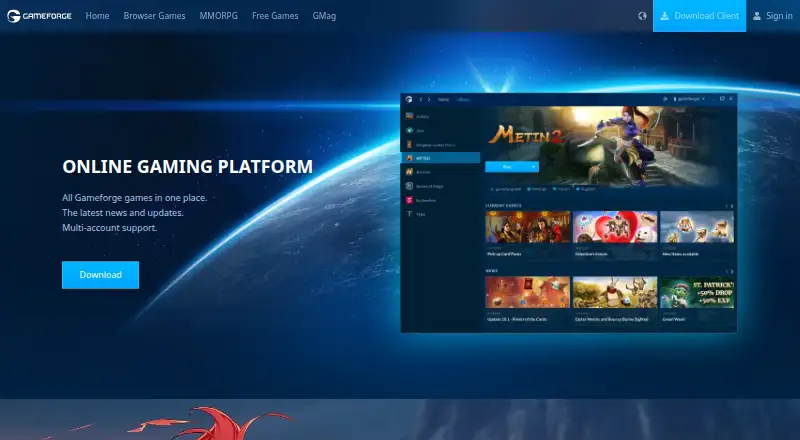
What Gameforge Client is
Gameforge Client is a Windows application that brings Gameforge games together for discovery and play. Its flow starts with installing the client, then finding games and launching them. A Gameforge account serves as a shared sign-in for accounts from multiple games, using one email address and password. Users can access and manage those accounts in one place, create new game accounts, and save them to the shared account. When launching a game, the client can sign users in automatically, and a remember-password feature avoids entering the password each time. To connect an existing game account, users sign in with that game’s credentials and confirm their email address. Additional game accounts can be added through a game’s Library settings. A Gameforge account works with a title when it appears in the client’s Library, and more games are planned for integration. Separate Gameforge accounts cannot currently be merged. The support system provides contact options and ticket history; registering an account simplifies ticket processing. Gameforge was founded in 2003 and is headquartered in Karlsruhe, Germany. The client is free.
Who it suits
It suits Windows players who want to discover and launch Gameforge games through one client and manage multiple game accounts with shared sign-in credentials. It may also help players who use Gameforge support and want ticket history in one account.
What it does well
- Free client for Windows.
- Brings Gameforge games together in one place.
- Supports multiple game accounts under one sign-in.
- Can automatically sign users in when launching a game.
- Provides support contact options and ticket history.
What to know first
- Separate Gameforge accounts cannot currently be merged.
- A title works with the account when it appears in the Library.
- The listed platform is Windows.
Plans
| Plan | Billed and limits | Price |
|---|---|---|
| Gameforge Client | All Gameforge games in one place · Latest news and updates · Multi-account support | Free |
As gameforge.com lists them, read 8 Oct 2026. The maker's own page has the final word.
Getting started
- Open the Gameforge download page on a Windows device.
- Download and install the Client.
- Create a Gameforge account, or sign in with existing game credentials and confirm your email address.
- Find a supported game in the Client's Library and launch it.
- Add another game account through that game's Library settings.
Verdict
Gameforge Client provides a shared place to access Gameforge games and manage their accounts. Its usefulness depends on the games a player needs appearing in the client’s Library.
Questions
How much does Gameforge Client cost?
The listed plan is free.
Is there a free plan?
Yes. The free plan includes Gameforge games in one place, latest news and updates, and multi-account support.
Which platform does it support?
The listed platform is Windows.
How does a Gameforge account work with existing game accounts?
Sign in with the game's credentials and confirm the email address to connect an existing account. Another game account can be added from that game's Library settings.
Can separate Gameforge accounts be merged?
No. Separate Gameforge accounts cannot currently be merged.
Who makes Gameforge Client?
Gameforge describes itself as a publisher and developer of online games, from browser titles to MMORPGs. It was founded in 2003 and is headquartered in Karlsruhe, Germany.
Facts from Gameforge Client's own pages
- Account limitation
- The FAQ says separate Gameforge accounts cannot currently be merged. · gameforge.com, 8 Oct 2026
- Account management
- Users with multiple game accounts can manage and access them through their Gameforge account, and can create new accounts and save them there. · gameforge.com, 8 Oct 2026
- Account setup
- To create a Gameforge account for an existing game account, users sign in with their game credentials and confirm their email address. · gameforge.com, 8 Oct 2026
- Add accounts
- The FAQ explains that users can add another game account from a game's Library settings. · gameforge.com, 8 Oct 2026
- Client flow
- The download page presents the client flow as Install, Discover, Play. · gameforge.com, 8 Oct 2026
- Discover and play
- The download page presents the flow as install, discover, and play. · gameforge.com, 8 Oct 2026
- Founded
- 2003 · gameforge.com, 28 Sept 2026
- Game availability
- The FAQ says a Gameforge account works with a game if that game appears in the Client's Library, and that more games are planned for integration. · gameforge.com, 8 Oct 2026
- Gameforge account
- A Gameforge account is a master account for managing accounts from multiple games with one email address and password. · gameforge.com, 8 Oct 2026
- Headquarters
- Karlsruhe, Germany · gameforge.com, 28 Sept 2026
- Maker
- Gameforge says it is a publisher and developer of online games, from browser titles to MMORPGs. · corporate.gameforge.com, 8 Oct 2026
- Purpose
- Gameforge describes the Client as an online gaming platform that puts all Gameforge games in one place. · gameforge.com, 8 Oct 2026
- Remembered sign-in
- The account can remember the password and automatically sign the user in when a game launches. · gameforge.com, 8 Oct 2026
- Remember password
- The account offers a remember-password function so users do not have to enter their password every time. · gameforge.com, 8 Oct 2026
- Security and privacy
- The download page links to Gameforge's privacy information and terms of use. · gameforge.com, 8 Oct 2026
- Shared account
- A Gameforge account is a master account for managing accounts from multiple games with the same sign-in credentials. · gameforge.com, 8 Oct 2026
- Sign-in
- The page says users can access their game accounts from one place and be automatically signed in when launching a game. · gameforge.com, 8 Oct 2026
- Support
- The FAQ links users to Gameforge Contact Support when it does not answer their question. · gameforge.com, 8 Oct 2026
Where Gameforge Client stands on Freedom251
- PC Game Launchers#6 of 21
- Game Launcher Software#9 of 24
- Game launchers#36 of 68