Freedom251 › Photo Metadata Editors

ExifTool
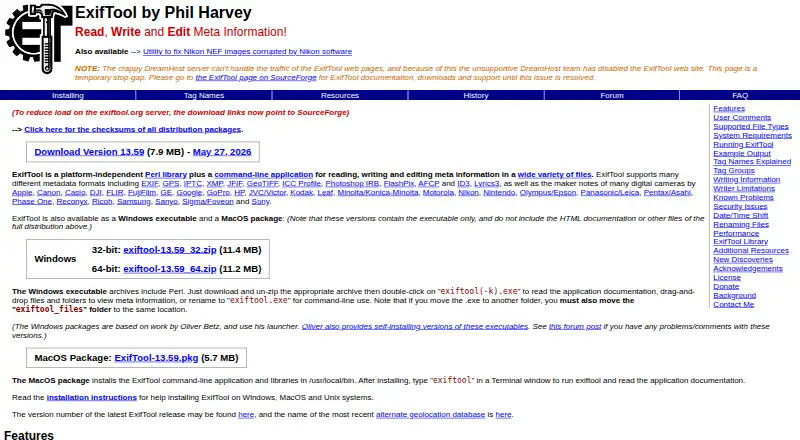
What ExifTool is
ExifTool is a free Perl library and command-line program for reading, writing, and editing metadata in many file types. It handles formats such as EXIF, GPS, IPTC, XMP, JFIF, GeoTIFF, ICC Profile, Photoshop IRB, FlashPix, AFCP, and ID3, plus maker notes from camera manufacturers including Apple, Canon, DJI, Nikon, and Sony. The command-line tool can inspect metadata, change or remove tag values, and copy or move metadata between files. It accepts file names, directory names, or standard input. When writing, it keeps a copy of the original file by adding `_original` to its name by default; it will not write metadata that the target format cannot support. A C++ interface lets applications communicate with an external ExifTool process. The full Perl distribution includes documentation and API libraries, while Windows and macOS packages leave out some files included in that distribution. ExifTool is not intended as an image validator, though its `-validate` option provides extra checks mainly for JPEG and TIFF files.
Who it suits
ExifTool suits people who need command-line or library-based access to metadata across many file formats. It can also serve C++ applications through the provided interface.
What it does well
- Reads, writes, and edits a wide range of metadata.
- Supports camera maker notes from numerous manufacturers.
- Can copy or move metadata between files.
- Preserves originals by default when writing.
- Available as a free software distribution.
What to know first
- Not designed as an image validator.
- Writes only metadata supported by the target format.
- Windows and macOS packages omit some distribution files.
Limits
Metadata is not written when the destination file format does not support that metadata type.
Plans
| Plan | Billed and limits | Price |
|---|---|---|
| ExifTool | Free software distribution; no paid plans listed | Free |
As exiftool.org lists them, read 30 Sept 2026. The maker's own page has the final word.
Getting started
- Visit https://exiftool.org/ to get the Perl distribution, Windows executable, or macOS package.
- On Mac or Linux, extract the Perl distribution to run it without installation; on Windows, extract the EXE version.
- Use file names, directory names, or standard input as the command-line source.
- For C++ application use, connect through the maker-provided interface to an external ExifTool process.
- Consult the ExifTool forum to discuss issues.
Overview
ExifTool is a command-line metadata utility and Perl library for people who need to inspect or change file metadata directly, including in batch-oriented workflows. It is a strong fit for photographers, developers and anyone comfortable with a command line; it is less suited to readers seeking a visual image editor or validation tool.
Its breadth is the draw: it handles many metadata standards and camera-specific notes, while format support determines what can actually be written. The command-line approach and security precautions make it a more deliberate choice than a simple desktop editor.
Key features
- Wide metadata coverage: ExifTool supports formats including EXIF, GPS, IPTC, XMP, JFIF, GeoTIFF, ICC Profile, Photoshop IRB, FlashPix, AFCP and ID3. That range makes it useful when a workflow crosses image, location and audio metadata rather than relying on EXIF alone.
- Camera maker notes: It handles manufacturer-specific notes from numerous camera makers, including Apple, Canon, DJI, Nikon, Panasonic and Sony. This is valuable when generic tag support does not cover the information recorded by a particular camera.
- Read, change and transfer tags: The command-line application reads metadata, writes or deletes tag values, and copies or moves metadata between files. Inputs can be file names, directories or standard input, enabling batch workflows without requiring a graphical interface.
- Format-dependent writing: ExifTool will not write a metadata type that the target file format does not support. Its broad coverage is therefore not a promise that every tag can be added to every file.
- Original-file safeguard: By default, a write operation preserves the original by appending _original to its filename. This gives users a fallback, though it also means they should account for extra files in their workflow.
- Application integration: A C++ interface communicates with an external ExifTool process and exposes its features to C++ applications. The full Perl distribution also includes documentation and API libraries.
- Security-aware use: Some options can execute Perl code, and ExifTool runs user-defined code in an .ExifTool_config file found in specified locations. Applications passing file names should use -- or guard against names beginning with a dash or Unicode minus; configuration files should contain only trusted code. These are important operational considerations for automated or shared systems.
- Not an image validator: ExifTool is built for metadata work, not image validation. Its -validate option provides extra checks mainly for JPEG and TIFF, so it should not be treated as a general validation solution.
Pricing
ExifTool is free software: the ExifTool plan is free, with no paid plans listed. There is no free trial to weigh against a subscription, and the author says the Perl Artistic License permits embedding it in a commercial application under stated conditions without requiring a donation. The license terms matter for commercial embedding, so application makers should review them before distribution.
The maker offers a full Perl distribution, Windows executables and a macOS package. The Windows and macOS packages omit some files found in the full distribution, which includes the documentation and API libraries. Choose the full package when those resources matter; the platform packages provide a more focused route to using the tool.
Platforms
ExifTool supports Linux, macOS and Windows, as well as API and self-hosted use. On Mac or Linux, the Perl distribution can run without installation after extraction; the Windows EXE can likewise run without installation after extraction. This portability suits users who want to bring the utility into a workflow without a conventional installer.
Who it's for
ExifTool is best for technically comfortable users who need broad metadata reading and editing, camera maker-note support, or directory-based processing. Developers can also use its Perl libraries or C++ interface to bring metadata operations into applications. People who want a primarily visual editing experience, or need image validation as a core function, should look elsewhere.
Pros and cons
- Pro — broad metadata and camera coverage: Support for numerous standards and manufacturer notes handles more than common EXIF-only tasks.
- Pro — flexible file workflows: File, directory and standard-input sources support both individual edits and batch-oriented work.
- Pro — free and embeddable: There is no paid plan, and the author says the license permits commercial embedding under stated conditions.
- Con — command-line first: The core application is a command-line tool, which is a poor fit for users who want a visual editor.
- Con — writes depend on the target format: Unsupported metadata types cannot be written to a file, despite the tool's wide overall coverage.
- Con — careful handling is required: Executable options, configuration code and specially prefixed filenames require security precautions in automated use.
- Con — limited validation role: Its additional checks focus mainly on JPEG and TIFF and do not make it a general image validator.
Alternatives
For a quick comparison of tools in this category, browse Photo Metadata Editors.
- FREE Browser is a free, open-source Android option; choose it if Android support is the priority.
- ExifCleaner is a free desktop app for Linux, macOS and Windows; it may suit users who want a desktop alternative rather than ExifTool's command-line and library approach.
- Photini is free software under GPL-3.0-or-later for Linux, macOS and Windows; consider it when those platforms and that licensing model fit better.
- Exif Pilot has a free Basic EXIF editor for Windows and a freemium model; it is a Windows alternative for readers focused on basic EXIF editing.
- GeoSetter is a free Windows-only option with no usage restrictions; choose it if Windows is your target platform.
- EXIF Studio is a paid macOS and Windows option with full access to all features on its Month by Month plan at $9.99 a month; consider it if that paid offering is a better fit than free software.
- Metadata Stripper is a free option for Windows, macOS and Linux; it is an alternative for readers looking at those platforms.
- MetaImage is a paid macOS option; consider it if you want a macOS alternative.
Verdict
Choose ExifTool if you need broad metadata access, camera maker-note support and flexible file-based workflows without paying for a plan. Its command-line orientation is the main trade-off, and users who need a visual editor or dependable general image validation should choose a tool built for those jobs instead.
Verdict
ExifTool offers broad metadata handling through a command-line application and Perl library, with a C++ interface for applications. Its writing limits depend on the target format, and image validation is not its main purpose.
Questions
How much does ExifTool cost?
ExifTool is free. Its listed plan is free, with no paid plans listed.
Which platforms does ExifTool support?
It is listed for Linux, macOS, and Windows, with API and self-hosted use also listed.
Can ExifTool work with camera maker notes and RAW files?
Yes. It supports RAW files and maker notes from numerous manufacturers, including Apple, Canon, DJI, Nikon, Panasonic, and Sony.
Can developers integrate ExifTool?
The full Perl distribution includes API libraries. A C++ interface communicates with an external ExifTool process.
Does ExifTool keep a backup when writing metadata?
By default, it preserves the original file by adding `_original` to its filename.
What security precautions does the maker advise?
Some options can execute Perl code. The maker advises applications passing file names to use `--` or ensure names do not begin with a dash or Unicode minus sign, and says `.ExifTool_config` files in specified locations should contain only trusted code.
Facts from ExifTool's own pages
- API
- The full Perl distribution includes ExifTool documentation and API libraries. · exiftool.org, 30 Sept 2026
- Backups
- When writing information, ExifTool preserves the original file by adding `_original` to its file name. · exiftool.org, 30 Sept 2026
- Camera maker notes
- It supports maker notes from digital cameras by numerous manufacturers, including Apple, Canon, DJI, Nikon, Panasonic, and Sony. · exiftool.org, 30 Sept 2026
- Camera makers
- Its supported camera maker notes include formats from Apple, Canon, DJI, Nikon, Sony and other manufacturers. · exiftool.org, 30 Sept 2026
- Configuration security
- ExifTool executes user-defined code from an `.ExifTool_config` file in specified locations, and the maker advises ensuring such files contain only trusted code. · exiftool.org, 30 Sept 2026
- Distribution
- The maker offers a full Perl distribution, Windows executables and a macOS package; the Windows and macOS packages omit some files included in the full distribution. · exiftool.org, 30 Sept 2026
- File handling
- The application accepts file names, directory names, or standard input as sources. · exiftool.org, 30 Sept 2026
- Headquarters
- Canada · exiftool.org, 23 Sept 2026
- Installation
- ExifTool can be run without installation by extracting the Perl distribution on Mac or Linux, or the EXE version on Windows. · exiftool.org, 30 Sept 2026
- Integrations
- The maker provides a C++ interface that communicates with an external ExifTool process and exposes its features to C++ applications. · exiftool.org, 30 Sept 2026
- License
- The author says ExifTool uses the Perl Artistic License, which permits embedding it in a commercial application under stated conditions and does not require a donation. · exiftool.org, 30 Sept 2026
- Limit
- The maker says ExifTool is not designed as an image validator, though it has a `-validate` feature for extra checks mainly on JPEG and TIFF files. · exiftool.org, 30 Sept 2026
- Maintainer
- The official site identifies Phil Harvey as the author. · exiftool.org, 30 Sept 2026
- Metadata formats
- It supports metadata formats including EXIF, GPS, IPTC, XMP, JFIF, GeoTIFF, ICC Profile, Photoshop IRB, FlashPix, AFCP, and ID3. · exiftool.org, 30 Sept 2026
- Original files
- When writing metadata, ExifTool preserves the original file by adding “_original” to its filename by default. · exiftool.org, 30 Sept 2026
- Purpose
- ExifTool is a Perl library and command-line application for reading, writing and editing metadata in many kinds of files. · exiftool.org, 30 Sept 2026
- Read and write
- The command-line application can read metadata, write or delete tag values, and copy or move metadata between files. · exiftool.org, 30 Sept 2026
- Release
- The official site lists ExifTool version 13.58 as available May 5, 2026. · exiftool.org, 30 Sept 2026
- Security
- The version history includes security updates. · exiftool.org, 30 Sept 2026
- Support
- The maker directs users to the ExifTool forum to discuss issues. · exiftool.org, 30 Sept 2026
- Supported write limits
- Metadata is not written when the target file format does not support that metadata type. · exiftool.org, 30 Sept 2026
Where ExifTool stands on Freedom251
- Photo Metadata Editors#4 of 31