Freedom251 › Photo Metadata Editors
Metadata Stripper
What Metadata Stripper is
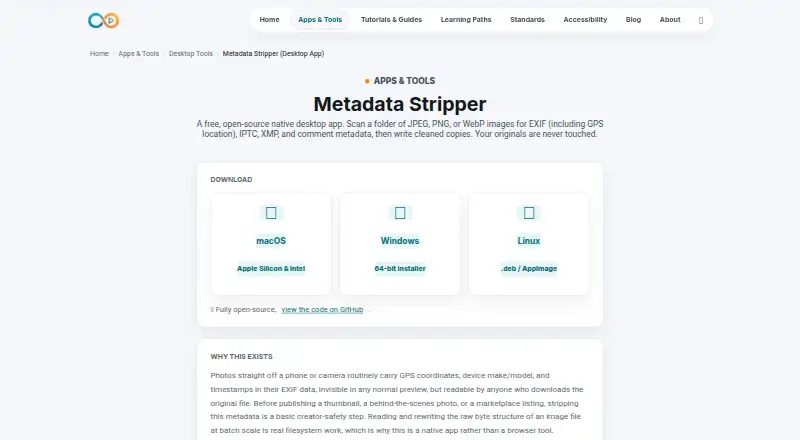
Metadata Stripper is a free desktop app that scans image folders and creates cleaned copies while leaving the originals untouched. It supports JPEG, PNG, and WebP on Linux, macOS, and Windows. Scanning reports which metadata categories each image contains without modifying files; cleaned versions are written to a `stripped/` subfolder beside the originals. For JPEGs, it removes EXIF, XMP, IPTC or Photoshop data, and comments. For PNGs, it removes specified metadata chunks; for WebP, it removes EXIF and XMP chunks. The app says it works on file containers without changing pixel data, recompressing, or resizing images. ICC color profiles are preserved in JPEG, PNG, and WebP files. After installation, it runs offline and images remain on the user’s machine. The maker describes metadata removal as a safety step for creators publishing thumbnails, behind-the-scenes photos, or marketplace listings. RAW file support is not included. The maker also warns that macOS Gatekeeper or Windows SmartScreen may show a standard launch warning because code-signing is not set up for the project.
Who it suits
Metadata Stripper may suit creators who want to remove image metadata before publishing thumbnails, behind-the-scenes photos, or marketplace listings. It is for people working with JPEG, PNG, or WebP files on desktop systems.
What it does well
- Keeps originals untouched and saves cleaned copies separately.
- Reports metadata categories during scanning.
- Processes images offline after installation.
- Preserves ICC color profiles.
- Free and open-source desktop app.
What to know first
- Does not support RAW files.
- macOS Gatekeeper or Windows SmartScreen may show a warning.
- PNG removal is limited to specified metadata chunks.
Limits
RAW file support is not included. The free app removes specified metadata chunks from PNG files.
Plans
| Plan | Billed and limits | Price |
|---|---|---|
| Free | JPEG, PNG and WebP images · native desktop app · open source | Free |
As infinitecreation.io lists them, read 15 Oct 2026. The maker's own page has the final word.
Getting started
- Visit the Metadata Stripper website.
- Choose the desktop version for Linux, macOS, or Windows.
- Install the app; macOS Gatekeeper or Windows SmartScreen may show a standard warning.
- Scan an image folder to review the metadata categories present.
- Create cleaned copies, which are saved in a `stripped/` subfolder beside the originals.
Metadata Stripper is a free desktop utility for checking and cleaning metadata across image folders. It best suits creators preparing JPEG, PNG, or WebP images for publication who want to keep their originals and work offline. It is a focused privacy tool, not an editor for every image format.
Overview
Scanning reports which metadata categories each image contains without changing files. When you clean a batch, the app saves copies in a stripped/ folder beside the originals. That separation is useful when you want to inspect a batch first or retain untouched files as a fallback.
Its format coverage is specific: JPEG cleanup removes EXIF, XMP, IPTC, Photoshop data, and comments; PNG cleanup removes specified metadata chunks; and WebP cleanup removes EXIF and XMP chunks. RAW files are not supported, so photographers working with camera originals will need another tool in their workflow.
Key features
Container-level cleanup
The app says it removes metadata from the file container without changing pixel data, recompressing, or resizing images. It also preserves ICC color profiles in JPEG, PNG, and WebP files. That combination suits creators who want to strip embedded information without changing image dimensions or visual content.
Batch processing and privacy
Folder scanning and batch cleanup make it practical to prepare multiple images together. After installation, the app runs offline, keeping images on the user's machine rather than sending them through an online service.
Platform warning
Metadata Stripper runs on Linux, macOS, and Windows. The maker warns that macOS Gatekeeper or Windows SmartScreen may display a standard warning because code-signing is not set up for the project. That may add a step for users who expect signed desktop software.
Pricing
The Free plan costs free and is described as free and open-source. It includes the native desktop app and support for JPEG, PNG, and WebP images. There is no paid tier to weigh against it; the principal trade-off is format coverage, especially the lack of RAW support.
Platforms
Native desktop versions are available for Linux, macOS, and Windows. Since the app works offline after installation, it is suited to local image workflows, including situations where keeping files on-device matters.
Who it's for
Creators publishing thumbnails, behind-the-scenes photos, or marketplace listings can use it as a pre-publication privacy step. It is also a fit for anyone who wants a batch report before cleaning and wants original images left intact. Choose a different tool if you need RAW support or broader metadata editing rather than removal.
Pros and cons
- Pros: Scans without modifying files, then writes cleaned copies beside the originals, making review and recovery straightforward.
- Pros: Batch processing, offline operation, and preserved ICC profiles suit local publishing workflows.
- Pros: Free and open-source, with desktop support across Linux, macOS, and Windows.
- Cons: No RAW support, which rules it out for workflows centered on camera originals.
- Cons: Metadata removal differs by format; PNG cleanup covers specified chunks rather than the JPEG and WebP categories.
- Cons: The code-signing warning on macOS and Windows may require users to respond to an operating-system prompt.
Alternatives
For a broader set of options, browse Photo Metadata Editors. ExifTool is a free alternative with Linux, macOS, Windows, API, and self-hosted platforms. ExifCleaner is another free desktop option for Linux, macOS, and Windows. Photini is free software for Linux, macOS, and Windows. Exif Pilot offers a free Basic EXIF editor on Windows, with a freemium model. ExiFox is a free macOS option. GeoSetter is free for Windows with no usage restrictions. MetaFix: EXIF Editor is an Android freemium option whose free plan has basic single-photo editing, banner ads, and a daily edit limit.
Verdict
Choose Metadata Stripper if you publish JPEG, PNG, or WebP images and want an offline batch cleaner that preserves originals and color profiles. Its clear format limits are the main reason to look elsewhere: RAW files are out, and the tool is built for stripping metadata rather than general editing.
Verdict
Metadata Stripper provides offline batch metadata removal while keeping original images intact. It covers JPEG, PNG, and WebP, but not RAW files.
Questions
How much does Metadata Stripper cost?
It is free and open source. The listed Free plan costs nothing.
Which image formats does it support?
It supports JPEG, PNG, and WebP. RAW file support is not included.
Which computers can run it?
It is available for Linux, macOS, and Windows.
Does it modify the original images?
Scanning does not modify files, and cleaned copies are written into a `stripped/` subfolder beside the originals. The app says it removes metadata without changing pixel data, recompressing, or resizing images.
Does it work offline?
After installation, the app runs offline and images stay on the user's machine.
What metadata does it remove?
It removes EXIF, XMP, IPTC, Photoshop data, and comments from JPEGs; specified metadata chunks from PNGs; and EXIF and XMP chunks from WebP files.
Facts from Metadata Stripper's own pages
- Accessibility claim
- Infinite Creation says its pages are audited against WCAG 2.2 level AA with browser-based checks. · infinitecreation.io, 15 Oct 2026
- API and SDK
- The product page documents downloadable desktop binaries and gives no public API or SDK instructions. · infinitecreation.io, 15 Oct 2026
- Availability limitation
- The terms provide the site as-is and do not promise uninterrupted availability. · infinitecreation.io, 15 Oct 2026
- Batch scanning
- The app scans every supported image in a selected folder and reports the metadata categories found without changing files. · infinitecreation.io, 15 Oct 2026
- Color preservation
- ICC color profiles are retained in JPEG, PNG and WebP files. · infinitecreation.io, 15 Oct 2026
- Color profiles
- ICC color profiles are preserved in JPEG, PNG, and WebP files. · infinitecreation.io, 7 Oct 2026
- Company positioning
- The maker says its property is evolving from a creator library into an independent media utility. · infinitecreation.io, 15 Oct 2026
- Documentation
- Documentation is provided as an on-page knowledge base covering workflow, metadata scope, privacy rationale and FAQs. · infinitecreation.io, 15 Oct 2026
- Downloads
- Downloads are listed for macOS Apple Silicon and Intel, Windows 64-bit, and Linux .deb or AppImage packages. · infinitecreation.io, 15 Oct 2026
- Formats limit
- The documented input scope is limited to JPEG, PNG and WebP images. · infinitecreation.io, 15 Oct 2026
- GitHub release status
- GitHub reports that the repository has no releases available. · github.com, 15 Oct 2026
- GitHub repository controls
- The repository page exposes Issues, Pull requests, Actions, Projects and Security and quality sections for the desktop-tools project. · github.com, 15 Oct 2026
- GitHub repository status
- The linked GitHub repository is public and shows zero forks, zero issues and zero pull requests. · github.com, 15 Oct 2026
- GitHub security status
- The repository page shows zero security-and-quality items. · github.com, 15 Oct 2026
- Image quality
- The maker says stripping removes container metadata without recompression, resizing or pixel changes. · infinitecreation.io, 15 Oct 2026
- Intended users
- The maker describes metadata stripping as a safety step for creators publishing thumbnails, behind-the-scenes photos, or marketplace listings. · infinitecreation.io, 7 Oct 2026
- JPEG cleaning
- JPEG processing removes EXIF, XMP, Photoshop/IPTC data and comments. · infinitecreation.io, 15 Oct 2026
- Launch warning
- The maker says macOS Gatekeeper or Windows SmartScreen may show a standard warning because code-signing is not set up for the project. · infinitecreation.io, 7 Oct 2026
- Licence
- The product page calls the application fully open-source but does not name a specific open-source licence. · infinitecreation.io, 15 Oct 2026
- Limit: code signing
- The maker warns that code signing is not yet set up, so first-launch operating-system warnings may occur. · infinitecreation.io, 15 Oct 2026
- Limit: extensibility documentation
- No integrations, plugin system, self-hosting procedure or developer extension mechanism is described on the product page. · infinitecreation.io, 15 Oct 2026
- Limit: mobile apps
- The maker lists only desktop downloads and provides no iOS or Android version on the product page. · infinitecreation.io, 15 Oct 2026
- Maker identity
- Infinite Creation describes itself as a group of media professionals building free tools, guides and checklists. · infinitecreation.io, 15 Oct 2026
- Metadata removed
- Removes EXIF, XMP, IPTC or Photoshop data, and comments from JPEGs; specified metadata chunks from PNGs; and EXIF and XMP chunks from WebP files. · infinitecreation.io, 7 Oct 2026
Where Metadata Stripper stands on Freedom251
- Photo Metadata Editors#1 of 31