Freedom251 › Photo Metadata Editors

ExifCleaner
What ExifCleaner is
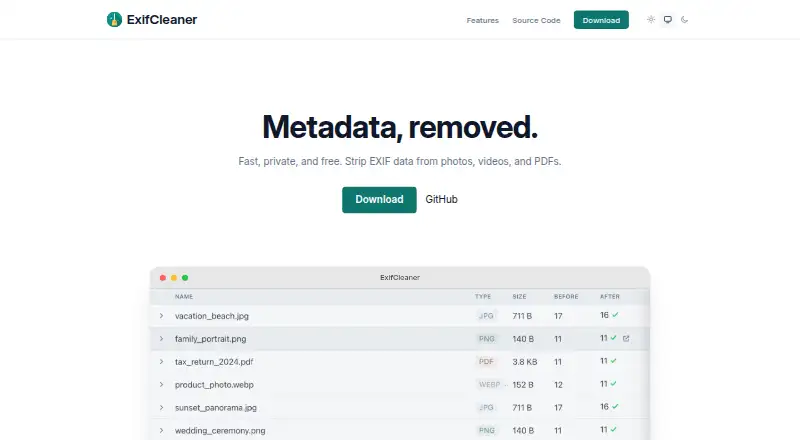
ExifCleaner is a free, open-source desktop app for removing metadata from supported images, media files, and PDFs. Add files or whole folders by dragging them into the app, then process tens, hundreds, or thousands in one batch. A before-and-after view shows which metadata fields changed for each file. Options let you preserve orientation and timestamps, save copies, and remove macOS extended attributes. ExifCleaner runs on macOS 12 or later, Windows 10 or later, and 64-bit Linux, and offers 25 languages with in-app switching. Its tested intake includes image formats, media such as MP4 and MOV, and PDFs. The project says it has no automatic updates, network traffic, telemetry, or phone-home behavior. Some formats, including RAF, MKV, TIFF, AVIF, and some RAW files, have partial or unsupported handling. PDF updates are reversible, so metadata may remain recoverable; releases are unsigned, though SHA-256 checksums are published for every artifact. It is released under the MIT License.
Who it suits
ExifCleaner suits people who want to inspect and remove metadata from batches of local files on desktop systems. Its PDF limitation matters if secure erasure is required.
What it does well
- Processes large batches of files at once
- Shows before-and-after metadata differences
- Offers timestamp and orientation preservation options
- Supports macOS, Windows, and 64-bit Linux
- Includes 25 in-app languages
What to know first
- PDF metadata updates can be reversed
- Some formats have partial or no support
- Releases are not code-signed
Limits
The free app does not securely erase PDF metadata: its PDF updates are reversible, leaving original metadata recoverable. Some formats, including RAF, MKV, TIFF, AVIF, and some RAW files, may be partly handled or unsupported.
Plans
| Plan | Billed and limits | Price |
|---|---|---|
| Free | free · macOS 12+ · Windows 10+ · Linux 64-bit · desktop app | Free |
As exifcleaner.com lists them, read 1 Oct 2026. The maker's own page has the final word.
Getting started
- Visit the ExifCleaner website.
- Download the desktop app for macOS 12 or later, Windows 10 or later, or 64-bit Linux.
- Open the app and drag files or folders onto it.
- Review the before-and-after metadata diff and choose options such as saving copies or preserving timestamps.
ExifCleaner is a free desktop app for removing metadata from supported images, media files, and PDFs. It is best for people who want to clean large batches locally and see what changed. Its privacy controls and offline design are compelling, but format gaps and reversible PDF updates rule it out for some sensitive work.
Overview
Drag files or folders into the app to process them in bulk, then review a before-and-after view of removed fields for each file. That combination suits routine cleanup of photo and media collections: batch handling saves repetitive work, while the per-file diff helps catch what the cleanup actually changed.
ExifCleaner is free and open source under the MIT License. The project says it has no automatic updates, network traffic, telemetry, or phone-home behavior. That is a meaningful fit for privacy-conscious workflows, though releases are not code-signed; SHA-256 checksums are published for every artifact. The app includes 25 languages with in-app switching.
Key features
- Batch removal: ExifCleaner can process tens, hundreds, or thousands of files at once. This is useful for library-wide cleanup, but only where the formats are fully supported.
- Per-file metadata diff: A before-and-after view shows removed metadata fields. It gives users a way to review the effect file by file rather than treating a large batch as a blind operation.
- Privacy controls: Options to save copies and preserve orientation or timestamps help avoid unwanted changes to files. macOS users can also remove extended attributes.
- Format coverage with caveats: The tested intake list spans image formats, MP4 and MOV media, and PDFs. Some formats, including RAF, MKV, TIFF, AVIF, and certain RAW files, have partial removal or are unsupported, so specialist collections need checking before relying on a single batch workflow.
- PDF handling: ExifTool's PDF update is reversible, leaving original metadata recoverable. ExifCleaner therefore cannot securely erase PDF metadata; choose another approach when irreversible document sanitization is essential.
- Desktop security posture: Version 4.0 added CSP, Electron Fuses, IPC validation, navigation hardening, and permission gates. These hardening measures are relevant, but they do not change the practical caution warranted by unsigned releases.
Pricing
Free — free (billed free). The plan is the desktop app for macOS 12+, Windows 10+, and 64-bit Linux, with batch editing and RAW file support. There is no paid tier to move up to; the trade-off is not a quota or seat limit, but format-specific gaps and the PDF limitation. It suits individual users who need a no-cost local cleanup tool and can work within those boundaries.
Platforms
ExifCleaner supports macOS 12 or later, Windows 10 or later, and 64-bit Linux. That cross-platform desktop reach makes it an option for mixed operating-system households or teams, while users on other systems will need a different tool.
Who it's for
Choose ExifCleaner for local batch cleanup of supported media when seeing removed fields and controlling copies or timestamps matters. It is less suitable for users who need secure PDF metadata erasure or dependable handling of formats with partial or unsupported removal.
Pros and cons
- Pro — Large batches: Processing hundreds or thousands of files at once can make recurring library cleanup substantially less repetitive.
- Pro — Reviewable changes: The per-file diff makes it easier to confirm which metadata fields were removed.
- Pro — Local privacy emphasis: The project's no-network, no-telemetry, and no-phone-home claims suit users seeking an offline workflow.
- Con — PDF metadata is recoverable: The reversible update does not meet a need for secure erasure.
- Con — Uneven format support: Partial or unsupported behavior for formats such as TIFF, AVIF, and some RAW files can interrupt a broad cleanup workflow.
- Con — Unsigned releases: Published SHA-256 checksums help verify artifacts, but users may prefer signed builds.
Alternatives
Photo Metadata Editors is a useful directory to compare more options. Pick FREE Browser instead if you need a free, open-source option on Android. ExifTool is also free and spans API, Linux, macOS, self-hosted, and Windows use; consider it when those platforms or an API fit better than ExifCleaner's desktop workflow. Metadata Stripper is a free, open-source desktop alternative for Linux, macOS, and Windows focused on JPEG, PNG, and WebP. Photini is another free option for Linux, macOS, and Windows, released under GPL-3.0-or-later. Exif Pilot offers a free basic EXIF editor on Windows; it may suit someone seeking editing rather than ExifCleaner's batch removal workflow. ExiFox is a free macOS alternative. GeoSetter is free for Windows with no usage restrictions. Photo Metadata Editor is a free Windows desktop option distributed as an MSI installer and portable ZIP.
Verdict
ExifCleaner is a strong choice for people who want free, local, high-volume metadata cleanup with a per-file change view across major desktop platforms. Its offline privacy posture is the clearest reason to choose it. Look elsewhere when secure PDF erasure or reliable support for a particular specialist format is central to the job.
Verdict
ExifCleaner combines batch metadata removal with a per-file change view and privacy options. Check format support and the reversible PDF behavior before relying on it for sensitive documents.
Questions
Is ExifCleaner free?
Yes. The plan is Free, billed free.
Which operating systems does it support?
ExifCleaner supports macOS 12 or later, Windows 10 or later, and 64-bit Linux.
Is ExifCleaner open source?
Yes. It is released under the MIT License.
Can ExifCleaner securely erase PDF metadata?
No. The PDF update can be reversed, so original metadata remains recoverable.
Does it process multiple files at once?
Yes. Users can drop files or folders into the app and process large batches.
Does it send files or usage data over the network?
The project states that ExifCleaner has no network traffic, telemetry, automatic updates, or phone-home behavior.
Facts from ExifCleaner's own pages
- Batch processing
- The app processes tens, hundreds, or thousands of files at once. · exifcleaner.com, 1 Oct 2026
- Input method
- Users can drag files or folders onto the application. · github.com, 1 Oct 2026
- Languages
- The application includes 25 languages with in-app language switching. · github.com, 1 Oct 2026
- License
- ExifCleaner is free and open source software released under the MIT License. · exifcleaner.com, 1 Oct 2026
- Metadata inspection
- Users can view a before-and-after diff of removed metadata fields for each file. · github.com, 1 Oct 2026
- Offline privacy
- The project states that ExifCleaner has no automatic updates or network traffic, zero telemetry, and no phone-home behavior. · github.com, 1 Oct 2026
- PDF limitation
- ExifTool writes a reversible PDF update, so the original PDF metadata remains recoverable and cannot be securely erased. · github.com, 1 Oct 2026
- Privacy controls
- Options include preserving orientation, saving copies, removing macOS extended attributes, and preserving timestamps. · github.com, 1 Oct 2026
- Purpose
- ExifCleaner strips metadata from supported images, media files, and PDFs. · github.com, 1 Oct 2026
- RAW and format limits
- ExifCleaner documents partial-removal or unsupported behavior for formats including RAF, MKV, TIFF, AVIF, and some RAW files. · github.com, 1 Oct 2026
- Security hardening
- Version 4.0 added CSP, Electron Fuses, IPC validation, navigation hardening, and permission gates. · github.com, 1 Oct 2026
- Supported formats
- The tested intake list includes image formats, media formats such as MP4 and MOV, and PDF. · github.com, 1 Oct 2026
- Supported systems
- The application supports macOS 12 or later, Windows 10 or later, and 64-bit Linux. · github.com, 1 Oct 2026
- Unsigned builds
- Releases are not code-signed, and the project publishes SHA-256 checksums for every artifact. · github.com, 1 Oct 2026
Where ExifCleaner stands on Freedom251
- Photo Metadata Editors#2 of 31