FREE Browser
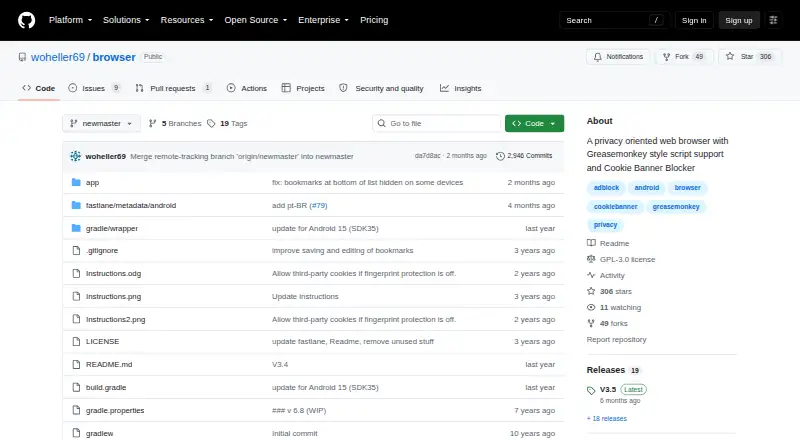
What FREE Browser is
FREE Browser is an open-source Android browser built around privacy controls. The project describes it as having no trackers and no unnecessary permissions. Its ad blocker uses the StevenBlack host list; users can choose a list and add domains to block. Fingerprinting protections are optional, and JavaScript, cookies, and DOM storage can be set by domain or bookmark. Ad blocking, fingerprinting protection, and desktop mode can also be changed for each tab.
The browser’s cookie banner blocker applies Mozilla Cookie Banner Rules to opt out of unnecessary cookies and try to dismiss banners. It requires JavaScript and does not apply rules in child windows. Simple Greasemonkey-style scripts are supported, with @match required and @run-at and @name recognized; @include, @exclude, and @grant are unsupported.
Navigation includes unlimited tabs, a bottom toolbar for one-hand use, in-page search, web search from selected text, PDF saving, and opening links in other apps. Users can back up and restore databases, bookmarks, and preferences in Documents/browser_backup. The maker’s repository offers source code and releases. F-Droid lists version 3.5.0.159, which requires Android 10 or newer.
Who it suits
FREE Browser suits Android users who want local controls over ads, fingerprinting, scripts, and site storage. It also fits readers who want open-source software, tab-level settings, and a way to back up bookmarks and preferences.
What it does well
- Open-source Android browser under GPLv3.
- Ad blocking supports list selection and custom blocked domains.
- Site storage and JavaScript can be configured by domain or bookmark.
- Unlimited tabs and per-tab privacy controls.
- Backs up databases, bookmarks, and preferences.
What to know first
- Available only on Android.
- Cookie banner rules require JavaScript and exclude child windows.
- Several Greasemonkey script tags are unsupported.
- Requires Android 10 or newer through F-Droid.
Plans
| Plan | Billed and limits | Price |
|---|---|---|
| Free | GPLv3 open-source Android browser | Free |
| FREE Browser | Android 10 or newer · 5.2 MiB APK | Free |
As github.com lists them, read 9 Oct 2026. The maker's own page has the final word.
Getting started
- Visit the maker's GitHub repository for source code and releases.
- Install on an Android device; the listed F-Droid release requires Android 10 or newer.
- Choose an ad-blocking list and add domains if needed.
- Set JavaScript, cookies, or DOM storage by domain or bookmark.
Overview
FREE Browser is a free, open-source browser for Android, built for people who want to manage privacy settings site by site.
Key features
The built-in ad blocker uses the StevenBlack host list and lets users choose a list and add domains to block. That flexibility is useful if a fixed blocking setup misses something you want to filter; the absence of extension support limits how far you can extend the browser beyond its built-in tools.
Users can toggle fingerprinting protection, configure JavaScript, cookies and DOM storage by domain or bookmark, and change ad blocking, fingerprinting protection and desktop mode per tab. These controls help when a site needs an exception without changing settings everywhere. They also suit people willing to manage those exceptions themselves.
The cookie-banner blocker uses Mozilla Cookie Banner Rules to opt out of unnecessary cookies and attempt to dismiss banners. It requires JavaScript and does not work with rules in child windows, which makes it a helpful aid rather than a reliable way to clear every banner.
Simple Greasemonkey-style scripts offer a limited way to customize pages. Scripts must use @match; @run-at and @name are supported, while @include, @exclude and @grant are not. That will suit basic site-specific scripts, but not users who depend on broader userscript support.
For everyday browsing, the browser includes a bottom toolbar for one-hand use, unlimited tabs, in-page search, web search from selected text, PDF saving and the option to open links in other apps. It can also back up and restore databases, bookmarks and preferences to Documents/browser_backup.
Pricing
The Free plan costs nothing and provides a GPLv3 open-source Android browser. There is no free trial, but no paid plan is needed to use the browser.
Platforms
FREE Browser is an Android mobile app. F-Droid lists version 3.5.0.159, which requires Android 10 or newer. The project warns that the app will stop working on certified Android devices after Google begins requiring developers to submit personal identity details in 2026/2027. That warning is a serious consideration for anyone choosing a browser for long-term use on a certified device.
Who it's for
Choose FREE Browser if you use Android and want granular control over blocking and site data without paying or relying on extensions. It is a weaker fit if you need a browser across several platforms, broad userscript support or dependable cookie-banner handling on sites that use child windows.
Pros and cons
- Pro: Domain, bookmark and per-tab settings let users tailor privacy controls to particular sites and browsing sessions.
- Pro: The ad blocker accepts a chosen list and user-added domains, giving more control than a fixed built-in list.
- Pro: Unlimited tabs and backup and restore for databases, bookmarks and preferences support regular personal use.
- Con: No extension support leaves users with only the browser's built-in tools and limited script support.
- Con: Cookie-banner rules require JavaScript and do not work in child windows, so banner handling has clear gaps.
- Con: The project's warning about future operation on certified Android devices complicates long-term reliance.
Alternatives
If you are choosing a tool for photo metadata rather than browsing, Photo Metadata Editors and Web browsers cover the adjacent categories. ExifTool is a free option for API, Linux, macOS, self-hosted and Windows environments; pick it if you need a metadata tool across those platforms instead of an Android browser. EXIF Magic is a free download for Android, iOS and macOS with no in-app purchases, subscription or account, so it fits someone seeking a cross-platform metadata app. ExifCleaner is a free desktop app for Linux, macOS and Windows; Metadata Stripper is a free, open-source desktop app for JPEG, PNG and WebP images. Photini is free GPL-3.0-or-later software for Linux, macOS and Windows, while Simple Photo Meta is a free GPLv3 alpha desktop app for Linux and macOS. Exif Lens is an iOS option with a free plan for viewing metadata and browsing, filtering and sorting a photo library, plus a $0.99 a month Pro plan for editing dates and times. Exif Pilot is a free Windows basic EXIF editor.
Verdict
FREE Browser is a sound choice for Android users who want a free, open-source browser with adjustable ad and fingerprinting protection and fine-grained site controls. Its built-in privacy features are the main reason to choose it; limited scripting, no extensions and the certified-device warning are strong reasons to look elsewhere.
Verdict
Choose FREE Browser if you want an open-source Android browser with controls for ads, fingerprinting, and site data. Its script support is limited to selected tags, and the cookie banner blocker has JavaScript and child-window constraints. The project also warns about future operation on certified Android devices after Google's 2026/2027 identity submission requirement begins.
Questions
How much does FREE Browser cost?
It is free, with a listed price of $0. There is no free trial.
Which devices does it support?
The listed platform is Android. F-Droid lists version 3.5.0.159 as requiring Android 10 or newer.
Is FREE Browser open source?
Yes. It is listed as open source under GPLv3, and the maker's repository provides source code and releases.
Does it block ads and cookie banners?
Its ad blocker uses the StevenBlack host list and allows list selection and custom blocked domains. The cookie banner blocker uses Mozilla Cookie Banner Rules, requires JavaScript, and does not work with rules in child windows.
What script features does it support?
It supports simple Greasemonkey-style scripts. @match is required; @run-at and @name are supported, while @include, @exclude, and @grant are not.
Can it back up browser data?
Yes. It can back up and restore databases, bookmarks, and preferences to Documents/browser_backup.
Facts from FREE Browser's own pages
- Ad blocking
- The browser uses the StevenBlack hosts list for ad blocking. · github.com, 15 Oct 2026
- Android dependency
- The F-Droid listing says the app depends on the device's built-in Android WebView, which should be kept updated. · f-droid.org, 15 Oct 2026
- Backup
- Browser data, bookmarks, and preferences can be backed up and restored from Documents/browser_backup. · github.com, 15 Oct 2026
- Browser engine
- other · github.com, 19 Sept 2026
- Built-in ad blocking
- Yes · github.com, 19 Sept 2026
- Cookie banner blocking
- Its cookie-banner blocker uses Mozilla Firefox Cookie Banner Rules and attempts automatic opt-out. · github.com, 15 Oct 2026
- Cookie banners
- Its cookie banner blocker uses Mozilla Cookie Banner Rules to opt out of unnecessary cookies and attempt to dismiss banners; it requires JavaScript and does not work for rules in child windows. · github.com, 9 Oct 2026
- Cookie controls
- Cookie permissions can be configured globally and for selected domains. · github.com, 15 Oct 2026
- Developer build note
- A GitHub issue reports that an external contributor built the app after upgrading Android Studio, Gradle, and JDK settings, while the maintainer said upgrades would wait until compilation breaks. · github.com, 15 Oct 2026
- Distribution and device requirement
- The maker's repository provides source code and releases; F-Droid lists version 3.5.0.159, requiring Android 10 or newer. · f-droid.org, 9 Oct 2026
- Distribution build
- F-Droid builds and signs the APK and states that it corresponds to the published source tarball. · f-droid.org, 15 Oct 2026
- DOM storage controls
- DOM-storage permissions can be controlled globally, by domain, and by bookmark. · github.com, 15 Oct 2026
- Download limitation
- F-Droid warns that direct APK installation does not provide update notifications and is less secure than using the F-Droid client. · f-droid.org, 15 Oct 2026
- Extension support
- none · github.com, 19 Sept 2026
- External app links
- Links can be opened in other applications, including YouTube. · github.com, 15 Oct 2026
- Fingerprinting protection
- The browser includes measures against browser fingerprinting that users can toggle. · github.com, 9 Oct 2026
- Fingerprint protection
- It includes measures intended to reduce browser fingerprinting. · github.com, 15 Oct 2026
- Free plan
- Yes · github.com, 19 Sept 2026
- Integrations
- The blocker supports Mozilla's Cookie Banner Rules, and the app can open links in other apps such as YouTube. · github.com, 9 Oct 2026
- JavaScript controls
- Users can set JavaScript permissions globally, per domain, and per bookmark. · github.com, 15 Oct 2026
- License
- The application is licensed under GNU GPL version 3. · github.com, 15 Oct 2026
- Limit: cookie blocker
- Cookie-banner blocking requires JavaScript and does not handle banners in child windows. · github.com, 15 Oct 2026
- Limit: reproducibility
- F-Droid's verification page marks version 3.5 as not reproducible, while versions 3.4 and earlier listed there are reproducible. · verification.f-droid.org, 15 Oct 2026
- Limit: third-party cookies
- Third-party cookies are generally unsupported. · f-droid.org, 15 Oct 2026
Where FREE Browser stands on Freedom251
- Web browsers#56 of 154