Freedom251 › Photo Metadata Editors
EXIF Studio
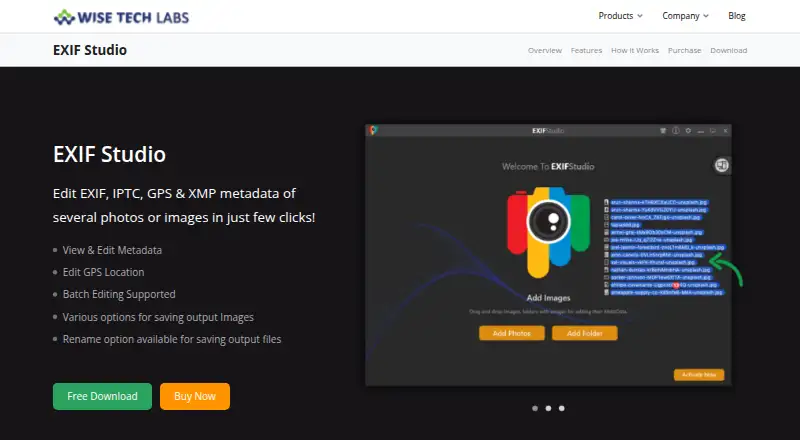
What EXIF Studio is
EXIF Studio edits photo and image metadata on macOS and Windows. It works with EXIF, IPTC, GPS, and XMP information, and supports common image formats including RAW. GPS locations can be changed by choosing a map point, entering a place name, or providing coordinates. The app can apply metadata edits to batches of photos, change an image’s Create Date, and remove all metadata or clear selected data such as GPS information, EXIF data, or user comments. Images can be added from folders, a batch, or a Photos Library. Edited files can be saved to a different folder or overwrite their originals, and batch renaming is available. Presets let users reuse metadata settings on later batches. The maker lists Windows 10, 8.1, 8, and 7 in 32-bit and 64-bit editions. Pricing starts at $9.99/mo; listed plans are $9.99 a month, $29.99 a month billed every six months, and $59.99, paid once. The six-month and lifetime plans advertise a 30-day money-back guarantee.
Who it suits
EXIF Studio may suit photographers or image managers who need to edit, remove, or standardize metadata across individual files and batches. It supports RAW files and both macOS and Windows.
What it does well
- Edits EXIF, IPTC, GPS, and XMP metadata.
- Supports common formats, including RAW.
- Batch edits and renames photos.
- Offers reusable metadata presets.
- Can save elsewhere or overwrite originals.
What to know first
- Month-by-month plan costs $9.99 a month.
- Six-month plan costs $29.99 a month.
- Lifetime plan is listed at $59.99, paid once.
Limits
The listed plans are paid, starting at $9.99/mo. The 6 Months and Life Time plans advertise a 30-day money-back guarantee.
Plans
| Plan | Billed and limits | Price |
|---|---|---|
| 6 Months | Billed Every Six Months · Full access to all features · Free extended download service · 30-day money-back guarantee · 24 X 7 premium live support | $29.99 a month |
| Life Time | Billed Once · Full access to all features · Free extended download service · 30-day money-back guarantee · 24 X 7 premium live support | $59.99, paid once |
| Month by Month | Billed per Month · Full access to all features · Cancel next tenure anytime · Free email support · 24 X 7 premium live support | $9.99 a month |
As wisetechlabs.com lists them, read 4 Oct 2026. The maker's own page has the final word.
Getting started
- Visit the EXIF Studio website.
- Choose macOS or Windows.
- Select a paid plan: Month by Month, 6 Months, or Life Time.
- Add image folders, a batch of photos, or a Photos Library.
- Edit metadata and save the processed images or overwrite the originals.
Verdict
EXIF Studio covers metadata editing, removal, batch work, and GPS changes, with support for RAW images. Review the billing terms carefully when choosing among its listed plans.
Questions
How much does EXIF Studio cost?
Month by Month costs $9.99 a month, billed per month. The 6 Months plan costs $29.99 a month, billed every six months, and Life Time costs $59.99, paid once, billed once.
Is there a free plan?
The pricing model is paid. The product page advertises unlimited free technical support.
Which platforms does it support?
EXIF Studio is listed for macOS and Windows. Windows support is listed for versions 10, 8.1, 8, and 7 in 32-bit and 64-bit editions.
What metadata can I edit or remove?
It edits EXIF, IPTC, GPS, and XMP metadata, including an image’s Create Date. You can remove all metadata or clear GPS information, EXIF data, or user comments individually.
Does it support RAW images and batch editing?
Yes. It supports common image formats, including RAW, and can apply metadata values or modifications to groups of photos.
Who makes EXIF Studio?
The site copyright identifies the maker as Wise Tech Labs Private Limited.
Facts from EXIF Studio's own pages
- Batch editing
- The app applies metadata values or modifications to groups of photos in batches. · wisetechlabs.com, 4 Oct 2026
- Batch renaming
- Users can rename edited photos in one operation and save them at the same or a different location. · wisetechlabs.com, 4 Oct 2026
- Company
- The site copyright identifies the maker as Wise Tech Labs Private Limited. · wisetechlabs.com, 4 Oct 2026
- Create date
- The product page says users can edit an image’s Create Date. · wisetechlabs.com, 4 Oct 2026
- File support
- It supports common image formats, including RAW images. · wisetechlabs.com, 4 Oct 2026
- GPS editing
- GPS locations can be edited by selecting a map location, entering a place name, or specifying coordinates. · wisetechlabs.com, 4 Oct 2026
- Guarantee
- The pricing page advertises a 30-day money-back guarantee for the six-month and lifetime plans. · wisetechlabs.com, 4 Oct 2026
- Input sources
- Users can add image folders, a batch of photos, or a Photos Library for editing. · wisetechlabs.com, 4 Oct 2026
- Metadata removal
- Users can remove all photo metadata or clear user comments, GPS information, or EXIF data individually. · wisetechlabs.com, 4 Oct 2026
- Presets
- The app can save metadata settings as presets for reuse on later photo batches. · wisetechlabs.com, 4 Oct 2026
- Purpose
- EXIF Studio edits EXIF, IPTC, GPS, and XMP metadata for photos and images. · wisetechlabs.com, 4 Oct 2026
- Saving options
- Processed images can be saved to a different folder or overwrite the originals at their source location. · wisetechlabs.com, 4 Oct 2026
- Support
- The product page advertises unlimited free technical support, and paid plans list email or premium live support. · wisetechlabs.com, 4 Oct 2026
- Windows compatibility
- The maker lists support for Windows 10, 8.1, 8, and 7 in both 32-bit and 64-bit editions. · wisetechlabs.com, 4 Oct 2026
Where EXIF Studio stands on Freedom251
- Photo Metadata Editors#28 of 31