Freedom251 › AI Spreadsheet Tools

ExcelGPT
What ExcelGPT is
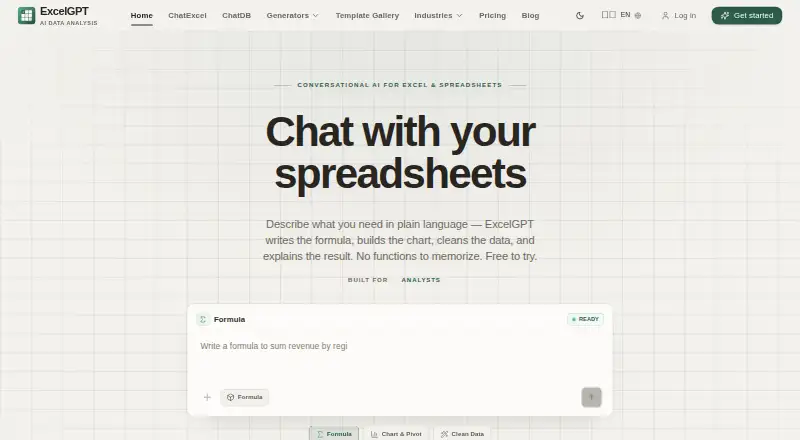
ExcelGPT turns plain-language spreadsheet requests into formulas, charts, cleaned data, templates, and analysis workflows. Its formula generator supports more than 400 functions across Excel, Google Sheets, WPS, and LibreOffice Calc. Users can upload spreadsheets and chat across multiple files and sheets to clean, merge, or query data; Work Agent handles multi-step workflows across files. ChatDB connects to MySQL, PostgreSQL, Supabase, and SQL Server, restricting queries to read-only SELECT operations. Imports include Excel, CSV, ODS, PDF, PNG, and JPG files, with XLSX available for export. Google Sheets connection is optional and uses permission for individual files; ExcelGPT says it cannot browse or read other Google Drive files. It offers ChatGPT with GPT-4o/GPT-5 as well as Claude, Gemini, and OpenAI workflows. A free plan is available. Pro costs $19.90 a month, and Max costs $29.90 a month. ChatGPT-powered features require a live connection, though the latest response is cached for offline reading. ExcelGPT is available on the web and through an API.
Who it suits
ExcelGPT suits operators, analysts, founders, finance teams, and spreadsheet-heavy businesses. It may fit people who want to query files in natural language or connect spreadsheet work to supported databases.
What it does well
- Formula generator supports more than 400 functions.
- Chats can analyze multiple files and sheets.
- ChatDB connects to four listed database systems.
- Free plan available.
- XLSX export is supported.
What to know first
- ChatGPT-powered features require a live connection.
- Google Sheets access is limited to per-file permission.
- Pro costs $19.90 a month.
- Max costs $29.90 a month.
Limits
The Free plan provides up to 90 credits per month through daily check-in. Pro provides 300 credits per month; Max includes unlimited usage. ChatGPT-powered features require a live connection, with the last response cached for offline reading.
Plans
| Plan | Billed and limits | Price |
|---|---|---|
| Pro | per month · 300 credits/month · ~150 formulas · ~75 charts & analyses | $19.90 a month |
| Max | per month · Unlimited usage · unlimited formula generation · unlimited chart analysis · collaboration and API access | $29.90 a month |
| Free | forever · Up to 90 credits/month via daily check-in · for individuals and occasional tasks | Free |
| Lifetime | one-time · Unlimited lifetime usage · unlimited formula generation · unlimited chart analysis | $599, paid once |
As excelgpt.app lists them, read 30 Sept 2026. The maker's own page has the final word.
Getting started
- Visit https://excelgpt.app/.
- Choose the Free plan or a paid plan.
- Use ExcelGPT on the web or through its API.
- Upload a supported spreadsheet or other supported file type to analyze it.
- Optionally connect Google Sheets with permission for individual files, or connect a supported database for read-only queries.
ExcelGPT is an AI workspace for turning natural-language spreadsheet requests into formulas, charts, cleaned data and repeatable workflows. It is aimed at operators, analysts, founders, finance teams and other spreadsheet-heavy businesses. The broadest value comes from combining file analysis, automation and read-only database access, while lower-plan quotas and the requirement for a live connection will shape who can rely on it every day.
Overview
ExcelGPT works through the web and an API. You can import Excel, CSV, ODS, PDF, PNG and JPG files, then ask questions in natural language. It can work across multiple uploaded spreadsheets and sheets, rather than limiting a conversation to one table. Optional Google Sheets access uses permission per file; ExcelGPT says it cannot browse, list or read other files in a connected Google Drive.
ChatGPT-powered functions need an active connection. The last response is cached for offline reading, but offline work is not a substitute for the live service. A support team is available through the Help Center.
Key features
Formulas, files and visual analysis
The AI formula generator supports more than 400 functions in Excel, Google Sheets, WPS and LibreOffice Calc. That coverage suits mixed-tool teams and users who need help translating a plain-language requirement into a spreadsheet expression. Spreadsheet chat can clean, merge and query data across files and sheets, and can produce charts, templates and analysis workflows. AI visualizations and XLSX export make the results useful beyond the chat itself.
Workflow automation
Work Agent runs multi-step workflows across a user's files. It is a stronger fit for recurring spreadsheet operations than a tool limited to isolated formula suggestions, particularly for teams that repeatedly prepare or transform the same kinds of data. The practical ceiling depends on the plan's credit allowance.
Read-only database queries
ChatDB connects to MySQL, PostgreSQL, Supabase and SQL Server and accepts natural-language requests that become read-only SELECT queries. A query guard and read-only transaction provide a clear boundary: ExcelGPT suits investigating and analyzing database contents, not processes that must insert, update or delete records.
Models and data controls
Users can work with ChatGPT using GPT-4o or GPT-5, and ExcelGPT also provides Claude, Gemini and OpenAI workflows. Its privacy policy describes SSL encryption, encryption of spreadsheet data at rest and in transit, regular malware scanning, security audits and penetration testing. For Google data, ExcelGPT says information is not sold or transferred to third parties, used for advertising or used to train generalized AI or machine-learning models.
Pricing
ExcelGPT uses a freemium model. The Free plan provides up to 90 credits per month through daily check-in and includes AI data analysis. It is a sensible way to assess the workflow, but the credit cap makes it a poor match for sustained, high-volume use.
Pro costs $19.90 a month, billed per month, and includes 300 credits monthly, about 150 formulas and about 75 charts and analyses. It fits an individual or small team with regular but bounded demand; the approximate formula and analysis allowances can become restrictive for heavy spreadsheet users.
Max costs $29.90 a month, billed per month. It removes usage ceilings with unlimited usage, formula generation and chart analysis, and adds collaboration and API access. This is the plan for teams standardizing recurring work or needing shared and programmatic access.
A Lifetime plan offers unlimited lifetime access, usage, formula generation and chart analysis at custom pricing. Choose it only when a one-time commercial arrangement fits your needs better than monthly billing.
Platforms
ExcelGPT is available on the web and through an API. It supports SQL connections, Google Sheets connections, team collaboration and XLSX export. ChatGPT-powered features require a live connection, with only the last response retained for offline reading.
Who it's for
Operators and analysts can use natural-language analysis and multi-step file workflows to reduce repetitive spreadsheet work. Founders and finance teams benefit when spreadsheets combine reporting, cleanup and recurring calculations. Businesses with SQL data gain conversational, read-only exploration across supported databases. It is less suitable for offline-first work, database processes that need write access, or users whose monthly activity regularly exceeds Pro's quotas without a Max budget.
Pros and cons
Pros
- More than 400 supported spreadsheet functions across four major spreadsheet applications.
- Multi-file chat, cleaning, merging, charts, templates and workflow automation in one workspace.
- Read-only SELECT enforcement makes connected database exploration more bounded.
- Optional per-file Google Sheets permissions and stated encryption and security controls.
- Max adds unlimited usage, collaboration and API access.
Cons
- The Free plan's 90 monthly credits limit ongoing use.
- Pro's 300 credits, roughly 150 formulas and roughly 75 charts and analyses may not cover busy teams.
- Database connections cannot support write operations.
- Core ChatGPT-powered features depend on a live connection.
Alternatives
For a wider directory of options, see AI Data Analysis Tools, Spreadsheet apps and AI Spreadsheet Tools.
Quadratic is the better alternative when you need broad platform coverage, including desktop, mobile and self-hosted options, with a freemium Personal plan.
Julius AI suits users who want a web and mobile data-analysis product with free daily credits and a Google Drive connector.
Byaan is a fit for individuals seeking a free, MIT-licensed macOS app or teams considering a self-hosted version.
Kiln is an option for users who prefer an open-source Python library, source-available desktop app and local datasets with git sync.
Chartt targets browser-based analysis with a 100-credit free tier, file-size and data-source limits, and PNG or CSV export.
Loam offers a free individual workspace for uploading files, asking grounded questions and connecting supported AI tools.
MySheetAI is worth considering for a free-forever plan with five monthly questions, small uploads and an unlimited formula generator.
PerSight is a desktop choice for users who want database connections and question quotas on macOS or Windows.
Verdict
Choose ExcelGPT if your work centers on spreadsheet formulas, multi-file analysis and repeatable workflows, especially when read-only SQL access and team or API features matter. Look elsewhere if you need offline operation, database writes or a lower-cost plan without recurring usage ceilings.
Verdict
ExcelGPT combines spreadsheet formula generation, file analysis, workflow automation, and read-only database queries. Its free plan is available, while paid monthly plans are listed at 19.90 USD for Pro and 29.90 USD for Max.
Questions
Does ExcelGPT have a free plan?
Yes. The Free plan offers up to 90 credits per month through daily check-in for AI data analysis.
How much do the paid plans cost?
Pro costs $19.90 a month. Max costs $29.90 a month.
Which spreadsheet formats can it import and export?
Imports include Excel (.xlsx, .xls), CSV, ODS, PDF, PNG, and JPG. XLSX is available for export.
Can ExcelGPT connect to databases?
Yes. ChatDB connects to MySQL, PostgreSQL, Supabase, and SQL Server, and runs read-only SELECT queries.
Does it work offline?
ChatGPT-powered features require a live connection. The last response is cached for offline reading.
Can ExcelGPT access my Google Drive files?
Google Sheets access is optional and uses permission for individual files. ExcelGPT says it cannot list, browse, or read other Google Drive files.
Facts from ExcelGPT's own pages
- Core purpose
- ExcelGPT turns plain-language spreadsheet questions into formulas, charts, cleaned data, templates, and analysis workflows. · excelgpt.app, 30 Sept 2026
- Database integrations
- ChatDB connects to MySQL, PostgreSQL, Supabase, and SQL Server and runs read-only SELECT queries enforced by a query guard and read-only transaction. · excelgpt.app, 30 Sept 2026
- Formula support
- Its AI Excel Formula Generator supports more than 400 functions across Excel, Google Sheets, WPS, and LibreOffice Calc. · excelgpt.app, 30 Sept 2026
- Free plan
- Yes · excelgpt.app, 19 Sept 2026
- Google data policy
- ExcelGPT says Google user data is not transferred or sold to third parties, is not used for advertising, and is not used to train generalized AI or machine-learning models. · excelgpt.app, 30 Sept 2026
- Google Sheets access
- Google Sheets connection is optional and uses per-file OAuth permission; ExcelGPT says it cannot list, browse, or read other Google Drive files. · excelgpt.app, 30 Sept 2026
- Model integrations
- ExcelGPT offers ChatGPT with GPT-4o/GPT-5 and also provides Claude, Gemini, and OpenAI workflows. · excelgpt.app, 30 Sept 2026
- Offline limitation
- ChatGPT-powered ExcelGPT features require a live connection, although the last response is cached for offline reading. · excelgpt.app, 30 Sept 2026
- Security controls
- The privacy policy states that sensitive information uses SSL encryption, spreadsheet data is encrypted at rest and in transit, malware scanning is regular, and security audits and penetration testing are performed. · excelgpt.app, 30 Sept 2026
- Spreadsheet chat
- Users can upload spreadsheets and analyze multiple files and sheets by chatting, including cleaning, merging, and querying data. · excelgpt.app, 30 Sept 2026
- Support
- ExcelGPT provides a support team and directs users to contact support through its Help Center. · excelgpt.app, 30 Sept 2026
- Target users
- ExcelGPT says it serves operators, analysts, founders, finance teams, and spreadsheet-heavy businesses. · excelgpt.app, 30 Sept 2026
- Workflow agent
- Work Agent runs multi-step spreadsheet workflows across users' files. · excelgpt.app, 30 Sept 2026
Where ExcelGPT stands on Freedom251
- AI Spreadsheet Tools#9 of 31
- AI Data Analysis Tools#10 of 27
- Spreadsheet apps#18 of 31