Freedom251 › AI Data Analysis Tools

Byaan
What Byaan is
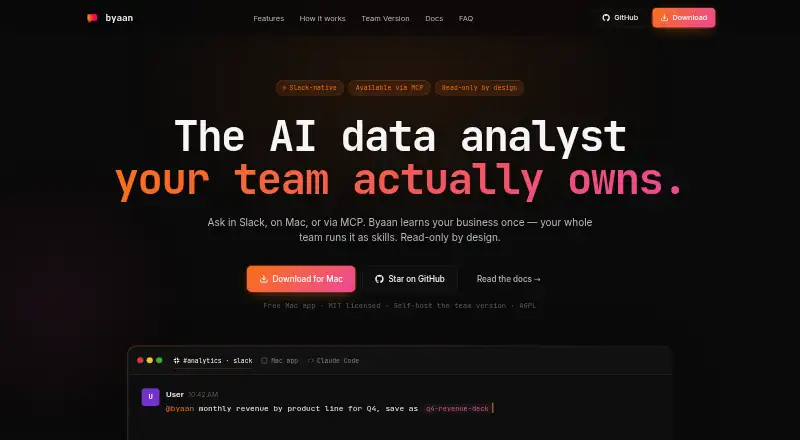
Byaan is an AI data analyst that answers natural-language questions about connected databases and files. It supports PostgreSQL, MongoDB, MySQL, MSSQL, SQLite, and CSV, Excel, Parquet, and JSON inputs. Users can access it through Slack, a Mac app, or MCP clients such as Claude Code, Cursor, and Codex, and bring keys for listed model providers including Anthropic, OpenAI, Azure, Bedrock, Groq, OpenRouter, and xAI. Byaan can save an organization’s business context and workflows as reusable skills, and read connected GitHub repositories to interpret data rules and intent. It can create interactive dashboards and export reports as PDF, Excel, or standalone HTML. The maker says it blocks DDL and DML writes across supported data sources. The free Mac App is for individuals and MIT licensed. A Team Version is self-hosted in a VPC and includes multi-user authentication, RBAC, Slack, and automatic HTTPS; it requires Linux and Docker, with 2 GB RAM minimum and 4 GB recommended. The maker directs questions to GitHub issues and discussions.
Who it suits
Byaan is suited to engineers and teams that need answers from databases or files using natural-language questions. Individuals can use the free Mac app, while teams can deploy the self-hosted version in their own infrastructure.
What it does well
- Accepts five listed SQL database types and four file formats.
- Creates interactive dashboards and exports reports.
- Saves business context and workflows as reusable skills.
- Maker says it blocks data-source writes.
- Team version includes multi-user authentication and RBAC.
What to know first
- Team deployment requires Linux and Docker.
- Team deployment needs at least 2 GB RAM.
- Free Mac app is for individuals.
Plans
| Plan | Billed and limits | Price |
|---|---|---|
| Mac App | Free for individuals · macOS app · MIT licensed | Free |
| Team Version | Self-hosted · AGPL licensed · multi-user auth and RBAC · Slack · automatic HTTPS | On request |
As byaan.ai lists them, read 29 Sept 2026. The maker's own page has the final word.
Overview
Byaan is an AI data analyst for asking natural-language questions about connected databases and files. It best suits engineers and teams that want reusable business context alongside analysis; the main trade-off is that team use requires a self-hosted Linux and Docker deployment.
Byaan can connect data with the code and business rules behind it by reading a connected GitHub repository. It also saves organizational context and workflows as reusable skills, which can help teams carry relevant knowledge into later questions. That makes it a better fit for recurring, engineering-led analysis than for readers looking for a conventional spreadsheet or a ready-made analytics suite.
Key features
Connections and questions
SQL connections cover PostgreSQL, MongoDB, MySQL, MSSQL, and SQLite; supported files include CSV, Excel, Parquet, and JSON. Natural-language queries make those sources accessible without requiring every question to start as a hand-written query. Users can bring keys from Anthropic, OpenAI, Azure, Bedrock, Groq, OpenRouter, or xAI, offering a range of model providers while leaving provider choice and credentials to the user.
Interfaces and outputs
Byaan is accessible through Slack, its Mac app, and MCP clients including Claude Code, Cursor, and Codex. It can turn analysis into interactive dashboards and export reports as PDF, Excel, or standalone HTML. These options suit teams that need to move from questions to shareable outputs, though the product is oriented around its supported interfaces rather than a traditional spreadsheet workflow.
Guardrails and privacy
The maker says Byaan blocks DDL and DML writes across supported data sources, a useful safeguard for teams concerned about analysis changing source data. The Mac app runs locally, while the team version runs in the customer's infrastructure; the maker says credentials, queries, and results remain there. That deployment model gives organizations control over where this information is handled, but the team edition also brings infrastructure responsibilities.
Pricing
The Mac App costs nothing and is free for individuals. It is a macOS app under the MIT license, making it the straightforward starting point for an individual Mac user. The plan is not the team deployment: multi-user authentication, RBAC, Slack, and automatic HTTPS are included with the Team Version.
The Team Version has custom pricing and is self-hosted under the AGPL license. It is aimed at organizations that need multi-user access and role-based controls, but teams must provide Linux and Docker, with 2 GB RAM minimum and 4 GB recommended. Support questions go through GitHub issues and discussions.
Platforms
Byaan supports macOS through its individual app, with Linux and Docker required for team deployment. It also supports web, API, and self-hosted use. The range serves both Mac individuals and organizations deploying within their own infrastructure, but does not remove the team edition's hosting requirements.
Who it's for
Byaan is strongest for engineers and teams that need answers from databases and files, want to relate data to code or business rules, and expect to reuse organizational context across questions. Mac users can start with the free individual app. Teams that want to keep credentials, queries, and results in their own infrastructure may prefer the self-hosted version if they can meet its deployment requirements.
It is a less suitable choice for someone who wants a spreadsheet-first experience or a team product without responsibility for Linux and Docker hosting.
Pros and cons
- Reusable organizational skills: saved context and workflows can support recurring analysis instead of requiring teams to rebuild that context each time.
- Broad source and model-provider support: database connections, common file formats, and multiple bring-your-own-key providers give technical teams flexibility across their data stack.
- Useful analysis outputs: interactive dashboards and PDF, Excel, and standalone HTML exports help move from questions to reports.
- Local and self-hosted options: the Mac app runs locally and the team version runs in the customer's infrastructure, with the maker saying credentials, queries, and results stay there.
- Team deployment burden: Linux, Docker, and at least 2 GB RAM are required, with 4 GB recommended, so the team version is not a low-setup hosted option.
- Free plan is individual Mac software: the free Mac App does not include the Team Version's multi-user authentication, RBAC, Slack, and automatic HTTPS.
Alternatives
Explore AI Data Analysis Tools for more options in the category.
- Choose Quadratic if you want a freemium option with broad platform support that includes Android, iOS, Windows, and web as well as macOS and self-hosting.
- Choose Julius AI if a freemium web, Android, or iOS option with a free tier and Google Drive connector better fits your workflow.
- Choose Kiln if you want a free open-source Python library and desktop app, with local datasets and git sync.
- Choose Chartt if a web-based tool with a defined free allowance of 100 credits per month and files under 100 MB suits your needs.
- Choose ExcelGPT if you want a web or API tool with a free plan offering up to 90 credits per month via daily check-in.
- Choose Loam if you want an individual free plan for file uploads, grounded questions, and supported AI tool connections.
- Choose MySheetAI if you want a web free plan with five questions a month and a 3 MB upload limit.
- Choose PerSight if you want a macOS or Windows option with a free allowance of 15 questions per month and one database connection.
Verdict
Byaan is a strong choice for engineers and teams that need natural-language analysis grounded in connected data, code, and reusable business context. Its combination of provider choice, reporting, and local or self-hosted deployment is compelling for that audience. Look elsewhere if you need a team service without infrastructure work: Byaan's team edition requires Linux and Docker, while its free option is the individual Mac app.
Verdict
Byaan combines natural-language data questions with dashboards, exports, and reusable organizational context. Individuals can use the free Mac app; teams should account for the Linux, Docker, and memory requirements of self-hosting.
Facts from Byaan's own pages
- GitHub
- Byaan can read a connected GitHub repository to understand the intent behind data and business rules. · byaan.ai, 29 Sept 2026
- Integrations
- The site lists PostgreSQL, MongoDB, MySQL, MSSQL, SQLite, and CSV, Excel, Parquet, and JSON inputs. · byaan.ai, 29 Sept 2026
- Interfaces
- Users can access Byaan through Slack, the Mac app, or MCP clients such as Claude Code, Cursor, and Codex. · byaan.ai, 29 Sept 2026
- Memory and skills
- It saves business context and workflows as reusable skills for an organization. · byaan.ai, 29 Sept 2026
- Model providers
- Users can bring keys for Anthropic, OpenAI, Azure, Bedrock, Groq, OpenRouter, and xAI. · byaan.ai, 29 Sept 2026
- Privacy
- The maker says the Mac app runs locally and the team version runs in the customer's infrastructure, keeping credentials, queries, and results there. · byaan.ai, 29 Sept 2026
- Product
- Byaan is an AI data analyst that answers natural-language questions about connected databases and files. · byaan.ai, 29 Sept 2026
- Read-only guardrails
- The maker says Byaan blocks DDL and DML writes across supported data sources. · byaan.ai, 29 Sept 2026
- Reports
- Byaan can create interactive dashboards and export reports as PDF, Excel, or standalone HTML. · byaan.ai, 29 Sept 2026
- Support
- The maker directs questions to GitHub issues and discussions. · byaan.ai, 29 Sept 2026
- Team deployment
- The Team Version is self-hosted in a VPC and includes multi-user authentication, RBAC, Slack, and automatic HTTPS. · byaan.ai, 29 Sept 2026
- Team requirements
- The team deployment requires Linux and Docker, with 2 GB RAM minimum and 4 GB recommended. · byaan.ai, 29 Sept 2026
- Who it is for
- The site describes Byaan as built for engineers and teams that need answers from their data. · byaan.ai, 29 Sept 2026
Where Byaan stands on Freedom251
- AI Data Analysis Tools#2 of 27