Freedom251 › AI Data Analysis Tools
Kiln
What Kiln is
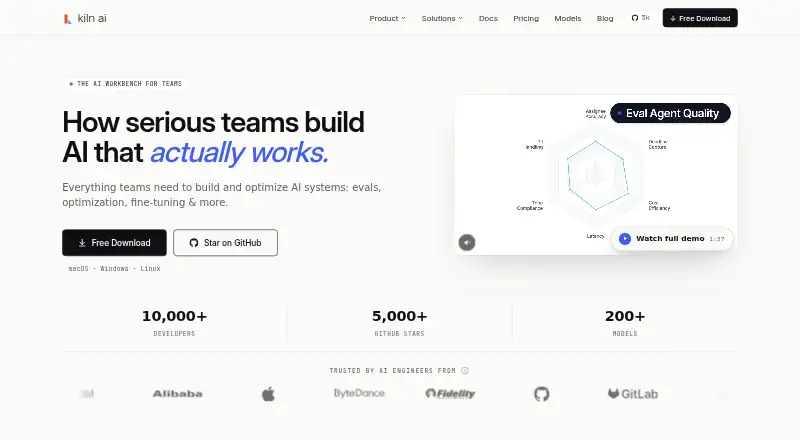
Kiln is an AI workbench for teams building and improving AI systems, with tools for evaluations, fine-tuning, and optimization. Users can describe an evaluation goal and have Kiln generate prompts and synthetic datasets, then benchmark judges against human ratings. For agent development, it supports composing agents and subagents, inspecting their tool calls, and evaluating each level in an agent hierarchy.
Kiln supports MCP servers and lists providers such as AWS Bedrock, Azure OpenAI, Vertex AI, OpenAI, Anthropic, Fireworks, Gemini, and Ollama, along with OpenAI-compatible endpoints. It syncs datasets, traces, and evaluations to Git; its enterprise page names GitHub Enterprise, GitLab, Bitbucket, and Azure DevOps. Prompts, outputs, ratings, and fine-tuning jobs are stored as JSON files on the user's filesystem, while provider API calls go from the user's machine to the selected provider. Kiln says it can run fully offline with Ollama, vLLM, Llama.cpp, or another compatible local server. The free Individual plan includes a Python library, a source-available desktop app, local datasets with Git sync, rate-limited standard models, and community support.
Who it suits
Kiln is aimed at engineers, data scientists, product managers, QA specialists, and subject matter experts working on AI systems. It suits teams that need to build evaluations or agents, work with multiple model providers, and sync project data through Git.
What it does well
- Generates evaluation prompts and synthetic datasets from a described goal.
- Benchmarks judges against human ratings.
- Supports composing agents and subagents and inspecting tool calls.
- Stores prompts, outputs, ratings, and fine-tuning jobs as local JSON files.
- Can run offline with listed local server options.
- Individual plan includes a Python library and source-available desktop app.
What to know first
- Individual model access is rate limited.
- Team and Enterprise prices require request access or a custom quote.
- The desktop app collects UI analytics through PostHog.
Limits
The free Individual plan includes standard models with rate limits. Team adds enhanced models with higher limits, while Enterprise adds SSO / SAML and other listed enterprise services.
Plans
| Plan | Billed and limits | Price |
|---|---|---|
| Individual | Open Source Python Library · Desktop App (source-available) · Local datasets with git sync · Kiln Pro standard models, rate limited · Community support | Free |
| Team | Request access · Everything in Individual · Kiln Pro enhanced models, higher limits · Automatic agent optimization · Priority access to new features · Email support | On request |
| Enterprise | Custom · Everything in Team · SSO / SAML · Annual contracts & procurement support · SLA & priority support · Dedicated solutions engineer · Custom onboarding & training | On request |
As kiln.tech lists them, read 7 Oct 2026. The maker's own page has the final word.
Getting started
- Visit kiln.tech and choose the Individual plan or request access to Team or Enterprise.
- Use the Python library or source-available desktop app included with Individual.
- Import evaluation data from CSV if needed.
- Connect to a supported provider or MCP server; for offline use, use Ollama, vLLM, Llama.cpp, or another OpenAI-compatible local server.
- Sync datasets, traces, and evaluations to Git.
Kiln is an AI workbench for building and improving AI systems, from evaluation to agent development. It is best suited to teams that need to inspect agent behavior and keep evaluation work in Git. Its local-first workflow and free Python library make it worth considering, though higher limits and team controls require paid offerings.
Overview
Kiln brings evaluation, synthetic data generation, agent composition, and optimization into one workflow. It can generate evaluation prompts and datasets from a description of a goal, then compare judge performance against human ratings. That focus is useful for teams building systems they need to assess systematically, rather than for people primarily looking to analyze spreadsheets or ask questions of general-purpose data.
Prompts, outputs, ratings, and fine-tuning jobs are stored as JSON files on the user's filesystem. Provider calls go directly from the user's machine to the selected service. Kiln also says it can run fully offline with Ollama, vLLM, Llama.cpp, or another OpenAI-compatible local server, an important distinction for teams that want local workflows.
Key features
Evaluation and agents
Goal-based generation of evaluation prompts and synthetic datasets can help teams create starting material without assembling every example manually. Benchmarking judges against human ratings adds a way to check whether automated evaluation tracks human assessments. Kiln also supports composing agents and subagents, inspecting tool calls, and evaluating each level of an agent hierarchy. That level-by-level view is more relevant to teams developing multi-step agents than to users who only need a simple chat interface.
Provider connections and Git sync
Kiln supports MCP servers and names AWS Bedrock, Azure OpenAI, Vertex AI, OpenAI, Anthropic, Fireworks, Gemini, Ollama, and OpenAI-compatible endpoints. Datasets, traces, and evaluations sync automatically to Git; enterprise deployments name GitHub Enterprise, GitLab, Bitbucket, and Azure DevOps. This makes it a natural fit for teams that already manage AI work alongside version-controlled projects.
Local storage and telemetry
Keeping project artifacts as local JSON files and sending provider requests directly from the user's machine gives the workflow a clear local-data orientation. The desktop app does collect UI analytics through PostHog, while the Python library sends no analytics; Kiln says telemetry can be disabled for enterprise contracts. The Python library is MIT-licensed, while the desktop app is source-available and has public CI builds and release checksums.
Pricing
Individual: free. It includes the open-source Python library, source-available desktop app, local datasets with Git sync, rate-limited Kiln Pro standard models, and community support. This is the sensible starting point for an individual or small-scale evaluation workflow, but rate limits and community-only support are meaningful constraints.
Team: custom pricing, billed by request access. It includes everything in Individual, plus enhanced models with higher limits, automatic agent optimization, priority access to new features, and email support. Teams that need more capacity or automated optimization should consider it; the move from Individual comes with custom pricing rather than a published monthly rate.
Enterprise: custom pricing. It includes everything in Team, along with SSO/SAML, annual contracts and procurement support, SLA and priority support, a dedicated solutions engineer, and custom onboarding and training. These controls and services target organizations with procurement and support requirements, not buyers seeking a self-serve price.
Platforms
Kiln supports API, Linux, macOS, self-hosted, and Windows. CSV imports and natural-language queries broaden how teams can bring in data and work with it, while team collaboration and Git synchronization support shared projects. Offline use depends on pairing Kiln with a local server such as Ollama, vLLM, or Llama.cpp.
Who it's for
Kiln is aimed at engineers, data scientists, product managers, QA teams, and subject matter experts working on AI systems. It is particularly compelling for teams that want a shared place to build evaluations, inspect agent tool calls, and preserve datasets and traces in Git. It is less suitable for buyers who mainly need a general-purpose spreadsheet-analysis tool, or organizations that require enterprise support and controls without entering a custom-pricing conversation.
Pros and cons
- Pro: Local JSON storage and direct provider calls give teams a clear local-first workflow.
- Pro: Evaluation generation, judge benchmarking, and hierarchy-level agent inspection address several stages of AI development in one workbench.
- Pro: Automatic Git sync and a broad provider list suit teams already working across version-controlled projects and multiple model services.
- Con: Individual model access is rate limited, so sustained team use may require custom-priced Team access.
- Con: The desktop app collects UI analytics; telemetry controls are described as an enterprise feature, while the Python library sends no analytics.
- Con: Team and Enterprise have custom pricing, making budget comparison harder before requesting access.
Alternatives
For spreadsheet-oriented analysis rather than AI-system development, consider Quadratic, which has a free plan and a broader set of listed platforms including web, mobile, and desktop. Julius AI is another freemium option, with a free tier offering daily credits and a Google Drive connector. For a free macOS app with a self-hosted team version, Byaan is worth comparing.
Chartt may fit better for web-based data work with a free tier capped at 100 credits per month and files under 100 MB. ExcelGPT offers AI data analysis through web and API access, with a free plan providing up to 90 monthly credits through daily check-in. For grounded questions over uploaded files and supported AI tools, Loam has a free individual plan. MySheetAI offers a free web plan with five questions per month and a 3 MB upload limit, while PerSight is a desktop alternative for macOS and Windows with a free tier of 15 questions per month and one database connection.
Verdict
Choose Kiln if your team is building AI systems and needs evaluation workflows, agent inspection, provider choice, and Git-synced project artifacts in a local-first setup. The free Individual plan is a credible way to begin, but rate limits, custom-priced upgrades, and enterprise-only controls make it a weaker fit for teams that need predictable costs or formal support from day one.
Verdict
Pick Kiln if your team needs evaluation and agent development tools, provider integrations, and Git-synced datasets, traces, and evaluations. The free Individual plan includes the Python library and desktop app, while teams needing higher limits, automatic agent optimization, or enterprise controls should review the Team or Enterprise offerings and request pricing.
Questions
Is Kiln free?
Yes. Individual is listed as free. Team pricing is request access, and Enterprise pricing is custom.
What is included in Individual?
It includes the open-source Python library, source-available desktop app, local datasets with Git sync, rate-limited standard models, and community support.
Which AI providers does Kiln support?
Listed providers include AWS Bedrock, Azure OpenAI, Vertex AI, OpenAI, Anthropic, Fireworks, Gemini, and Ollama. It also supports MCP servers and OpenAI-compatible endpoints.
Can Kiln run offline?
Kiln says it can run fully offline with Ollama, vLLM, Llama.cpp, or another OpenAI-compatible local server.
Where does Kiln store project data?
Prompts, outputs, ratings, and fine-tuning jobs are stored as JSON files on the user's filesystem. Provider API calls go directly from the user's machine to the selected provider.
What do the paid plans add?
Team adds enhanced models with higher limits, automatic agent optimization, priority access to new features, and email support. Enterprise adds SSO / SAML, SLA and priority support, a dedicated solutions engineer, and custom onboarding and training.
Facts from Kiln's own pages
- Agents
- Kiln supports composing agents and subagents, inspecting tool calls, and evaluating each level of an agent hierarchy. · kiln.tech, 7 Oct 2026
- Collaboration
- Kiln automatically syncs datasets, traces, and evals to Git, and its enterprise page names GitHub Enterprise, GitLab, Bitbucket, and Azure DevOps. · kiln.tech, 7 Oct 2026
- Company
- The website footer identifies Kiln AI as Chesterfield Laboratories Inc. · kiln.tech, 7 Oct 2026
- Enterprise controls
- Enterprise services can include SSO, VPC deployment, and telemetry controls. · kiln.tech, 7 Oct 2026
- Evaluation
- Kiln can generate evaluation prompts and synthetic datasets from a description of the goal, then benchmark judges against human ratings. · kiln.tech, 7 Oct 2026
- Integrations
- Kiln supports MCP servers and lists providers including AWS Bedrock, Azure OpenAI, Vertex AI, OpenAI, Anthropic, Fireworks, Gemini, Ollama, and OpenAI-compatible endpoints. · kiln.tech, 7 Oct 2026
- Intended users
- Kiln describes its audience as engineers, data scientists, product managers, QA, and subject matter experts working on AI systems. · kiln.tech, 7 Oct 2026
- Local data
- Kiln stores prompts, outputs, ratings, and fine-tuning jobs as JSON files on the user's filesystem, while provider API calls go directly from the user's machine to the chosen provider. · kiln.tech, 7 Oct 2026
- Offline use
- Kiln says it can run fully offline with Ollama, vLLM, Llama.cpp, or another OpenAI-compatible local server. · kiln.tech, 7 Oct 2026
- Product
- Kiln describes itself as an AI workbench for teams to build and optimize AI systems, including evals, fine-tuning, and optimization. · kiln.tech, 7 Oct 2026
- Security
- Kiln says its Python library is MIT-licensed and its source-available desktop app has public CI builds and checksums for every release. · kiln.tech, 7 Oct 2026
- Support
- The Individual plan includes community support, Team includes email support, and Enterprise includes SLA and priority support. · kiln.tech, 7 Oct 2026
- Telemetry
- The desktop app collects UI analytics through PostHog, while the Python library sends no analytics; the company says telemetry can be disabled for enterprise contracts. · kiln.tech, 7 Oct 2026
Where Kiln stands on Freedom251
- AI Data Analysis Tools#5 of 27