Freedom251 › AI Data Analysis Tools

Loam
What Loam is
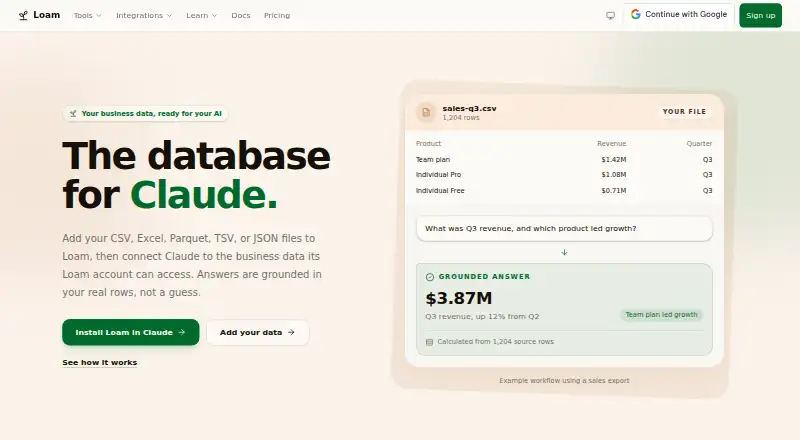
Loam stores supported files and connected business data so authorized AI tools can query the information and ground answers in real rows. It accepts formats including CSV, Excel, Parquet, TSV, and JSON, with natural-language queries available. Connections to tools such as ChatGPT, Claude, and Cursor use an MCP-compatible setup. The maker describes Loam as intended for teams without a dedicated data group, including sales and marketing teams and company founders. Queries use the connected Loam account's current access, and table-data access is checked whenever a request runs. Users can set permissions to allow AI access to selected data while excluding other information. Loam says uploaded and connected data is not used to train AI models and can be deleted by the user; providers process data to generate results and do not use it for training. The free Individual plan supports one person. Individual Pro is $399 a year, with $39/month also available. Team is $499 a year, with a two-seat minimum and $49/seat/month also available. Web uploads are limited to 100 MB, and sensitive information such as protected health information cannot be stored.
Who it suits
Loam suits sales and marketing teams and founders who want to query supported business files with connected AI tools, especially where there is no dedicated data team.
What it does well
- Connects supported data to named AI tools
- Supports natural-language queries
- Checks table access with each request
- Allows permissions for selected data
- Offers a free individual plan
What to know first
- Web uploads are limited to 100 MB
- Terms prohibit storing sensitive information
- Team plan requires at least two seats
Limits
The free Individual plan is for one person and includes file uploads, grounded questions and connections to supported AI tools. The web upload interface supports files up to 100 MB; larger files are not supported through that interface. The Team plan has a two-seat minimum, and Loam’s terms prohibit storing protected health information, primary cardholder information or other sensitive information.
Plans
| Plan | Billed and limits | Price |
|---|---|---|
| Individual Free | No paid subscription required · One person · Upload files · Ask grounded questions · Connect supported AI tools | Free |
| Individual Pro | $39/month also available · One person · One personal workspace | $399 |
| Team | $49/seat/month also available · Two-seat minimum: $998/year before tax · Two-seat minimum · Shared workspace and data · Roles, permissions, team administration | $499 |
As loamdata.com lists them, read 7 Oct 2026. The maker's own page has the final word.
Getting started
- Open loamdata.com in a web browser.
- Start with the free Individual plan or choose a paid plan.
- Upload supported files or connect a supported data source.
- Connect a supported AI tool using the MCP-compatible setup.
- Set permissions for the data the AI may access.
Loam is a web workspace that lets selected AI assistants query uploaded files and connected business data. It is aimed at founders and sales or marketing teams that need dependable answers from operational data without hiring a data team. The key appeal is permission-aware access to live rows; the main trade-off is that it is designed for ordinary business data and modest file sizes.
Overview
Loam turns CSV, TSV, JSON, Excel, Parquet and SQLite files, plus supported connected sources, into data an authorized AI can query in natural language. ChatGPT, Claude and Cursor connect through an MCP-compatible setup. Instead of treating an upload as an isolated prompt attachment, Loam keeps the data in a workspace that those tools can consult.
Access follows the connected Loam account. Table permissions are checked when each request runs, and administrators can expose only a chosen slice—for example, revenue without payroll. That makes the product a sensible option for internal reporting where different people or assistants should see different tables. It is less suitable as a catch-all repository: the terms prohibit protected health information, primary cardholder information and other sensitive data.
Key features
- Practical file coverage: CSV, TSV, JSON, XLS, XLSX, Excel, Parquet and SQLite accommodate common exports, spreadsheets and analytical files.
- Natural-language analysis: Users can ask questions in ordinary language and have supported AI tools ground responses in actual table rows. Loam does not provide SQL connections, so teams that require direct database querying need another approach.
- MCP AI connections: ChatGPT, Claude and Cursor are named integrations, with other supported tools possible through the same connection model.
- Controlled data scope: Current account access and per-request table checks reduce the risk of an assistant seeing data outside its authorization. User-defined permissions can separate commercially useful figures from payroll or other restricted tables.
- Source imports: Windsor connections are documented, but imports work only for supported source profiles. This is useful when a team already uses one of those profiles, not a guarantee of arbitrary connector coverage.
- Privacy controls: Loam says uploaded and connected data is not used to train AI models and can be deleted by the user. It also says Google, OpenAI and Anthropic process data to produce results rather than train their models.
- Guided support: The help center supplies walkthroughs for uploading, querying, connecting AI tools and managing accounts, which should help teams without dedicated data specialists.
Pricing
Loam uses a freemium structure. Individual Free costs nothing with no paid subscription required. It allows one person to upload files, ask grounded questions and connect supported AI tools. It is a useful way to validate the workflow, but it is a single-user setup without the shared workspace and administration features of the team tier.
Individual Pro costs $399 a year, or $39/month when billed monthly. It is for one person and includes one personal workspace. Solo operators who need a continuing private workspace get a straightforward upgrade, but there is no collaboration layer.
Team costs $499 a year, with $49/seat/month also available. A two-seat minimum makes the annual commitment $998 before tax. It adds a shared workspace and data, roles, permissions and team administration. Those controls justify the higher spend for a small group sharing governed data; a single user pays for capacity they may not need.
Platforms
Loam is delivered through the web. AI access occurs through connected tools such as ChatGPT, Claude and Cursor rather than through a separate native desktop or mobile application. The web upload interface accepts files up to 100 MB; larger files are not supported through that interface.
Who it's for
Loam fits founders and sales or marketing teams that work from spreadsheets, exports or a supported business source and want conversational answers without building a data stack. Team is the appropriate plan when several people need a common workspace with differentiated permissions. Individual plans suit one analyst or operator.
Look elsewhere if your workload depends on SQL connections, files above 100 MB through the web interface, or regulated records such as protected health or cardholder data. The stated restriction also rules out using Loam as a repository for sensitive information.
Pros and cons
Pros
- Permission-aware AI queries: Access is evaluated at request time, and selected tables can be granted without exposing the rest.
- Useful import range: Common spreadsheet, export and analytical formats are covered, including Parquet and SQLite.
- Clear privacy position: Loam says customer data is not used to train models and can be deleted.
- Team governance: Shared data, roles and administration are included in the Team plan.
Cons
- 100 MB web upload ceiling: Larger files cannot be sent through the interface.
- No SQL connections: Database-first teams cannot connect through a direct SQL integration.
- Sensitive-data prohibition: Protected health, cardholder and other sensitive information should not be stored.
- Team cost floor: Two seats are required, creating a $998 annual minimum before tax.
Alternatives
AI Data Analysis Tools is the broader directory for comparing products in this category.
- Quadratic is a freemium, multi-platform option with a Personal plan that has limited AI usage, sharing, files, connections and support.
- Julius AI suits users wanting Android, iOS or web access; its free tier includes daily credits and a Google Drive connector, while Plus costs $20 per month.
- Byaan is a free, web-capable choice with a free macOS app and an MIT license; its Team Version is self-hosted with multi-user authentication.
- Kiln is better for users seeking an open-source Python library, a source-available desktop app and local datasets with git sync.
- Chartt is a web alternative whose free plan allows 100 credits monthly, files under 100 MB and one data source.
- ExcelGPT focuses on spreadsheet analysis through web and API access, with a $19.90 monthly Pro plan.
- MySheetAI offers a free web plan with five questions per month and 3 MB uploads, making it more limited for file-based work.
- PerSight is a macOS and Windows option with a free tier capped at 15 questions monthly, one database connection and one device.
Verdict
Choose Loam if you want ChatGPT, Claude or Cursor to answer from business rows while permissions limit what each request can reach. Its broad file support and Team governance are strongest for small, non-regulated organizations. Choose another tool if you need SQL connectivity, large web uploads, sensitive-record storage or a lower-cost multi-seat commitment.
Verdict
Loam connects supported files and business data to AI tools while applying the connected account's access and user-defined permissions. The 100 MB upload cap and restriction on sensitive data are important limits to consider.
Questions
Does Loam have a free plan?
Yes. Individual Free costs nothing and supports one person, file uploads, grounded questions and connections to supported AI tools.
How much does Loam cost?
Individual Pro is $399 a year, with a $39/month option. Team is $499 a year with a two-seat minimum, or $49/seat/month; the minimum annual total is $998/year before tax.
Which file types can I upload?
Loam supports CSV, TSV, JSON, Excel and Parquet file types. The web interface supports uploads up to 100 MB.
Which AI tools can connect to Loam?
Loam names ChatGPT, Claude and Cursor among the supported AI tools. The setup uses an MCP-compatible connection.
Does Loam support team collaboration?
Yes. The Team plan includes a shared workspace and data, roles, permissions and team administration. It requires at least two seats.
Can Loam store sensitive information?
Loam’s terms say not to store protected health information, primary cardholder information or other sensitive information.
Facts from Loam's own pages
- Access controls
- Queries use the connected Loam account's current access, and table-data access is checked when each request runs. · loamdata.com, 7 Oct 2026
- AI integrations
- The site names ChatGPT, Claude, Cursor, and other supported AI tools; its setup uses an MCP-compatible connection. · loamdata.com, 7 Oct 2026
- AI permissions
- The maker says users can use permissions to let an AI access selected data, such as revenue without payroll. · loamdata.com, 7 Oct 2026
- AI processing
- Loam says providers such as Google, OpenAI, and Anthropic process data only to generate results and do not use it to train their models. · loamdata.com, 7 Oct 2026
- Data integration
- Loam's help center documents connecting Windsor sources, with imports limited to supported source profiles. · loamdata.com, 7 Oct 2026
- Intended users
- Loam says it is built for teams without a dedicated data team, including sales, marketing, and company founders. · loamdata.com, 7 Oct 2026
- Notable restriction
- The terms say not to store protected health information, primary cardholder information, or other sensitive information in Loam. · loamdata.com, 7 Oct 2026
- Privacy
- Loam says uploaded and connected data is not used to train AI models and can be deleted by the user. · loamdata.com, 7 Oct 2026
- Purpose
- Loam stores supported files and connected business data so authorized AI tools can query it and ground answers in real rows. · loamdata.com, 7 Oct 2026
- Support
- The help center provides step-by-step guides for uploads, querying, AI connections, and account management. · loamdata.com, 7 Oct 2026
- Supported file types
- Loam supports CSV, Excel, Parquet, TSV, and JSON files. · loamdata.com, 7 Oct 2026
- Upload limit
- The web interface supports file uploads up to 100 MB; larger files are not supported through that interface yet. · loamdata.com, 7 Oct 2026
Where Loam stands on Freedom251
- AI Data Analysis Tools#13 of 27