
remio
by remio
What remio is
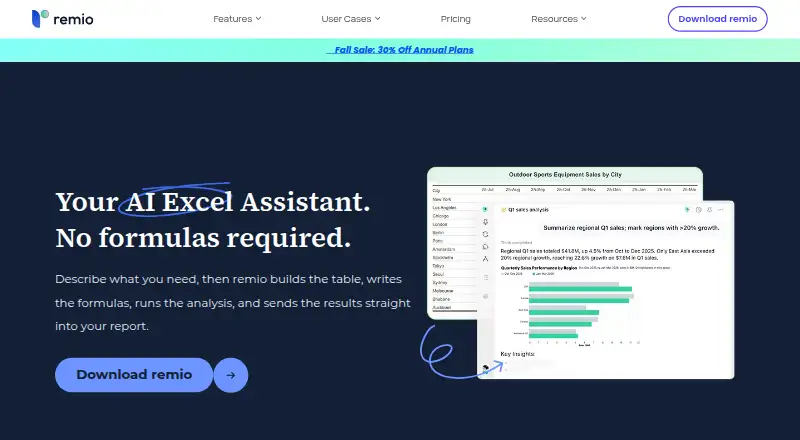
remio is an AI personal knowledge hub and office assistant centered on personal data, with tools for spreadsheet work. Users can describe a task in plain language, and its Excel assistant can build tables, write formulas, analyze data, and send results to reports. The Excel page says it works with Excel, CSV, Google Sheets, and Markdown. It also says files are parsed locally so raw data does not touch an external server.
Remio’s download information describes a mixed local and cloud setup: web content is stored locally, while local or cloud models are used depending on the task, and large language models are accessed remotely. The privacy policy claims GDPR, CCPA/CPRA, and PIPEDA compliance, and says Ask remio interactions are encrypted and are not used to train models on personal data. Integrations listed on the pricing page include Slack, Gmail, Outlook, and WeChat Assistant.
The desktop app supports Windows 10 or later on x64 and Macs with Apple silicon. iPhone and Android apps support note-taking, voice memos, meeting recording, PDF collection, and image capture, with content syncing to desktop. The browser extension and Local File Sync are recommended for building a broader knowledge base. A free plan includes 500 AI credits per month; paid plans include larger credit allowances and additional features.
Who it suits
remio suits people who want an AI assistant for spreadsheet tasks and a personal knowledge hub spanning desktop and mobile. It may fit users working with Excel, CSV, Google Sheets, or Markdown, as well as people who want notes and captured content synced to a desktop app.
What it does well
- Generate formulas and build tables from plain-language requests.
- Analyze spreadsheet data and send results to reports.
- Supports Excel, CSV, Google Sheets, and Markdown.
- Parses files locally so raw data does not touch an external server.
- iPhone and Android apps sync content to desktop.
- Pricing page lists Slack, Gmail, Outlook, and WeChat Assistant integrations.
What to know first
- Free plan has 500 AI credits per month.
- Desktop support is limited to Windows 10+ x64 and Macs with Apple silicon.
- Large language models are accessed remotely.
- Free use is estimated at about 15 chat queries per month.
Limits
The Free plan includes 500 AI credits per month, and the pricing comparison estimates about 15 chat queries monthly. Pro, Plus, and Max list 10,000, 40,000, and 150,000 AI credits per month respectively; BYOK lists 500 AI credits per month.
Plans
| Plan | Billed and limits | Price |
|---|---|---|
| Free | $0 USD / month · 500 AI credits/mo · Unlimited webpage capture · Unlimited local file parsing · Slack, Gmail & Outlook integration · Basic search and reference | Free |
| Pro | $168/year (page also shows $239/year) · 10,000 AI credits/mo · Premium LLMs · AI meeting assistant · BYOK · Cross-device sync | $13.90 a month |
| Plus | $504/year (page also shows $719/year) · 40,000 AI credits/mo · Premium LLMs · AI meeting assistant · BYOK · Cross-device sync | $42 a month |
| Max | $1680/year (page also shows $2399/year) · 150,000 AI credits/mo · Premium LLMs · AI meeting assistant · BYOK · Cross-device sync | $139 a month |
| BYOK | USD / month · 500 AI credits/mo · Use your own API keys · Strict key-based privacy · Mobile app and cross-device sync | $14.90 a month |
As remio.ai lists them, read 7 Oct 2026. The maker's own page has the final word.
Getting started
- Visit https://www.remio.ai/ai-excel.
- Install the desktop app on Windows 10+ x64 or a Mac with Apple silicon.
- Install the iPhone or Android app if you want mobile capture and desktop syncing.
- Enable the browser extension and Local File Sync to add to the knowledge base.
- Choose the Free plan or a paid plan based on the listed credit allowance and features.
Remio is a personal knowledge hub with an AI assistant for spreadsheet tasks, aimed at people who want to work with data alongside notes and collected information. It can turn plain-language requests into tables, formulas, analysis, and reports, but its remote model access and credit-based plans make it less suitable for users who need all processing to stay local or have predictable, unlimited AI use.
Overview
Remio combines spreadsheet assistance with a broader hub for personal information. It works with Excel, CSV, Google Sheets, and Markdown, letting users describe a task rather than begin with a formula or manual transformation. That breadth is useful for people who want spreadsheet work near their other information; readers seeking only a dedicated spreadsheet editor may find the wider scope unnecessary.
The Excel page says files are parsed locally and raw data does not touch an external server. Remio also says it stores web content locally and uses local or cloud models depending on the task, while large language models are accessed remotely. Its privacy policy claims GDPR, CCPA/CPRA, and PIPEDA compliance, and says Ask remio interactions are encrypted and personal data is not used to train models. These commitments may reassure users, but remote model access means Remio is not an all-local AI option.
Key features
Spreadsheet assistance
Users can describe a spreadsheet task in plain language; Remio can build tables, write formulas, analyze data, and send results to reports. This is a practical fit for people who need help with several kinds of spreadsheet work without starting from a blank formula. The value depends on having enough AI credits for the frequency and complexity of those requests.
Knowledge hub and integrations
Remio is centered on personal data and can connect with Slack, Gmail, Outlook, and WeChat Assistant. Its browser extension and Local File Sync help build a broader knowledge base. The mobile apps support note-taking, voice memos, meeting recording, PDF collection, and image capture, with content syncing to the desktop app. That makes the product more compelling for people who want a single place for varied personal material than for spreadsheet-only workflows.
Pricing
Remio has a free plan and paid plans. The free tier costs nothing, billed $0 USD / month, and includes 500 AI credits per month, unlimited webpage capture, unlimited local file parsing, Slack, Gmail, and Outlook integration, and basic search and reference. The comparison estimates about 15 chat queries a month. It is a useful way to try the hub, but the credit allowance may be restrictive for regular AI use.
Pro costs $13.90 a month, billed $168/year (the page also shows $239/year). It includes 10,000 AI credits per month, premium LLMs, an AI meeting assistant, BYOK, and cross-device sync; the comparison estimates about 300 monthly chat queries. This is the most accessible paid tier for someone who expects recurring use, though the annual amounts shown are inconsistent.
Plus costs $42 a month, billed $504/year (also shown as $719/year), and includes 40,000 credits a month with the same premium models, meeting assistant, BYOK, and sync features. Its estimated 1,200 monthly queries suit heavier use. Max costs $139 a month, billed $1680/year (also shown as $2399/year), and raises the allowance to 150,000 credits, estimated at about 4,500 queries; that scale is for intensive use and is a substantial step up in price.
BYOK costs $14.90 a month, billed USD / month. It includes 500 AI credits a month, use of personal API keys, strict key-based privacy, the mobile app, and cross-device sync. This may suit users who want to bring their own keys, but it does not increase the listed credit allowance over Free. Paid plans include enhanced support; help is available at [email protected].
Platforms
Remio lists Android, iOS, macOS, Windows, and a browser extension. The desktop app supports Windows 10+ on x64 and Macs with Apple silicon, so users on other computer configurations should check compatibility before choosing it. Mobile apps add capture and note-taking, with content syncing to desktop.
Who it's for
Remio is best for people who want spreadsheet assistance as part of a personal information hub and can work within monthly AI-credit limits. It is less suited to spreadsheet users who need a narrowly focused tool, users requiring local-only model processing, or anyone whose AI workload would outgrow the free allowance without a paid plan.
Pros and cons
- Pro: Plain-language requests can produce tables, formulas, analysis, and reports across several common file formats.
- Pro: Mobile capture, desktop sync, and integrations make it useful beyond spreadsheets.
- Pro: Local file parsing and stated privacy safeguards offer meaningful protections for personal data.
- Con: Large language models are accessed remotely, so the service does not keep all model processing local.
- Con: Every plan is bounded by monthly AI credits, including BYOK at 500 credits.
- Con: The paid tiers show conflicting annual billing amounts, making the annual commitment harder to assess.
Alternatives
For a broader comparison, browse AI Spreadsheet Tools or Spreadsheet apps. Consider Quadratic if its free plan's limited AI usage and sharing, files, and connections suit your needs. SheetFactorys is another freemium option, with a free trial. Grist may fit readers who value a free plan with unlimited documents, up to 5,000 records per document, and 30-day snapshot history. Shortcut offers a free plan with 20 weekly credits. Adamant AI Spreadsheet Agent is a free alpha for Windows and macOS. Ajelix, CleanSheet AI, and Excel AI App are other spreadsheet options to compare.
Verdict
Choose Remio if you want plain-language spreadsheet help in the same product as a personal knowledge hub, and its supported formats and desktop configurations match your workflow. Its combination of spreadsheet tasks, mobile capture, and integrations is the main reason to choose it. Look elsewhere if you require all model processing to stay local or need more monthly AI capacity than the free plan provides without moving to a paid tier.
Verdict
Choose remio if you want spreadsheet assistance alongside a personal knowledge hub, and its listed file formats and platforms suit your workflow. Look elsewhere if you require all model processing to stay local, since large language models are accessed remotely, or if the free plan’s 500 monthly AI credits are insufficient.
Questions
Is remio free?
Yes. The Free plan is listed as free and includes 500 AI credits per month.
What platforms does remio support?
The listed platforms include Android, iOS, macOS, Windows, and a browser extension. The desktop app currently supports Windows 10+ on x64 and Macs with Apple silicon.
What spreadsheet formats are supported?
The Excel page says remio works with Excel, CSV, Google Sheets, and Markdown.
What does the free plan include?
It includes 500 AI credits per month, unlimited webpage capture, unlimited local file parsing, Slack, Gmail, and Outlook integration, and basic search and reference.
How much do paid plans cost?
The pricing note says paid plans start from $14.90/mo. The listed BYOK plan is $14.90 a month; Pro is $13.90 a month, Plus is $42 a month, and Max is $139 a month.
Is remio open source?
The supplied product details do not state whether remio is open source.
Facts from remio's own pages
- Browser extension
- The download page recommends enabling the Remio browser extension and Local File Sync to build a more comprehensive knowledge base. · remio.ai, 7 Oct 2026
- Spreadsheet analysis
- Yes · remio.ai, 20 Sept 2026
- Excel assistant
- Users can describe a spreadsheet task in plain language and Remio builds tables, writes formulas, analyzes data, and sends results to reports. · remio.ai, 7 Oct 2026
- Formula generation
- Yes · remio.ai, 20 Sept 2026
- Free plan
- Yes · remio.ai, 20 Sept 2026
- Headquarters
- Canada · remio.ai, 28 Sept 2026
- Hybrid architecture
- The download page says Remio stores web content locally while using local or cloud models depending on the task, and large language models are accessed remotely. · remio.ai, 7 Oct 2026
- Integrations
- The pricing page lists Slack, Gmail, Outlook, and WeChat Assistant integrations. · remio.ai, 7 Oct 2026
- Local processing
- The Excel page says Remio parses files locally and raw data does not touch an external server. · remio.ai, 7 Oct 2026
- Mobile apps
- Remio provides iPhone and Android apps for note-taking, voice memos, meeting recording, PDF collection, and image capture, with content syncing to the desktop app. · remio.ai, 7 Oct 2026
- Primary platform
- multiple · remio.ai, 20 Sept 2026
- Privacy and compliance
- The privacy policy claims GDPR, CCPA/CPRA, and PIPEDA compliance and says Ask remio interactions are encrypted and are not used to train models on personal data. · remio.ai, 7 Oct 2026
- Purpose
- Remio describes itself as an AI personal knowledge hub and office assistant centered on personal data. · remio.ai, 7 Oct 2026
- Spreadsheet analysis
- The Excel assistant handles VLOOKUP-style matching, pivots, comparisons, and summaries through conversation. · remio.ai, 7 Oct 2026
- Support
- The pricing page directs users to [email protected] for help and says paid plans include enhanced support. · remio.ai, 7 Oct 2026
- Supported computers
- The desktop app currently supports Windows 10+ (x64) and Macs with Apple silicon. · remio.ai, 7 Oct 2026
- Supported data formats
- The Excel page says Remio works with Excel, CSV, Google Sheets, and Markdown. · remio.ai, 7 Oct 2026
- Table transformation
- Yes · remio.ai, 20 Sept 2026
- Usage limits
- The pricing comparison estimates about 15 chat queries per month on Free, 300 on Pro, 1,200 on Plus, and 4,500 on Max. · remio.ai, 7 Oct 2026
Where remio stands on Freedom251
- Spreadsheet apps#9 of 31
- AI Spreadsheet Tools#11 of 31