Freedom251 › AI Spreadsheet Tools
Shortcut
What Shortcut is
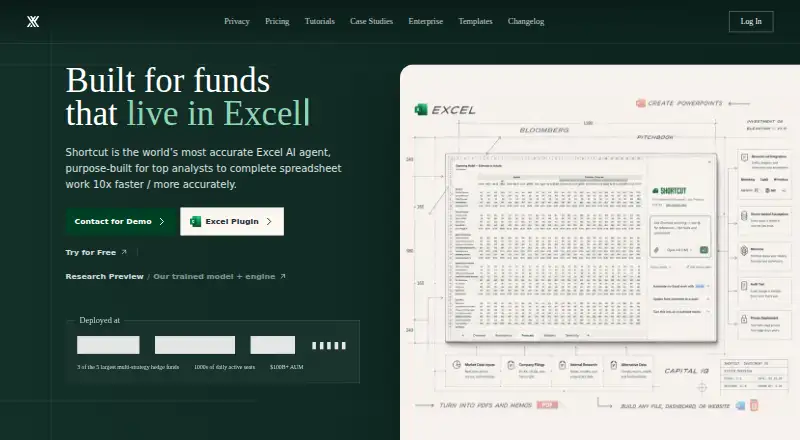
Shortcut is an AI spreadsheet agent for analyzing, automating, and enhancing Excel spreadsheets and financial models. It can generate formulas, transform tables, analyze spreadsheet contents, and automate workflows. Shortcut says it creates formula-driven outputs, applies professional formatting, and places edits without overwriting existing data. It shows changed cells and explains hard-coded values, with options to undo, revert, or restore edits. It can open and export Excel files while preserving formatting, formulas, and features. The Free plan includes Excel and Google Sheets plugins, and the product also offers a Platform API. Shortcut is available through web, Windows, API, and extension platforms, with Microsoft Excel as its primary platform; ShortcutXL is a Windows-only, terminal-first agent for Excel power users. The Free plan costs nothing and includes 20 free weekly credits. Pro costs $100 a month, billed annually, with 1,000 monthly credits. Teams costs $320 a month, billed annually, with 1,000 monthly team credits. Free-tier data may be used for AI model training, while Pro, Teams, and Enterprise account data is excluded. Enterprise pricing is available by contacting the maker.
Who it suits
Shortcut is aimed at spreadsheet users, particularly analysts and funds, who want AI-assisted Excel analysis, editing, or workflow automation. Its Windows-only ShortcutXL option is for Excel power users who prefer a terminal-first agent.
What it does well
- Generates formulas and transforms tables.
- Shows changed cells and explains hard-coded values.
- Excel files retain formatting, formulas, and features.
- Free plan includes Excel and Google Sheets plugins.
- Enterprise lists SSO, access controls, and BYOK encryption.
What to know first
- Free-tier user data may be used for AI training.
- Pro costs $100 a month, billed annually.
- Teams costs $320 a month, billed annually.
- ShortcutXL is Windows-only.
Limits
The Free plan includes 20 weekly credits. The Platform API allows up to five concurrent jobs, with a 25-minute maximum job timeout and a 100MB per-file upload limit.
Plans
| Plan | Billed and limits | Price |
|---|---|---|
| Free | 20 free credits · web, desktop app, Excel plugin, and Google Sheets plugin | Free |
| Pro | Billed annually; credits refresh monthly. | save $60 / year · 500 monthly plan credits · 500 additional monthly credits · 20 free credits · unlimited file creation and edits · Platform API access | $20 a month |
| Enterprise | Contact us for pricing · Dedicated support · custom integrations and SLA · custom payment options · option for unlimited seats or credits | On request |
| Teams | Billed annually; credits refresh monthly. · 4k shared monthly credits · SSO and MFA · group-based access control · usage stats and analytics · shared resources | On request |
As mog.shortcut.ai lists them, read 3 Oct 2026. The maker's own page has the final word.
Getting started
- Visit https://mog.shortcut.ai/.
- Choose the Free plan or a paid plan.
- Use the Excel or Google Sheets plugin included with the Free plan.
- Access Shortcut through web, Windows, API, or extension platforms.
- For terminal-first Excel use, choose the Windows-only ShortcutXL route.
Shortcut is an AI agent for Excel analysis, modeling, and workflow automation, aimed at analysts and fund teams. Its strongest case is spreadsheet help that leaves edits visible and reversible; its annual paid plans and free-tier data policy deserve careful consideration.
Overview
Shortcut brings formula generation, table transformation, spreadsheet analysis, and workflow automation to Excel workbooks and financial models. That concentration is useful for people whose work is already organized around Excel, but less compelling for anyone seeking a general-purpose spreadsheet workspace.
The maker says Shortcut adds formula-driven results with professional formatting without overwriting existing data. It can open and export Excel files while preserving formatting, formulas, and features. Changed cells are shown, hard-coded values are explained, and users can revert, restore, or undo edits. Those controls make review more practical, though consequential model changes still warrant scrutiny.
Key features
- Spreadsheet work: Formula generation, table transformation, analysis, and workflow automation address recurring modeling and workbook tasks.
- Reviewable changes: Visible edits and recovery options help users inspect and reverse agent changes instead of accepting a workbook blindly.
- Plugins and API: The Free plan includes Excel and Google Sheets plugins, and Shortcut also offers a Platform API. API jobs allow up to five concurrent tasks, a 25-minute maximum timeout, and uploads up to 100MB per file.
- Windows command line: ShortcutXL is described as a Windows-only, terminal-first agent for Excel power users, a more specialized route than a conventional spreadsheet interface.
- Security and data: Shortcut states that it is SOC 2 Type II compliant and uses AES-256 encryption at rest and TLS 1.3 in transit. Free-tier data may be used for AI model training; Pro, Teams, and Enterprise data is excluded.
Pricing
Shortcut uses a freemium model, with a free trial also offered. The distinction that matters most is not just the credit allowance: free-tier data may be used for model training, while paid-plan account data is excluded.
| Plan | Price and terms | What it suits |
|---|---|---|
| Free | free, billed monthly; 20 free weekly credits | A low-commitment way to try the workflow, provided the free-tier data policy is acceptable. |
| Pro | $100 a month, billed annually; 1,000 monthly plan credits, refreshed monthly | Individual users who need a larger recurring allowance and the paid-plan data exclusion. The annual billing term is a meaningful commitment. |
| Teams | $320 a month, billed annually; 1,000 monthly team credits, refreshed monthly | Teams that want a shared monthly credit pool; the published allowance is team-wide, so it should be weighed against expected group usage. |
| Enterprise | Custom pricing | Organizations needing SSO, custom permissions, BYOK and a private gateway, dedicated support, custom contracts and SLAs, custom integrations, or optional unlimited seats or credits. |
Pro and Teams renew on annual billing despite their monthly price presentation. Enterprise adds controls such as SAML 2.0 SSO, role-based access controls, and BYOK encryption, with dedicated support and custom integrations; the maker also describes priority support with custom SLAs and a dedicated account manager. No seat count is stated for the standard paid plans, so teams should confirm whether those plans fit their deployment before choosing.
Platforms
Shortcut supports web, Windows, API, and extension access, with Microsoft Excel as its primary platform. The Windows-only ShortcutXL option is specifically aimed at terminal-oriented Excel power users. Its plugin access reaches Google Sheets as well as Excel, but the product’s central focus remains Excel.
Who it's for
Shortcut is best suited to analysts and fund teams who spend substantial time in Excel and want help with formulas, transformations, analysis, or automation while retaining a way to inspect and reverse edits. The preservation claims and visible changes are particularly relevant for model-heavy work. It is a weaker fit for users seeking a broad spreadsheet platform, or for anyone unwilling to accept the free tier’s training-data policy or the annual commitment attached to the main paid plans.
Pros and cons
- Pro: Changed-cell visibility and revert, restore, and undo options make AI-assisted workbook edits easier to review.
- Pro: Excel file compatibility is designed to preserve formatting, formulas, and features during opening and export.
- Pro: Free includes both Excel and Google Sheets plugins, while API access supports sizable files up to 100MB each.
- Con: Free-tier user data may be used for AI model training, which may rule it out for sensitive spreadsheet work.
- Con: Pro and Teams are billed annually, so their monthly prices do not represent a month-to-month commitment.
- Con: Teams includes 1,000 monthly team credits, not a stated per-seat allowance, which may constrain heavier group use.
Alternatives
For a wider set of spreadsheet choices, browse AI Spreadsheet Tools or Spreadsheet apps.
- Quadratic is another freemium option with a free plan and support across web, desktop, mobile, API, and self-hosted platforms; consider it when that broader platform range matters more than Shortcut’s Excel-centered focus.
- SheetFactorys is a freemium product with a free plan and broad mobile and desktop platform coverage; it is an alternative to compare if that platform mix suits your needs.
- Grist offers a free plan with unlimited documents, up to 5,000 records per document, 30-day snapshot history, and 100 lifetime AI credits. Choose it when document and record caps with snapshot history are a better match than Shortcut’s monthly credit plans.
- remio is a free-plan option with 500 AI credits monthly and unlimited webpage capture and local file parsing; consider it for those capture and parsing workflows rather than an Excel-focused agent.
- Adamant AI Spreadsheet Agent is a free alpha for macOS and Windows.
- Ajelix offers a Lite plan at $39 a month and a Pro plan at $99 a month; compare it if a lower monthly price than Shortcut Pro is the priority.
- CleanSheet AI has a free plan capped at five files per month, 10 rows per file, and five AI analyses per month, plus a Pro plan at $15 a month. It is worth considering for a modest analysis allowance at a lower monthly price.
- Excel AI App offers a free plan with 3,000 AI credits refreshed every 30 days and Excel and CSV uploads up to 5MB; consider it when those stated free allowances fit better.
Verdict
Choose Shortcut if Excel is central to your analysis work and you value visible, reversible edits alongside formula and workflow assistance. The case is strongest for analysts and fund teams willing to pay for an annual plan to keep account data out of model training. Look elsewhere if you need month-to-month paid billing, have concerns about free-tier data use, or want a broader spreadsheet platform.
Verdict
Shortcut offers spreadsheet analysis and editing with visible changes and recovery options. Review the annual billing terms and free-tier data use before choosing a plan.
Questions
Is there a free plan?
Yes. The Free plan costs nothing and includes 20 free weekly credits.
How much do the paid plans cost?
Pro costs $100 a month, billed annually, and includes 1,000 monthly plan credits. Teams costs $320 a month, billed annually, and includes 1,000 monthly team credits. Enterprise pricing is available by contacting the maker.
Which platforms does Shortcut support?
The listed platforms are API, extension, web, and Windows. Microsoft Excel is its primary platform.
Does Shortcut offer a free trial?
Yes, a free trial is available.
What spreadsheet tools does it offer?
It can generate formulas, transform tables, analyze spreadsheets, automate workflows, and access the Platform API.
How does Shortcut handle user data and security?
The maker states that Shortcut is SOC 2 Type II compliant and uses AES-256 encryption at rest and TLS 1.3 in transit. Free-tier data may be used for AI model training; Pro, Teams, and Enterprise account data is excluded from training.
Facts from Shortcut's own pages
- API access
- Yes · shortcut.ai, 20 Sept 2026
- API limits
- The Platform API documentation lists up to five concurrent jobs, a 25-minute maximum job timeout, and a 100MB per-file upload limit. · mog.shortcut.ai, 3 Oct 2026
- Auditability
- Shortcut shows changed cells and explains hard-coded values, with options to revert, restore, or undo changes. · mog.shortcut.ai, 3 Oct 2026
- Spreadsheet analysis
- Yes · shortcut.ai, 20 Sept 2026
- Data use
- Shortcut's privacy policy says free-tier user data may be used for AI model training, while Pro, Teams, and Enterprise account data is excluded from training. · mog.shortcut.ai, 3 Oct 2026
- Enterprise controls
- Enterprise features include BYOK encryption, SAML 2.0 SSO, role-based access controls, and custom integrations. · mog.shortcut.ai, 3 Oct 2026
- File compatibility
- Shortcut says it can open and export Excel files while preserving formatting, formulas, and features. · mog.shortcut.ai, 3 Oct 2026
- Formula generation
- Yes · shortcut.ai, 20 Sept 2026
- Free plan
- Yes · shortcut.ai, 20 Sept 2026
- Integrations
- The Free plan includes access to an Excel plugin and Google Sheets plugin, and the site also offers a Platform API. · mog.shortcut.ai, 3 Oct 2026
- Primary platform
- microsoft_excel · shortcut.ai, 20 Sept 2026
- Product
- Shortcut is an AI spreadsheet agent that helps users analyze, automate, and enhance Excel spreadsheets and financial models. · mog.shortcut.ai, 3 Oct 2026
- Security
- The maker states that Shortcut is SOC 2 Type II compliant and uses AES-256 encryption at rest and TLS 1.3 in transit. · mog.shortcut.ai, 3 Oct 2026
- Spreadsheet editing
- Shortcut says it produces formula-driven outputs, applies professional formatting, and places edits without overwriting existing data. · mog.shortcut.ai, 3 Oct 2026
- Support
- The Enterprise plan includes dedicated support, and the maker describes priority support with custom SLAs and a dedicated account manager. · mog.shortcut.ai, 3 Oct 2026
- Table transformation
- Yes · shortcut.ai, 20 Sept 2026
- Target users
- The maker describes Shortcut as purpose-built for top analysts and built for funds. · mog.shortcut.ai, 3 Oct 2026
- Windows CLI
- The homepage describes ShortcutXL as a Windows-only, terminal-first AI agent for Excel power users. · mog.shortcut.ai, 3 Oct 2026
- Workflow automation
- Yes · shortcut.ai, 20 Sept 2026
Where Shortcut stands on Freedom251
- AI Spreadsheet Tools#15 of 31
- Spreadsheet apps#15 of 31