
Formula Bot (now Better Analyst)
What Formula Bot (now Better Analyst) is
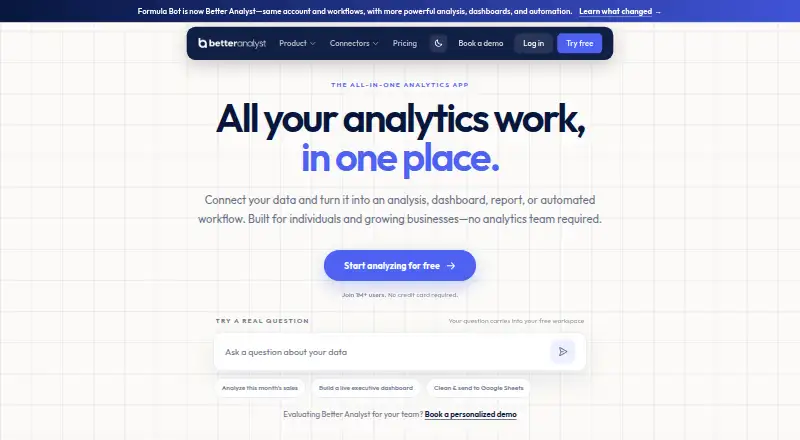
Formula Bot, now Better Analyst, is a web platform for analyzing spreadsheets, databases, and documents through natural-language questions. It combines data connections and preparation with analysis, interactive charts, dashboards, reports, presentations, and recurring automation. Users can schedule dashboard data refreshes, and they can inspect and export the code generated for each request.
Better Analyst accepts uploads in formats including Excel, CSV, Google Sheets, PDF, DOCX, PPTX, TXT, MP3, WAV, MP4, MOV, and WebM. Listed connectors include Google Analytics, Google Search Console, Tableau, Power BI, Airtable, Google Sheets and Drive, Dropbox, OneDrive, SharePoint, BigQuery, Snowflake, MySQL, PostgreSQL, Supabase, and Microsoft SQL Server. Its Max plan includes a Slack agent for questions and scheduled reports in Slack. The maker says data is encrypted in transit with TLS and at rest with AES-256, and that user data is not used to train AI models. Better Analyst has a free plan; paid plans start at $20/mo. Starter costs $20 a month, Max $40 a month per user, and Business $80 a month per user.
Who it suits
Better Analyst is aimed at individuals, small businesses, and growing teams that want to analyze data without assembling an analytics team. It may suit people who work across spreadsheets, databases, and documents and want dashboards, reports, or recurring workflows alongside analysis.
What it does well
- Accepts natural-language questions about spreadsheets, databases, and documents.
- Combines data connections, preparation, analysis, and recurring automation.
- Creates interactive charts and dashboards with scheduled data refreshes.
- Generated code can be inspected and exported.
- Lists connectors for databases, cloud storage, and analytics tools.
- Maker says user data is not used to train AI models.
What to know first
- Free-plan chats and uploads are permanently deleted after 60 days of inactivity.
- Starter limits use to 250 chat messages and 2,500 AI Actions monthly.
- Starter includes two automated dashboards and two connected data sources.
- Max and Business pricing is per user.
Limits
On the free plan, chats and uploaded files are automatically and permanently deleted after 60 days of inactivity. Starter costs $20 a month and includes 250 chat messages per month, 2,500 AI Actions, two automated dashboards, 25 tasks with two scheduled, two connected data sources, and a 200 MB file upload limit.
Plans
| Plan | Billed and limits | Price |
|---|---|---|
| Custom | Custom plan · Custom AI Action volumes · Additional dashboards · Custom data connectors · Expanded embed controls | On request |
| Starter | $20/month; $14/month, billed $168 yearly · 250 messages/month · 2,500 AI Actions/month · 200MB file limit · 2 scheduled tasks · 1 Data Flow to Google Sheets | $20 a month |
| Max | $40/seat/month; $28/seat/month, billed $336 yearly · Unlimited messages · 5,000 AI Actions/seat · 500MB file limit · 10 scheduled tasks · 5 active Data Flows | $40 a month |
| Business | $80/seat/month; $56/seat/month, billed $672 yearly · 15,000 AI Actions/seat · 1GB file limit · 20 scheduled tasks · Unlimited white-label embeds · 20 active Data Flows | $80 a month |
| Free | $0/month · 10 messages/month · 25 AI Actions/month · 5MB file limit · 5-minute code timeout | On request |
As betteranalyst.com lists them, read 20 Sept 2026. The maker's own page has the final word.
Getting started
- Open the Better Analyst website.
- Choose the Free plan or a paid plan.
- Connect a listed data source or upload a supported file.
- Ask a natural-language question, then use the available analysis, charts, dashboards, reports, or automation.
Better Analyst, formerly Formula Bot, is a web-based workspace for asking natural-language questions of spreadsheets, databases, and documents. It suits individuals, small businesses, and growing teams that need analysis, reporting, and repeatable workflows without building an analytics department. Its broad connections and automation make it more than a formula generator, although usage quotas and file limits become important on the lower tiers.
Overview
Better Analyst combines data connections, preparation, analysis, dashboards, reports, presentations, and recurring automation in one workflow. You can upload Excel, CSV, Google Sheets, PDF, DOCX, PPTX, TXT, MP3, WAV, MP4, MOV, and WebM files, or connect services and databases such as Google Analytics, Google Search Console, Tableau, Power BI, Airtable, Google Drive, Dropbox, OneDrive, SharePoint, BigQuery, Snowflake, MySQL, PostgreSQL, Supabase, and Microsoft SQL Server.
Natural-language requests can generate formulas, transform tables, and analyze spreadsheets. Interactive charts and dashboards support ongoing reporting, with scheduled dashboard refreshes. Better Analyst also says you can inspect the code produced for each request and export it, which gives technically minded users a way to review or reuse the work rather than treating every result as a black box.
Key features
- Cross-format analysis: Questions can span spreadsheets, connected databases, and office documents, while the wide upload support also covers audio and video files.
- Dashboards and reports: Interactive visualizations and scheduled refreshes are useful when reporting must continue after the initial analysis.
- Workflow automation: Tasks, scheduled tasks, and recurring workflows turn one-off answers into repeatable operations, subject to each plan’s quotas.
- Inspectable output: Generated code can be viewed and exported, a practical safeguard for users who need to adapt or audit transformations.
- Security and retention: Better Analyst says data is encrypted in transit with TLS and at rest with AES-256, and is not used to train AI models. It states GDPR compliance for EU users; its security documentation identifies AWS as maintaining SOC 2 Type II certification. Free-plan chats and uploads are permanently deleted after 60 days of inactivity, while paid-plan chats and files are retained indefinitely.
Pricing
The model is freemium. The Free plan costs nothing, billed free forever, and includes community support. It is suitable for occasional exploration, but the 60-day inactivity deletion rule matters if you expect to return to old chats or uploads.
Starter costs $20 a month at the regular monthly price, with the discounted first month excluded. It provides 250 chat messages per month, 2,500 AI Actions, two automated dashboards, 25 tasks (two scheduled), two connected data sources, and a 200MB file-upload limit, plus priority support. This fits a solo user with a small, stable data setup; the message, source, and storage ceilings can constrain heavier analysis.
Max costs $40 a month per user at the regular monthly price, excluding the discounted first month. The allowance rises to 5,000 AI Actions per user, 10 automated dashboards, 50 tasks (10 scheduled), 10 connected data sources, 500MB uploads, and 25 files per chat. It also includes a Slack agent for questions and scheduled reports in Slack, making it the more practical choice for teams distributing recurring updates.
Business costs $80 a month per user at the regular monthly price, again excluding the discounted first month. It includes 15,000 AI Actions per user, 20 automated dashboards, 50 connected data sources, 1GB uploads, 60 files per chat, and 20 Data Flows, with dedicated founder chat. Growing teams with larger connected estates and governed workflows get substantially more headroom here.
Custom has custom pricing and offers custom AI Action volumes, additional dashboards, custom data connectors, and expanded embed controls. It is the route for organizations whose connector or embedding requirements exceed the fixed plans.
Platforms
Better Analyst runs on the web and is described as a multiple-platform product through its connected services and data sources.
Who it's for
Choose it for spreadsheet-heavy individuals, small businesses, and growing teams that want one place to question varied data, publish dashboards, and automate recurring work. Starter suits focused solo workflows; Max is better when multiple sources, scheduled tasks, or Slack delivery matter; Business is aimed at larger volumes and team processes. It is a weaker fit for users who need permanent free-plan retention or whose work routinely exceeds Starter’s monthly messages, actions, or upload allowance.
Pros and cons
Pros
- Broad data coverage: Connectors span common analytics tools, cloud storage, warehouses, and SQL databases.
- End-to-end workflow: Preparation, analysis, visualization, reporting, and automation are joined in one product.
- Exportable code: Inspecting and exporting generated code supports review and reuse.
- Clear paid retention: Paid chats and files are retained indefinitely.
Cons
- Free retention is temporary: Inactivity triggers permanent deletion after 60 days.
- Starter is tightly metered: 250 chats, two sources, 200MB uploads, and only two scheduled tasks may be restrictive for active projects.
- Higher tiers are per-user: Max and Business costs scale with each user.
Alternatives
For a wider starting point, browse Spreadsheet apps or AI Spreadsheet Tools.
- Quadratic is worth choosing if you need desktop, mobile, self-hosted, or web availability and can accept limited AI usage, sharing, files, connections, and support on its Personal plan.
- Rows is an alternative for an API-centered spreadsheet product with a free tier and trial.
- GPTExcel suits users seeking a free-to-try web/API tool with a no-card trial and credit-based plans.
- Grist is a fit for document-style data work, including unlimited documents on its Free plan.
- ChatGPT for Excel is the narrower choice for Excel-focused ChatGPT access.
- Pelayar AI Spreadsheet Agent is an alternative spreadsheet agent with credit-based chat allowances.
- Bricks is a web option centered on AI dashboards, reports, visualization, and analysis.
- ExcelAI is suited to macOS and Windows users wanting a lower-cost, request-metered spreadsheet tool.
Verdict
Choose Better Analyst when you want natural-language analysis that can progress from mixed data sources to dashboards, reports, and scheduled automation, with exportable code and broad connectors. Look elsewhere if permanent free retention is essential, if you need a non-web desktop or self-hosted deployment, or if Starter’s quotas cannot support your workload.
Verdict
Choose Better Analyst if you want to ask questions across spreadsheets, databases, or documents and carry the work through to dashboards, reports, and automation. Look elsewhere if you need free-plan chat and file retention beyond 60 days of inactivity, or if Starter’s monthly message and action allowances are too small.
Questions
Is Better Analyst free?
Yes. Better Analyst lists a Free plan that is free forever.
What are the paid plan prices?
Starter is $20 a month. Max is $40 a month per user, and Business is $80 a month per user.
Which file types can I upload?
Supported formats include Excel, CSV, Google Sheets, PDF, DOCX, PPTX, TXT, MP3, WAV, MP4, MOV, and WebM.
Which data sources connect to Better Analyst?
Listed connectors include Google Analytics, Google Search Console, Tableau, Power BI, Airtable, Google Sheets, Google Drive, Dropbox, OneDrive, SharePoint, BigQuery, Snowflake, MySQL, PostgreSQL, Supabase, and Microsoft SQL Server.
How long does Better Analyst keep free-plan chats and files?
They are automatically and permanently deleted after 60 days of inactivity. Paid-plan chats and files are retained indefinitely.
What does the Max plan add for Slack?
Max includes a Slack agent for asking questions and receiving scheduled reports in Slack.
Facts from Formula Bot (now Better Analyst)'s own pages
- Audience
- The maker describes the product as built for individuals, small businesses, and growing teams that need analysis without assembling an analytics team. · betteranalyst.com, 7 Oct 2026
- Code transparency
- The product says users can inspect the code generated for each request and export it for their own use. · betteranalyst.com, 7 Oct 2026
- Compliance
- The security documentation says Better Analyst complies with GDPR for EU users and identifies AWS as maintaining SOC 2 Type II certification. · betteranalyst.com, 7 Oct 2026
- Spreadsheet analysis
- Yes · betteranalyst.com, 20 Sept 2026
- Data protection
- The maker says data is encrypted in transit with TLS and at rest with AES-256, and that user data is not used to train AI models. · betteranalyst.com, 7 Oct 2026
- Data retention
- On the free plan, chats and uploaded files are automatically and permanently deleted after 60 days of inactivity; paid-plan chats and files are retained indefinitely. · betteranalyst.com, 7 Oct 2026
- File formats
- Supported uploads include Excel, CSV, Google Sheets, PDF, DOCX, PPTX, TXT, MP3, WAV, MP4, MOV, and WebM. · betteranalyst.com, 7 Oct 2026
- Formula generation
- Yes · betteranalyst.com, 20 Sept 2026
- Free plan
- Yes · betteranalyst.com, 20 Sept 2026
- Integrations
- Listed connectors include Google Analytics, Google Search Console, Tableau, Power BI, Airtable, Google Sheets, Google Drive, Dropbox, OneDrive, SharePoint, BigQuery, Snowflake, MySQL, PostgreSQL, Supabase, and Microsoft SQL Server. · betteranalyst.com, 7 Oct 2026
- Primary platform
- multiple · betteranalyst.com, 20 Sept 2026
- Product
- Better Analyst lets users analyze spreadsheets, databases, and documents using natural-language questions. · betteranalyst.com, 7 Oct 2026
- Slack
- The Max plan includes a Slack agent for asking questions and receiving scheduled reports in Slack. · betteranalyst.com, 7 Oct 2026
- Support
- The plans list community support for Free, priority support for Starter, and dedicated founder chat for Business. · betteranalyst.com, 7 Oct 2026
- Table transformation
- Yes · betteranalyst.com, 20 Sept 2026
- Visualizations
- It creates interactive charts and dashboards, and users can schedule dashboard data refreshes. · betteranalyst.com, 7 Oct 2026
- Workflow
- The platform brings together data connections, preparation, analysis, dashboards, reports, presentations, and recurring automation. · betteranalyst.com, 7 Oct 2026
- Workflow automation
- Yes · betteranalyst.com, 20 Sept 2026
Where Formula Bot (now Better Analyst) stands on Freedom251
- Spreadsheet apps#11 of 31
- AI Spreadsheet Tools#17 of 31