Freedom251 › AI Spreadsheet Tools

ExcelAI
by ExcelAI
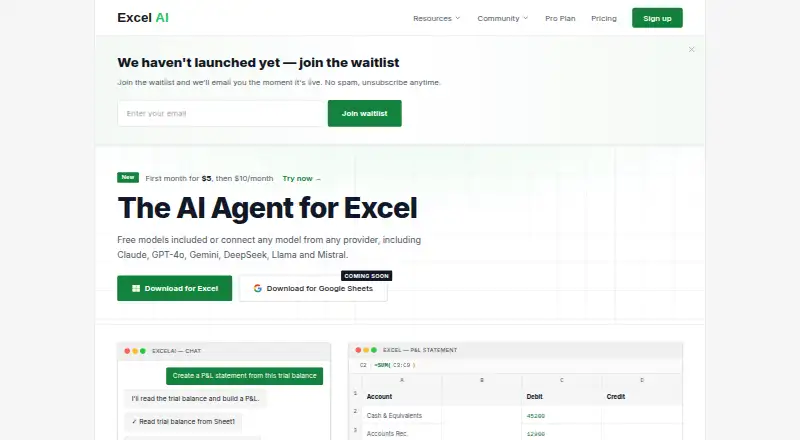
What ExcelAI is
ExcelAI is an assistant add-in that works inside Microsoft Excel and responds to natural-language requests. It can generate formulas and reports, including P&L statements, balance sheets, and cash flow reports. It can also format sheets, create charts, clean data, and carry out multi-step workflows with undo support. For analysis, ExcelAI can identify patterns and anomalies and process thousands of rows. It is a COM add-in for Excel 2019, Excel 2021, and Microsoft 365 on Windows and macOS. The site lists AI models and providers including Claude, GPT-4o, Gemini, DeepSeek, Llama, and Mistral. ExcelAI has a free plan with 20 requests per five hours. Starter costs $5 a month for the first month, then $10/month, and includes up to 3,165 requests per five hours and email support. Pro is listed at $20 a month; its billing details say there is no monthly fee and separately list a $0.88 card processing fee. Google Sheets is marked as coming soon.
Who it suits
ExcelAI suits people who want to generate formulas, reports, or perform spreadsheet cleanup and analysis within Excel. Its Windows and macOS support covers Excel 2019, Excel 2021, and Microsoft 365.
What it does well
- Works inside Microsoft Excel.
- Creates formulas, reports, charts, and formatted sheets.
- Supports multi-step workflows with undo.
- Says workbook contents are not stored.
- Free plan includes 20 requests per five hours.
What to know first
- Google Sheets download is still coming soon.
- Free plan is limited to 20 requests per five hours.
- Starter billing details change after the first month.
Limits
The Free plan is limited to 20 requests per 5 hours. Starter allows up to 3,165 requests per 5 hours; its listing says the first month, then $10/month. The pricing FAQ says team or enterprise plans are not yet available.
Plans
| Plan | Billed and limits | Price |
|---|---|---|
| Starter | First month, then $10/month · Up to 3,165 requests per 5h · All advanced models · Email support | $5 a month |
| Free | Free forever · 20 requests per 5h · Basic and fast models · Excel 2019, 2021 & 365 | Free |
| Pro | $20 pay-as-you-go balance +$0.88 card processing fee · Pay per request · No monthly fee · Auto top-up when balance reaches $5 | $20, paid once |
As excelai.org lists them, read 7 Oct 2026. The maker's own page has the final word.
Getting started
- Visit https://excelai.org/.
- Use a supported version of Excel: Excel 2019, Excel 2021, or Microsoft 365 on Windows or macOS.
- Choose Free, or review Starter and Pro.
- Use the add-in inside Microsoft Excel to make natural-language requests.
Verdict
ExcelAI combines formula writing, reporting, cleanup, and analysis in an Excel add-in. Its free request allowance and the differing paid-plan billing details are worth reviewing before choosing a plan.
Questions
Is ExcelAI free?
Yes. The Free plan is listed as free and includes 20 requests per 5 hours.
How much does Starter cost?
Starter is listed at $5 a month, with billing details stating first month, then $10/month.
How much does Pro cost?
Pro is listed at $20 a month. Its billing details also state no monthly fee and separately list a $0.88 card processing fee.
Which Excel versions and platforms are supported?
ExcelAI supports Excel 2019, Excel 2021, and Microsoft 365 on Windows and macOS as a COM add-in.
Does ExcelAI work with Google Sheets?
The homepage labels its Google Sheets download as coming soon.
Are team or enterprise plans available?
The pricing FAQ says a team or enterprise plan is not yet available and invites inquiries about custom enterprise licensing.
Facts from ExcelAI's own pages
- Analysis
- The maker says ExcelAI can spot patterns and anomalies and process thousands of rows. · excelai.org, 7 Oct 2026
- Spreadsheet analysis
- Yes · excelai.org, 20 Sept 2026
- Excel versions
- ExcelAI supports Excel 2019, Excel 2021, and Microsoft 365 on Windows and macOS as a COM add-in. · excelai.org, 7 Oct 2026
- Formula generation
- Yes · excelai.org, 20 Sept 2026
- Formulas and reports
- It can write formulas and generate reports such as P&L statements, balance sheets, and cash flow reports. · excelai.org, 7 Oct 2026
- Free plan
- Yes · excelai.org, 20 Sept 2026
- Google Sheets
- The homepage labels a Google Sheets download as coming soon. · excelai.org, 7 Oct 2026
- Headquarters
- London, United Kingdom · excelai.org, 28 Sept 2026
- Integrations
- The site lists AI models and providers including Claude, GPT-4o, Gemini, DeepSeek, Llama, and Mistral. · excelai.org, 7 Oct 2026
- Maker
- The site identifies Bright Commerce Ltd and lists its address in Covent Garden, London, United Kingdom. · excelai.org, 7 Oct 2026
- Plan availability
- The pricing FAQ says a team or enterprise plan is not yet available and invites inquiries about custom enterprise licensing. · excelai.org, 7 Oct 2026
- Primary platform
- microsoft_excel · excelai.org, 20 Sept 2026
- Privacy
- The privacy policy says prompts and temporary operation context are processed transiently and not stored after the operation completes. · excelai.org, 7 Oct 2026
- Product
- ExcelAI is an AI assistant add-in that works inside Microsoft Excel and responds to natural language requests. · excelai.org, 7 Oct 2026
- Security
- The privacy policy says communications between ExcelAI and its servers are encrypted using TLS 1.3. · excelai.org, 7 Oct 2026
- Spreadsheet data
- The maker says it does not store workbook contents and does not train AI models on user data. · excelai.org, 7 Oct 2026
- Support
- The Starter plan includes email support. · excelai.org, 7 Oct 2026
- Table transformation
- Yes · excelai.org, 20 Sept 2026
- Workbook actions
- It can format sheets, create charts, clean data, and perform multi-step workflows with undo support. · excelai.org, 7 Oct 2026
- Workflow automation
- Yes · excelai.org, 20 Sept 2026
Where ExcelAI stands on Freedom251
- AI Spreadsheet Tools#8 of 31
- Spreadsheet apps#12 of 31