Freedom251 › AI Spreadsheet Tools

CleanSheet AI
What CleanSheet AI is
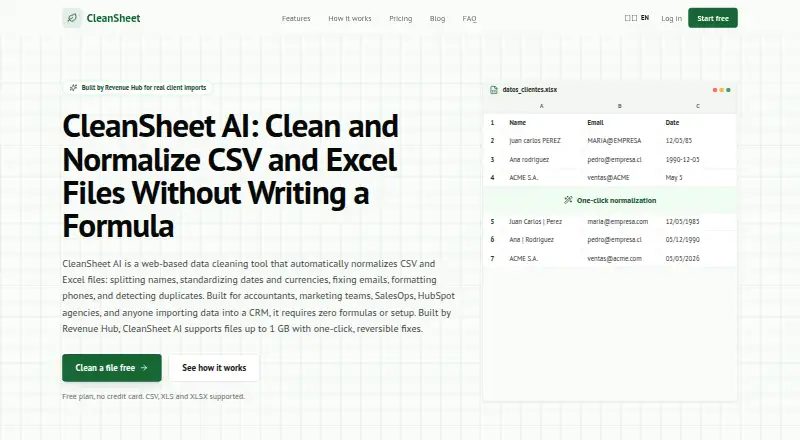
CleanSheet AI is a web tool for cleaning and standardizing CSV and Excel files without formulas. Users upload a file, inspect proposed edits, approve them, and download the result. Available transformations include splitting names, standardizing dates and currencies, correcting email formatting, formatting phone numbers, and detecting duplicates. It accepts CSV, XLS, and XLSX files up to 1 GB, and users can select a sheet in a multi-sheet workbook. A preview appears before changes are applied, with completed operations recorded in a change log. The maker says cleaned files can be prepared for HubSpot, Salesforce, and CRM imports. It also says files pass through isolated encrypted workflows, are not used to train AI models, and are separated by account. The Free plan permits five files per month, ten rows per file, and five AI analyses per month. Pro costs $15 a month and includes ten AI analyses per month and files up to 1 GB. AI analysis add-ons are available for Pro: AI Basic is $10 a month for 100 analyses, and AI Pro is $30 a month for unlimited analyses.
Who it suits
CleanSheet AI suits people preparing spreadsheet files for CRM imports or cleaning and normalizing tabular data. Its individual accounts may suit solo users better than teams, since shared team workspaces are not yet available.
What it does well
- Previews proposed changes before approval.
- Supports CSV, XLS, and XLSX files up to 1 GB.
- Can detect duplicates and standardize common fields.
- Applied operations are recorded in a change log.
- The maker says files are not used to train AI models.
What to know first
- Free allows five files per month.
- Free limits each file to ten rows.
- Shared team workspaces are not yet available.
- AI Basic and AI Pro are add-ons to Pro.
Limits
Free allows five files per month, ten rows per file, and five AI analyses per month. Pro costs $15 a month and includes ten AI analyses per month; AI Basic and AI Pro add-ons increase the allowance to 100 or unlimited analyses.
Plans
| Plan | Billed and limits | Price |
|---|---|---|
| AI Basic | Add-on to Pro · 100 AI analyses/month | $10 a month |
| AI Pro | Add-on to Pro · Unlimited AI analyses/month | $30 a month |
| Free | No credit card required · 5 files/month · 10 rows/file · 5 AI analyses/month · CSV and Excel formats · Email support | Free |
| AI Basic add-on | Billed separately on top of Pro · 100 AI analyses/month | $10 a month |
| Pro | Monthly; yearly billing is listed as $10/mo · Unlimited files · Unlimited rows · 10 AI analyses/month · Full history and replay · CSV, Excel, and JSON export · Priority support | $15 a month |
| AI Pro add-on | Billed separately on top of Pro · Unlimited AI analyses/month | $30 a month |
As cleansheet.cloud lists them, read 20 Sept 2026. The maker's own page has the final word.
Getting started
- Visit the CleanSheet AI website.
- Create an individual account.
- Choose Free or Pro; AI analysis add-ons are available with Pro.
- Upload a CSV, XLS, or XLSX file.
- Choose a sheet if the workbook contains multiple sheets.
- Review the proposed changes, approve fixes, and download the cleaned file.
Verdict
CleanSheet AI focuses on file cleanup with a review step before changes are applied. Check the Free row and file limits, and note that AI analysis add-ons are billed separately on top of Pro.
Questions
Is there a free plan?
Yes. Free allows five files per month, ten rows per file, and five AI analyses per month, and includes email support.
How much do the paid plans cost?
Pro costs $15 a month. AI Basic costs $10 a month as an add-on to Pro, and AI Pro costs $30 a month as an add-on to Pro.
Which file formats can I use?
CleanSheet AI accepts CSV, XLS, and XLSX files up to 1 GB. Users can select a sheet in a multi-sheet workbook.
Is CleanSheet AI available as a desktop or mobile app?
The listed platform is web, and its primary platform is standalone.
Can I use it with a team?
Accounts are individual, and shared team workspaces are not available.
Can I cancel, and is there a refund window?
Subscriptions can be canceled through the billing portal. The maker offers a 15-day refund window.
Facts from CleanSheet AI's own pages
- Account isolation
- The maker says user-scoped data is isolated by account. · cleansheet.cloud, 4 Oct 2026
- CRM compatibility
- The maker says cleaned files can be prepared for HubSpot, Salesforce, and CRM imports. · cleansheet.cloud, 4 Oct 2026
- Spreadsheet analysis
- Yes · cleansheet.cloud, 20 Sept 2026
- File support
- It accepts CSV, XLS, and XLSX files up to 1 GB and lets users choose a sheet in multi-sheet workbooks. · cleansheet.cloud, 4 Oct 2026
- Formula generation
- No · cleansheet.cloud, 20 Sept 2026
- Free plan
- Yes · cleansheet.cloud, 20 Sept 2026
- Headquarters
- Santiago, Chile · cleansheet.cloud, 28 Sept 2026
- Maker
- CleanSheet AI was built by Revenue Hub, which the maker describes as normalizing client spreadsheets for B2B companies across Latin America. · cleansheet.cloud, 4 Oct 2026
- Primary platform
- standalone · cleansheet.cloud, 20 Sept 2026
- Product
- CleanSheet AI is a web-based tool that cleans and normalizes CSV and Excel files without formulas. · cleansheet.cloud, 4 Oct 2026
- Refunds and cancellation
- The maker offers a 15-day refund window and says subscriptions can be canceled through the billing portal. · cleansheet.cloud, 4 Oct 2026
- Review and history
- Changes are previewed before approval, and applied operations have a change log. · cleansheet.cloud, 4 Oct 2026
- Security
- The maker says files are processed through isolated encrypted workflows and are not used to train AI models. · cleansheet.cloud, 4 Oct 2026
- Support
- The Free plan includes email support, while Pro includes priority support. · cleansheet.cloud, 4 Oct 2026
- Table transformation
- Yes · cleansheet.cloud, 20 Sept 2026
- Team availability
- Shared team workspaces are not yet available; accounts are individual. · cleansheet.cloud, 4 Oct 2026
- Transformations
- It can split names, standardize dates and currencies, fix emails, format phone numbers, and detect duplicates. · cleansheet.cloud, 4 Oct 2026
- Workflow
- Users upload a file, review suggested changes, approve fixes, and download the cleaned file. · cleansheet.cloud, 4 Oct 2026
- Workflow automation
- Yes · cleansheet.cloud, 20 Sept 2026
Where CleanSheet AI stands on Freedom251
- AI Spreadsheet Tools#6 of 31
- Spreadsheet apps#20 of 31