Zubtitle
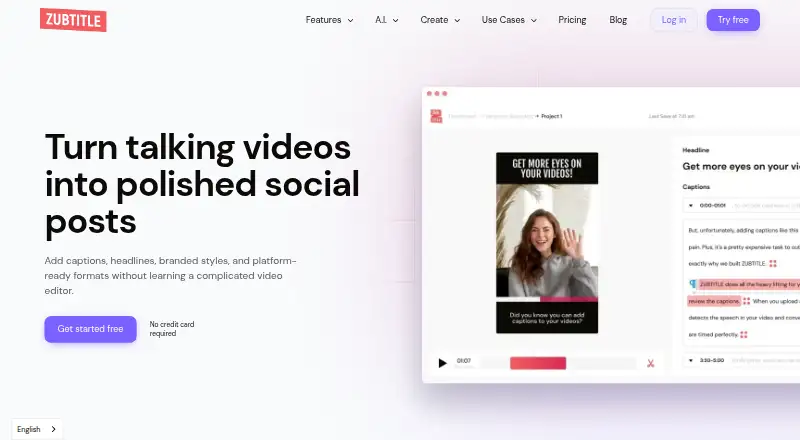
What Zubtitle is
Zubtitle adds captions to videos on web, iOS, and Android. It supports 59 caption languages, caption styling, brand caption presets, and burned-in captions. Subtitles can also be exported in other formats. Videos can be up to 20 minutes long. Zubtitle has a free Bootstrapper plan and two paid plans. Bootstrapper costs nothing and includes two videos per month, a Zubtitle watermark, and resolutions up to 720p. Guru costs $19 a month for 10 videos per month, removes the watermark, supports resolutions up to 4K, and includes premium support; annual billing is listed at $190 per year. Agency costs $49 a month for 30 videos per month, with watermark removal, resolutions up to 4K, and premium support; annual billing is listed at $490 per year. The plans differ in their monthly video limits, and the free plan has the lowest listed resolution ceiling.
Who it suits
Zubtitle suits people making captioned videos who need language options, caption styling, or subtitle exports. The plans serve different monthly video volumes, from two on the free plan to 30 on Agency.
What it does well
- Supports captions in 59 languages.
- Captions can be burned in or exported.
- Brand caption presets are available.
- Paid plans support resolutions up to 4K.
- Available on web, iOS, and Android.
What to know first
- Free plan is limited to two videos monthly.
- Free exports include a Zubtitle watermark.
- Free plan supports resolutions only up to 720p.
- Videos are limited to 20 minutes.
Limits
Bootstrapper allows two videos per month, adds a Zubtitle watermark, and supports resolutions up to 720p. Guru allows 10 videos per month; Agency allows 30. Both paid plans remove the watermark and support resolutions up to 4K.
Plans
| Plan | Billed and limits | Price |
|---|---|---|
| Bootstrapper | billed monthly · 2 videos per month · Zubtitle watermark added · Resolutions up to 720p · Free forever | Free |
| Guru | billed monthly · 10 videos per month · Watermark removed · Resolutions up to 4K · Premium support · Annual billing listed at $190 per year | $19 a month |
| Agency | billed monthly · 30 videos per month · Watermark removed · Resolutions up to 4K · Premium support · Annual billing listed at $490 per year | $49 a month |
As zubtitle.com lists them, read 19 Sept 2026. The maker's own page has the final word.
Getting started
- Visit the Zubtitle website or use its iOS or Android platform.
- Choose Bootstrapper, Guru, or Agency based on the monthly video allowance you need.
- Add a video up to 20 minutes long.
- Select caption language and styling, including a brand caption preset if useful.
- Burn captions into the video or export subtitles in another format.
Zubtitle is a web and mobile captioning service for creators and teams producing short videos. It is a strong fit when multilingual, on-brand captions matter across recurring content, while its monthly video quotas make high-volume production a less natural match.
Overview
Zubtitle combines caption creation with visual treatment and delivery options. It supports up to 59 caption languages, styled text, reusable brand caption presets, captions burned directly into video, and subtitle export in other formats. The maximum video length of 20 suits clips and social posts better than long lectures, interviews, or event recordings. The service runs on the web, iOS, and Android, so a creator can work from a browser or mobile device rather than being tied to one desktop operating system.
Key features
Language coverage is the clearest reason to consider Zubtitle for international publishing. A 59-language range can support channels that routinely localize short videos, although the service remains oriented around video jobs rather than general subtitle-file editing.
Caption styling and brand presets address consistency: recurring series can use a recognizable treatment instead of rebuilding the look for each upload. Burn-in captions are appropriate when text must remain visible in the rendered video, while export to other subtitle formats preserves a separate file for platforms or workflows that accept one. Having both paths is more versatile than a tool restricted to a single delivery method.
The 20-minute maximum and per-plan quotas are important operational boundaries. Zubtitle can handle defined batches of short content, but it is not positioned as an unlimited captioning queue for a large archive or continuous long-form production.
Pricing
Bootstrapper costs nothing, billed monthly, and is free forever. It includes 2 videos per month at resolutions up to 720p, with a Zubtitle watermark added. This is suitable for occasional personal clips, evaluation, or a low-frequency channel. The watermark and 720p ceiling make it a poor choice for client delivery or polished promotional work.
Guru costs $19 a month on monthly billing, with annual billing listed at $190 per year. The quota rises to 10 videos per month, the watermark is removed, and output reaches 4K; premium support is included. It is the sensible tier for an individual creator or small team publishing a predictable set of finished videos each month. The ten-video limit still requires planning if output is frequent.
Agency costs $49 a month, or $490 per year with annual billing. It allows 30 videos per month, removes the watermark, supports up to 4K, and includes premium support. This tier fits a small production operation handling several clients or series, provided thirty monthly videos cover the workload. Moving up from Guru buys capacity rather than a different caption feature set.
All paid quotas are monthly, so the right plan depends on regular output, not just occasional peaks. No separate seat allowance is stated, making the plans easier to assess by video volume than by team size.
Platforms
Zubtitle is available on the web, iOS, and Android. That combination suits creators who move between desktop planning and mobile publishing, while teams seeking a desktop-only editor or a self-hosted workflow may prefer another category of tool.
Who it's for
Choose Zubtitle for short-form creators, social publishers, and small agencies that need styled captions, reusable branding, multilingual coverage, and a choice between burned-in text and subtitle files. Guru is the practical starting point for regular individual production; Agency is aimed at a larger monthly batch. Bootstrapper works when two videos a month, a watermark, and 720p are acceptable.
Look elsewhere if your work centers on videos longer than 20, requires more than 30 videos monthly, or depends on a desktop subtitle-editing environment rather than a captioning service with fixed quotas.
Pros and cons
- Pros: 59 caption languages support multilingual channels; styling and brand presets help maintain a repeatable visual identity; burn-in and alternate subtitle export cover different publishing requirements; iOS, Android, and web access support flexible production; paid plans remove the watermark and reach 4K.
- Cons: the free tier is limited to two videos monthly, 720p, and a watermark; even Agency stops at 30 videos per month; the 20-minute maximum narrows its usefulness for long-form work; paid plans are primarily differentiated by quota and output limits.
Alternatives
Browse the Subtitle Software list for a wider set of subtitle-focused tools, or the AI Video Caption Generators list when automated caption workflows are the priority.
Editsub is a better fit when you want Linux, macOS, Windows, and web access, with a free allowance of 10 subtitle files and a Pro plan based on monthly credits rather than Zubtitle’s video quotas. Choose Jubler for a free desktop subtitle editor on Linux, macOS, or Windows that relies on donations. Subtitle Edit is another free, open-source option across Windows, macOS, and Linux. Aegisub offers a free, open-source desktop editor for those platforms, while Gaupol targets Linux and Windows under the GPL. SRTGen suits API or web users who need SRT, VTT, and TXT export, with a free tier and a five-minute screen-recording limit. GNOME Remote Desktop is a free Linux, self-hosted remote-desktop project rather than a direct replacement for Zubtitle. GNOME Subtitles is a free Linux subtitle editor for GNOME.
Verdict
Zubtitle is a good choice for short-form creators and small agencies that need branded, multilingual captions and both rendered-video and subtitle-file output. Guru offers the best balance for regular individual publishing, while Agency makes sense only when thirty monthly videos justify the higher fee. Choose another tool if your videos run longer than 20 minutes, your volume exceeds the monthly caps, or you need a traditional open-source subtitle editor.
Verdict
Zubtitle offers several caption treatments and subtitle export, with plans that specify monthly video limits and resolution ceilings. The free plan carries a watermark and limits output to 720p.
Questions
Is there a free plan?
Yes. Bootstrapper costs nothing and allows two videos per month.
How much do the paid plans cost?
Guru costs $19 a month, with annual billing listed at $190 per year. Agency costs $49 a month, with annual billing listed at $490 per year.
Which platforms does Zubtitle support?
Zubtitle is available on the web, iOS, and Android.
How many languages are supported for captions?
Zubtitle supports 59 caption languages.
Can I export subtitles instead of burning captions into a video?
Yes. Captions can be burned into the video or subtitles can be exported in other formats.
What are the free plan's limits?
Bootstrapper allows two videos per month, adds a Zubtitle watermark, and supports resolutions up to 720p.
Facts from Zubtitle's own pages
- Brand caption presets
- Yes · zubtitle.com, 19 Sept 2026
- Burn-in captions
- Yes · zubtitle.com, 19 Sept 2026
- Caption languages
- 59 · zubtitle.com, 19 Sept 2026
- Caption styling
- Yes · zubtitle.com, 19 Sept 2026
- Free plan
- Yes · zubtitle.com, 19 Sept 2026
- Max video length
- 20 · zubtitle.com, 19 Sept 2026
- Paid from
- 19 · zubtitle.com, 19 Sept 2026
- Subtitle export
- other formats · zubtitle.com, 19 Sept 2026
Where Zubtitle stands on Freedom251
- Subtitle tools#11 of 31
- AI Video Caption Generators#39 of 99
- Subtitle Software#14 of 31
- Video Captioning Software#7 of 11