Subtitle Edit
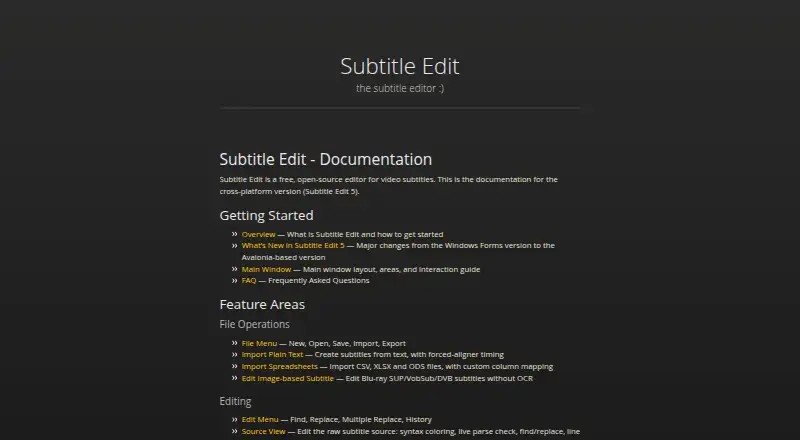
What Subtitle Edit is
Subtitle Edit is a free, open-source subtitle editor documented for Windows, macOS and Linux. It covers subtitle creation and editing, caption styling, speaker identification and export to other formats. Documentation for Subtitle Edit 5 describes an Avalonia-based cross-platform version and references SRT, WebVTT and ASSA formats. For speech-to-text, it supports Whisper, Qwen3 ASR, Crisp ASR and related engines; translation options include automatic translation and local engines. OCR support includes Tesseract, PaddleOCR and cloud engines. Video tools can burn captions into video, re-encode, cut and remux files. Proofreading can use llama.cpp, Ollama or an OpenAI-compatible endpoint. Its seconv command-line tool supports headless conversion, scripts and bulk conversion, while plugin documentation covers writing and installing plugins. The project is maintained at SubtitleEdit and hosted on GitHub Pages. Documentation, a FAQ and contributing guidance are available. No free-tier limits are stated on the page, and no trial or refund policy is stated.
Who it suits
Subtitle Edit may suit people who need to create, edit, translate or convert subtitles across the listed desktop platforms. Its OCR, speech-to-text, video and command-line tools may also fit more technical subtitle workflows.
What it does well
- Free and open-source.
- Documentation covers Windows, macOS and Linux.
- Supports multiple speech-to-text and OCR engines.
- Includes burn-in and video conversion tools.
- Provides a command-line tool for bulk conversion.
What to know first
- No trial or refund policy is stated.
- No team, sharing or administrator controls are stated.
- No security, encryption or certification information is stated.
Plans
| Plan | Billed and limits | Price |
|---|---|---|
| Free | — | On request |
As subtitleedit.github.io lists them, read 27 Sept 2026. The maker's own page has the final word.
Getting started
- Visit the Subtitle Edit website
- Choose the version for Windows, macOS, or Linux
- Use the documentation for Subtitle Edit 5 and supported formats
- Explore the FAQ or contributing guidance if needed
Overview
Subtitle Edit is a free, open-source subtitle editor for people who need to create, refine, or convert subtitles across desktop platforms. It suits independent editors with varied workflows especially well; its extensive toolset is a strength, though it does not provide stated team or administrator controls.
Subtitle Edit 5 is the cross-platform version, built on Avalonia. Its documentation, FAQ, and contributing guidance support a project maintained at SubtitleEdit. Support for formats including SRT, WebVTT, and ASSA gives editors room to work with common subtitle types, while styling and speaker identification help shape the finished captions.
For broader browsing, see Subtitle Software and AI Video Caption Generators.
Key features
Recognition, translation, and proofreading
Speech-to-text support includes Whisper, Qwen3 ASR, Crisp ASR, and related engines. That breadth is useful for editors who want recognition options within one subtitle workflow, rather than a tool focused only on manual timing. Automatic translation and advanced local translation engines extend the workflow to other languages. Proofreading with llama.cpp, Ollama, or an OpenAI-compatible endpoint adds another review step, although the choice of engine means users may need to bring their own setup.
OCR and video processing
Multiple OCR engines, including Tesseract, PaddleOCR, and cloud engines, can extract text embedded in video images. Burn-in, re-encoding, cutting, and remuxing tools also keep common video tasks close to subtitle work. This makes Subtitle Edit a practical fit for editors handling both captions and source footage; someone seeking only a lightweight text editor may find this scope unnecessary.
Styling, export, and automation
Caption styling, speaker identification, brand caption presets, and export to other formats address both presentation and delivery. The seconv command-line utility supports headless conversion, scripts, and bulk conversion, which is particularly useful when repetitive jobs need automation. Plugin documentation adds scope for extensions, but users who want managed team workflows should look elsewhere: no sharing or administrator controls are stated.
Pricing
Subtitle Edit is free and open-source. The Free plan has no stated free-tier limits, making it a strong option for individual editors who need the full described workflow without a subscription. No trial or refund policy is stated.
Platforms
Subtitle Edit supports Windows, macOS, and Linux. The cross-platform documentation covers Subtitle Edit 5, an Avalonia-based version, so it is relevant to desktop users across all three operating systems.
Who it's for
Choose Subtitle Edit if you need more than text-and-timing edits: its recognition, OCR, translation, video-processing, and batch-conversion tools serve independent subtitle creators with varied or repeatable tasks. It is less suitable for teams that need shared workspaces or administrator controls, and the range of features may be excessive for someone seeking only a basic editor.
Pros and cons
- Pros: Free and open-source, with no stated free-tier caps, so the described toolkit does not come with a stated usage ceiling.
- Pros: Recognition, OCR, translation, proofreading, and video-processing options cover multiple stages of subtitle production.
- Pros: seconv supports scripts and bulk conversion, a meaningful advantage for repetitive workflows.
- Cons: No team, sharing, or administrator controls are stated, limiting its fit for coordinated group work.
Alternatives
Editsub is worth considering for a freemium option that spans Linux, macOS, web, and Windows, with a free tier capped at 10 subtitle files and a Pro plan offering 1,500 credits per month.
Jubler is another free desktop subtitle editor for Linux, macOS, and Windows; its video preview and audio waveform require VLC.
Aegisub is a free, open-source editor for Linux, macOS, and Windows. Gaupol is a free option for Linux and Windows. SRTGen is a web and API alternative with a free tier for localization features, SRT, VTT, and TXT export, and a five-minute screen-recording limit. Zubtitle is a web, iOS, and Android option whose free Bootstrapper plan allows two videos per month, adds a watermark, and supports resolutions up to 720p. GNOME Remote Desktop is a free Linux and self-hosted option with RDP and VNC backends. Subtitle Composer is a free Linux subtitle editor.
Verdict
Subtitle Edit is the right choice for independent editors who want a no-cost, cross-platform toolkit spanning subtitle creation, recognition, translation, OCR, and video work. Its command-line conversion capability is an added reason to choose it for repeatable jobs. Look elsewhere if team controls are essential or if you only need a narrowly focused editor.
Verdict
Subtitle Edit combines subtitle editing with recognition, translation, OCR and video-processing tools. Its command-line utility and plugin support add options for scripted or extended workflows.
Questions
How much does Subtitle Edit cost?
The pricing model is free. The Free plan has no price listed.
Which platforms does it support?
Windows, macOS, and Linux are listed. Documentation covers the cross-platform Subtitle Edit 5 version.
Is Subtitle Edit open source?
Yes. The project is open-source and maintained at SubtitleEdit.
Which subtitle formats does it cover?
Documentation references SRT, WebVTT, and ASSA, along with a Supported Formats section.
Does it include speech recognition and translation?
It supports Whisper, Qwen3 ASR, Crisp ASR, and related speech-to-text engines. Translation options include automatic translation and advanced local engines.
Where can I find help?
The project provides documentation, a FAQ, and contributing guidance.
Facts from Subtitle Edit's own pages
- Admin controls
- No team, sharing, or administrator controls are stated · subtitleedit.github.io, 27 Sept 2026
- AI review
- Can proofread with llama.cpp, Ollama, or an OpenAI-compatible endpoint · subtitleedit.github.io, 27 Sept 2026
- Application framework
- Subtitle Edit 5 uses an Avalonia-based version · subtitleedit.github.io, 27 Sept 2026
- Brand caption presets
- Yes · subtitleedit.github.io, 19 Sept 2026
- Burn-in captions
- Yes · subtitleedit.github.io, 19 Sept 2026
- Caption styling
- Yes · subtitleedit.github.io, 19 Sept 2026
- Command-line tool
- Includes seconv for headless conversion, scripts, and bulk conversion · subtitleedit.github.io, 27 Sept 2026
- Free plan
- Yes · subtitleedit.github.io, 19 Sept 2026
- Free tier limits
- No free-tier limits are stated on the page · subtitleedit.github.io, 27 Sept 2026
- Project hosting
- The project is hosted on GitHub Pages · subtitleedit.github.io, 27 Sept 2026
- OCR support
- Supports multiple OCR engines, including Tesseract, PaddleOCR, and cloud engines · subtitleedit.github.io, 27 Sept 2026
- Platform support
- The documentation covers the cross-platform version, Subtitle Edit 5 · subtitleedit.github.io, 27 Sept 2026
- Plugin support
- Documentation includes writing and installing plugins · subtitleedit.github.io, 27 Sept 2026
- Pricing model
- Free and open-source · subtitleedit.github.io, 27 Sept 2026
- Security certifications
- No security, encryption, or certification information is stated · subtitleedit.github.io, 27 Sept 2026
- Source code
- The project is open-source and maintained at SubtitleEdit · subtitleedit.github.io, 27 Sept 2026
- Speaker identification
- Yes · subtitleedit.github.io, 19 Sept 2026
- Speech to text
- Supports Whisper, Qwen3 ASR, Crisp ASR, and related engines · subtitleedit.github.io, 27 Sept 2026
- Subtitle export
- other formats · subtitleedit.github.io, 19 Sept 2026
- Subtitle formats
- Documentation includes Supported Formats, SRT, WebVTT, and ASSA references · subtitleedit.github.io, 27 Sept 2026
- Subtitle translation
- Includes automatic translation and advanced local translation engines · subtitleedit.github.io, 27 Sept 2026
- Support resources
- The page provides documentation, a FAQ, and contributing guidance · subtitleedit.github.io, 27 Sept 2026
- Trial and refund
- No trial or refund policy is stated · subtitleedit.github.io, 27 Sept 2026
- Video processing
- Includes burn-in, re-encoding, cutting, and remuxing tools · subtitleedit.github.io, 27 Sept 2026
Where Subtitle Edit stands on Freedom251
- Subtitle tools#4 of 31
- AI Video Caption Generators#24 of 99
- Subtitle Software#12 of 31