Jubler
What Jubler is
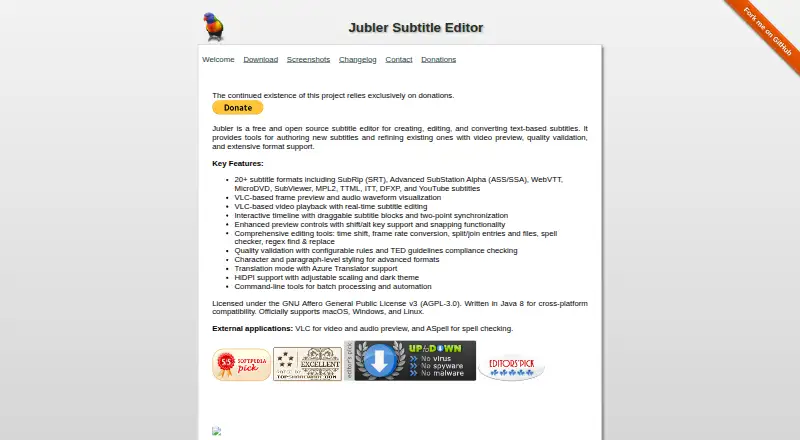
Jubler is a free, open-source desktop editor for creating, editing, and converting text-based subtitles. It runs on Linux, macOS, and Windows and lists support for more than 20 subtitle formats, including SRT, ASS/SSA, WebVTT, TTML, ITT, DFXP, and YouTube subtitles. Editors can shift timings, convert frame rates, split or join entries and files, run spell checks, and use regular-expression find and replace. Its interactive timeline has draggable subtitle blocks and two-point synchronization. VLC provides video and frame preview, audio waveforms, and subtitle editing during playback; VLC is required for those preview features. Jubler also offers configurable quality checks, TED guidelines checking, and translation mode with Azure Translator support. Command-line tools support batch processing and automation. It can export SRT and VTT, and downloads include macOS, Windows, Linux, and generic Java builds. The project uses the AGPL-3.0 license and directs users to GitHub for support.
Who it suits
Jubler suits subtitle editors who want a free desktop tool with broad format support and timing, review, and translation tools. Its Linux, macOS, and Windows builds offer options across desktop platforms.
What it does well
- Supports more than 20 subtitle formats.
- Exports SRT and VTT.
- Timeline supports draggable blocks and two-point synchronization.
- Command-line tools handle batch processing and automation.
- No user data collected, according to its privacy policy.
What to know first
- VLC is required for video preview and audio waveforms.
- Generic Java version does not support embedded preview.
- ASpell is suggested for spell checking.
Limits
Jubler is free. VLC is required for video preview and audio waveform features, and the generic Java version does not support embedded preview.
Plans
| Plan | Billed and limits | Price |
|---|---|---|
| Free | Desktop subtitle editing · 20+ formats · video/audio preview · translation · command-line tools | Free |
As jubler.org lists them, read 15 Oct 2026. The maker's own page has the final word.
Getting started
- Visit jubler.org.
- Choose a download for macOS, Windows, Linux or the generic Java version.
- Install VLC if you need video preview or audio waveform features.
- Install ASpell if you want the suggested spell-checking support.
- Open subtitle files to edit, convert or validate them; use command-line tools for batch processing.
Overview
Jubler is a free, open-source desktop editor for creating, editing, and converting text-based subtitles. It is a strong fit for people who need detailed timing, validation, or batch-processing tools across Linux, macOS, and Windows. Its broad editing toolkit comes without a plan charge, though video preview and waveform work require VLC.
Key features
Support for more than 20 subtitle formats, including SRT, ASS/SSA, WebVTT, TTML, ITT, DFXP, and YouTube subtitles, makes Jubler useful when a project must move between formats. It exports SRT and VTT, and tools for time shifting, frame-rate conversion, and splitting or joining entries and files handle common editing and conversion tasks.
The interactive timeline lets editors drag subtitle blocks and synchronize at two points, offering a visual counterpart to text-based adjustments. Spell checking and regular-expression find and replace help with consistency and repetitive cleanup; ASpell is suggested for spell checking.
Automatic captioning and translation mode with Azure Translator support broaden its role beyond manual editing. Configurable quality rules and TED guidelines compliance checks can help review subtitles before delivery. Command-line tools make batch processing possible, which is particularly useful for repeat jobs rather than occasional, single-file edits.
VLC enables video and frame preview, audio waveform visualization, and real-time editing during playback. Without VLC, those parts of the workflow are unavailable; the generic Java version also lacks embedded preview. The preview requirement is a meaningful setup trade-off for editors who depend on seeing timing against media.
Pricing
Free — free. The plan provides a desktop subtitle editor, and the project relies exclusively on donations. There is no paid tier to step up to; the practical cost is setting up VLC if video preview or waveform visualization matters. The generic Java version does not support embedded preview.
Platforms
Jubler runs on Linux, macOS, and Windows. Downloads include macOS builds for Apple Silicon and Intel, Windows, Linux builds for x86_64 and arm64, and a generic Java version. VLC is required for video preview and audio waveform visualization.
Who it's for
Jubler suits subtitle editors who value format coverage, precise timing controls, quality checks, and command-line batch work without a subscription. It is less suitable for someone who wants preview features without installing VLC, or who prefers a web-based or mobile editing workflow.
Pros and cons
- Pros: More than 20 formats, SRT and VTT export, timing tools, and validation checks give editors substantial control over subtitle files.
- Pros: Command-line batch processing supports repeat workflows, while the free plan carries no subscription charge.
- Pros: Builds cover Linux, macOS, and Windows, with Linux options for x86_64 and arm64 and separate macOS builds for Apple Silicon and Intel.
- Cons: VLC is required for video preview and waveform features, adding a dependency to workflows that rely on media-based timing.
- Cons: The generic Java version has no embedded preview, so it is a weaker fit for editors who need to check subtitles against video in the app.
- Cons: Support is directed through GitHub for issues and support, which may not suit users seeking another support channel.
Alternatives
Subtitle Software is the broader directory for comparing tools in this category.
- Editsub is worth considering if web access matters; its free plan is capped at 10 subtitle files, while Pro is $4.00 per year with 1,500 credits per month.
- Subtitle Edit is another free, open-source option for Windows, macOS, and Linux.
- Gaupol is a free option for Linux and Windows.
- SRTGen is a web and API option whose free tier includes SRT, VTT, and TXT export, with a 5-minute screen-recording limit and 2 GB storage.
- Zubtitle is a web and mobile option; its free Bootstrapper plan is limited to 2 videos per month, adds a watermark, and supports resolutions up to 720p.
- Subtitle Composer is a free Linux alternative.
- VideoLocalize is a web and API alternative with a free tier limited to 1 user, 2 jobs, and 4-minute videos.
- Subvideo.ai is a web alternative with free guest and account tiers.
Verdict
Choose Jubler if you want a capable, free desktop editor with broad format support, detailed timing and validation controls, and automation across major desktop platforms. Look elsewhere if your workflow depends on built-in preview without VLC or you need a web-first editor.
Verdict
Jubler offers a wide set of subtitle editing and validation tools at no plan cost. Check the VLC requirement if preview and waveform features matter to your workflow.
Questions
How much does Jubler cost?
Jubler is free, with a free plan. The project relies exclusively on donations.
Which platforms can I use it on?
Downloads are listed for macOS on Apple Silicon and Intel, Windows, Linux x86_64 and arm64, and a generic Java version.
Which subtitle formats does Jubler support?
The homepage lists more than 20 formats, including SRT, ASS/SSA, WebVTT, TTML, ITT, DFXP and YouTube subtitles. SRT and VTT export are listed.
Does Jubler support translation?
Yes. Its translation mode lists Azure Translator support.
What does Jubler integrate with?
The site lists VLC for video and audio preview, ASpell for spell checking, and Azure Translator support.
What is its license, and where can I get support?
Jubler is licensed under GNU Affero General Public License v3 (AGPL-3.0). Its contact page directs users to GitHub for issues and support.
Facts from Jubler's own pages
- Architecture
- The current repository is written in C++ with Qt 6 and uses libmpv; Java code is retained on a separate branch from before version 10.0.0. · github.com, 15 Oct 2026
- Auto-captioning
- Yes · jubler.org, 20 Sept 2026
- Automation
- The project provides command-line tools for batch processing and terminal workflows. · jubler.org, 15 Oct 2026
- Developer attribution
- The repository copyright identifies Panayotis Katsaloulis and dates the project from 2005. · github.com, 15 Oct 2026
- Documentation
- The public 24-page guide covers setup, subtitle creation, customization, exporting, synchronization and translation. · jubler.readthedocs.io, 15 Oct 2026
- Downloads
- Version 10.0.0 binaries are offered for Apple Silicon and Intel macOS, Windows, Linux x86_64 and arm64, plus a generic Java build. · jubler.org, 15 Oct 2026
- Editing
- Editing tools include time shifting, frame rate conversion, splitting and joining entries or files, spell checking, and regular expression find and replace. · jubler.org, 3 Oct 2026
- Editing tools
- Editing includes time shifting, frame-rate conversion, splitting and joining, spell checking, regular-expression replacement, undo and redo. · jubler.org, 15 Oct 2026
- Encoding support
- The editor detects encodings on load and supports UTF-8, UTF-16 and legacy code pages. · github.com, 15 Oct 2026
- External tools
- Configurable recipes can run command-line tools such as Whisper, faster-whisper and whisper.cpp on subtitles, audio or video. · jubler.org, 15 Oct 2026
- Formats
- The homepage lists support for more than 20 subtitle formats, including SRT, ASS/SSA, WebVTT, TTML, ITT, DFXP, and YouTube subtitles. · jubler.org, 3 Oct 2026
- Free plan
- Yes · jubler.org, 20 Sept 2026
- Funding
- The official site says the project relies exclusively on donations for continued existence. · jubler.org, 15 Oct 2026
- Integrations
- Official integrations include VLC for media preview and ASpell for spell checking. · jubler.org, 15 Oct 2026
- License
- Jubler is licensed under the GNU Affero General Public License version 3. · github.com, 15 Oct 2026
- Limit: SourceForge usability
- Two SourceForge reviewers struggled to learn the many options and asked for a clearer manual or starting guidance. · sourceforge.net, 15 Oct 2026
- Limit: third-party dependencies
- Softpedia notes that some operations require separately installed applications such as the media player and spell checker. · softpedia.com, 15 Oct 2026
- Limit: VideoHelp language support
- One VideoHelp reviewer reports that missing diacritic support made the software unusable for their language work. · videohelp.com, 15 Oct 2026
- Platform downloads
- The download page lists macOS builds for Apple Silicon and Intel, Windows, Linux builds for x86_64 and arm64, and a generic Java version. · jubler.org, 3 Oct 2026
- Platform support
- The project officially supports Windows, macOS and Linux. · jubler.org, 15 Oct 2026
- Praise: Softpedia assessment
- Softpedia highlights the organized interface, preview-based synchronization and broad subtitle-format support. · softpedia.com, 15 Oct 2026
- Praise: SourceForge users
- SourceForge reviewers describe the Mac version as powerful, polished and stable, and another reviewer calls the program nicely working. · sourceforge.net, 15 Oct 2026
- Praise: VideoHelp users
- VideoHelp reviewers praise ease of use, flexibility, multi-format output, Unicode handling and value for money. · videohelp.com, 15 Oct 2026
- Preview
- Jubler provides VLC-based video and frame preview, audio waveform visualization, and real-time subtitle editing during playback. · jubler.org, 3 Oct 2026
Where Jubler stands on Freedom251
- Subtitle tools#1 of 31
- Subtitle Software#2 of 31
- Video Captioning Software#1 of 12
- Subtitle Editing Software#1 of 8