
Kapwing
by Kapwing
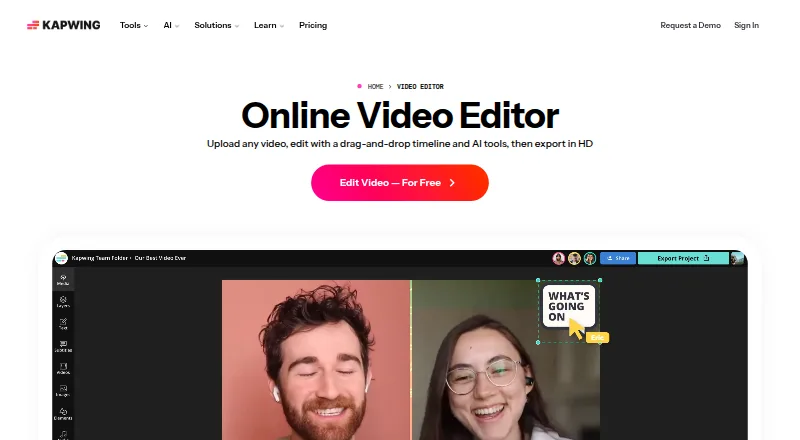
What Kapwing is
Kapwing is a cloud-based video editor used through a browser on Mac, Windows, Chromebook, and mobile devices. Users can edit sections of a video by changing its automatically generated transcript, while Smart Cut removes silences. Projects can be created, edited, and exported at up to 4K on supported plans. Users can also paste URLs from TikTok, YouTube, Twitter, and other internet sources into projects.
Kapwing supports subtitles, dubbing, and lip-sync technology in more than 100 languages. Pro users can use Brand Kit to manage color palettes, logos, fonts, and templates. The Free plan includes 10 credits, exports up to four minutes at 720p, and 5 GB of cloud storage. Pro costs $16 a month billed annually, per member, and includes 1,000 credits per month, up to 4K export, a 120-minute export limit, a 6 GB upload limit, 100 GB cloud storage, and watermark-free exports. Business costs $50 a month billed annually per member. Enterprise pricing is custom. Kapwing offers neither a desktop app nor a mobile app.
Who it suits
It suits creators who want browser-based editing, transcript changes, and silence removal across desktop and mobile devices. Users needing 4K export, longer exports, or more storage should compare the plan limits.
What it does well
- Transcript-based editing changes video sections.
- Smart Cut removes silences.
- Supported plans export up to 4K.
- Supports subtitles, dubbing, and lip-sync in over 100 languages.
- Pro includes watermark-free exports.
What to know first
- Free exports are limited to four minutes at 720p.
- Free plan includes 10 credits and 5 GB storage.
- Pro costs $16 a month billed annually.
- No desktop or mobile app is offered.
Limits
The Free plan includes 10 credits, 5 GB of cloud storage, exports up to four minutes, and 720p resolution. Pro costs $16 a month billed annually per member and includes 1,000 monthly credits, a 6 GB upload limit, exports up to 120 minutes, and 100 GB of cloud storage.
Plans
| Plan | Billed and limits | Price |
|---|---|---|
| Free | It's Free! · 10 credits · 4 minutes export length · 720p | Free |
| Pro | billed annually · 1,000 credits per month · 6 GB upload limit · 4K export · 120 minutes export length · 100 GB cloud storage | $16 a month |
| Business | billed annually · 4,000 credits per month · 6 GB upload limit · 4K export · 120 minutes export length · 500 GB cloud storage | $50 a month |
| Enterprise | Custom credits · Custom cloud storage | On request |
As kapwing.com lists them, read 20 Sept 2026. The maker's own page has the final word.
Getting started
- Open https://www.kapwing.com/video-editor in a browser.
- Choose the Free plan or a paid plan.
- Use the browser app on a supported device.
- Paste a URL from TikTok, YouTube, Twitter, or another internet source to add material to a project.
- Edit the video and export at a resolution supported by your plan.
Overview
Kapwing is a browser-based video editor for creators who want to shape footage through text and automate routine cleanup. It is strongest for speech-led videos, multilingual publishing, and teams working in a shared cloud workflow. Its free tier is useful for short drafts, but regular or high-resolution exports call for a paid plan.
Key features
Transcript-based editing lets users adjust video sections by editing an automatically generated transcript, a useful alternative to navigating footage only by timeline. Smart Cut removes silences automatically, which can shorten cleanup for dialogue-heavy clips. These tools make Kapwing a more compelling fit for explainers, interviews, and social video than for workflows that do not center on speech.
Subtitles, dubbing, and lip-sync technology support more than 100 languages, giving creators options for adapting content for audiences in multiple languages. Users can also paste URLs from TikTok, YouTube, Twitter, and other internet sources into projects. Team collaboration is supported; Pro adds Brand Kit controls for color palettes, logos, fonts, and templates, helping teams keep recurring content visually consistent.
Projects can be created, edited, and exported in up to 4K on supported plans. That ceiling is valuable for creators who need high-resolution output, but the Free plan is limited to 720p and four minutes per export. Kapwing runs in a browser rather than through a desktop or mobile app, and supports access on Mac, Windows, Chromebook, and mobile devices. That suits flexible, device-independent work, though it is not a native-app option.
Pricing
Kapwing has a free tier and three paid tiers. The free plan costs nothing and includes 10 credits, a four-minute export limit, 720p resolution, and 5 GB of cloud storage. It is a constrained way to try the workflow, not a good fit for longer finished videos or high-resolution delivery.
Pro costs $16 a month, billed annually, per member. It includes 1,000 credits per month, a 6 GB upload limit, exports up to 4K and 120 minutes, 100 GB of cloud storage, and watermark-free exports. It is the most direct upgrade for an individual creator who needs longer exports, higher resolution, and no watermark; the annual billing and per-member price matter for anyone budgeting month to month or adding seats.
Business costs $50 a month, billed annually, per member. It raises the monthly allowance to 4,000 credits and cloud storage to 500 GB, while retaining the 6 GB upload limit, 4K exports, and 120-minute export length. Its additional team features make it a better fit for collaborative production than Pro, but the per-member annual charge can add up as a team grows.
Enterprise has custom pricing, credits, billing, and storage, with priority customer support, a dedicated account manager, onboarding, and SAML single sign-on. It is aimed at organizations that need tailored capacity and managed support rather than a fixed self-serve package.
Platforms
Kapwing is available through a browser on Mac, Windows, Chromebook, and mobile. The platform listing includes macOS, web, and Windows; there is no desktop or mobile app. Cloud access is a practical advantage for switching devices, but users who require an installed editor should look elsewhere.
Who it's for
Kapwing is best suited to creators and teams producing speech-led videos who can benefit from transcript editing, automatic silence removal, multilingual tools, and browser access. Pro fits solo creators with recurring export needs; Business is more appropriate for teams that need larger credit and storage allowances and additional team features. The free plan works for brief, low-resolution output, while Enterprise suits organizations seeking custom capacity and support.
Pros and cons
- Pro: Transcript editing and automatic silence removal target two time-consuming parts of dialogue-led editing.
- Pro: Support for more than 100 languages through subtitles, dubbing, and lip-sync technology serves multilingual publishing.
- Pro: Browser access across desktop and mobile devices avoids dependence on a particular installed app.
- Con: Free exports are limited to four minutes and 720p, with only 10 credits, which restricts serious ongoing use.
- Con: Pro and Business are priced per member and billed annually, so the advertised monthly rates do not offer a month-to-month term.
- Con: There is no desktop or mobile app for users who prefer native software.
Alternatives
Choose Powtoon if you want a freemium option with Android, iOS, web, and extension access and are comfortable with a free plan capped at three minutes, 720p, and a watermark. Canva is another freemium choice, with a free plan for one person and a core design editor, templates, and content library; it may suit a one-person design workflow better than Kapwing's video-focused editing tools.
Consider Renderforest Slideshow Maker for slideshow work: its free plan offers HD video with a watermark, while its Lite plan is $12 a month. VEED may suit a browser or mobile workflow, but its free exports are limited to 720p and carry a watermark.
Adobe Express Video offers a free plan with 25 generative credits per month, 155,000+ templates, and 5 GB of storage. RenderTiger is a freemium web and API option whose free plan includes 15 credits and a first video of up to four seconds in 720p. H3 Video offers a free plan with 10 starter credits, MP4 downloads, and 2K generation for short clips. InVideo AI is a freemium web option with a free plan whose quota resets weekly.
For narrower creative tasks, browse Video Ad Maker Software, Social Media Post Maker Software, Meme Makers, Podcast Cover Maker Software, Video Thumbnail Makers, or Video Collage Maker Software.
Verdict
Kapwing is a strong choice for creators and teams making dialogue-led video who value transcript-based edits, automatic silence removal, multilingual tools, and 4K output on paid plans. Its browser access and collaboration support reinforce that case. Look elsewhere if you need a native app, or if the Free tier's four-minute, 720p export cap cannot accommodate your work; Pro also requires annual billing per member.
Verdict
Kapwing provides browser-based editing tools, including transcript editing and silence removal, with 4K available on supported plans. The Free plan has limited export length and resolution, while Pro is priced per member and billed annually.
Questions
Is Kapwing free?
Yes. The Free plan costs nothing plan and includes 10 credits, 5 GB of cloud storage, exports up to four minutes, and 720p resolution.
How much does Pro cost?
Pro costs $16 a month, billed annually per member. It includes 1,000 credits per month and watermark-free exports.
What platforms does Kapwing support?
Kapwing is available through a browser on Mac, Windows, Chromebook, and mobile. It lists macOS, web, and Windows platforms, and has no desktop or mobile app.
Can Kapwing export in 4K?
Yes. Projects can be exported in up to 4K resolution on supported plans.
Does Kapwing support team collaboration?
Yes. Team collaboration is available. Business includes additional team features.
What does Enterprise include?
Enterprise offers custom credits, billing, storage, support, onboarding, and SAML single sign-on. Its price is custom.
Facts from Kapwing's own pages
- Brand management
- Pro users can use Brand Kit for color palettes, logos, fonts, and templates. · kapwing.com, 28 Sept 2026
- Browser access
- Kapwing is cloud based and available on any device through the browser. · kapwing.com, 28 Sept 2026
- Included cloud storage
- 100 · kapwing.com, 20 Sept 2026
- Creator usage
- Kapwing says 35 million creators use it and 100,000 videos are created every day. · kapwing.com, 28 Sept 2026
- Customer support
- Enterprise includes priority customer support and a dedicated account manager. · kapwing.com, 28 Sept 2026
- Desktop app
- No · kapwing.com, 20 Sept 2026
- Export resolution
- Projects can be created, edited, and exported in up to 4K resolution on supported plans. · kapwing.com, 28 Sept 2026
- 4K export
- Yes · kapwing.com, 20 Sept 2026
- Free cloud storage
- The Free plan includes 5 GB of cloud storage. · kapwing.com, 28 Sept 2026
- Free plan
- Yes · kapwing.com, 20 Sept 2026
- Headquarters
- San Francisco, California · kapwing.com, 28 Sept 2026
- Content integrations
- Users can paste URLs from TikTok, YouTube, Twitter, and other internet sources into projects. · kapwing.com, 28 Sept 2026
- Language support
- Kapwing supports more than 100 languages through subtitles, dubbing, and lip-sync technology. · kapwing.com, 28 Sept 2026
- Mobile app
- No · kapwing.com, 20 Sept 2026
- Silence removal
- Smart Cut automatically removes silences from videos. · kapwing.com, 28 Sept 2026
- Paid from
- 16 · kapwing.com, 20 Sept 2026
- Supported platforms
- The browser-based app works on Mac, Windows, Chromebook, and mobile. · kapwing.com, 28 Sept 2026
- Team collaboration
- Shared workspaces support comments, project links, team members, and real-time collaboration. · kapwing.com, 28 Sept 2026
- Text-based editing
- Users can edit video sections by editing an auto-generated transcript. · kapwing.com, 28 Sept 2026
- Web app
- Yes · kapwing.com, 20 Sept 2026
Where Kapwing stands on Freedom251
- Meme Makers#4 of 27
- Video Editing Software#24 of 155
- Video Ad Maker Software#5 of 31
- Social Media Template Libraries#7 of 41
- GIF makers#10 of 54
- Video Thumbnail Makers#9 of 46
- Video Collage Maker Software#5 of 22
- Video editors#19 of 71
- Podcast Cover Maker Software#10 of 35
- Logo Animation Makers#6 of 21
- AI Video Editors#24 of 81
- Social Media Video Makers#9 of 29
- AI Video Stabilization Software#11 of 33
- AI GIF Makers#8 of 23
- Social Media Post Maker Software#8 of 23
- Video Creation And Editing Software#12 of 31
- Video Making Software#12 of 31
- YouTube Banner Makers#8 of 20
- AI Podcast Editing Software#12 of 26
- AI Video Generation & Editing Software#15 of 30