Freedom251 › Digital Adoption Platforms

Zoho Digital Adoption Platform
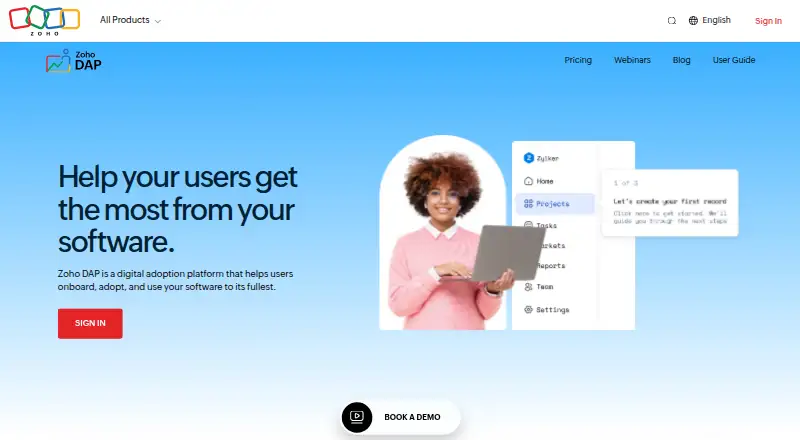
What Zoho Digital Adoption Platform is
Zoho Digital Adoption Platform (DAP) adds contextual guidance inside applications to support onboarding, software and process adoption, change management, and self-service support. Its walkthroughs lead users through a process step by step, while interactive videos let them practice steps as they watch. Guides offer a visual reference users can return to when needed. An in-app Help Hub surfaces relevant walkthroughs, guides, and videos based on a user’s role and current page. Checklists track user progress, and banners display in-app messages and prompts. Product tours are available. The listed Zoho integrations are CRM, Projects, People, Desk, Cliq, Creator, Sprints, CRM Plus, and Zoho One. The platform is available on the web and as a browser extension; Zoho’s documentation names Google Chrome, Brave, and Ulaa for the extension. Plans range from a free option to paid tiers, with different walkthrough, banner, video-and-guide, manager, and collaborator allowances. All four priced plans include unlimited consumers, meaning users who can only view published content. Zoho is headquartered in Chennai, India, and was founded in 1996.
Who it suits
Zoho DAP suits teams that need to guide users through software or process changes, provide self-service help, and track onboarding progress. It can also suit organizations already using Zoho products listed as integrations.
What it does well
- Provides step-by-step in-app walkthroughs and interactive video practice.
- Help Hub content adapts to a user’s role and page.
- Checklists track progress; banners deliver in-app prompts.
- Integrates with nine listed Zoho products.
- All four priced plans include unlimited content-viewing consumers.
- Zoho lists encryption, SSO, MFA, access controls, logging, auditing, and monitoring.
What to know first
- The Free plan includes only one walkthrough and one web banner.
- Standard requires at least three managers and one collaborator.
- Professional and Premium have minimum manager and collaborator counts.
- Enterprise uses custom pricing.
Limits
The Free plan allows one manager, one walkthrough, three interactive videos plus guides, and one web banner. Standard allows one walkthrough and five web banners; Professional allows 20 walkthroughs and 50 banners; Premium allows 50 walkthroughs and 100 banners. The listed tiers also set minimum manager and collaborator counts for paid plans.
Plans
| Plan | Billed and limits | Price |
|---|---|---|
| Free | Free for 1 manager · 1 walkthrough · 3 interactive videos + guides · 1 web banner · Unlimited Help Hub | Free |
| Standard | Monthly; US$24/manager/month · 3 minimum managers · 1 minimum collaborator · Unlimited consumers · 1 walkthrough · 150 interactive videos + guides · 5 web banners · Unlimited Help Hub | $24 a month |
| Professional | Monthly; US$36/manager/month · 5 minimum managers · 10 minimum collaborators · Unlimited consumers · 20 walkthroughs · 500 interactive videos + guides · 50 web banners · Unlimited Help Hub | $36 a month |
| Premium | Monthly; US$60/manager/month · 10 minimum managers · 25 minimum collaborators · Unlimited consumers · 50 walkthroughs · Unlimited interactive videos + guides · 100 web banners · Unlimited Help Hub | $60 a month |
| Enterprise | Custom pricing · Custom pricing to meet business requirements | On request |
As zoho.com lists them, read 9 Oct 2026. The maker's own page has the final word.
Getting started
- Visit https://www.zoho.com/dap/.
- Choose the Free plan or a paid tier; Enterprise uses custom pricing.
- Use the web app or the browser extension supported in Google Chrome, Brave, or Ulaa.
- Create walkthroughs, interactive videos, guides, checklists, or banners within the plan’s limits.
- Offer published content to consumers through the Help Hub or in-app guidance.
Zoho Digital Adoption Platform (DAP) adds contextual guidance inside business applications. It is best for teams formalizing onboarding, software changes, and self-service support, particularly those working in Zoho products. Its broad mix of walkthroughs, practice videos, guides, and role-aware help is balanced by content quotas and minimum paid-plan staffing requirements.
Overview
DAP is built to teach processes where they happen. Walkthroughs take a user through an in-application task step by step; interactive videos let people practice each step while watching; and guides provide a visual reference for later use. Checklists track progress, while banners deliver in-app messages and prompts.
The Help Hub brings those resources together and shows relevant walkthroughs, guides, and videos according to a user’s role and current page. That makes it more useful after initial onboarding than a one-off tour. Zoho positions the platform for onboarding users, managing process or software change, increasing adoption, and reducing routine support demand. Zoho has operated since 1996 and is headquartered in Chennai, India.
Key features
Multiple learning formats
The combination of guided procedures, practice-oriented video, reference guides, checklists, and banners supports instruction, rehearsal, lookup, progress tracking, and timely prompts. It is a strong fit when different teams need different ways to learn the same workflow. The quotas on walkthroughs and banners, however, can become restrictive for organizations documenting many processes or running frequent in-app campaigns.
Zoho coverage and browser extension
Zoho lists integrations with CRM, Projects, People, Desk, Cliq, Creator, Sprints, CRM Plus, and Zoho One. That makes DAP especially compelling when adoption work spans several Zoho services. The extension is supported in Google Chrome, Brave, and Ulaa. Its platform availability is otherwise limited to extension and web.
Security and compliance
Security offerings include encryption at rest and in transit, single sign-on, multi-factor authentication, role-based access controls, plus logging, auditing, and monitoring. Zoho lists ISO 27001, ISO 27017, ISO 27018, SOC 2 Type II, and GDPR among its compliance standards and certifications. These controls suit organizations that need governed access and auditability, although the appropriate configuration remains a customer responsibility.
Pricing
Zoho describes the model as freemium and advertises paid access from $20/mo (annual). The published plan figures below are monthly manager prices and show the staffing commitments that affect the real cost.
| Plan | Price and limits | Best for |
|---|---|---|
| Free | free. One manager; one walkthrough; three interactive videos plus guides; one web banner; unlimited Help Hub. | A single manager validating a small onboarding flow. The one-walkthrough and one-banner caps make it unsuitable for broad rollouts. |
| Standard | $24 a month, billed monthly (US$24/manager/month); minimum three managers and one collaborator; unlimited consumers; one walkthrough; 150 interactive videos + guides; five web banners; unlimited Help Hub. | Small teams needing more video and guide capacity while retaining only one formal walkthrough. |
| Professional | $36 a month, billed monthly (US$36/manager/month); minimum five managers and 10 collaborators; unlimited consumers; 20 walkthroughs; 500 interactive videos + guides; 50 web banners; unlimited Help Hub. | Growing adoption programs with multiple processes and regular in-app messaging. The five-manager and 10-collaborator minimums raise the entry cost. |
| Premium | $60 a month, billed monthly (US$60/manager/month); minimum 10 managers and 25 collaborators; unlimited consumers; 50 walkthroughs; unlimited interactive videos + guides; 100 web banners; unlimited Help Hub. | Larger enablement teams that need high content volume and no video/guide ceiling. |
| Enterprise | Custom pricing to meet business requirements. | Organizations needing a tailored commercial arrangement. |
All four plans list unlimited consumers, meaning users who only view published content. The meaningful constraints are therefore manager and collaborator minimums and the caps on walkthroughs and banners. Standard gives up walkthrough and banner volume compared with Professional; Premium removes the interactive-video and guide ceiling but still caps walkthroughs and banners.
Platforms
DAP runs on the web and through a browser extension. The extension supports Google Chrome, Brave, and Ulaa, making it practical for browser-based applications in those environments. It does not provide a separately listed mobile, desktop, or self-hosted platform.
Who it's for
Choose DAP when a team needs repeatable onboarding, contextual change guidance, and self-service help across several business applications. Zoho customers gain the clearest fit from the listed integrations. A small group wanting only a couple of tours may find the paid-plan minimums disproportionate, while organizations needing extensive walkthrough and banner libraries should budget for Professional or Premium.
Pros and cons
- Pro: Walkthroughs, interactive videos, guides, checklists, banners, and a role-aware Help Hub cover the full adoption cycle.
- Pro: Integrations span major Zoho applications, reducing the need to coordinate separate guidance tools.
- Pro: Encryption, SSO, MFA, role controls, audit features, and named compliance standards support governed deployments.
- Con: Free allows only one walkthrough and one web banner.
- Con: Paid plans require at least three, five, or 10 managers, plus collaborator minimums on paid tiers.
- Con: Even Premium limits walkthroughs to 50 and banners to 100.
Alternatives
Whatfix is the better comparison for teams requiring a paid platform across web, desktop, mobile, API, self-hosted, and major operating systems; its Product Analytics Standard plan is free only with a DAP Web & Desktop plan.
Stonly suits buyers seeking a freemium, guide-centered product with Android, iOS, and web support and a free trial.
Ziplyne is worth considering if a 14-day trial with three guides and unlimited steps is preferable to a permanent free tier.
Candu fits teams focused on overlays, including a free plan with three live experiences and unlimited user licenses.
VisualSP is aimed at Microsoft 365 web apps, with predefined prompts and step-by-step answers in its free Adopt365 plan.
Nexthink Adopt is an alternative for organizations already evaluating Nexthink’s cross-platform offering.
Cornerstone Learning is a quote-based learning platform for organizations whose requirements and size determine pricing.
Newired is a paid option with private hosting and 100–500 user-token Foundation plans.
Verdict
Zoho DAP is a strong choice for organizations standardizing adoption across Zoho applications and needing more than static documentation. Its main reason to choose is the combination of contextual guidance formats and role-based Help Hub; its main reason to look elsewhere is the paid tiers’ manager and collaborator minimums, together with finite walkthrough and banner quotas.
Verdict
Choose Zoho DAP if your team needs contextual walkthroughs, practice videos, guides, and an in-app Help Hub, especially alongside the listed Zoho integrations. The free tier has limited walkthrough and banner allowances, while paid tiers carry minimum manager and collaborator counts. Enterprise pricing is custom.
Questions
Is Zoho DAP free?
Yes. The Free plan costs nothing and includes one manager, one walkthrough, three interactive videos plus guides, one web banner, and unlimited Help Hub.
What do the paid plans cost?
The listed monthly plans are Standard at $24 a month, Professional at $36 a month, and Premium at $60 a month. The pricing note also says paid plans start at $20/mo (annual). Enterprise has custom pricing.
Which platforms and browsers are supported?
Zoho DAP is available on the web and as an extension. Zoho documentation names Google Chrome, Brave, and Ulaa for the extension.
What does the Help Hub do?
It gives users access to relevant walkthroughs, guides, and videos based on their role and the page they are using.
Which Zoho products are listed as integrations?
Zoho CRM, Projects, People, Desk, Cliq, Creator, Sprints, CRM Plus, and Zoho One.
What security and compliance standards does Zoho list?
Zoho lists encryption at rest and in transit, single sign-on, multi-factor authentication, role-based access controls, and logging, auditing, and monitoring. Its listed standards and certifications include ISO 27001, ISO 27017, ISO 27018, SOC 2 Type II, and GDPR.
Facts from Zoho Digital Adoption Platform's own pages
- Browser extension
- The DAP extension is supported in Google Chrome, Brave, and Ulaa, according to Zoho Projects help documentation. · help.zoho.com, 9 Oct 2026
- Compliance
- Zoho lists ISO 27001, ISO 27017, ISO 27018, SOC 2 Type II, and GDPR among its compliance standards and certifications. · zoho.com, 9 Oct 2026
- Consumer seats
- All four priced plans list unlimited minimum consumers, defined as users who can only view published content. · zoho.com, 9 Oct 2026
- Founded
- 1996 · zoho.com, 28 Sept 2026
- Guides
- Guides provide users with a visual reference to understand a process when needed. · zoho.com, 9 Oct 2026
- Headquarters
- Chennai, India · zoho.com, 28 Sept 2026
- Help Hub
- The in-app Help Hub gives users access to relevant walkthroughs, guides, and videos based on their role and the page they are using. · zoho.com, 9 Oct 2026
- Interactive video
- Interactive videos let users practice each step as they watch. · zoho.com, 9 Oct 2026
- Other content
- The product page lists checklists for tracking user progress and banners for in-app messages and prompts. · zoho.com, 9 Oct 2026
- Plan limits
- The Free plan includes one walkthrough and one web banner; Professional includes 20 walkthroughs and 50 web banners; Premium includes 50 walkthroughs and 100 web banners. · zoho.com, 9 Oct 2026
- Purpose
- Zoho DAP provides contextual in-app guidance for onboarding, change management, product adoption, and self-service support. · zoho.com, 9 Oct 2026
- Security
- Zoho lists encryption at rest and in transit, single sign-on, multi-factor authentication, role-based access controls, and logging, auditing, and monitoring among its security offerings. · zoho.com, 9 Oct 2026
- Support
- Zoho's DAP announcement page directs product questions to [email protected]. · cdn.zoho.com, 9 Oct 2026
- Walkthroughs
- Walkthroughs guide users step by step through processes inside their application. · zoho.com, 9 Oct 2026
- Who it is for
- Zoho describes DAP as a way to help teams onboard users, adopt software and processes, and reduce reliance on support. · zoho.com, 9 Oct 2026
- Zoho integrations
- The product page lists Zoho CRM, Projects, People, Desk, Cliq, Creator, Sprints, CRM Plus, and Zoho One. · zoho.com, 9 Oct 2026
Where Zoho Digital Adoption Platform stands on Freedom251
- Digital Adoption Platforms#7 of 29