Freedom251 › Presentation software

WorshipTools Presenter
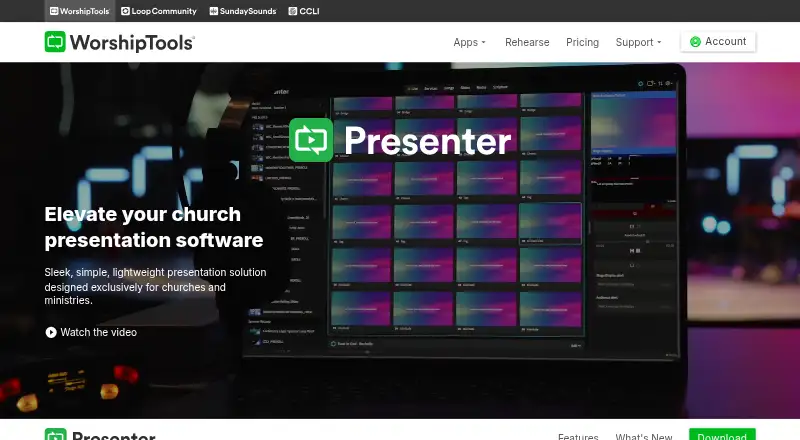
What WorshipTools Presenter is
WorshipTools Presenter is a presentation solution designed for churches and ministries, with a free plan for creating and managing services. Cloud syncing makes song lyrics, videos, images, and cue lists available from different computers. Users can also create or open services offline, but internet-dependent functions such as YouTube playback and SongSelect imports are unavailable without a connection. Presenter supports multiple output screens with different visual layouts, limited by the displays connected to the computer. CCLI SongSelect supports lyric, chord, and lyric-video imports, and Presenter integrates with Charts. Built-in Bibles let users display scripture by entering a reference; each plan lists 65+ Bibles. Loop Connect can turn a setlist into lyric slides after users choose how many lines appear per slide. The Free plan includes 500 MB cloud storage, 10 users, and 15 items per service, plus unlimited services and songs. Presenter supports Windows and macOS, with downloads listed for Windows, macOS, and Linux. Mobile remote control requires a WorshipTools Pro or Pro Plus account. The site also lists documentation, tutorials, a support forum, and contact support.
Who it suits
Presenter suits churches and ministries that prepare services with lyrics, scripture, media, and multiple display layouts. It may fit teams needing offline service preparation, though mobile remote control requires a Pro or Pro Plus account.
What it does well
- Cloud sync shares service assets across computers
- Services can be created or opened offline
- Multiple output screens support different layouts
- Built-in Bibles display scripture by reference
- Free plan includes unlimited services and songs
What to know first
- YouTube playback is unavailable offline
- SongSelect imports are unavailable offline
- Free plan limits storage to 500 MB
- Mobile remote control requires Pro or Pro Plus
Plans
| Plan | Billed and limits | Price |
|---|---|---|
| Free | 500 MB cloud storage · 10 users · 15 items per service · unlimited services and songs | Free |
| Pro | 5 GB cloud storage · 30 users · unlimited items per service · Stage Display, mobile remote and multiple output screens | On request |
| Pro Plus | 50 GB cloud storage · unlimited users · advanced permissions · simultaneous Presenter sessions · motion graphics and templates | On request |
As worshiptools.com lists them, read 30 Sept 2026. The maker's own page has the final word.
WorshipTools Presenter is a church presentation app for preparing and displaying service materials. It suits worship teams that work with lyrics, scripture and several screens. Its strongest case is a capable free starting tier; its main trade-off is that key display and remote-control features require Pro or Pro Plus.
Overview
Cloud sync keeps lyrics, videos, images and cue lists accessible from any computer, while real-time collaboration supports shared preparation. PowerPoint import can help teams bring existing slide decks into the service workflow. Presenter can create and open services offline, which is useful when a venue has unreliable internet, though YouTube playback and SongSelect imports still need a connection.
Beyond presentations, its listed capabilities include volunteer scheduling, participant assignments, a service calendar, team notifications and mobile access. Churches comparing adjacent tools can browse Worship Planning Software, Church Presentation Software and Presentation software.
Key features
Lyrics, scripture and screens
Loop Connect can add a full setlist as lyric slides once a user chooses the number of lines per slide. That can reduce repetitive preparation for song-led services. CCLI SongSelect imports cover lyrics, chords and lyric videos, while built-in Bibles let presenters display a passage by reference; all plans list 65+ Bibles.
Multiple output screens can show different visual layouts, with the practical ceiling set by the displays connected to the computer. That flexibility is useful for teams needing distinct views, but multiple outputs are a Pro and Pro Plus feature rather than a Free-plan inclusion. Presenter also offers a Presenter Stage Display on those paid tiers.
Remote control and offline use
The Presenter Remote app controls a presentation from iPhone, iPad or Android devices, but requires a WorshipTools Pro or Pro Plus account. Free users therefore cannot rely on mobile remote control as part of the no-cost setup. Offline service creation and opening are valuable for preparation and venues with poor connectivity, but they do not extend to online-dependent YouTube playback or SongSelect imports.
Security and support
WorshipTools says transfers use HTTPS encryption, its payment processing is PCI compliant through Stripe, and it does not store card information. Its servers and infrastructure are in Google Cloud data centers in South Carolina. Documentation, tutorials, a support forum and contact support provide several routes for help.
Pricing
Presenter uses a freemium model. The Free plan costs nothing and includes 500 MB of cloud storage, 10 users and up to 15 items per service, alongside unlimited services and songs. It is a generous way to organize recurring services, but the per-service item cap and absence of listed Stage Display, mobile remote and multiple outputs may constrain larger or more elaborate productions.
Pro has custom pricing and includes 5 GB of cloud storage, 30 users and unlimited items per service. Pro Plus also has custom pricing, with 50 GB of storage and unlimited users. Both paid plans list Presenter Stage Display, mobile remote and multiple output screens. Pro fits teams that need more room per service and a larger user group; Pro Plus is the better fit when storage or the user limit is the bigger concern. The published plan details do not distinguish Pro Plus from Pro on service-item limits, so that should not be assumed to change.
Platforms
Presenter is listed for Android, iOS, Linux, macOS and Windows, with downloads for Windows 32-bit and 64-bit, macOS Intel and Apple, and Linux. The Presenter Remote app supports iPhone, iPad and Android devices, subject to the Pro or Pro Plus account requirement. A broader platform list does not remove the need to check whether a particular workflow depends on internet access.
Who it's for
Churches and ministries that assemble song lyrics, scripture and other service assets will find the clearest fit, especially if they want offline service preparation, PowerPoint import or shared access across computers. The free tier makes sense for small teams comfortable with 10 users, 500 MB and 15 items per service. Teams needing remote control, Stage Display or multiple outputs should budget for a custom-priced paid plan instead. It is less compelling for users who need those presentation features without an account upgrade.
Pros and cons
Pros
- Useful free capacity: unlimited services and songs support recurring use, with 10 users and 500 MB included.
- Church-specific lyric and scripture workflow: Loop Connect, SongSelect imports and 65+ Bibles on every plan address common service materials.
- Flexible preparation and output: collaboration, PowerPoint import, offline service access and layouts across connected screens support varied team setups.
Cons
- Free-plan presentation limits: mobile remote, Stage Display and multiple outputs are Pro and Pro Plus features.
- Free service cap: 15 items per service may be restrictive for productions with many separate materials.
- Offline is partial: YouTube playback and SongSelect imports still depend on an internet connection.
- Paid-plan cost is hard to compare: Pro and Pro Plus use custom pricing rather than published amounts.
Alternatives
For volunteer administration rather than service presentation, GraceSquad has a free Starter plan for up to 100 members and one ministry, with manual scheduling, volunteer profiles, basic member CRM and email notifications. HolyJot is a free option for individuals and churches centered on journal entries, FaithAI conversations and community. For broader church management, Planning Center offers free Calendar, People and Services plans with limits including one room, an unlimited database and reporting, and five team members respectively.
Church Volunteering is another volunteer-focused option, with a free tier for one team and up to 10 volunteers, manual reminders and a basic roster builder. Ministry Planner offers free tools with limits such as one scheduling team or one active event. RosterThat may suit teams comparing roster plans: its Pro tier is $5 a month, billed monthly, for up to three admin members and 50 people. SimpleServ has a free plan for up to five volunteers and one admin account, with a few services and teams. Ministry Scheduler Pro is a paid alternative with a six-month initial subscription period that renews annually; its price is custom pricing.
For more options, browse Church Volunteer Management Software and Church Scheduling Software.
Verdict
WorshipTools Presenter is a strong starting point for churches that need to prepare lyrics, scripture and service slides without paying upfront, especially when offline preparation and cross-computer cloud sync matter. Choose it if the Free plan's user, storage and item limits fit and you can do without remote control and multiple outputs. Look elsewhere or move to a custom-priced paid tier if those presentation controls are essential from day one.
Verdict
WorshipTools Presenter brings service materials, scripture, lyric imports, and multi-screen output into a church-focused presentation tool. Its Free plan permits unlimited services and songs, but mobile remote control is reserved for Pro or Pro Plus accounts.
Facts from WorshipTools Presenter's own pages
- Cloud sync
- Cloud syncing makes presentation assets, including song lyrics, videos, images and cue lists, accessible from any computer. · worshiptools.com, 30 Sept 2026
- Data location
- WorshipTools says its servers and infrastructure are located in Google Cloud data centers in South Carolina. · worshiptools.com, 30 Sept 2026
- Free plan
- Yes · worshiptools.com, 20 Sept 2026
- Headquarters
- Wilmington, Delaware, United States · worshiptools.com, 28 Sept 2026
- Integrations
- Presenter supports CCLI SongSelect lyric, chord and lyric video imports, and the product page describes integration with Charts. · worshiptools.com, 30 Sept 2026
- Lyrics automation
- Loop Connect can add an entire setlist as lyric slides after the user chooses the number of lines per slide. · worshiptools.com, 30 Sept 2026
- Offline access
- Yes · worshiptools.com, 20 Sept 2026
- Offline use
- Presenter can create or open services offline, but internet-dependent functions such as YouTube playback and SongSelect imports are unavailable. · worshiptools.com, 30 Sept 2026
- Outputs
- Presenter supports multiple output screens with different visual layouts and has no limit beyond the displays connected to the computer. · worshiptools.com, 30 Sept 2026
- Plan limit
- The pricing page lists Presenter Stage Display, mobile remote and multiple output screens as Pro and Pro Plus features; they are not listed for Free. · worshiptools.com, 30 Sept 2026
- Platform downloads
- The legacy Presenter download page lists Windows 32-bit and 64-bit, macOS Intel and Apple, and Linux versions. · worshiptools.com, 30 Sept 2026
- PowerPoint import
- Yes · worshiptools.com, 20 Sept 2026
- Presenter mode
- Yes · worshiptools.com, 20 Sept 2026
- Purpose
- Presenter is a lightweight presentation solution designed for churches and ministries. · worshiptools.com, 30 Sept 2026
- Real-time collaboration
- Yes · worshiptools.com, 20 Sept 2026
- Remote control
- The Presenter Remote app controls presentations from iPhone, iPad or Android devices, and requires a WorshipTools Pro or Pro Plus account. · worshiptools.com, 30 Sept 2026
- Scripture
- Built-in Bibles let users display scripture by entering a reference, and the pricing page lists 65+ Bibles on each plan. · worshiptools.com, 30 Sept 2026
- Security
- WorshipTools says data transfers use HTTPS encryption and that it is PCI compliant, uses Stripe for payments, and does not store card information. · worshiptools.com, 30 Sept 2026
- Support
- The site lists documentation and tutorials, a support forum, and contact support. · worshiptools.com, 30 Sept 2026
- Supported platforms
- Windows,macOS · worshiptools.com, 20 Sept 2026
Where WorshipTools Presenter stands on Freedom251
- Presentation software#29 of 93
- Church Presentation Software#20 of 35