Freedom251 › AI Presentation Makers

Gamma
by Gamma
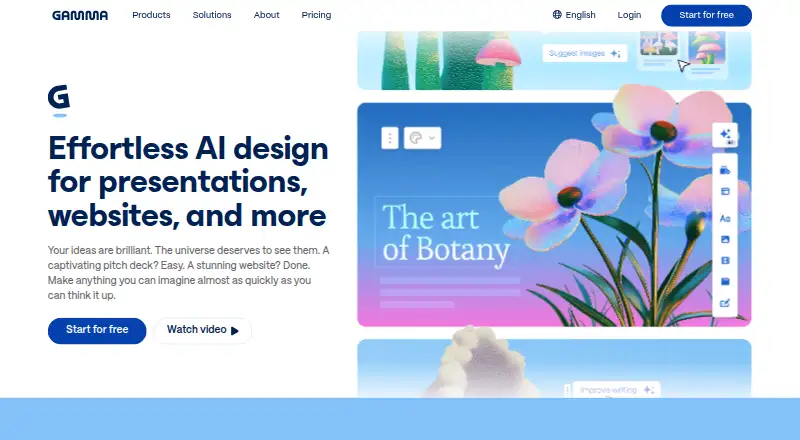
What Gamma is
Gamma is a visual communication platform for creating presentations, documents, websites, social media content, and graphics with help from an AI agent. A project can begin with a prompt, an outline, or a file, then be refined through AI or manual editing. For presentations, Gamma can turn text into a deck and offers smart layouts, templates, custom themes, and AI-generated visuals. Its template library, illustration tools, brand kit, and real-time collaboration support are part of the product. Users can import PDF and PowerPoint files and export work as PDF, PowerPoint, PNG, or Google Slides.
Projects are private by default and can be shared with selected people, a team, or publicly. Team features include shared workspaces, templates, brand controls, and custom instructions. The Business and Enterprise workspace content is automatically excluded from AI training; individual workspace users can opt out in account settings. Gamma states that it is a SOC 2 Type II compliant organization. The service is available on the web and through a mobile app, with an API for custom integrations and presentation creation at scale. Its gallery lists Claude, ChatGPT, Atlassian Rovo, Superhuman Go, Profound, Glean, n8n, Make, and Zapier, as well as Gamma API. Gamma Tech, Inc. is based in San Francisco.
Who it suits
Gamma suits consultants, marketers, sales teams, and educators who need to create and share presentations or other visual content. Teams can use shared workspaces and brand controls, while individual users can start projects from prompts, outlines, or files.
What it does well
- Starts projects from prompts, outlines, or files.
- Exports presentations to PDF, PowerPoint, PNG, and Google Slides.
- Includes templates, custom themes, and AI-generated visuals.
- Supports shared workspaces and real-time collaboration.
- Offers a mobile app and API access on eligible plans.
What to know first
- The Free plan is limited to 10 slides per prompt.
- There is no desktop app.
Limits
The Free plan allows up to 10 slides per prompt and includes PDF and PPTX import plus PDF, PPTX, PNG, and Google Slides export. Plus allows up to 100 slides per prompt; Pro lists up to 10 custom domains, and Ultra lists 75 cards per prompt and 100 custom domains.
Plans
| Plan | Billed and limits | Price |
|---|---|---|
| Free | Up to 10 slides per prompt · Import PDF and PPTX · Export PDF, PPTX, PNG, Google Slides | Free |
| Plus | Up to 100 slides per prompt · Remove Gamma branding · Advanced AI image models | On request |
| Pro | Premium AI image models · Custom branding · Analytics and advanced sharing · Up to 10 custom domains · API access | On request |
| Ultra | 20× more AI usage · Advanced text, image, and video models · Up to 100 custom domains · Early access to features | On request |
As gamma.app lists them, read 11 Oct 2026. The maker's own page has the final word.
Getting started
- Open https://gamma.app/ in a web browser.
- Start with a prompt, outline, or file.
- Refine the result with AI or manual editing.
- Choose the Free plan to create up to 10 slides per prompt, or review paid-plan features.
- Share with selected people, a team, or publicly.
Overview
Gamma is an AI-assisted visual communication platform for creating presentations, documents, websites, social posts, and graphics. It is best suited to people and teams who want to turn prompts, outlines, or files into editable visual material; its free plan is a practical starting point, but limits larger presentations to 10 slides per prompt.
The breadth is a genuine advantage for users working across formats, while the lack of a desktop app makes Gamma a weaker fit for anyone who needs one. Its web and mobile availability, collaborative tools, and multiple export formats make it more compelling as a flexible creation and sharing workspace than as a conventional desktop slide editor.
Key features
Users can begin with a prompt, outline, or file, then refine the result with AI or manual editing. Smart layouts, templates, custom themes, and AI-generated visuals give presentations a range of starting points without requiring users to build every element from scratch. The template library, illustration tools, and brand kit also support work beyond decks, making Gamma useful to marketers, consultants, sales teams, and educators who produce several kinds of visual material.
PDF and PowerPoint imports provide a route for bringing existing presentations into the platform. Gamma exports to PDF, PowerPoint, PNG, and Google Slides, a useful range for sharing or continuing work in other tools. Real-time collaboration, shared workspaces, shared templates, brand controls, and custom instructions are meaningful advantages for teams that need consistent materials. Projects are private by default and can be shared with selected people, a team, or the public.
The integration gallery includes Claude, ChatGPT, Atlassian Rovo, Superhuman Go, Profound, Glean, Gamma API, n8n, Make, and Zapier. Gamma describes its API as a way to create custom integrations and generate presentations at scale from applications. Business and Enterprise workspace content is automatically excluded from AI training; individual workspace users can opt out in account settings. Gamma states that it is a SOC 2 Type II compliant organization.
Pricing
Gamma uses a freemium model. Free costs nothing and allows up to 10 slides per prompt, with PDF and PPTX import and PDF, PPTX, PNG, and Google Slides export. It is a sensible way to try the workflow or make short presentations, but the prompt cap is restrictive for longer decks.
Plus has custom pricing and raises the limit to 100 slides per prompt. It also removes Gamma branding and adds advanced AI image models, making it the more relevant step up for users whose main constraints are deck length and branding. Pro has custom pricing and adds premium AI image models, custom branding, analytics, advanced sharing, up to 10 custom domains, and API access. It is the stronger fit for users publishing branded work or building integrations.
Ultra has custom pricing and allows 75 cards per prompt and up to 100 custom domains. Those limits may suit larger publishing needs, but the plan details given do not establish that it is a better choice for every longer presentation: Plus lists up to 100 slides per prompt, while Ultra specifies cards. The paid plans do not have published prices, so compare their terms directly before committing.
Platforms
Gamma is available on the web and mobile, and has an API. It has no desktop app, which rules it out for users who require a dedicated desktop application. The API and integration gallery are useful for teams seeking to connect Gamma with other services or generate presentations from applications.
Who it's for
Gamma is a good match for consultants, marketers, sales teams, and educators who need to create or share presentations and other visual materials from prompts, outlines, or existing files. Teams can benefit from real-time collaboration, shared workspaces, and brand controls. Individual users making longer decks on the free plan, or anyone who requires a desktop app, should consider alternatives.
Pros and cons
- Pros: Multiple starting points and AI or manual refinement suit users who need to shape existing material as well as create from scratch.
- Pros: Imports and exports cover common presentation formats, including PowerPoint and Google Slides.
- Pros: Collaboration, shared templates, brand controls, and custom instructions support coordinated team work.
- Pros: A free plan includes imports and several export formats, so users can assess the workflow without a paid plan.
- Cons: Free presentations are capped at 10 slides per prompt, limiting the plan for substantial decks.
- Cons: There is no desktop app, which is a deal-breaker for users who require one.
- Cons: Paid plan prices are custom, so buyers cannot compare their cost from the listed plan terms alone.
Alternatives
Choose Pitch if desktop access matters: it supports web, Windows, macOS, iOS, and Android, and its free plan includes five members, two external guests, and 10GB of total storage. Choose Genspark AI Slides if you want a service spanning desktop, mobile, web, and browser extension platforms; its free plan includes 100 credits per day and 1GB of AI Drive storage.
OpenCharts is another freemium option, with web, Windows, macOS, and API platforms; its Free Forever plan includes 500K AI credits, one of each project type, one Code Canvas project, 10GB of Drive storage, and all export formats. Choose MiriCanvas if a large template and graphics library is the priority: its free plan includes over 50,000 templates, 350,000+ photos and graphics, and 1GB of personal storage.
Presenton is available as a free self-hosted/open-source option under Apache 2.0, and supports API, web, desktop, and self-hosted platforms. ChatSlide is web-based and has a free plan with 100 credits and PDF export. arg.ai offers web, desktop, mobile, API, and self-hosted platforms, with a free plan that includes 1GB storage, unlimited workspaces, custom apps, and integrations, prepaid AI credits, and API access.
Presentations.AI is a web-based freemium option with a free Starter plan that includes 100 credits and 20 slides; its Pro plan is $20 a month, billed annually, and includes 5,000 credits.
For more options, browse AI Presentation Makers, AI Social Media Post Generators, Presentation software, AI Presentation Software, AI Website Builders, and Graphic Design Software.
Verdict
Choose Gamma if you want to create presentations and other visual materials from prompts, outlines, or files, with collaboration and multiple export formats. Its breadth and team features make it a strong fit for people working across visual formats, but the 10-slide free-plan cap and lack of a desktop app are clear reasons to look elsewhere. If either limit matters, compare a desktop-capable alternative or a plan with a higher prompt allowance.
Verdict
Choose Gamma if you want to build presentations and other visual materials from prompts, outlines, or files, with collaboration and multiple export formats. Look elsewhere if a desktop app is essential or if you need more than 10 slides per prompt without moving beyond Free.
Questions
Is Gamma free?
Yes. The Free plan costs nothing and allows up to 10 slides per prompt.
Which platforms does Gamma support?
Gamma lists web and API platforms, and it also offers a mobile app. It does not have a desktop app.
What can I create with Gamma?
Gamma describes its platform for presentations, documents, websites, social media, and graphics. It can turn text into presentations and supports AI-assisted and manual refinement.
What can I import and export?
Gamma lists PDF and PowerPoint imports. Exports include PDF, PowerPoint, PNG, and Google Slides.
Who makes Gamma?
Gamma is identified as a product of Gamma Tech, Inc., based in San Francisco.
Facts from Gamma's own pages
- AI training
- Gamma says Business and Enterprise workspace content is automatically excluded from AI training; individual workspace users can opt out in account settings. · gamma.app, 11 Oct 2026
- API
- Gamma describes its API as a way to build custom integrations and create presentations at scale from applications. · gamma.app, 11 Oct 2026
- Brand kit
- Yes · gamma.app, 20 Sept 2026
- Company
- The site identifies the company as Gamma Tech, Inc. and says it is proudly built in San Francisco. · gamma.app, 11 Oct 2026
- Creation
- Users can start with a prompt, outline, or file and refine results with AI or manual editing. · gamma.app, 11 Oct 2026
- Desktop app
- No · gamma.app, 20 Sept 2026
- Free plan
- Yes · gamma.app, 20 Sept 2026
- Free plan limit
- The Free plan allows up to 10 slides per prompt. · gamma.app, 11 Oct 2026
- Headquarters
- San Francisco · gamma.app, 23 Sept 2026
- Illustration tools
- Yes · gamma.app, 20 Sept 2026
- Import and export
- Gamma says users can import PDF and PowerPoint files and export to PDF, PowerPoint, PNG, and Google Slides. · gamma.app, 11 Oct 2026
- Integrations
- The integration gallery lists Claude, ChatGPT, Atlassian Rovo, Superhuman Go, Profound, Glean, Gamma API, n8n, Make, and Zapier. · gamma.app, 11 Oct 2026
- Intended users
- Gamma presents use cases for consultants, marketers, sales teams, and educators. · gamma.app, 11 Oct 2026
- Mobile app
- Yes · gamma.app, 20 Sept 2026
- Paid plan limits
- The Pro plan lists publishing up to 10 custom domains, while Ultra lists up to 100 custom domains. · gamma.app, 11 Oct 2026
- Presentation design
- Yes · gamma.app, 20 Sept 2026
- Presentation features
- Gamma says it can turn text into presentations and offers smart layouts, templates, custom themes, and AI-generated visuals. · gamma.app, 11 Oct 2026
- Product
- Gamma describes itself as a visual communication platform for presentations, documents, websites, social media, and graphics, with an AI agent. · gamma.app, 11 Oct 2026
- Real-time collaboration
- Yes · gamma.app, 20 Sept 2026
- Security
- Gamma states that it is a SOC 2 Type II compliant organization. · gamma.app, 11 Oct 2026
- Sharing
- Gamma says projects are private by default and can be shared with selected people, a team, or publicly, with real-time collaboration. · gamma.app, 11 Oct 2026
- Support
- Gamma lists [email protected] as its support contact. · gamma.app, 11 Oct 2026
- Teams
- Gamma says teams can use shared workspaces, templates, brand controls, and custom instructions; Enterprise includes SSO, SCIM, permissions, and admin controls. · gamma.app, 11 Oct 2026
- Template library
- Yes · gamma.app, 20 Sept 2026
Where Gamma stands on Freedom251
- AI Presentation Makers#9 of 109
- AI Social Media Post Generators#4 of 27
- Presentation software#25 of 93
- AI Presentation Software#32 of 84
- AI Website Builders#37 of 95
- Graphic Design Software#72 of 150
- Design tools#71 of 146