Freedom251 › AI Presentation Makers
Presenton
by Presenton
What Presenton is
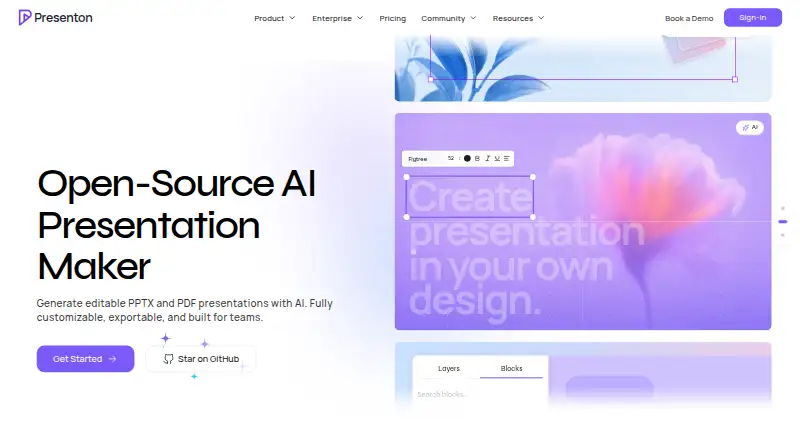
Presenton generates editable PPTX and PDF presentations from prompts, documents, and data. Users can edit slides on a canvas or refine them through chat-based AI editing. It can also turn an existing PowerPoint file into a reusable design system that retains its colors, typography, spacing, and layout rules. For developers, the Cloud v3 API accepts prompts, files, URLs, Markdown, JSON, and slide-specific content, and can export PPTX, PDF, and PNG. The API supports REST requests, asynchronous jobs, webhooks, and scoped iframe embedding. Self-hosted deployments can use configurable providers, including OpenAI-compatible endpoints and local models through Ollama. The desktop app is described as free on Windows, macOS, and Linux, with no usage limits; the self-hosted/open-source plan is free under Apache 2.0. Each generated slide uses one credit, so a 10-slide presentation takes 10 credits. Enterprise deployments can run in customer-controlled cloud, VPC, on-premises, or air-gapped environments, with added access, audit, networking, and retention controls. Data handling depends on deployment and configured providers.
Who it suits
Presenton suits people creating decks from prompts, documents, or data, as well as teams and developers generating presentations through an API. Organizations needing controlled deployment can consider the enterprise environment options.
What it does well
- Exports editable PPTX and PDF presentations
- Existing PPTX files can become reusable design systems
- Desktop app is described as free with no usage limits
- Self-hosted deployments can use local models through Ollama
What to know first
- Generated slides use one credit each
- Data handling depends on deployment and configured providers
- Compliance certification should not be inferred
Limits
API generation uses one credit per slide. The desktop app is described as having no usage limits; no other free-plan quota is stated in these facts.
Plans
| Plan | Billed and limits | Price |
|---|---|---|
| Free self-hosted/open-source | Free to self-host under Apache 2.0 · no desktop app usage limits stated | Free |
| Enterprise | Billed annually · Custom pricing · 30 minimum users · deployment, integrations, and support needs | On request |
As presenton.ai lists them, read 11 Oct 2026. The maker's own page has the final word.
Getting started
- Visit presenton.ai to explore the product.
- Choose the web, API, or self-hosted route that fits your use.
- For desktop use, select the app for Windows, macOS, or Linux.
- For self-hosting, use the free Apache 2.0 plan and configure an AI provider, including an OpenAI-compatible endpoint or Ollama local model.
- For API use, send prompts, files, URLs, Markdown, JSON, or slide-specific content through Cloud v3.
Presenton is a presentation generator and editor for individual creators, teams, and developers who need decks from prompts, source material, or an API. It stands out for pairing editable output with desktop and self-hosted options, though cloud generation’s per-slide credits make usage worth tracking.
Overview
Presenton creates editable PPTX and PDF presentations from prompts, documents, and data. Users can revise slides on a canvas or use chat-based AI editing, so the workflow extends beyond producing a first draft.
It spans web, desktop, API, and self-hosted deployments. The desktop app is free on Windows, macOS, and Linux, with no usage limits. Cloud generation uses one credit per slide: a 10-slide deck consumes 10 credits. The free self-hosted/open-source plan costs nothing and is available under Apache 2.0.
Key features
Generation and editing
Prompt-to-deck and document-to-deck generation are useful when the starting point is a brief or an existing file. Canvas editing and chat-based refinement offer distinct ways to revise the result; this suits creators who want editable slides rather than a fixed generated file.
Branding and output
Presenton can turn an existing PPTX into a reusable design system that carries over its colors, typography, spacing, and layout rules. That gives teams a way to keep generated decks aligned with an established visual identity. PowerPoint and PDF exports cover common editing and sharing needs.
API and deployment
Cloud v3 accepts prompts, files, URLs, Markdown, JSON, or slide-specific content and can export PPTX, PDF, and PNG. REST requests, asynchronous jobs, webhooks, and scoped iframe embedding make it relevant to developers building presentation workflows into other products. Self-hosted deployments can configure OpenAI-compatible providers or local models through Ollama.
Presenton says it does not use prompts, documents, or presentations to train its models. Data handling depends on the deployment and configured providers, so organizations should assess their own setup. Enterprise deployments can run in customer-controlled cloud, a VPC, on-premises, or air-gapped environments, with controls including identity integration or SSO, role-based access, auditability, private networking, and customer-controlled retention. The enterprise offer also includes dedicated support, response SLAs, deployment help, and ongoing optimization.
Pricing
Presenton uses a freemium model. Its Free self-hosted/open-source plan costs nothing and is released under Apache 2.0. The desktop app is described as free on Windows, macOS, and Linux with no usage limits, making it the clearest fit for individual creators who want to generate and edit decks locally.
Cloud generation’s one-credit-per-slide charge matters for anyone producing decks at volume: a 10-slide presentation uses 10 credits. The Enterprise plan has custom pricing and is sized for 30 users. Its private deployment options, security controls, and dedicated support target organizations with deployment and governance requirements; the available plans do not establish a cloud quota, trial length, or renewal term.
Platforms
Presenton supports API, Linux, macOS, self-hosted, web, and Windows use. That range gives individuals a desktop option and developers or organizations a route to integrate or control deployment. Its self-hosted provider configuration is particularly relevant when local models or customer-managed infrastructure are priorities.
Who it's for
Presenton is a strong fit for solo creators who want a free desktop presentation tool, teams that need editable decks and reusable brand rules, and developers generating slides through an API. Organizations needing customer-controlled environments and access controls should consider Enterprise. It is a less obvious fit for high-volume cloud users who need predictable per-deck costs, since the stated credit use scales with slide count.
Pros and cons
- Pro: Free desktop availability across Windows, macOS, and Linux with no usage limits suits individual creators who want to avoid a usage cap.
- Pro: PPTX-to-design-system conversion preserves key brand rules, helping teams keep generated slides consistent with existing materials.
- Pro: API inputs, exports, and integration options support developers building deck generation into their own workflows.
- Pro: Customer-controlled and air-gapped enterprise deployment is available for organizations with stricter infrastructure requirements.
- Con: Cloud usage consumes one credit per slide, so larger decks use more credits and high-volume costs require monitoring.
- Con: Enterprise pricing is custom, which may make budget comparison less direct than a published per-seat price.
- Con: Data handling depends on deployment and configured providers, so teams must evaluate their chosen setup rather than assume uniform handling.
Alternatives
Cuppa Studio is worth considering for a free plan with 50K AI tokens per month and presentations up to 15 slides; choose it if those published monthly and per-deck limits suit your usage better.
Microsoft PowerPoint offers a free web version for one person with basic templates and tools plus 5 GB of cloud storage, making it an option when a familiar presentation editor and included storage matter more than Presenton’s generation and deployment choices.
deckhost offers a free plan with unlimited local presentations, up to five published decks, public-only decks, and BYOK AI; consider it if local presentations and those publishing limits match your needs.
Google Drive is a free option for users who need up to 15 GB of storage included with a Google Account.
Pitch has a free plan for five members, two external guests, and 10 GB of total storage, which may better suit a small group focused on shared presentation work.
Slaide releases its language, CLI, themes, importers, MCP server, and native desktop viewer under Apache-2.0; consider it if those open-source components are the priority.
Canva is another freemium option for people looking for a design editor with templates and a content library.
Decks.Studio has a free plan with three decks a month, five AI refinements a day, one Agent-mode run a month, watermarked PDF export, and no PPTX or DOCX export; choose it if those capped monthly and daily limits are sufficient and PDF output is enough.
For more options, see AI Presentation Software, AI Presentation Makers, and Presentation software.
Verdict
Presenton is a good choice for creators and developers who value editable decks, free desktop use, or self-hosting, and for enterprises that need customer-controlled deployment. Its combination of generation, editing, and API access is the main reason to choose it. Look elsewhere if you need a clear cloud-generation cost before committing or a published Enterprise price.
Verdict
Presenton supports both direct deck creation and API-based generation, with options for self-hosting and customer-controlled enterprise deployment. Check credit usage and deployment-specific data handling against your needs.
Questions
Is Presenton free?
Presenton lists a free plan and a free self-hosted/open-source plan under Apache 2.0. Its desktop app is described as free on Windows, macOS, and Linux, with no usage limits.
What does Presenton generate?
It generates editable PPTX and PDF presentations from prompts, documents, and data. Cloud v3 can also export PNG.
Which platforms does Presenton support?
The listed platforms are API, Linux, macOS, self-hosted, web, and Windows.
How does API credit use work?
Each generated slide uses one credit, so a 10-slide presentation uses 10 credits.
Can Presenton be self-hosted with a local AI model?
Yes. Self-hosted deployments can use configurable providers, including local models through Ollama.
Who makes Presenton, and where is it based?
The maker is Presenton, with headquarters in Dover, Delaware, USA.
Facts from Presenton's own pages
- AI providers
- Self-hosted deployments can use configurable providers including OpenAI-compatible endpoints and local models through Ollama. · presenton.ai, 11 Oct 2026
- Brand controls
- Yes · presenton.ai, 20 Sept 2026
- Brand templates
- It can turn an existing PPTX into a reusable design system that preserves colors, typography, spacing, and layout rules. · presenton.ai, 11 Oct 2026
- Compliance
- The security page says not to infer a compliance certification and advises contacting Presenton for current security and compliance documentation. · presenton.ai, 11 Oct 2026
- Credits
- One generated slide uses one credit, so a 10-slide presentation uses 10 credits. · presenton.ai, 11 Oct 2026
- Desktop availability
- The desktop app is described as free on Windows, macOS, and Linux, with no usage limits. · presenton.ai, 11 Oct 2026
- Document-to-deck generation
- Yes · presenton.ai, 20 Sept 2026
- Editing
- Users can edit slides on a canvas and refine them through chat-based AI editing. · presenton.ai, 11 Oct 2026
- Free plan
- Yes · presenton.ai, 20 Sept 2026
- Headquarters
- Presenton Inc. lists its company address as 8 The Green, STE R, Dover, DE 19901, USA. · presenton.ai, 11 Oct 2026
- Inputs and exports
- The API accepts prompts, files, URLs, Markdown, JSON, or slide-specific content and can export PPTX, PDF, and PNG through Cloud v3. · presenton.ai, 11 Oct 2026
- Integrations
- The API supports REST requests, asynchronous jobs, webhooks, and scoped iframe embedding. · presenton.ai, 11 Oct 2026
- PDF export
- Yes · presenton.ai, 20 Sept 2026
- PowerPoint export
- Yes · presenton.ai, 20 Sept 2026
- Private deployment
- Enterprise deployments can run in customer-controlled cloud, VPC, on-premises, or air-gapped environments. · presenton.ai, 11 Oct 2026
- Prompt-to-deck generation
- Yes · presenton.ai, 20 Sept 2026
- Security and data
- Presenton says it does not use prompts, documents, or presentations to train Presenton models; data handling depends on deployment and configured providers. · presenton.ai, 11 Oct 2026
- Security controls
- Enterprise capabilities include SSO or identity integration, role-based access, auditability, private networking, and customer-controlled retention. · presenton.ai, 11 Oct 2026
- Support
- The enterprise offer lists dedicated support, response SLAs, deployment help, and ongoing optimization. · presenton.ai, 11 Oct 2026
- What it does
- Presenton generates editable PPTX and PDF presentations from prompts, documents, and data. · presenton.ai, 11 Oct 2026
- Who it is for
- Presenton describes the product as serving individual deck creators, teams, and developers generating presentations through an API. · presenton.ai, 11 Oct 2026
Where Presenton stands on Freedom251
- AI Presentation Makers#4 of 109
- Presentation software#19 of 93
- AI Presentation Software#26 of 84