Freedom251 › AI Presentation Software
deckhost
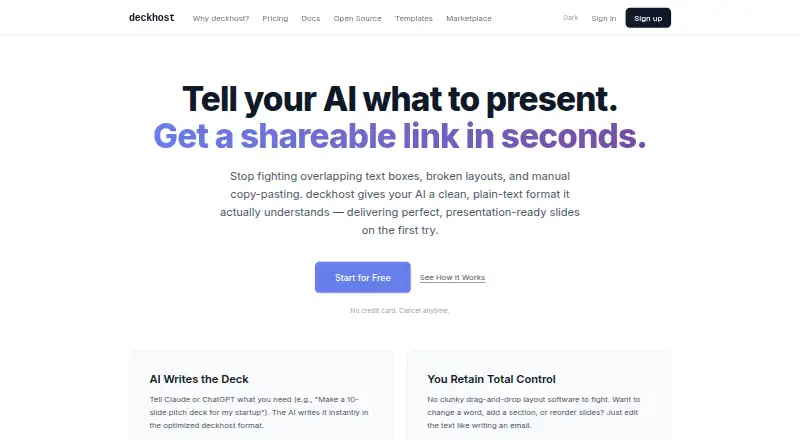
What deckhost is
deckhost turns plain-text enhanced Markdown into presentations that can be published as shareable links. You can edit slide text directly and see a live preview as you type. Presentations offer keyboard navigation, fullscreen mode, 12 reveal styles, math styling, syntax highlighting and background controls. You can bring your own Anthropic or OpenAI API key, and an MCP server is documented for Claude Desktop and Claude Code. VS Code and Cursor extensions add live preview, speaker notes and one-click publishing. deckhost can import Marp frontmatter and map common directives. Its CLI, MCP server and local presentation engine support local work without an account; the CLI can also build static HTML for external hosting. Published decks open in a browser without an account. The free plan costs nothing, billed forever, with five public published decks and 100 API calls per day. Pro is $20 a month; Team is $29 a month.
Who it suits
deckhost suits founders, product managers, educators, trainers, developers and analysts who want to create and publish presentations from text. Its local tools may suit people who want to work without an account, while private decks and shared editing are available on paid plans.
What it does well
- Live preview updates while editing text.
- 12 built-in animation reveal styles.
- VS Code and Cursor extensions support publishing.
- Local work needs no account.
- Published decks open without viewer accounts.
What to know first
- Free-plan published decks are public only.
- Free plan allows five published decks.
- Free API access is limited to 100 calls daily.
- Pro includes 300 AI credits monthly.
Limits
The Free plan permits five published decks, all public, and 100 API calls per day. Pro allows 100 published decks and 1,000 API calls per day; Team includes unlimited published decks. Pro and Team include monthly AI credits, with stated per-credit overage rates.
Plans
| Plan | Billed and limits | Price |
|---|---|---|
| Free | forever · Unlimited local presentations · 5 published decks · Public decks only · BYOK AI · API access (100 calls/day) · deckhost branding | Free |
| Pro | or $200/year (save 17%) · 100 published decks · Private and password-protected decks · 300 AI credits/month · $0.08/credit overage · 10 versions per deck · API access (1,000 calls/day) | $20 a month |
| Team | or $290/seat/year (save 17%) · Unlimited published decks · 500 AI credits/seat/month pooled · $0.06/credit overage · Shared workspace · Multiple editors per deck · Priority support | $29 a month |
| Pro | save 17% · 100 published decks · Private and password-protected decks · 300 AI credits/month · $0.08/credit overage · 10 versions per deck · API access (1,000 calls/day) | $200 a year |
| Team | save 17% · Unlimited published decks · 500 AI credits/seat/month pooled · $0.06/credit overage · Shared workspace · Multiple editors per deck · Priority support | $290 a year |
As deckhost.com lists them, read 11 Oct 2026. The maker's own page has the final word.
Getting started
- Visit https://deckhost.com/.
- Use the CLI, MCP server, or local presentation engine for account-free local work.
- Enter plain-text enhanced Markdown or import a presentation with Marp frontmatter.
- Edit presentation text and check the live preview.
- Choose a plan if you need published decks, API access, or AI credits beyond the Free plan.
- Publish a deck as a shareable link, or use the CLI to build static HTML.
deckhost turns enhanced Markdown into browser-ready presentations, making it a strong fit for developers and other people who prefer to work in text. Its local tools are unusually capable at no charge, while published decks become more useful once a paid plan lifts the public-only and five-deck limits.
Overview
Writing and editing happen in plain text, with a live preview as the content changes. Finished presentations can be shared as browser links, and viewers do not need an account. That makes deckhost a practical choice for people who want presentation work to sit close to their code or documents; it is less compelling for teams seeking a conventional visual editor.
Key features
Presentations support keyboard navigation, fullscreen display, 12 reveal animations, math styling, syntax highlighting, and background controls. Those features cover common needs for technical talks and lessons without moving the authoring workflow out of text.
AI generation is available through prompt-to-deck tools, with BYOK support for Anthropic and OpenAI keys. The product also provides an MCP server for Claude Desktop and Claude Code. Bring-your-own-key access gives AI users a way to connect their own provider credentials, while the paid plans add monthly AI credits.
VS Code and Cursor extensions offer live preview, speaker notes, and one-click publishing. Marp users can import decks: deckhost detects Marp frontmatter and translates common directives, which may ease a move for existing text-based presentations.
The CLI can build static HTML for hosting on services such as Netlify, S3, or GitHub Pages. The CLI, MCP server, and local presentation engine are free forever and work without an account, so local use does not depend on a subscription. The free plan also includes API access, capped at 100 calls per day; Pro raises that to 1,000.
Pricing
Free costs nothing, billed forever. It includes unlimited local presentations, five published decks, public-only sharing, BYOK AI, 100 API calls per day, and deckhost branding. This is enough to explore the workflow or publish a small portfolio, but the public-only rule rules it out for confidential work, and the five-deck cap constrains a growing library.
Pro costs $20 a month, or $200/year (save 17%). It raises the publishing allowance to 100 decks, adds private and password-protected decks, 300 AI credits per month, 10 versions per deck, and 1,000 API calls per day. Extra credits cost $0.08/credit. Pro suits solo publishers who need privacy, more publishing headroom, or regular API use; its monthly credit allowance and overage rate matter for heavy AI generation.
Team costs $29 a month, or $290/seat/year (save 17%). It includes unlimited published decks, 500 AI credits per seat per month pooled across the team, $0.06/credit overage, a shared workspace, multiple editors per deck, and priority support. The per-seat annual term and pooled credit model make the total cost depend on team size and combined usage. It is the fit for collaborative publishing, rather than an economical upgrade for a solo user.
A free trial is offered. For local work alone, the paid publishing and collaboration limits may not justify a subscription.
Platforms
deckhost supports API, extension, Linux, macOS, self-hosted, web, and Windows use. The editor extensions target VS Code and Cursor, while static HTML output leaves hosting under the user's control.
Who it's for
Founders and product managers can use the text workflow to build and share presentations; educators and trainers get browser viewing without requiring learner accounts. Developers and analysts are especially well matched through syntax highlighting, math styling, editor extensions, the CLI, and API. Anyone who relies on private publishing needs at least Pro, and people who want to lay out slides primarily through a visual canvas should look elsewhere.
Pros and cons
- Pros: Local creation and static HTML builds are free forever and require no account, keeping a useful workflow available without a subscription.
- Pros: Live preview in VS Code and Cursor, plus speaker notes and one-click publishing, keeps authoring close to the editor.
- Pros: Browser links need no viewer account, reducing friction when sharing presentations.
- Cons: Free published decks are public and capped at five, a serious constraint for private work or a larger portfolio.
- Cons: Pro's 300 monthly AI credits have paid overages, so frequent generation can increase its cost.
- Cons: Team is priced per seat, making its unlimited publishing and pooled credits less suited to an individual.
Alternatives
AI Presentation Software and AI Presentation Makers are useful category starting points for comparing other presentation tools.
Choose Cuppa Studio if mobile access matters: it supports Android and iOS as well as desktop and web platforms, and its free plan includes 50K AI tokens per month, up to 15 slides per presentation, and all eight themes and templates.
Microsoft PowerPoint is an option for someone who wants a free web edition with basic templates and tools, one-person use, and 5 GB of cloud storage.
Google Drive may suit someone prioritizing general-purpose cloud storage: its free plan includes up to 15 GB with a Google Account.
Pitch is worth considering for a small collaborative group: its free plan includes five members, two external guests, and 10 GB of total storage.
Presenton is another option for people seeking a self-hosted presentation tool across API, desktop, and web platforms.
Slaide may fit readers who specifically want an Apache-2.0-licensed language, CLI, themes, importers, MCP server, and native desktop viewer.
Canva offers a free plan for one person with a core design editor, templates, and a content library.
Decks.Studio may appeal to readers who want a free monthly allowance of three decks and five AI refinements a day, with watermarked PDF export.
Verdict
Choose deckhost if you want to write presentations in Markdown, keep local creation free, and publish technical or instructional material through simple browser links. Pro is the sensible step when published decks need privacy or the five-deck cap becomes restrictive; Team makes sense when multiple editors need a shared workspace. If your priority is a free private publishing workflow or visual, canvas-based slide design, deckhost's free tier and text-first approach point elsewhere.
Verdict
deckhost combines text-based presentation creation with local tools, browser publishing and editor extensions. The free plan is limited to public decks and five published presentations; Pro and Team add higher publishing allowances and other plan features.
Questions
Is deckhost free?
Yes. The Free plan costs nothing, billed forever, and includes five published decks and 100 API calls per day.
How much do the paid plans cost?
Pro is $20 a month or $200/year. Team is $29 a month or $290/seat/year.
Can I use deckhost without an account?
The CLI, MCP server, and local presentation engine support local work without an account. Published decks can be viewed in a browser without an account.
Which platforms and editor integrations are available?
Listed platforms are API, extension, Linux, macOS, self-hosted, web, and Windows. VS Code and Cursor extensions provide live preview, speaker notes, and one-click publishing.
Can I keep published decks private?
The Free plan is limited to public decks. Pro includes private and password-protected decks.
What AI integrations does deckhost document?
It supports bringing your own Anthropic or OpenAI API key and provides an MCP server for Claude Desktop and Claude Code.
Facts from deckhost's own pages
- AI integrations
- The maker documents BYOK support for Anthropic and OpenAI API keys, and an MCP server for Claude Desktop and Claude Code. · deckhost.com, 11 Oct 2026
- API
- The free plan includes API access at 100 calls per day, and Pro includes 1,000 calls per day. · deckhost.com, 11 Oct 2026
- Brand controls
- Yes · deckhost.com, 22 Sept 2026
- Editing
- Users can edit presentation text directly, with a live preview that updates as they type. · deckhost.com, 11 Oct 2026
- Editor integrations
- The VS Code and Cursor extension provides live preview, speaker notes, and one-click publishing to a hosted URL. · deckhost.com, 11 Oct 2026
- Free plan
- Yes · deckhost.com, 22 Sept 2026
- Import
- The product detects Marp frontmatter and maps common Marp directives to deckhost equivalents on import. · deckhost.com, 11 Oct 2026
- Intended users
- The maker describes the product for founders and product managers, educators and trainers, and developers and analysts. · deckhost.com, 11 Oct 2026
- Local use
- The CLI, MCP server, and local presentation engine are free forever, with no account required for local work. · deckhost.com, 11 Oct 2026
- Presenting
- Presentations include keyboard navigation, fullscreen mode, 12 built-in animation reveal styles, math styling, syntax highlighting, and background controls. · deckhost.com, 11 Oct 2026
- Product
- deckhost turns plain-text, enhanced Markdown into presentations that can be published as shareable links. · deckhost.com, 11 Oct 2026
- Prompt-to-deck generation
- Yes · deckhost.com, 22 Sept 2026
- Security and privacy
- Pro includes private and password-protected decks; the maker's pricing page says free-plan decks are public only. · deckhost.com, 11 Oct 2026
- Self-hosting
- The CLI can build presentations into static HTML for hosting on services such as Netlify, S3, or GitHub Pages. · deckhost.com, 11 Oct 2026
- Support
- The Team plan includes priority support. · deckhost.com, 11 Oct 2026
- Viewer access
- Published decks can be viewed in a browser without an account. · deckhost.com, 11 Oct 2026
Where deckhost stands on Freedom251
- AI Presentation Software#4 of 84
- AI Presentation Makers#40 of 109