Freedom251 › AI Presentation Software
Ambiguous Slides
What Ambiguous Slides is
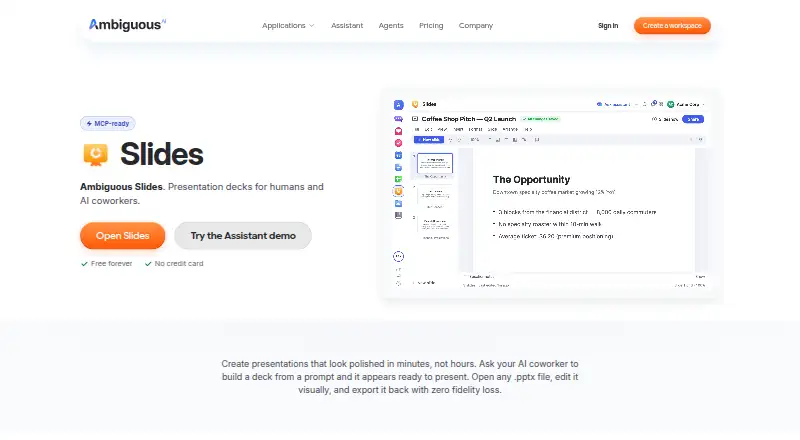
Ambiguous Slides is a presentation-deck tool for teams and AI coworkers, available through the web, macOS, and API. Its Assistant can create a complete deck from a prompt with layout, content, and styling in under 10 seconds. The slide editor supports dragging, resizing, and aligning text, images, shapes, and charts. Real-time collaboration includes multiple cursors, presence indicators, and live edits. Full-screen presenting provides speaker notes, a laser pointer, and a slide timer. Slides imports and exports PowerPoint PPTX files losslessly and also exports PDF; the maker says exported PPTX files open in PowerPoint or Google Slides without reformatting. Agents can create, read, update, remove, reorder, and apply templates through MCP or REST. The free workspace supports up to five members and 1,000 AI actions per month. Pro costs $20 a month, billed at $20 per seat, with 5,000 AI actions per seat. A one-time top-up costs 5.00 USD for 500 actions that never expire. Traffic is encrypted with TLS 1.3 and stored data with AES-256. SOC 2 Type II is in progress, and HIPAA BAA is unavailable.
Who it suits
It suits teams and AI coworkers that need prompt-built presentations, shared editing, and PowerPoint-compatible files. The free tier is designed for workspaces of up to five members.
What it does well
- Creates decks from prompts in under 10 seconds
- Supports real-time multi-user editing
- Imports and exports PPTX losslessly
- Offers PDF export
- Provides MCP and REST agent access
What to know first
- Free workspace limited to five members
- Free workspace includes 1,000 AI actions monthly
- SOC 2 Type II is still in progress
- HIPAA BAA is unavailable
Limits
The Free plan allows up to five members and 1,000 AI actions per month. Pro provides 5,000 AI actions per seat for $20 a month, while a 5.00 USD one-time top-up adds 500 actions that never expire.
Plans
| Plan | Billed and limits | Price |
|---|---|---|
| Free | Up to 5 members · 1,000 AI actions/month · all 17 apps | Free |
| Pro | $20/seat, 5,000 actions each · 5,000 AI actions per seat | $20 a month |
| AI action top-up | $5 = 500 actions, never expiring · 500 AI actions · never expire | $5, paid once |
As ambiguous.ai lists them, read 11 Oct 2026. The maker's own page has the final word.
Getting started
- Open the Ambiguous Slides website
- Use the web app or download the Mac application
- Create a free workspace for up to five members
- Build a deck with the Assistant from a prompt
- Edit slides with text, images, shapes, and charts
- Export the presentation as PPTX or PDF
Verdict
Ambiguous Slides combines prompt generation, visual editing, collaboration, presenting, and agent controls in one presentation workflow. Its free allowance and per-seat Pro action limit should be weighed against team size and usage.
Questions
Is there a free plan?
Yes. The Free plan costs nothing, supports up to five members, and includes 1,000 AI actions per month.
What does Pro cost?
Pro costs $20 a month, billed at $20 per seat, with 5,000 AI actions per seat.
Which platforms are supported?
Ambiguous Slides is available on the web and through an API. A Mac download supports Apple Silicon and Intel.
Can it export PowerPoint files?
Yes. It imports and exports .pptx files losslessly, and the maker says exported files open in PowerPoint or Google Slides without reformatting.
Does it support collaboration?
Yes. Multiple collaborators can work with live edits, multiple cursors, and presence indicators.
Is a HIPAA BAA available?
No. The security information says a HIPAA BAA is not available today.
Facts from Ambiguous Slides's own pages
- Agent access
- Agents can create, read, update, remove, reorder, and apply templates to presentations through MCP or REST. · ambiguous.ai, 11 Oct 2026
- Collaboration
- Slides supports real-time collaboration with multiple cursors, presence indicators, and live edits. · ambiguous.ai, 11 Oct 2026
- Collaboration level
- realtime · ambiguous.ai, 22 Sept 2026
- Compliance limits
- The security page says SOC 2 Type II is in progress and HIPAA BAA is not available today. · ambiguous.ai, 11 Oct 2026
- Desktop platform
- The maker offers a Mac download with support for Apple Silicon and Intel. · ambiguous.ai, 11 Oct 2026
- File formats
- Slides imports and exports PowerPoint .pptx files losslessly and also supports PDF export. · ambiguous.ai, 11 Oct 2026
- Free plan
- Yes · ambiguous.ai, 22 Sept 2026
- Free tier limit
- The free workspace is for up to five members and includes 1,000 AI actions per month. · ambiguous.ai, 11 Oct 2026
- Headquarters
- Bellevue, Washington, United States · ambiguous.ai, 28 Sept 2026
- Integrations
- The maker says exported .pptx files open in PowerPoint or Google Slides without reformatting. · ambiguous.ai, 11 Oct 2026
- Intended users
- The product is designed for teams and AI coworkers to use the same apps, authoring formats, and API. · ambiguous.ai, 11 Oct 2026
- PDF export
- Yes · ambiguous.ai, 22 Sept 2026
- PPTX export
- Yes · ambiguous.ai, 22 Sept 2026
- Presentation tools
- Full-screen presentation mode includes speaker notes, a laser pointer, and a slide timer. · ambiguous.ai, 11 Oct 2026
- Prompt-built decks
- The Assistant can create a full presentation with layout, content, and styling from a prompt in under 10 seconds. · ambiguous.ai, 11 Oct 2026
- Prompt-to-deck generation
- Yes · ambiguous.ai, 22 Sept 2026
- Purpose
- Ambiguous Slides is a presentation deck tool for people and AI coworkers. · ambiguous.ai, 11 Oct 2026
- Security
- Ambiguous says it encrypts traffic with TLS 1.3 and data at rest with AES-256, and isolates workspaces at the ORM level. · ambiguous.ai, 11 Oct 2026
- Support
- Workspace, billing, account, and integration support is available at [email protected]. · ambiguous.ai, 11 Oct 2026
- Visual editing
- The slide editor lets users drag, resize, and align elements, and supports text, images, shapes, and charts. · ambiguous.ai, 11 Oct 2026
Where Ambiguous Slides stands on Freedom251
- AI Presentation Software#5 of 84
- AI Presentation Makers#39 of 109