Freedom251 › AI Presentation Makers

MiriCanvas
What MiriCanvas is
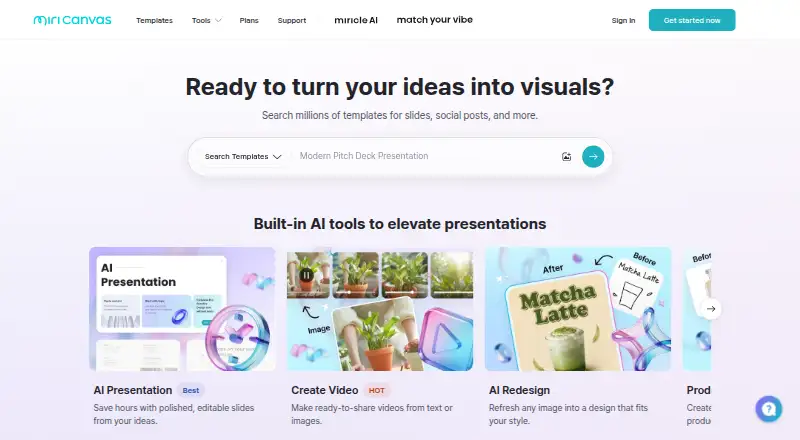
MiriCanvas is a design platform for making presentations, social media posts, videos, posters, and other visual materials. It provides templates, presentation and illustration tools, a brand kit, and real-time collaboration. Its AI presentation maker can turn a topic into a slide deck that users can edit and export. Free users can create up to five AI presentations per month, with up to 30 slides in each. Other AI tools include writing, image and illustration generation, icon generation, background removal, and image upscaling. Presentations can be exported as PDF, PNG, JPG, PPTX, MP4, or GIF, or shared through a live link for co-editing. MiriCanvas is available on the web and through Android and iOS apps, with editing across PC and mobile. The Free plan costs nothing (billed billed monthly) and includes more than 50,000 templates, over 350,000 photos and graphics, and 1 GB of personal storage. Pro adds unlimited premium templates and photos and graphics, 10 GB of storage, AI tools, unlimited background removal, and seven-day task history and restoration. Enterprise offers organization-wide collaboration, productivity features, flexible pricing, and dedicated support.
Who it suits
MiriCanvas suits individuals creating presentations and other visual designs with templates, illustrations, and AI tools. Its live-link co-editing and Enterprise collaboration features also suit people working on shared or organization-wide designs.
What it does well
- Free plan includes over 50,000 templates and 350,000+ photos and graphics.
- AI can generate editable presentations from a topic.
- Presentation exports include PDF, PNG, JPG, PPTX, MP4, and GIF.
- Live links support real-time co-editing.
- Apps are available for Android and iOS, alongside the web version.
What to know first
- Free plan provides 1 GB of personal storage.
- Free users can create up to five AI presentations monthly.
- Each free AI presentation is limited to 30 slides.
Limits
The Free plan includes 1 GB of personal storage. Free users can create up to five AI presentations per month, with up to 30 slides each.
Plans
| Plan | Billed and limits | Price |
|---|---|---|
| Free | 50,000+ templates · 350,000+ photos and graphics · 1 GB personal storage | Free |
| Pro | Monthly option shown; price not displayed on the opened page · Unlimited premium templates and photos/graphics · 10 GB personal storage · AI tools · unlimited background removal · 7-day task history | On request |
| Enterprise | Contact for flexible pricing · Organization-wide design collaboration · smart asset management · dedicated support | On request |
| Pro | Annual option shown; price not displayed on the opened page · Unlimited premium templates and photos/graphics · 10 GB personal storage · AI tools · unlimited background removal · 7-day task history | On request |
As miricanvas.com lists them, read 11 Oct 2026. The maker's own page has the final word.
Getting started
- Open https://www.miricanvas.com/en or get the app through the Apple App Store or Google Play Store.
- Choose the Free plan, which is free for life, or review Pro and Enterprise options.
- Create a presentation from a topic with the AI presentation maker, or start another visual design.
- Edit the design on PC or mobile, then export it or share a live link for collaboration.
Overview
MiriCanvas brings template-led graphic design and presentation creation into one platform, with AI tools and editing across web and mobile. It is a flexible option for people making both slide decks and everyday visual content, though the Free plan’s 1 GB of storage is a meaningful constraint if a project library grows.
Key features
The template library supports presentations, social posts, videos, posters and other designs. Illustration tools and a brand kit add room to shape the results and keep a visual identity consistent. That breadth suits users with varied design needs better than a tool focused only on slides.
Its AI presentation maker turns a topic into a designed deck that users can edit and export. Free users can create up to 5 AI presentations per month, with up to 30 slides each: a generous allowance for occasional decks, but a hard ceiling for frequent AI-assisted presentation work. Other AI tools cover writing, image and illustration generation, icon generation, background removal and image upscaling.
Presentations can be exported as PDF, PNG, JPG, PPTX, MP4 or GIF, or shared by live link for real-time co-editing. The export range makes it practical to hand off work in different formats, while shared editing supports joint projects. MiriCanvas says uploaded content and text are not used to train AI models; its site also displays ISO/IEC 27001 and ISO/IEC 27701 certification badges.
Pricing
MiriCanvas uses a freemium model. Free costs nothing, billed monthly, and free for life. It includes over 50,000 templates, 350,000+ photos and graphics, and 1 GB of personal storage. That is a substantial starting library at no cost, but the storage cap may pinch users who keep many projects and assets in one account.
Pro has custom pricing. It adds unlimited premium templates and premium photos and graphics, 10 GB of personal storage, AI tools, unlimited background removal, and seven-day task history and restoration. The larger storage allocation and unlimited background removal make it the more suitable tier for regular design work, but the price cannot be weighed against the Free plan from the stated terms alone.
Enterprise also has custom pricing. It offers organization-wide design collaboration, enterprise design productivity features, flexible pricing and dedicated support. It is aimed at organizations that need shared design operations and support beyond an individual workflow.
Platforms
MiriCanvas is available on web, Android and iOS. Its mobile apps let users continue editing designs across PC and mobile, which helps when work moves between devices. The Help Center provides support articles, and users can contact customer support through its help button or listed support email.
Who it's for
MiriCanvas is a good fit for individuals and teams producing a mix of presentations and other visual materials, especially when templates, AI assistance and live co-editing matter. The Free plan works for lighter use and caps AI presentations at five per month. Frequent creators may prefer Pro for its 10 GB of storage and unlimited background removal; organizations seeking broader collaboration and dedicated support should consider Enterprise. It is less compelling for someone who only needs occasional design work but expects ample storage without moving beyond Free.
Pros and cons
- Pros: A broad template and asset library supports more than slide decks, including social posts, videos and posters.
- Pros: AI presentation creation, editing and multiple export formats make it possible to take a deck from topic to shareable file in one platform.
- Pros: Live-link co-editing and mobile apps support collaboration across devices.
- Cons: Free storage is limited to 1 GB, so a growing body of work may require a paid tier.
- Cons: Free AI presentations are capped at five monthly, while Pro and Enterprise have custom pricing.
Alternatives
For a presentation-first workflow, compare AI Presentation Makers and AI Presentation Software; for broader visual work, browse Graphic Design Software.
Pitch may suit teams that want a presentation-focused option with a Free plan for five members, two external guests and 10GB of total storage. Genspark AI Slides is another option for AI slide creation, with a Free plan offering 100 credits per day and 1 GB of AI Drive storage. Gamma is worth considering for prompt-based decks, with Free exports to PDF, PPTX, PNG and Google Slides and up to 10 slides per prompt. OpenCharts is an alternative for users who want a Free Forever plan with 500K AI credits and all export formats.
Presenton, ChatSlide, arg.ai and Presentations.AI are additional options to compare.
Verdict
Choose MiriCanvas if you want one template-rich workspace for presentations and other visual designs, with AI creation, real-time co-editing and editing across web and mobile. Its strongest case is breadth: it combines varied design work with presentation tools and flexible exports. Look elsewhere if the Free plan’s 1 GB storage and five monthly AI presentations are too restrictive, or if you need a published Pro price before deciding.
Verdict
Choose MiriCanvas for template-based visual design, AI-assisted presentations, and real-time collaboration across web and mobile. The Free plan has defined storage and AI presentation limits; Pro adds more storage and unlimited background removal.
Questions
Is MiriCanvas free?
Yes. The Free plan is listed as free (billed billed monthly) and is described as free for life.
What does the Free plan include?
It includes over 50,000 templates, more than 350,000 photos and graphics, and 1 GB of personal storage.
What is the free AI presentation limit?
Free users can create up to five AI presentations per month, with up to 30 slides in each.
Which platforms does MiriCanvas support?
MiriCanvas is available on the web and through Android and iOS apps.
What can I export a presentation as?
Presentations can be exported as PDF, PNG, JPG, PPTX, MP4, or GIF.
What does Enterprise offer?
Enterprise includes organization-wide design collaboration, design productivity features, flexible pricing, and dedicated support.
Facts from MiriCanvas's own pages
- AI data use
- The AI presentation page states that uploaded content and text are not used to train AI models. · miricanvas.com, 11 Oct 2026
- AI features
- The site lists AI writing, image and illustration generation, icon generation, background removal, and image upscaling tools. · miricanvas.com, 11 Oct 2026
- AI presentation free limit
- The product page says free users can create up to 5 AI presentations per month, with up to 30 slides each. · miricanvas.com, 11 Oct 2026
- AI presentations
- Its AI presentation maker generates a designed slide deck from a topic and lets users edit and export the slides. · miricanvas.com, 11 Oct 2026
- Brand kit
- Yes · miricanvas.com, 23 Sept 2026
- Collaboration
- MiriCanvas says users can share a presentation link for real-time co-editing. · miricanvas.com, 11 Oct 2026
- Design platform
- MiriCanvas offers templates and tools for creating presentations, social media posts, videos, posters, and other visual designs. · miricanvas.com, 11 Oct 2026
- Enterprise offering
- The Enterprise plan describes organization-wide collaboration, smart asset management, flexible pricing, and dedicated support from adoption to integration. · miricanvas.com, 11 Oct 2026
- Exports and sharing
- Presentations can be exported as PDF, PNG, JPG, PPTX, MP4, or GIF, or shared by live link for collaboration. · miricanvas.com, 11 Oct 2026
- Free plan
- Yes · miricanvas.com, 23 Sept 2026
- Illustration tools
- Yes · miricanvas.com, 23 Sept 2026
- Mobile app
- Yes · miricanvas.com, 23 Sept 2026
- Mobile apps
- MiriCanvas provides apps through the Apple App Store and Google Play Store, and says users can continue editing designs across PC and mobile. · help.miricanvas.com, 11 Oct 2026
- Presentation design
- Yes · miricanvas.com, 23 Sept 2026
- Real-time collaboration
- Yes · miricanvas.com, 23 Sept 2026
- Security certifications
- The official site displays ISO/IEC 27001 and ISO/IEC 27701 certification badges. · miricanvas.com, 11 Oct 2026
- Support
- The Help Center offers support articles and says users can contact customer support through its help button or the listed support email. · help.miricanvas.com, 11 Oct 2026
- Template library
- Yes · miricanvas.com, 23 Sept 2026
Where MiriCanvas stands on Freedom251
- AI Presentation Makers#5 of 109
- Graphic Design Software#16 of 150
- Design tools#16 of 146
- AI Presentation Software#24 of 84