Freedom251 › Event Venue Management Software
Venuine
What Venuine is
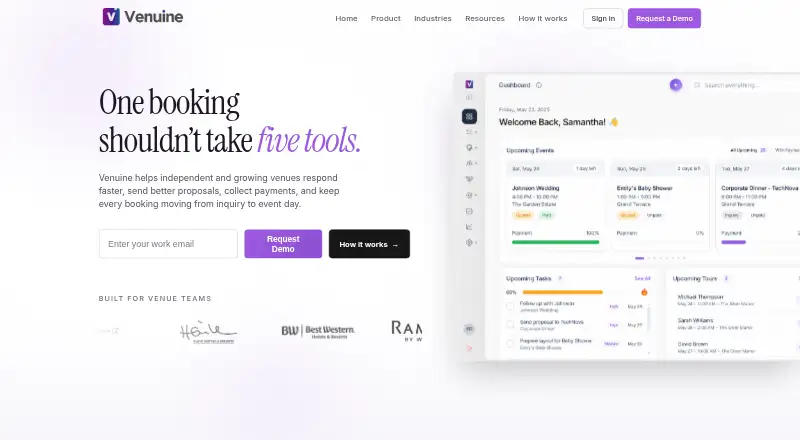
Venuine is an AI-powered venue management platform for handling bookings, proposals, contracts, payments, customer relationships, and floor plans from one dashboard. Its workflow connects inquiry capture and qualification through proposals, booking, and event handoff. The Veni assistant can draft proposals and follow-up emails, answer client inquiries, suggest prices based on venue history, and recommend floor-plan layouts. Accounts include a customizable public booking page for availability checks and requests, which venues can embed on a website or share by link. The editor supports itemized pricing, terms, custom clauses, and browser or mobile e-signatures for proposals and contracts. Venuine syncs with Google Calendar and integrates with Stripe and Square. Listed processing fees are 2.9% + 30¢ for Stripe and 2.6% + 10¢ for Square. It is available on Android, iOS, and the web, with subscription pricing available on request. Professional supports up to three venue locations; Enterprise offers unlimited venues. All plans include email support, while Enterprise includes a dedicated account manager and priority phone support.
Who it suits
Venuine is aimed at event-hosting businesses such as wedding venues, conference centers, banquet halls, and hotel event spaces. It may suit teams that want to manage bookings and event paperwork alongside payment and floor-plan tools.
What it does well
- Manages booking, contracts, payments, and floor plans.
- Veni can draft proposals and follow-up emails.
- Public booking pages can be embedded or shared.
- Supports Google Calendar sync.
- Available on Android, iOS, and the web.
What to know first
- Subscription pricing is available on request.
- Professional supports up to three venue locations.
- Payment processing fees apply for Stripe and Square.
Limits
Professional supports up to three venue locations; Enterprise offers unlimited venues. After cancellation, data remains accessible for export for 30 days.
Plans
| Plan | Billed and limits | Price |
|---|---|---|
| Pricing not published on the pages opened | Subscription pricing is not stated; request a demo | On request |
As venuine.com lists them, read 7 Oct 2026. The maker's own page has the final word.
Getting started
- Visit the Venuine website and request a demo.
- Choose a subscription plan after discussing pricing with Venuine.
- Set up the customizable public booking page to accept availability requests.
- Connect Google Calendar if you want calendar sync.
- Connect Stripe or Square if you want to process payments.
Venuine is an AI-assisted venue management platform for event spaces that need bookings, sales documents, payments and event handoff in one workflow. It is a strong fit for wedding venues, conference centers, banquet halls, hotels and similar operators managing more than simple inquiries. Its broad scope is useful, but custom pricing and processor fees should be weighed before committing.
Overview
Venuine connects inquiry capture and qualification to proposals, booking and event handoff from one dashboard. Customer relationships, venue calendars, space booking, payments and floor plans sit alongside the sales workflow, so staff do not have to move an inquiry into separate systems before an event is confirmed.
Each account includes a customizable public booking page. Prospective clients can check availability and submit requests, while the venue can embed the page on its own website or distribute it as a link. That gives operators a direct intake route without abandoning the central booking record.
Google Calendar synchronization helps align venue scheduling with an existing calendar. Venuine says connected calendar data is used to provide the enabled sync feature, not for advertising or AI training. Its security claims include TLS 1.3 in transit, AES-256 at rest and SOC 2-compliant cloud infrastructure; its privacy policy also says safeguards are reasonable and cannot guarantee absolute security.
Key features
Proposals, contracts and signatures
The editor handles proposals and contracts with itemized pricing, terms and custom clauses. Browser and mobile e-signatures keep approval in the same workflow as the booking, which suits venues that repeatedly turn qualified inquiries into formal agreements.
Veni AI assistant
Veni can draft proposals and follow-up emails, answer client inquiries, suggest pricing from the venue's history and recommend floor-plan layouts. Those functions can reduce repetitive sales and planning work, but pricing suggestions and generated responses still need oversight when an event has unusual requirements or high financial stakes.
Public booking and event operations
The booking page combines availability checks with request submission and can be embedded or shared. Alongside venue calendars and space booking, Venuine includes event-day tools and floor-plan tools, extending its usefulness beyond lead management to preparation and handoff.
Payments and data handling
Stripe and Square integrations let venues collect payments through established processors. Stripe processing is 2.9% + 30¢ per transaction, while Square is 2.6% + 10¢. Venuine says processors handle payment data and that it does not store full card details, but these transaction charges remain part of the operating cost.
Pricing
Venuine uses custom pricing; subscription prices are not published, so a venue must request a demo or quote. Every plan includes email support with an average response time under four hours during business hours.
Professional
Professional supports up to three venue locations and adds priority support. It is the logical tier for a growing operator with several properties that needs faster assistance, while a single small venue should confirm that the broader platform justifies a negotiated subscription.
Enterprise
Enterprise allows unlimited venues and includes a dedicated account manager plus priority phone support. It is aimed at multi-property organizations that need centralized assistance; smaller operators are unlikely to need its location capacity or service level.
Subscriptions can be cancelled from account settings at any time. Data remains accessible for 30 days after cancellation for export, giving departing customers a defined window to retrieve records. Processor fees are separate from the subscription decision.
Platforms
Venuine runs on the web and has Android and iOS apps. That combination supports office-based administration and mobile work such as reviewing inquiries, signing documents or handling event preparation away from a desk.
Who it's for
Venuine is designed for wedding venues, conference centers, banquet halls, hotel event spaces and other event-hosting businesses. It makes the most sense when one operation needs public inquiries, proposals, contracts, payments, calendars and floor plans connected end to end. A venue seeking only a lightweight calendar or lead form may find its breadth and custom-sales process disproportionate.
Pros and cons
- Pro: Inquiry capture, proposals, contracts, booking and event handoff share one workflow, reducing duplicate entry between sales and operations.
- Pro: Veni covers drafting, inquiry responses, historical pricing suggestions and floor-plan recommendations, targeting several recurring administrative tasks.
- Pro: Public booking pages can be embedded or shared, giving venues a customer-facing request path they control.
- Pro: Browser and mobile signatures, Google Calendar sync, Stripe and Square integrations support common booking and payment processes.
- Con: Subscription prices require a quote, making budget comparison difficult before a sales conversation.
- Con: Stripe and Square fees add per-payment costs, even though Venuine does not retain full card details.
- Con: Professional is capped at three locations; unlimited venues requires Enterprise.
Alternatives
For a no-monthly-software-fee model where renters pay a 4% service fee plus payment processing, choose Metro-Tec Rentals; it offers Android, iOS and web access with a free plan and trial.
Choose Joinways when a permanently free, web/API/extension option for one venue, two spaces and 10 inquiries per month is enough, accepting that excess inquiries are locked and the free tier has no proposals or e-signatures.
Velsa suits teams wanting a self-hosted community edition at no cost, or a $199-per-month Starter plan, rather than a quote-based hosted arrangement.
Pick VenueArc for a free single-facility plan with core booking, calendar, scheduling, basic reporting and email support.
VenueSprocket is a web-based alternative with a free plan capped at 10 leads per month and basic inquiry, calendar and customer-record tools.
Choose GridX Events if a free web plan covering leads, quotations, bookings with payment schedules, availability and blackout dates matches your process.
Events500 is another paid option available through web and API platforms.
For district-scale facility operations on Android and iOS, consider Facilitron FIT, which prices its software according to district size and scope.
Verdict
Choose Venuine if your event venue wants one system for public inquiries, AI-assisted sales work, agreements, payments, scheduling and floor plans, especially across multiple locations. Look elsewhere if you need transparent subscription pricing, a permanently free entry tier or a simpler tool focused on one part of venue administration.
Verdict
Venuine brings venue booking workflows and event administration into one platform, with an AI assistant and public booking pages. Check pricing with the provider and account for the listed payment processor fees.
Questions
How much does Venuine cost?
Subscription pricing is available on request, and Venuine offers a demo.
Which platforms can I use?
Venuine is available on Android, iOS, and the web.
Which payment services does it integrate with?
Venuine integrates with Stripe and Square. The listed processing fees are 2.9% + 30¢ for Stripe and 2.6% + 10¢ for Square.
Can clients book through a public page?
Yes. Each account includes a customizable page where clients can check availability and submit requests. Venues can embed it on their website or share it by link.
How many venues can a plan support?
Professional supports up to three venue locations. Enterprise offers unlimited venues.
What happens after I cancel?
You can cancel from account settings at any time. Your data remains accessible for export for 30 days after cancellation.
Facts from Venuine's own pages
- AI assistant
- Veni can draft proposals and follow-up emails, suggest pricing based on venue history, answer client inquiries, and recommend floor plan layouts. · venuine.com, 7 Oct 2026
- Audience
- Venuine is aimed at event venues including wedding venues, conference centers, banquet halls, hotel event spaces, and other event-hosting businesses. · venuine.com, 7 Oct 2026
- Booking pages
- Accounts include a customizable public booking page that clients can use to check availability and submit requests, and that venues can embed on their website or share by link. · venuine.com, 7 Oct 2026
- Calendar integration
- Venuine supports Google Calendar sync; its privacy policy says connected calendar data is used to provide the enabled sync feature and is not used for advertising or AI training. · venuine.com, 7 Oct 2026
- Cancellation and data
- Subscriptions can be cancelled from account settings at any time, and data remains accessible for 30 days after cancellation for export. · venuine.com, 7 Oct 2026
- Company
- The maker identifies itself as Venuine, Inc.; its About page says the founding team researched venue operations in 2024 but does not state a headquarters or founding date. · venuine.com, 7 Oct 2026
- Contracts
- The built-in editor supports proposals and contracts with itemized pricing, terms, custom clauses, and browser or mobile e-signatures. · venuine.com, 7 Oct 2026
- Payment data
- Venuine says payments are processed by third-party processors and that it does not store full payment card details. · venuine.com, 7 Oct 2026
- Payment integrations
- Venuine integrates with Stripe and Square; the FAQ lists processing fees of 2.9% + 30¢ for Stripe and 2.6% + 10¢ for Square. · venuine.com, 7 Oct 2026
- Plan limits
- The FAQ says Professional supports up to three venue locations and Enterprise offers unlimited venues. · venuine.com, 7 Oct 2026
- Product
- Venuine is an AI-powered venue management platform for managing bookings, proposals, contracts, payments, customer relationships, and floor plans from one dashboard. · venuine.com, 7 Oct 2026
- Security
- The FAQ claims TLS 1.3 in transit, AES-256 at rest, and SOC 2-compliant cloud infrastructure; the privacy policy separately describes its safeguards as reasonable and says it cannot guarantee absolute security. · venuine.com, 7 Oct 2026
- Support
- All plans include email support with an average response time under four hours during business hours; Professional includes priority support and Enterprise includes a dedicated account manager and priority phone support. · venuine.com, 7 Oct 2026
- Workflow
- It connects the work from inquiry capture and qualification through proposals, booking, and event handoff. · venuine.com, 7 Oct 2026
Where Venuine stands on Freedom251
- Event Venue Management Software#22 of 24