Freedom251 › PC Migration Software
UserFolderMigrator
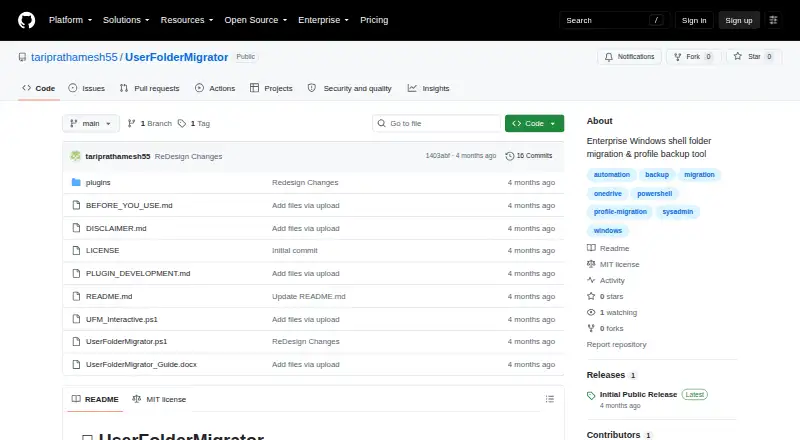
What UserFolderMigrator is
UserFolderMigrator is a free PowerShell tool for moving Windows shell folders and backing up or restoring user profiles. It can move Desktop, Documents, Downloads, Pictures, Music, and Videos, update their registry paths, and optionally remove the original folders. Backups can include AppData, Wi-Fi profiles, printers, scheduled tasks, mapped drives, and WSL distributions. Restore runs through eight stages for files, registry settings, access control lists, Wi-Fi, mapped drives, scheduled tasks, printers, and WSL distributions.
For checking file integrity, it supports MD5, SHA1, and SHA256 checksums. Checkpointing and resume help continue interrupted work. Dry-run mode simulates changes without modifying files or the registry, while report-only mode creates HTML and JSON reports. Notifications can be sent by SMTP email, Microsoft Teams webhook, or remote syslog. A plugin system loads PowerShell modules from a plugins folder and provides hooks during migration stages. The project also documents optional signature and manifest checks and a BitLocker requirement for the destination. UserFolderMigrator requires PowerShell 7 or later, Windows 10 or Server 2016 or later, and administrator privileges. It is Windows-only; the main script has no GUI, though an interactive wrapper is included.
Who it suits
It suits home users, IT administrators, MSPs, consultants, Intune or SCCM engineers, and home-lab users who need to move Windows folders or handle profile backup and restoration. Its selective transfers, reporting modes, and recovery features are useful for administrators planning or resuming migration work.
What it does well
- Moves six common Windows shell folders and updates registry paths.
- Backups can include AppData, Wi-Fi, printers, and WSL distributions.
- Supports checksums and checkpointing with resume.
- Dry-run and report-only modes avoid making changes.
- Sends notifications through email, Teams, or remote syslog.
- MIT-licensed and free to use.
What to know first
- Works only on Windows.
- Requires PowerShell 7 or later and administrator privileges.
- The main script has no GUI.
- Some listed environments and restore scenarios are untested or may have issues.
Limits
The tool is free under the MIT License. It is limited to Windows, and the main script has no GUI. Domain roaming profiles, Azure AD-only environments, ReFS volumes, and cross-architecture printer restores are listed as untested or potentially problematic.
Plans
| Plan | Billed and limits | Price |
|---|---|---|
| Free | Free tool · MIT License · Windows only | Free |
As github.com lists them, read 8 Oct 2026. The maker's own page has the final word.
Getting started
- Open the UserFolderMigrator GitHub page.
- Use a Windows 10 or later PC, or Windows Server 2016 or later.
- Install or use PowerShell 7 or later.
- Run with administrator privileges.
- Choose the migration, backup, or restore operation and use dry-run or report-only mode when appropriate.
UserFolderMigrator is a free PowerShell toolkit for relocating Windows shell folders and carrying user profiles through backup and restore operations. It is aimed at administrators, MSPs, consultants, deployment engineers, and technically capable home users who need selective, repeatable control. The payoff is unusually broad migration coverage without a licence fee; the cost is an administrator-level, command-line workflow rather than a conventional desktop application.
Overview
The script combines shell-folder redirection, profile backup, and profile restoration. It can move Desktop, Documents, Downloads, Pictures, Music, and Videos, update their registry paths, and optionally remove the source after migration. This is a practical fit for rebuilds and storage-layout changes where the destination must become Windows' active location, not merely a second copy of the data.
A full profile backup can extend to AppData, Wi-Fi profiles, printers, scheduled tasks, mapped drives, and WSL distributions. Selective transfer is supported, so an operator can restore only the components needed for a particular machine or incident. That flexibility is valuable in managed environments, although hardware- and environment-specific items require care when restored to a different target.
Key features
Migration and recovery
Restore follows an eight-phase pipeline covering files, registry data, ACLs, Wi-Fi, mapped drives, scheduled tasks, printers, and WSL distributions. The staged approach gives administrators a defined recovery sequence instead of an all-at-once copy. MD5, SHA1, or SHA256 checksums provide integrity checks, while checkpoint and resume support can continue an interrupted operation rather than forcing a complete restart.
Dry runs, reports, and notifications
Dry-run mode simulates work without changing the filesystem or registry, making it useful for validating a migration plan before committing it. Report-only mode produces HTML and JSON reports without changes, which suits audit and change-review workflows. SMTP notifications, Microsoft Teams webhooks, and forwarding to a remote syslog server help teams monitor longer or distributed jobs.
Extensibility and safeguards
A plugin system loads PowerShell modules from a plugins folder and exposes hooks across migration stages, giving IT teams a way to add workflow-specific logic. Security controls include optional Authenticode signature enforcement, plugin-manifest hash checks, HMAC-signed manifests, and a requirement that the destination use BitLocker. These controls are useful for controlled deployments, but they add operational decisions that casual users may not want to manage.
Pricing
| Plan | Price | Includes |
|---|---|---|
| Free | free | Free tool, MIT License, Windows only |
There is no paid tier or free trial. The single plan fits home users, IT administrators, MSPs, consultants, Intune or SCCM engineers, and home-lab operators who can supply their own Windows and PowerShell administration. It does not promise a vendor-backed commercial support package; bug reports go through GitHub Issues, and email feedback receives replies when time allows.
Platforms
UserFolderMigrator requires PowerShell 7 or later, Windows 10 or Windows Server 2016 or later, and administrator privileges. It is Windows-only. The main script has no graphical interface, although an interactive wrapper is included, so it is a poor match for users expecting a point-and-click migration suite.
Who it's for
Choose it for controlled workstation rebuilds, profile preservation, folder redirection, or selective restoration where scripting and detailed reporting matter. It is especially well suited to administrators and service providers managing repeatable procedures. Home users can benefit when they are comfortable with elevated PowerShell and want more than a file-copy utility. Domain roaming profiles, Azure AD-only environments, ReFS volumes, and cross-architecture printer restores are identified as untested or potentially problematic, so those cases call for caution.
Pros and cons
Pros
- Broad profile coverage: backups can include AppData, connectivity settings, printers, scheduled tasks, mapped drives, and WSL distributions.
- Selective and recoverable operations: component-level transfer, checksums, and checkpoint/resume support controlled recovery.
- Safe planning and auditing: dry runs plus HTML and JSON reporting reduce the risk of committing an incorrect registry or filesystem change.
- Automation hooks: plugins, email, Teams, and syslog integrations fit managed operations.
- No licence cost: the MIT-licensed tool is free for Windows use.
Cons
- No full GUI: the primary workflow requires elevated PowerShell knowledge.
- Windows lock-in: it cannot serve macOS or Linux migration needs.
- Compatibility uncertainty: several enterprise and cross-architecture scenarios are untested or may have issues.
- Operational responsibility: plugin, signing, HMAC, and BitLocker controls require administrators to configure and govern them.
Alternatives
For a broader survey of migration products, see PC Migration Software. If your task is database structure comparison rather than Windows profile movement, Database Schema Comparison Tools is the relevant category.
apgdiff is a free, MIT-licensed PostgreSQL schema-diff tool for Linux, macOS, and Windows, so choose it for cross-platform PostgreSQL schema work. dbForge Studio for PostgreSQL suits readers wanting a freemium, cross-platform PostgreSQL environment with a free Express plan and visual editing features. Skeema is the alternative when MySQL-oriented schema tooling and a paid Plus tier are appropriate. sqldef is a free, open-source CLI option for schema changes across Linux, macOS, self-hosted, and Windows. pgquarrel is another free, BSD-3-Clause-licensed choice for PostgreSQL comparison. driftcurve is a free self-hosted or web/API option with no accounts in its default local mode. Windows Malicious Software Removal Tool is for removing prevalent malware families, not migrating profiles. DBC is a free database-focused alternative available on Linux, macOS, and Windows.
Verdict
UserFolderMigrator is a strong choice for Windows administrators and technically confident users who need free, selective profile migration with restore staging, integrity checks, reporting, and automation hooks. Look elsewhere if you need a full graphical application, non-Windows support, or dependable coverage for the maker's untested enterprise and cross-architecture scenarios.
Verdict
Choose UserFolderMigrator if you need a free Windows tool for selective folder migration, profile backup, or restore, with reporting and recovery options. Look elsewhere if you need a graphical main application or support beyond Windows; the maker also flags several scenarios as untested or potentially problematic.
Questions
How much does UserFolderMigrator cost?
It is free. The plan is listed as free, and the project states it uses the MIT License.
Which Windows versions does it require?
It requires Windows 10 or later, or Windows Server 2016 or later, plus PowerShell 7 or later and administrator privileges.
Can it back up and restore a user profile?
Yes. Backups can include AppData, Wi-Fi profiles, printers, scheduled tasks, mapped drives, and WSL distributions. Restore uses an eight-phase pipeline covering files, registry, ACLs, and those profile components.
Does it have a graphical interface?
The main script has no GUI, but the project includes an interactive wrapper.
What license does it use?
The repository states that UserFolderMigrator is provided under the MIT License.
How can I contact the maker for support?
The maker invites bug reports through GitHub Issues and feedback by email, with replies when time allows.
Facts from UserFolderMigrator's own pages
- Extensibility
- A plugin system loads PowerShell modules from a plugins folder and provides hooks across migration stages. · github.com, 8 Oct 2026
- Integrations
- It supports SMTP email notifications, Microsoft Teams webhooks, and forwarding events to a remote syslog server. · github.com, 8 Oct 2026
- Integrity and recovery
- The script supports MD5, SHA1, or SHA256 checksums and checkpoint/resume for interrupted operations. · github.com, 8 Oct 2026
- Intended users
- The README identifies home users, IT administrators, MSPs and consultants, Intune or SCCM engineers, and home-lab users as intended audiences. · github.com, 8 Oct 2026
- License
- The repository states that UserFolderMigrator is provided under the MIT License. · github.com, 8 Oct 2026
- Limits
- The project says it is Windows-only and has no GUI for the main script, though it includes an interactive wrapper. · github.com, 8 Oct 2026
- Migration
- It can move shell folders such as Desktop, Documents, Downloads, Pictures, Music, and Videos, update their registry paths, and optionally clean up the source. · github.com, 8 Oct 2026
- Profile backup
- Full profile backups can include AppData, Wi-Fi profiles, printers, scheduled tasks, mapped drives, and WSL distributions. · github.com, 8 Oct 2026
- Purpose
- UserFolderMigrator is a PowerShell script for Windows shell folder migration, profile backup and restore, and redirect management. · github.com, 8 Oct 2026
- Requirements
- It requires PowerShell 7 or later, Windows 10 or Server 2016 or later, and administrator privileges. · github.com, 8 Oct 2026
- Restore
- Profile restore uses an eight-phase pipeline covering files, registry, ACLs, Wi-Fi, mapped drives, scheduled tasks, printers, and WSL distributions. · github.com, 8 Oct 2026
- Safety
- Dry-run mode simulates operations without filesystem or registry changes, and report-only mode generates HTML and JSON reports without making changes. · github.com, 8 Oct 2026
- Security
- The project documents optional Authenticode signature enforcement, plugin manifest hash checks, HMAC-signed manifests, and a BitLocker destination requirement. · github.com, 8 Oct 2026
- Support
- The maker invites bug reports through GitHub Issues and feedback by email, and says replies are sent when time allows. · github.com, 8 Oct 2026
- Untested cases
- The maker lists domain roaming profiles, Azure AD-only environments, ReFS volumes, and cross-architecture printer restores among scenarios that are untested or may have issues. · github.com, 8 Oct 2026
Where UserFolderMigrator stands on Freedom251
- PC Migration Software#10 of 26
- Database Schema Comparison Tools#15 of 25