Freedom251 › Database Schema Comparison Tools
sqldef
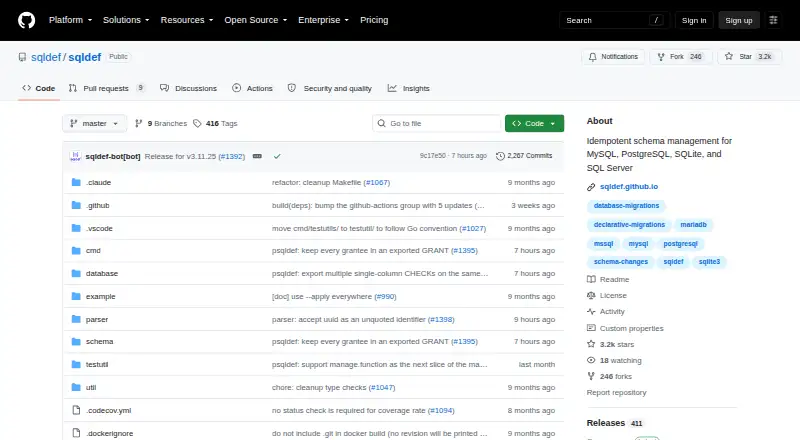
What sqldef is
sqldef is a free command-line tool for managing relational database schema changes with SQL DDLs. You maintain a SQL file describing the complete schema you want; sqldef compares it with the current database and generates and applies the required changes. It lists support for MySQL, MariaDB, TiDB, PostgreSQL, SQL Server, and SQLite3. The workflow can export a database schema and preview proposed migrations in a dry run. It can also compare SQL files without a database connection, for schema validation, CI/CD, or migration-script generation. Repeated runs are safe: when the database already matches the desired schema, a later run shows no changes. Rename annotations are documented for tables, columns, indexes, and ENUM values. Each database tool is distributed as a single binary without dependencies. The project lists Linux, macOS, Windows, and self-hosted availability, and links to Docker images and a GitHub Action for previewing changes. Linux binaries and Docker images are available, but Debian packages are not currently offered. Source files use the MIT License; the parser uses Apache License 2.0.
Who it suits
sqldef suits developers and teams managing schema changes across supported relational databases using SQL. Its offline file comparison and GitHub Action may fit validation and CI/CD workflows.
What it does well
- Supports six listed database engines
- Previews migrations with dry-run
- Compares SQL files without a database connection
- Single binaries have no dependencies
- Free: free
What to know first
- Debian packages are not currently available
- Free trial is not offered
Plans
| Plan | Billed and limits | Price |
|---|---|---|
| sqldef | Open-source CLI tool · MIT license (parser is Apache 2.0) | Free |
As github.com lists them, read 30 Sept 2026. The maker's own page has the final word.
Getting started
- Open the sqldef GitHub project page.
- Choose a database-specific tool for one of the supported engines.
- Use a listed platform route, such as a prebuilt Linux binary, Docker image, or available macOS Homebrew tap.
- Maintain a SQL file with the complete desired schema.
- Export the current schema or compare SQL files offline, then preview changes with a dry run.
sqldef is a free command-line tool for teams that want to manage relational database changes in SQL. It is at its best when a team can treat a complete schema file as the desired state and use repeatable comparisons in deployment workflows. Choose it for that SQL-first, multi-engine approach; look elsewhere if a graphical workspace is central to how you manage databases.
Overview
Keep the complete schema you want in a SQL file, and sqldef compares it with the current database to generate and apply the required DDL. This shifts the workflow away from maintaining each migration step by hand. Its idempotent operations are useful in recurring deployments: once the database matches the file, running the command again produces no changes. That repeatability helps make schema updates predictable, though teams still need to review proposed changes as part of their own release process.
Supported engines include MySQL, MariaDB, TiDB, PostgreSQL, SQL Server, and SQLite3. That range can help teams standardize their schema-change workflow across different relational databases, but it does not make SQL portable between them; schemas must still fit their target engines.
Key features
- Declarative schema comparison: Compare a complete desired schema with the current database, then generate and apply DDL changes. This suits teams that prefer describing the end state over tracking every edit as a separate migration step.
- Dry-run and export: Export the current schema and preview migrations without executing them. That gives developers a chance to inspect proposed changes before applying them, rather than making a preview depend on a live alteration.
- Offline comparison: Compare two SQL files without connecting to a database. This makes sqldef useful for validating schema changes in CI/CD or generating migration scripts before a database is involved.
- Rename annotations: An @renamed annotation documents renames of tables, columns, indexes, and ENUM values. That gives the comparison workflow an explicit way to represent changes that might otherwise be interpreted differently.
- Repeatable commands: Operations are safe to run more than once, and a database already aligned with the desired schema yields no changes. This is a practical fit for automated workflows that may invoke the same operation repeatedly.
- Single-binary distribution: Each database tool is distributed as a binary without dependencies, reducing setup requirements. Docker images and a GitHub Action for previewing schema changes also provide options for containerized and CI workflows.
Pricing
sqldef is free: its plan costs nothing. It is an open-source CLI tool under the MIT License, with the parser under Apache License 2.0. There is no free trial to weigh against a paid tier; the tool itself is the free offering.
That makes it an accessible option for individuals and teams without a per-seat or subscription cost. The trade-off is the command-line, SQL-based workflow: the free price does not turn it into a visual database management environment.
Platforms
sqldef is cross-platform, with support for Linux, macOS, Windows, and self-hosted use. Linux users can choose prebuilt binaries or Docker images, though Debian packages are not available. On macOS, the Homebrew tap covers mysqldef, psqldef, sqlite3def, and mssqldef. The project also links to a GitHub Action for previewing changes, which is useful for teams that want schema checks in CI/CD.
Who it's for
sqldef suits developers and database teams comfortable writing SQL and working from the command line. It is particularly relevant when a team wants one desired-state workflow for supported relational databases, or needs to compare SQL files offline as part of validation and migration-script generation. It is a weaker fit for people who want a graphical interface or prefer to manage changes through a visual editor.
Pros and cons
- Pro: A complete desired schema drives generated DDL, reducing the need to maintain every change as a separate hand-written migration step.
- Pro: Dry-run previews, offline file comparison, and repeatable operations support review and automation before changes reach a database.
- Pro: Six supported database engines and a no-dependency binary distribution make the tool relevant across varied SQL environments.
- Con: The workflow is SQL and command-line centered, so it is not the right choice for readers who need visual schema management.
- Con: Support across multiple engines does not make schemas interchangeable; teams must still account for each database's SQL.
- Con: Linux users looking specifically for a Debian package will need to use another distribution route.
Alternatives
For a free PostgreSQL schema diff tool, apgdiff is a narrower option; sqldef is the better fit when support for several database engines matters. Choose dbForge Studio for PostgreSQL instead if you want a freemium PostgreSQL tool with a free trial and features such as context-aware code completion, query history, a visual data editor, and data export and import.
Skeema is worth considering for MySQL-focused teams that want table, stored procedure, and function support plus 18 linter checks in its free Community plan; its Plus plan is $124 a month. pgquarrel is another free alternative for readers comparing PostgreSQL schemas.
driftcurve is a free self-hosted option with no subscription and no accounts in its default local mode. UserFolderMigrator is a free, Windows-only alternative. DBC is another free option for Linux, macOS, and Windows users, while dbdiff is a free alternative available for Linux, macOS, Windows, and self-hosted use. Browse Database Schema Comparison Tools for more options.
Verdict
Choose sqldef if you want a free, repeatable SQL workflow for generating, previewing, and applying schema changes across multiple relational engines. Its strongest advantage is combining desired-state comparison with offline checks and automation-friendly operations. Look elsewhere if your priority is a graphical interface or a workflow that hides SQL and command-line work.
Verdict
sqldef offers a SQL-based workflow for generating, previewing, and applying changes across multiple database engines. Its offline comparison and repeatable operations are useful options for teams managing schema changes.
Questions
How much does sqldef cost?
sqldef is free. Its listed plan is free.
Which databases does sqldef support?
The project lists MySQL, MariaDB, TiDB, PostgreSQL, SQL Server, and SQLite3.
Can I preview changes before applying them?
Yes. The command workflow includes a dry-run mode to preview migrations without executing them.
Can sqldef work without a database connection?
Yes. It can compare two SQL files offline for validation, CI/CD, and migration script generation.
What platforms are listed?
Linux, macOS, Windows, and self-hosted use are listed. The project provides prebuilt Linux binaries and Docker images; its Homebrew tap covers mysqldef, psqldef, sqlite3def, and mssqldef.
What license does sqldef use?
The repository says its source files use the MIT License and its parser uses Apache License 2.0.
Facts from sqldef's own pages
- Build and dependencies
- The project says each database tool is distributed as a single binary with no dependencies. · github.com, 30 Sept 2026
- Databases
- The project lists support for MySQL, MariaDB, TiDB, PostgreSQL, SQL Server, and SQLite3. · sqldef.github.io, 30 Sept 2026
- Declarative schemas
- Users maintain a SQL file with the complete desired schema, which sqldef compares with the current schema to generate and apply DDL changes. · github.com, 30 Sept 2026
- Idempotence
- The README says operations are safe to run multiple times and repeated runs show no changes when the database already matches the desired schema. · github.com, 30 Sept 2026
- Integrations
- The project links to Docker images on Docker Hub and a GitHub Action that previews database schema changes. · github.com, 30 Sept 2026
- Intended users
- The project describes sqldef as a tool for managing schema changes across supported relational databases using SQL. · sqldef.github.io, 30 Sept 2026
- License
- The repository says source files are distributed under the MIT License, with the parser under Apache License 2.0. · github.com, 30 Sept 2026
- Linux availability
- The README provides prebuilt Linux binaries and Docker images and says Debian packages are not currently available. · github.com, 30 Sept 2026
- macOS availability
- The README says a Homebrew tap is available for mysqldef, psqldef, sqlite3def, and mssqldef. · github.com, 30 Sept 2026
- Offline mode
- sqldef can compare two SQL files without connecting to a database, for schema validation, CI/CD, and migration script generation. · github.com, 30 Sept 2026
- Preview and export
- The command workflow includes exporting the current schema and using dry-run to preview migrations without executing them. · github.com, 30 Sept 2026
- Purpose
- sqldef is a CLI tool for diffing SQL schemas and managing relational database migrations with regular SQL DDLs. · sqldef.github.io, 30 Sept 2026
- Rename support
- The README documents renaming tables, columns, indexes, and ENUM values using an @renamed annotation. · github.com, 30 Sept 2026
- Security and provenance
- The release page marks the release commit as signed with GitHub’s verified signature and displays a release attestation asset. · github.com, 30 Sept 2026
- Support and community
- The README directs feature requests to pull requests or GitHub Discussions. · github.com, 30 Sept 2026
Where sqldef stands on Freedom251
- Database Schema Comparison Tools#9 of 25