Freedom251 › Photo Management Software
Tonfotos
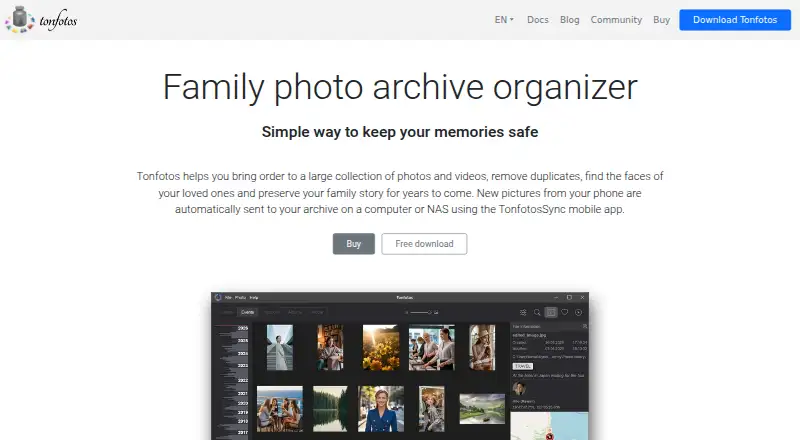
What Tonfotos is
Tonfotos organizes photo and video collections, helps find duplicates, recognizes people, and provides tools for recording family history. Its AI groups faces and learns from identifications, including when people appear at different ages or with partly visible faces. Users can record relationships and genealogical details, view them in a family tree, and search archives by people, events, tags, dates, or shooting locations. Files can remain on a PC, NAS, or removable drive, and the archive is described as usable offline when drives or shared folders are disconnected. TonfotosSync for iOS and Android transfers new phone photos to a computer or NAS after QR-code pairing; the app can also download Telegram photos and videos shared with the user. It indexes RAW and HEIC, and can display HEIC without JPEG conversion. Other tools include albums, slideshows, favorites, photo conversion, and duplicate removal. The free lifetime license has full functionality but limits the number of people in photos. Paid licenses cost $59.00 once for Personal or $159.00 once for Family.
Who it suits
Tonfotos suits people organizing large personal or family photo collections who want face-based search and family-history records. It may also suit users who want archives stored on a PC, NAS, or removable drive rather than mandatory cloud storage.
What it does well
- Search by people, events, tags, dates, and locations
- Records relationships and genealogical information
- Indexes RAW and HEIC images
- Archives can remain on local or removable storage
What to know first
- Free license limits the number of people in photos
- No free trial
- Privacy policy lists usage and crash-report data processing
Limits
The Free license is lifetime use with full functionality, but limits the number of people in photos. The Personal license costs $59, paid once and covers one user or device; the Family license costs $159, paid once and covers up to five users or devices.
Plans
| Plan | Billed and limits | Price |
|---|---|---|
| Free license | No time limit · Full paid-version functionality · limited number of people · anonymous usage statistics | Free |
| Family license | Lifetime/perpetual · Up to 5 users/devices · synchronized people information · simultaneous installation on different operating systems · priority email support | $159, paid once |
| Personal license | Lifetime/perpetual · 1 user/device · unlimited people · anonymous statistics can be disabled · priority email support | $59, paid once |
As tonfotos.com lists them, read 15 Oct 2026. The maker's own page has the final word.
Getting started
- Visit the Tonfotos website.
- Choose Android, iOS, Linux, macOS, or Windows.
- Select the Free, Personal, or Family license.
- For phone photo transfer, install TonfotosSync on iOS or Android and pair it by QR code.
Tonfotos is a cross-platform photo and video organizer built around local archives, AI people recognition, and family-history records. It suits households that want one searchable collection on a computer or NAS rather than a mandatory cloud library. Its lifetime licenses are particularly compelling for families, while the free edition is a practical way to organize smaller people collections.
Overview
Tonfotos brings photo management and family documentation into one archive. It can remove duplicates, index images and videos, and search by people, events, tags, dates, and shooting locations. Face recognition groups people automatically, learns from confirmed identities, and can still match faces at different ages or when partly hidden. That makes a large, mixed-age family archive more usable than a folder-only approach.
The family-history tools go beyond tagging: you can record relationships and genealogical information, then browse those connections as a family tree. Files stay on a PC, NAS, or removable drive, and the archive is designed to remain usable offline when a drive or shared folder is disconnected. This is a strong fit for privacy-conscious owners who already control storage, but it is not a cloud-sync service.
Key features
- AI organization: Face grouping and AI-powered search reduce the work of finding relatives, occasions, and places. Recognition that improves from identified people is useful for long-running archives.
- Local storage control: Keep originals on a computer, NAS, or removable hard drive without mandatory cloud storage or monthly fees. Offline access is valuable when network shares are unavailable, though it leaves backup and drive management to you.
- Phone intake: TonfotosSync for iOS and Android sends new phone photos automatically to a computer or NAS after QR-code pairing, turning the desktop archive into a destination for ongoing capture.
- Telegram downloads: Shared photos and videos from Telegram can be downloaded automatically, useful for family groups that exchange media there.
- Broad media support: RAW and HEIC files are indexed, and HEIC images can be viewed without conversion. Slideshows, albums, favorites, conversion, duplicate removal, and File Explorer viewing cover everyday maintenance and browsing.
- Privacy considerations: The developer says you choose the archive location. Its privacy policy also allows processing of usage statistics, activation and computer data, crash reports, and names, filenames, folders, tags, or albums that appear in crash reports.
Pricing
| Plan | Price and terms | What you get |
|---|---|---|
| Free license | 0.00 USD, lifetime use, no time limit | Full paid-version functionality, but a limited number of people in photos; anonymous usage statistics |
| Personal license | 59.00 USD once, perpetual lifetime license | 1 user/device, unlimited people in photos, optional disabling of anonymous usage statistics, priority email support |
| Family license | 159.00 USD once, perpetual lifetime license | Up to 5 users/devices, synchronized people information, installation on different operating systems |
The free license is best for individual archives where the recognized-person count stays modest; it keeps the full feature set but its people limit can become restrictive for extensive family collections. Personal removes that cap for one installation and adds support and statistics control. Family costs more but is the logical choice when several people need their own devices and shared identity data. There is no free trial, and the published paid pricing is a one-time purchase rather than a renewal subscription.
Platforms
Tonfotos runs on Android, iOS, Linux, macOS, and Windows. The Family license specifically supports installations across different operating systems. RAW support, metadata tools, and multi-platform coverage make it suitable for mixed-device households; cloud sync is not offered.
Who it's for
Choose Tonfotos if you want a searchable, locally controlled archive, automatic phone imports, and family-tree context in the same application. It is especially well suited to families sharing a long history of photos across several operating systems, and to photographers who keep RAW files. Look elsewhere if your priority is provider-managed cloud storage, built-in off-site redundancy, or a subscription service that handles backup infrastructure for you.
Pros and cons
Pros
- Face recognition handles age changes and partially visible faces, improving results in real family albums.
- Family trees and relationship records add context that ordinary photo catalogues lack.
- Local, offline-capable archives avoid mandatory cloud storage and recurring fees.
- HEIC viewing, RAW indexing, duplicate removal, and Telegram and phone ingestion cover varied sources.
- One-time Personal and Family licenses provide perpetual use, with Family synchronizing people data across users.
Cons
- The free edition limits the number of people in photos, which can constrain large collections.
- No cloud sync means you must arrange your own backup and keep storage devices available.
- The privacy policy permits crash reports containing file and album names, folders, or tags.
- Personal is limited to one user/device; multi-user households need the costlier Family license.
Alternatives
For broader backup comparisons, see Photo Backup Software; for cataloguing-focused options, see Photo Management Software.
- IDrive is a better fit when you want cloud backup, web access, and a free trial, with plans starting from 10 GB in its Basic tier.
- PhoneCopy suits users prioritizing cross-device synchronization of contacts, calendars, tasks, notes, and media rather than family-tree cataloguing.
- Ente Photos is preferable when encrypted cloud photo storage and a 10 GB free tier are more important than local-only archives.
- PhotoSync is aimed at straightforward transfers; its free tier offers basic transfers, while full-size, RAW, NAS, and cloud features are paid.
- Rawback is worth considering for cloud storage combined with monthly AI and face-recognition quotas, including a 5 GB free plan.
- Fotoback targets iOS and macOS users wanting encrypted backup and a baby timeline, with a free one-child profile.
- Immich is the choice for a free, self-hosted server-based photo library.
- Pho is an option for users who want an open-source core sync engine and a local gallery.
Verdict
Tonfotos is a strong recommendation for families and serious personal archivists who want local storage, dependable people-based search, and genealogical context without subscription payments. The main reason to choose it is the combination of AI organization and family-history features across desktop and mobile platforms. Look elsewhere if you need built-in cloud backup, web-first access, or infrastructure managed for you.
Verdict
Tonfotos combines collection organization, face recognition, and family-history features across desktop and mobile platforms. The free license includes full functionality but limits the number of people in photos; paid lifetime licenses remove that limit for Personal and Family use.
Questions
Is Tonfotos free?
Yes. Its Free license costs nothing and provides lifetime use with full functionality, subject to a limit on the number of people in photos.
What do the paid licenses cost?
The Personal license is $59, paid once, and the Family license is $159, paid once. Both are perpetual lifetime licenses.
Which platforms does Tonfotos support?
It is available on Android, iOS, Linux, macOS, and Windows.
Does Tonfotos use cloud storage?
Cloud sync is listed as no. Photo files can remain on a PC, NAS, or removable hard drive.
Who makes Tonfotos?
Tonfotos lists its headquarters in Yerevan, Armenia.
Does Tonfotos offer a free trial?
No. A free trial is not offered; a Free license is available.
Facts from Tonfotos's own pages
- Albums and favorites
- Users can create albums and mark favorites without changing the original storage locations. · tonfotos.com, 15 Oct 2026
- Backup limitation
- Tonfotos states that it organizes existing files but does not create or manage independent backup copies, so backup remains the user’s responsibility. · tonfotos.com, 15 Oct 2026
- Company founding
- LinkedIn lists Tonfotos as founded in 2021 with headquarters in Moscow, Russia. · linkedin.com, 15 Oct 2026
- Company size
- LinkedIn lists Tonfotos as a privately held desktop-computing software company with 2–10 employees. · linkedin.com, 15 Oct 2026
- Documentation
- The official manual covers library setup, imports, duplicates, people, family trees, events, locations, tags, metadata, conversion, slideshows, hotkeys and supported formats. · tonfotos.com, 15 Oct 2026
- Documentation limitation
- The documentation navigation describes user features and reference material but provides no public API or SDK section. · tonfotos.com, 15 Oct 2026
- Duplicate cleanup
- Tonfotos detects duplicate images so users can remove copies and free storage space. · tonfotos.com, 15 Oct 2026
- Face recognition
- Local neural-network face recognition finds people, learns from confirmed photos and can recognize partially visible faces. · tonfotos.com, 15 Oct 2026
- Family history
- Users can record relationships and genealogical information about people and view family ties as a family tree. · tonfotos.com, 30 Sept 2026
- Family relationships
- People records can contain relationships and Tonfotos can display those connections as a family tree. · tonfotos.com, 15 Oct 2026
- Formats and media
- The product indexes image and video formats, including RAW files and HEIC images, and supports viewing HEIC without first converting it to JPEG. · tonfotos.com, 30 Sept 2026
- Google Play listing
- Google Play lists TonfotosSync with 1K+ downloads and declares no data shared with third parties and no data collected; the opened listing does not show a rating count. · play.google.com, 15 Oct 2026
- GPU acceleration
- Windows users with CUDA-capable NVIDIA GPUs can install a separate CUDA Runtime package to accelerate face recognition. · tonfotos.com, 15 Oct 2026
- Headquarters
- Yerevan, Armenia · tonfotos.com, 28 Sept 2026
- Indexing limitation
- Initial indexing reads files, creates thumbnails and runs face recognition, and the vendor warns that large libraries can take substantial time. · tonfotos.com, 15 Oct 2026
- Legal operator
- The EULA identifies Andrey Isaev as licensor and creator, registered in Armenia in 2023; Google Play lists an Andrey Isaev address in Yerevan, Armenia. · tonfotos.com, 15 Oct 2026
- Licence model
- The EULA grants a non-exclusive limited licence and identifies Andrey Isaev as the creator and owner; the software is copyrighted proprietary software. · tonfotos.com, 15 Oct 2026
- Limit: missing editing
- Independent reviewers note that Tonfotos is for organizing rather than editing photos and lacks a full photo-editing workflow. · fotografille.nl, 15 Oct 2026
- Limit: processing and recognition
- Trustpilot reviewers report long first-time cataloging, high CPU usage, overwhelming or inaccurate face suggestions and occasional freezes. · trustpilot.com, 15 Oct 2026
- Local processing
- Official documentation says photos remain where they are and face recognition runs locally; developers cannot access the photos. · tonfotos.com, 15 Oct 2026
- Maps
- Geo-tagged photos are grouped and displayed on an interactive map. · tonfotos.com, 15 Oct 2026
- Notable news
- The vendor announced Tonfotos 1.0 as officially out of beta and retained a permanent free version limited by the number of people in the library. · community.tonfotos.com, 15 Oct 2026
- Other tools
- The product supports slideshows, albums and favorites, photo conversion, duplicate removal, and viewing photos from File Explorer when set as the default viewer. · tonfotos.com, 30 Sept 2026
- Phone backup integration
- TonfotosSync automatically imports new photos from iOS and Android phones to a computer or NAS after QR pairing. · tonfotos.com, 15 Oct 2026
Where Tonfotos stands on Freedom251
- Photo Management Software#23 of 37
- Photo Backup Software#16 of 25