Freedom251 › Photo Backup Software

PhotoSync
What PhotoSync is
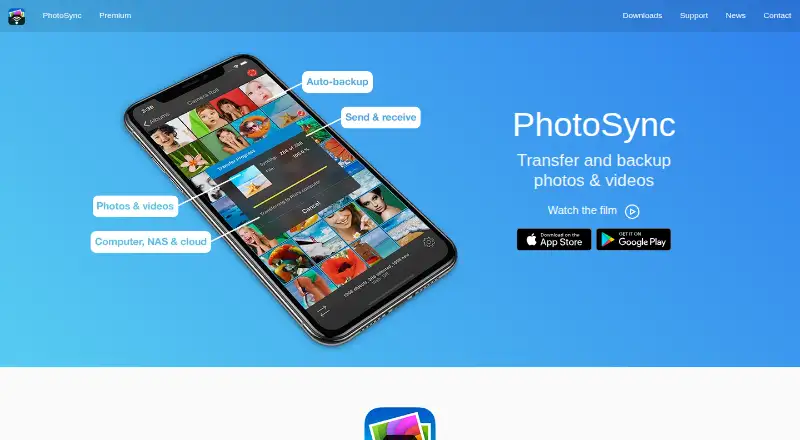
PhotoSync transfers and backs up photos and videos between mobile devices, computers, NAS devices, and cloud services. Mobile devices and computers can exchange files over local Wi-Fi; the maker says these transfers stay on the local network without going over the Internet. The free PhotoSync Companion supports transfers between iPhone, iPad, or Android devices and Windows PCs or Macs. Linux access is described through SFTP, FTP, or SMB. NAS and personal-cloud connections can use FTP, SFTP, SMB, or WebDAV, with services such as Synology, QNAP, ownCloud, and Nextcloud. Listed cloud and photo destinations include Dropbox, Google Photos, Google Drive, Amazon S3, Flickr, SmugMug, OneDrive, Box, Backblaze, Wasabi, and PhotoPrism. Autotransfer can back up new photos and videos; on iOS, its available triggers are location-based transfer and charging. PhotoSync preserves EXIF, GPS, and IPTC metadata and supports RAW photos. It also supports direct Wi-Fi transfers between iOS and Android devices when both have the app and share a network. The Free plan covers basic transfers. Full-size transfers, RAW, NAS, and cloud features are listed as paid features. The product is available for Android, iOS, Linux, macOS, and Windows, and is headquartered in Hamburg, Germany.
Who it suits
PhotoSync suits people who want to move or back up photos and videos across phones, computers, NAS devices, or cloud services. It may also fit photographers and organizations that need RAW transfers, camera connections, metadata preservation, or managed app configuration.
What it does well
- Local Wi-Fi transfers stay on the local network, according to the maker.
- Transfers can connect mobile devices with Windows PCs and Macs.
- NAS connections support FTP, SFTP, SMB, and WebDAV.
- Listed services include Google Photos, Dropbox, and Nextcloud.
- EXIF, GPS, and IPTC metadata are preserved.
- RAW photo transfers are supported.
What to know first
- The Free plan covers basic transfers.
- Full-size transfers, RAW, NAS, and cloud features are paid features.
- iOS autotransfer triggers are limited to location-based transfer and charging.
- Client-side encryption is iOS-only and Premium.
Limits
The Free plan includes basic transfers; full-size transfers, RAW, NAS, and cloud features are shown as paid. The listed Premium features include autotransfer, camera, Siri workflows, S3/Backblaze/Wasabi, client-side encryption, and camera tethering; encryption is marked iOS-only and Premium.
Plans
| Plan | Billed and limits | Price |
|---|---|---|
| Free | Unlimited transfers · reduced transfer quality · no ads | Free |
| PhotoSync Premium Monthly | automatically renewing monthly subscription · Autotransfer · automatic backup · Premium features | $0.99 a month |
| PhotoSync Premium Lifetime | one-time purchase · Autotransfer · automatic backup · Premium features | $24.99, paid once |
| PhotoSync Pro Lifetime | one-time purchase · Full-quality transfers · RAW/HEIC support · current Pro features | $5.99, paid once |
| PhotoSync Premium Yearly | automatically renewing annual subscription · Autotransfer · automatic backup · Premium features | $6.49 a year |
| Premium | Lifetime purchase or subscriptions · Pro features plus autotransfer, camera, Siri workflows, S3/Backblaze/Wasabi, client-side encryption, and camera tethering | On request |
| Pro | Lifetime purchase · Full-size transfers; RAW and HEIC/HEVC transfer; computer, device, NAS, and cloud transfers | On request |
As photosync-app.com lists them, read 15 Oct 2026. The maker's own page has the final word.
Getting started
- Install PhotoSync on the mobile device or computer you want to use.
- For transfers to a Windows PC or Mac, use the free PhotoSync Companion.
- Connect the devices over local Wi-Fi for a local transfer.
- For Linux, NAS, or personal-cloud connections, choose a supported SFTP, FTP, SMB, or WebDAV connection.
- Select a supported cloud or photo service as a transfer destination, or configure Autotransfer for new media.
PhotoSync is a cross-platform transfer and backup utility for photos and videos, built around destinations you control: phones, computers, NAS hardware, and cloud services. It suits people managing media across mixed devices or maintaining their own storage, particularly when local-network transfers and network protocols matter. Its broad compatibility is compelling, but the free tier is mainly a way to try basic transfers rather than a complete backup solution.
Overview
PhotoSync runs on Android and iOS, with Windows and macOS computer support and protocol-based access to Linux. Its bring-your-own-storage approach avoids locking your library into a PhotoSync-hosted account: you send files to a computer, external or wireless drive, NAS, personal cloud, or one of many listed online services.
Transfers between mobile devices and computers can use local Wi-Fi. The maker says that traffic remains on the local network rather than crossing the Internet, which is useful for large libraries or locations with limited connectivity. iOS and Android devices can also transfer directly to each other over Wi-Fi without a computer or cloud intermediary, provided both devices run PhotoSync and share the same network.
PhotoSync is associated with Hamburg, Germany. Support is handled at [email protected].
Key features
Broad destination support
The free PhotoSync Companion links iPhone, iPad, or Android devices with Windows PCs and Macs. Linux connections use SFTP, FTP, or SMB, while NAS and personal-cloud transfers add WebDAV to those protocols. Synology, QNAP, ownCloud, and Nextcloud are named examples. This is a strong fit for self-hosters and households with existing network storage, though protocol setup is less turnkey than using a single consumer cloud.
Destinations include Dropbox, Google Photos, Google Drive, Amazon S3, Flickr, SmugMug, OneDrive, Box, Backblaze, Wasabi, and PhotoPrism. The range lets you keep using an established provider or assemble a multi-destination backup strategy, but PhotoSync itself does not supply included storage.
Backup, metadata, and formats
Autotransfer can send new photos and videos to a computer, NAS, wireless storage device, or supported cloud service. On iOS, the documented triggers are location-based transfer and charging, so it is better suited to deliberate routines than every possible background scenario. PhotoSync preserves EXIF, GPS, and IPTC metadata and supports RAW transfers. iOS can optionally convert HEIC to JPEG and HEVC to H.264 when compatibility matters more than retaining the original encoding.
Camera transfer and viewing support covers Canon EOS, Nikon, Sony, Fujifilm, Olympus, and Lumix cameras. Organizations and schools can manage settings through MDM or a settings file; the settings-file method is iOS-only. Premium on iOS can encrypt media before sending it to NAS and file-based cloud destinations, adding protection without requiring the destination to provide its own encryption workflow.
Pricing
The Free plan costs 0.00 USD and is cost-free. It covers basic transfers, while full-size transfers, RAW handling, NAS destinations, and cloud features are paid capabilities. It is suitable for occasional basic moves, not for serious archival or camera workflows.
Pro has custom pricing and is sold as a lifetime purchase. It adds full-size transfers, RAW and HEIC/HEVC transfer, and transfers to computers, devices, NAS systems, and clouds. Choose it when you want the core high-quality transfer set without the extra automation and camera-oriented tools.
Premium also has custom pricing, with either a lifetime purchase or subscriptions. It includes Pro features plus autotransfer, camera and Siri workflows, S3, Backblaze, and Wasabi support, client-side encryption, and camera tethering. It is the appropriate tier for automated backup, specialist cloud targets, or privacy-conscious NAS/file-cloud storage; the subscription option may suit users who do not want a permanent purchase, while lifetime purchase avoids recurring billing.
Platforms
PhotoSync supports Android, iOS, Linux, macOS, and Windows. Linux access is through SFTP, FTP, or SMB rather than a named native desktop companion, while Windows and Mac users can use the free PhotoSync Companion.
Who it's for
Choose PhotoSync if you combine phones, cameras, computers, and NAS storage, want local Wi-Fi transfers, or need RAW and metadata preservation with destinations such as Synology, Nextcloud, or S3-compatible storage. It is less suitable if you want an all-inclusive cloud plan with storage included, or if your needs stop at occasional small, basic transfers covered by the free tier.
Pros and cons
- Pro: Transfers can stay on local Wi-Fi, avoiding an Internet hop for device-to-computer moves.
- Pro: FTP, SFTP, SMB, and WebDAV support accommodates a wide range of NAS and personal-cloud setups.
- Pro: RAW files and EXIF, GPS, and IPTC metadata are supported, with optional iOS format conversion.
- Pro: Premium adds client-side encryption, automation, and specialist S3-compatible destinations.
- Con: The free plan excludes full-size, RAW, NAS, and cloud capabilities, limiting it for serious backup.
- Con: iOS background triggers are limited to location and charging, so unattended automation is narrower there.
- Con: Storage is bring-your-own, leaving capacity costs and destination administration to you.
Alternatives
IDrive is a better choice when you want included cloud storage, with a 10 GB Basic plan and a 100 GB IDrive Mini option at $0.25 a month for one user.
PhoneCopy suits users prioritizing contact, calendar, task, and note synchronization alongside media, with a Basic tier covering two devices and a 1 GB media pack.
Ente Photos is preferable when encrypted, hosted photo storage with a defined quota is the priority; its free plan includes 10 GB and one replica.
Rawback is an option for users who want hosted storage combined with AI credits and face-recognition allowances, starting with 5 GB on its free tier.
Tonfotos is worth considering for a desktop-oriented photo library with a lifetime free license and limited people recognition.
Fotoback targets iOS and macOS users seeking encrypted family-photo backup, including 5 GB on its free plan.
Immich fits users who are comfortable running a self-hosted server and want a free, self-managed system.
Pho is an alternative for users who value an open-source core and a simpler local gallery across its supported platforms.
For a wider comparison, see Photo Backup Software.
Verdict
PhotoSync is a strong choice for people who need one transfer tool across mobile devices, computers, Linux services, NAS hardware, cameras, and varied cloud destinations. Its local-network operation, protocol coverage, RAW and metadata support, and Premium encryption make it especially capable in a bring-your-own-storage setup. Look elsewhere if you expect storage to be bundled, want a simpler hosted photo library, or need broad always-on background automation from the free plan.
Verdict
Choose PhotoSync if you need to move or back up media across devices and storage destinations, especially over local Wi-Fi or through NAS protocols. The Free plan is limited to basic transfers, so users who need full-size, RAW, NAS, or cloud features should consider the paid plans.
Questions
Is PhotoSync free?
Yes. The Free plan costs nothing and covers basic transfers.
Which platforms does PhotoSync support?
Android, iOS, Linux, macOS, and Windows are listed.
Can PhotoSync transfer files without using the Internet?
The maker says mobile-to-computer transfers over local Wi-Fi stay on the local network without going over the Internet.
Which NAS protocols does it support?
FTP, SFTP, SMB, and WebDAV are supported for NAS and personal-cloud transfers.
Does PhotoSync support RAW photos?
Yes. RAW transfer is listed as a paid feature.
Does PhotoSync offer a lifetime purchase?
The Pro plan is listed with a lifetime purchase option. Premium is listed with lifetime purchase or subscription billing; prices are not given.
Facts from PhotoSync's own pages
- Autotransfer triggers
- Android supports Wi-Fi, location, schedules, instant transfer and charging triggers; iOS is limited to location and charging triggers. · photosync-app.com, 15 Oct 2026
- Background backup
- Autotransfer can back up new media automatically to computers, NAS devices, wireless storage and supported cloud services. · photosync-app.com, 15 Oct 2026
- Camera support
- Premium camera functions support Wi-Fi or USB connections for Canon, Nikon, Sony, Lumix, Fujifilm and Olympus cameras. · photosync-app.com, 15 Oct 2026
- Client-side encryption
- On iOS Premium, media can be encrypted before transfer to NAS or file-based cloud targets, with Rclone and OpenSSL workflows supported. · photosync-app.com, 15 Oct 2026
- Cloud integrations
- Listed cloud and photo integrations include Dropbox, Google Drive, Google Photos, Amazon S3, Flickr, SmugMug, OneDrive, Box, Backblaze, Wasabi, Zenfolio, PhotoPrism, pCloud, InfiniCLOUD and SugarSync. · photosync-app.com, 15 Oct 2026
- Company capital
- CompanyHouse lists €27,000 share capital for touchbyte GmbH. · companyhouse.de, 15 Oct 2026
- Company founding
- CompanyHouse records touchbyte GmbH as founded on 10 March 2010. · companyhouse.de, 15 Oct 2026
- Company legal identity
- The maker is touchbyte GmbH, registered in Hamburg with HRB 112995. · photosync-app.com, 15 Oct 2026
- Computer transfers
- The free PhotoSync Companion supports transfers between iPhone, iPad, or Android devices and Windows PCs or Macs. · photosync-app.com, 30 Sept 2026
- Desktop requirements
- Current downloads list macOS 10.9 or later for Companion and Windows 10 or later for Companion, while the specifications page documents older legacy compatibility. · photosync-app.com, 15 Oct 2026
- Direct device transfer
- iOS and Android devices can exchange media directly over Wi-Fi, and iOS devices can also use Bluetooth. · photosync-app.com, 15 Oct 2026
- Documentation
- The support center provides searchable categories for basics, connectivity, iOS, Android, Mac, Windows, cloud, NAS, encryption and camera use. · photosync-app.com, 15 Oct 2026
- Encryption
- The maker says PhotoSync can encrypt photos and videos before transfer for storage on NAS and file-based cloud services, and marks this feature as iOS-only and Premium. · photosync-app.com, 30 Sept 2026
- Encryption key handling
- Encryption keys remain on the device and users are instructed to back them up; Face ID, Touch ID or a passcode can protect access. · photosync-app.com, 15 Oct 2026
- Extensibility
- Documented automation interfaces are Siri Shortcuts and MDM configuration; no public PhotoSync API or SDK documentation is provided. · photosync-app.com, 15 Oct 2026
- File conversion
- Optional conversions include HEIC to JPEG and HEVC to H264 on iOS. · photosync-app.com, 15 Oct 2026
- Headquarters
- Hamburg, Germany · photosync-app.com, 23 Sept 2026
- Licence
- The legal page describes PhotoSync as a commercial application from touchbyte GmbH, with no open-source licence stated. · photosync-app.com, 15 Oct 2026
- Limit: automation failures
- Google Play reviewers report that the paid autotransfer feature can stop running, forget its target folder or work only intermittently. · appbrain.com, 15 Oct 2026
- Limit: basic camera
- Macworld found the built-in camera comparatively basic and noted that the free edition sends lower-quality files. · macworld.com, 15 Oct 2026
- Limit: quality paywall
- App Store reviewers complain that full-quality transfers and some shortcuts require Pro or Premium after the free test period. · apps.apple.com, 15 Oct 2026
- Limit: service coverage
- Macworld criticized the relatively limited set of online photo services and specifically mentioned no Shutterfly integration. · macworld.com, 15 Oct 2026
- Limit: transfer errors
- A Google Play reviewer reported that receiving media from a PC to a phone failed while sending from the PC worked. · play.google.com, 15 Oct 2026
- Linux support
- The site describes Linux access through SFTP, FTP, or SMB connections. · photosync-app.com, 30 Sept 2026
Where PhotoSync stands on Freedom251
- Photo Backup Software#7 of 25