Freedom251 › Photo Storage Services
Fotoback
What Fotoback is
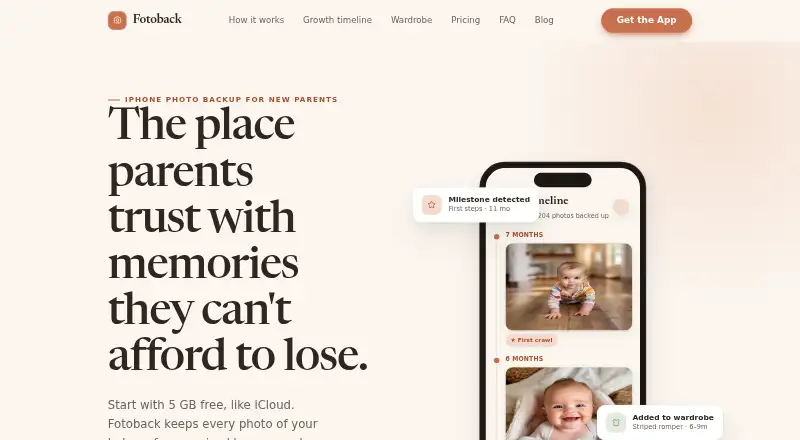
Fotoback is an iPhone photo backup service for parents that organizes pictures around a child’s age, milestones and clothing. It backs up new camera-roll photos in the background, including while the app is closed or the phone is locked. Its timeline sorts photos by a child’s age and identifies milestones such as first smiles, crawling and first steps. The wardrobe organizer builds a clothing inventory from outfits in photos, tracks wear and alerts users to items that are outgrown or unworn. Separate wardrobe profiles are available for the user, their partner and each child.
The free plan includes 5 GB of encrypted backup, a basic timeline and one child profile. Monthly options include 100 GB for $1.99 a month, 500 GB for $4.99 a month, and 2 TB for $9.99 a month. One-time options include Pro App for 24.99 USD and Lifetime 1 TB for 199.00 USD. Fotoback for Mac can back up iPhone messages, app data, settings and photos to a Fotoback account without using iCloud storage. The listed platforms are iOS and macOS; the App Store listing identifies iPhone and iPad support and says the app is not verified for macOS. Photos are not used to train AI or shared with third parties.
Who it suits
Fotoback suits parents who want camera-roll photos automatically backed up and arranged around a child’s growth and milestones. Its wardrobe profiles may also suit families tracking children’s outfits alongside photos.
What it does well
- Backs up new camera-roll photos in the background, even when closed or locked.
- Automatically organizes photos by child age and milestones.
- Wardrobe tracks clothing wear and flags outgrown or unworn items.
- Separate wardrobe profiles support a user, partner and each child.
- Mac backup can include iPhone messages, app data, settings and photos.
What to know first
- The free plan provides 5 GB and one child profile.
- RAW photo support is not available.
- The App Store listing says macOS is not verified.
Limits
The free plan includes 5 GB of encrypted backup, a basic baby timeline and photo organization, and one child profile. The 100 GB plan adds full organization, milestones and the wardrobe organizer; the higher storage plans specify family sharing for four or six.
Plans
| Plan | Billed and limits | Price |
|---|---|---|
| Free | forever · 5 GB encrypted backup · Basic baby timeline and photo organisation · One child profile | Free |
| 100 GB | monthly · 100 GB encrypted backup · Full organisation · Baby timeline and milestones · Wardrobe organiser | $1.99 a month |
| Lifetime 1 TB | one-time · 1 TB encrypted backup · Organisation features for life | $199, paid once |
| 100 GB | annual · 100 GB encrypted backup · Full organisation · Maker FAQ states annual price | $19.99 a year |
| Pro App | one-time · 10 GB encrypted backup · All organisation features · Unlimited child profiles | $24.99, paid once |
| 500 GB | monthly · 500 GB encrypted backup · Family sharing for 4 · Priority backup queue | $4.99 a month |
| 2 TB | monthly · 2 TB encrypted backup · Family sharing for 6 | $9.99 a month |
As fotoback.app lists them, read 7 Oct 2026. The maker's own page has the final word.
Getting started
- Open the Fotoback website or find the app for iPhone or iPad.
- Choose the free plan or a paid plan that fits your storage and organization needs.
- Use the app to enable background backup of camera-roll photos.
- Set up a child timeline and, if needed, separate wardrobe profiles.
- For Mac backup, use Fotoback for Mac to back up iPhone data to a Fotoback account.
Fotoback is a photo-backup service for parents who want their children’s pictures arranged as a growing record, with wardrobe tracking alongside storage. It is a focused choice for iPhone families, while photographers needing RAW support or broad device coverage should consider other services.
Overview
Fotoback uploads new camera-roll photos in the background, including while the app is closed or the phone is locked. It groups images by a child’s age and recognizes milestones such as first smiles, crawling and first steps. The result is a family-memory workflow rather than a general-purpose archive: valuable when a child’s timeline is the organizing principle, less relevant when you simply need a device-agnostic photo vault.
Key features
Timeline and wardrobe organization
The baby timeline removes much of the manual sorting involved in documenting early years. Fotoback also creates a clothing inventory from outfits in photos, provides wear insights, and alerts you when items are outgrown or have not been worn. Separate wardrobe profiles cover you, a partner and each child, so the feature can serve a household rather than one individual. That combination is a genuine differentiator for parents who want clothing records; it is unnecessary complexity for users seeking backup alone.
Broader backup
Fotoback for Mac can back up an iPhone’s messages, app data, settings and photos to a Fotoback account without consuming iCloud storage. The App Store identifies iPhone and iPad support, but says the app is not verified for macOS, so Mac users should treat desktop compatibility as a qualification to check before relying on it.
Privacy and security
The maker says photos are not used to train AI, are accessed only to store and return them, and are not shared with third parties. Transit is protected with TLS 1.2 or newer; photos at rest use AES-256 through S3 server-side encryption; and iOS authentication tokens are kept in the Keychain. Photos reside in isolated AWS S3 buckets, with Ireland or configurable US storage regions and backend infrastructure in the EU or US. Account and backed-up-photo deletion is available in the app under Settings → Danger Zone → Delete Account.
Pricing
Fotoback uses a freemium model with no free trial. The Free plan costs nothing, is billed forever, and includes 5 GB of encrypted backup, basic baby timeline and photo organization, and one child profile. It is suitable for trying the workflow or maintaining a small library, but the storage cap will arrive quickly for an active camera roll.
The 100 GB plan costs $1.99 a month, billed monthly. It adds full organization, baby milestones and the wardrobe organizer, making it the practical entry point for parents who want Fotoback’s complete feature set. The 500 GB plan is $4.99 a month, billed monthly, and adds family sharing for four plus a priority backup queue. It fits households with larger libraries or several users. The 2 TB plan costs $9.99 a month, billed monthly, and supports family sharing for six; it is the capacity choice for a larger extended-family archive.
For one-time payment, Pro App costs 24.99 USD once and includes 10 GB of encrypted backup, all organization features and unlimited child profiles. Its storage is smaller than the 100 GB subscription, so it suits users who value the feature set and multiple profiles more than capacity. Lifetime 1 TB costs 199.00 USD once and includes organization features for life with 1 TB of encrypted backup, favoring long-term users who want to avoid recurring charges.
Platforms
Fotoback is offered for iOS and macOS, with the App Store listing iPhone and iPad support. The listing does not verify the app for macOS. RAW photos are not supported, and storage is bundled with the plans rather than offered as a separate storage-only product.
Who it's for
Choose it for an iPhone-using parent who wants automatic backup, age-based milestones and a household clothing inventory in one service. It is a weaker fit for RAW shooters, non-Apple households, or anyone who needs a broadly verified desktop application.
Pros and cons
- Pro: Background uploads continue when the app is closed or the phone is locked, reducing the chance of forgotten backups.
- Pro: Age and milestone sorting gives a child’s archive a useful structure without manual cataloging.
- Pro: Wardrobe profiles, wear insights and outgrown or unworn alerts extend the service beyond storage.
- Pro: The maker states that photos are not used for AI training or shared with third parties, with modern encryption controls.
- Con: The free tier is limited to 5 GB and one child profile, so larger libraries require payment.
- Con: RAW support is absent, excluding an important workflow for many serious photographers.
- Con: macOS support is not verified in the App Store listing, which weakens its appeal as a cross-platform backup system.
Alternatives
For broader device coverage, IDrive supports Android, iOS, Linux, macOS, web and Windows, with a 10 GB Basic plan and a 100 GB IDrive Mini at $0.25 a month. PhoneCopy is a better fit when contacts, calendars, tasks and notes matter alongside media, with support across Android, iOS, Linux, macOS, web and Windows.
Ente Photos offers encrypted photo storage across Android, iOS, Linux, macOS, web and Windows, including a 10 GB free tier and family-oriented paid storage. PhotoSync suits users prioritizing transfers; its free tier provides basic transfers, while full-size, RAW, NAS and cloud functions are paid features.
Rawback is the alternative to examine when RAW-oriented workflows and AI credits are more important. Tonfotos offers a lifetime-use free license with the paid version’s full functionality, subject to limits on people in photos. Immich is a free, self-hosted option for readers prepared to run their own server. Pho is an open-source-core option with local-gallery features and paid Pro extensions.
Browse broader comparisons in Photo Backup Software and Photo Storage Services.
Verdict
Fotoback is a strong specialist choice for parents who want child timelines and wardrobe management attached to automatic iPhone backup. Its small free allowance, lack of RAW support and uncertain macOS verification are the main reasons to look elsewhere; choose a broader service if those constraints matter more than its family-focused organization.
Verdict
Choose Fotoback if you want an iPhone photo backup organized around a child’s timeline, with wardrobe tracking as well. The free plan is limited to 5 GB and one child profile; larger storage and additional features require a paid option.
Questions
Is there a free plan?
Yes. Free includes 5 GB of encrypted backup, a basic baby timeline and photo organization, and one child profile.
How much do the paid plans cost?
Monthly plans are 1.99 USD for 100 GB, 4.99 USD for 500 GB, and 9.99 USD for 2 TB. One-time options are Pro App at 24.99 USD and Lifetime 1 TB at 199.00 USD.
Which devices are supported?
The listed platforms are iOS and macOS. The App Store listing identifies iPhone and iPad support and says the app is not verified for macOS.
Does it support RAW photos?
No. RAW photo support is listed as unavailable.
Can it back up iPhone data besides photos?
Fotoback for Mac can back up an iPhone’s messages, app data, settings and photos to a Fotoback account without using iCloud storage.
How does Fotoback handle photos?
Photos are not used to train AI or shared with third parties. They are accessed only to store and return them.
Facts from Fotoback's own pages
- Automatic backup
- The app syncs new camera-roll photos in the background, including when the app is closed or the phone is locked. · fotoback.app, 7 Oct 2026
- Baby timeline
- It automatically sorts photos by a child’s age and detects milestones such as first smiles, crawling, and first steps. · fotoback.app, 7 Oct 2026
- Compatibility
- The App Store listing identifies iPhone and iPad as supported and says the app is not verified for macOS. · apps.apple.com, 7 Oct 2026
- Data deletion
- Users can delete their account and backed-up photos in the app under Settings → Danger Zone → Delete Account. · fotoback.app, 7 Oct 2026
- Family profiles
- The wardrobe feature supports separate profiles for a user, their partner, and each child. · fotoback.app, 7 Oct 2026
- Mac backup
- The maker says Fotoback for Mac can back up an iPhone’s messages, app data, settings, and photos to a Fotoback account without using iCloud storage. · fotoback.app, 7 Oct 2026
- Privacy
- The maker says photos are never used to train AI, are not accessed except to store and return them, and are not shared with third parties. · fotoback.app, 7 Oct 2026
- Product
- Fotoback is an iPhone photo backup service aimed at parents that organizes baby photos by age and milestones. · fotoback.app, 7 Oct 2026
- Security
- The privacy policy says data in transit uses TLS 1.2+, photos at rest use AES-256 via S3 server-side encryption, and authentication tokens are stored in the iOS Keychain. · fotoback.app, 7 Oct 2026
- Storage and regions
- The privacy policy says photos are held in dedicated isolated AWS S3 buckets, with storage regions listed as Ireland or configurable US and backend infrastructure in the EU or US. · fotoback.app, 7 Oct 2026
- Support
- The privacy policy lists [email protected] for privacy inquiries and [email protected] for support. · fotoback.app, 7 Oct 2026
- Wardrobe
- Fotoback builds a clothing inventory from outfits in photos, with wear insights and outgrown or unworn alerts. · fotoback.app, 7 Oct 2026
Where Fotoback stands on Freedom251
- Photo Storage Services#22 of 71
- Photo Backup Software#9 of 25