Freedom251 › Photo Storage Services

Noodle Gallery
What Noodle Gallery is
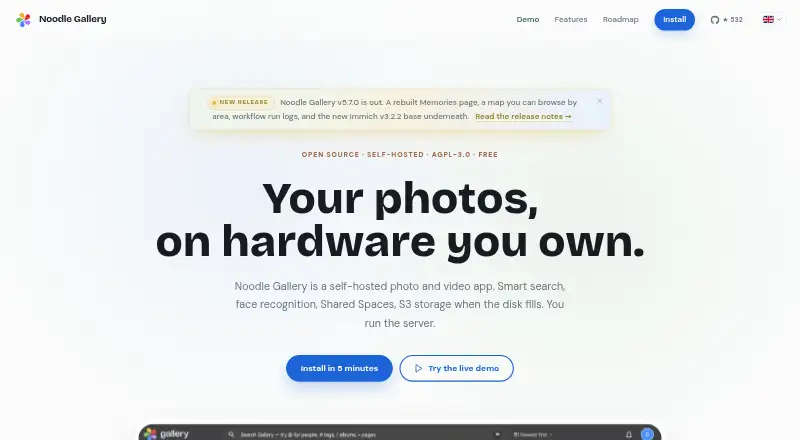
Noodle Gallery is a free, self-hosted photo and video app for keeping media, metadata and account data on a server the user provides. Its features include original-quality storage, video backup, face recognition, smart search and Shared Spaces. A Space lets several people contribute to a chronological timeline while each keeps a separate library. A Cmd/Ctrl+K palette searches photos, people, places, tags, albums, Spaces, commands and settings. The server supports S3-compatible storage such as AWS S3, MinIO, Cloudflare R2, Backblaze B2 and Wasabi. A browser wizard imports Google Takeout archives while retaining dates, GPS coordinates, descriptions, favorites and album structure. Native iOS and Android apps offer background camera backup, CLIP search, a map and Shared Spaces. The developers say they cannot access media and related data stored on the user's server. The apps connect directly to that server and, according to the privacy policy, contain no analytics, tracking or crash reporting. Each instance serves REST API documentation and Swagger UI at /doc. The free self-hosted plan has no subscription or storage cap.
Who it suits
It suits individuals or groups who can provide and manage a server for their photo and video library. Shared Spaces support group contributions without combining personal libraries.
What it does well
- No subscription or storage cap on the free plan.
- Shared timelines keep personal libraries separate.
- Imports Google Takeout archives with album structure.
- Supports several S3-compatible storage services.
- Native apps include background camera backup.
What to know first
- Runs on hardware the user provides.
- Installation specifies 2+ CPU cores and 4 GB RAM.
- Machine-learning features specify 6 GB+ RAM.
- Server installation guide recommends Linux.
Limits
The free self-hosted plan has no storage cap or subscription, but runs on hardware you provide. The installation guide specifies 2+ CPU cores, 4 GB RAM, Docker Engine v25+ with Compose v2, and about 10 GB for containers and database; machine-learning features call for 6 GB or more of RAM.
Plans
| Plan | Billed and limits | Price |
|---|---|---|
| Free self-hosted | No subscription · No storage cap · Runs on hardware you provide · AGPL-3.0 | Free |
As opennoodle.de lists them, read 7 Oct 2026. The maker's own page has the final word.
Getting started
- Visit https://opennoodle.de/.
- Provide server hardware meeting the installation requirements: 2+ CPU cores, 4 GB RAM, Docker Engine v25+ with Compose v2, and about 10 GB for containers and database.
- Install on Linux, or use macOS or Windows with WSL2.
- Set up the self-hosted instance and choose supported S3-compatible storage if needed.
- Connect the iOS or Android app to your self-hosted server, or use the web app.
Noodle Gallery is a self-hosted photo and video library for people who want control of their media and can manage a server. Its strongest case is an uncapped, subscription-free archive with shared timelines; its trade-off is that the hardware and installation are yours to provide.
Overview
The free plan avoids both a recurring fee and a storage ceiling, which is appealing for a growing collection. But “free” does not mean hosted: you need suitable hardware, must install the software, and remain responsible for operating the server. Choose another service if you want someone else to handle that work.
Photos, videos, metadata, face-recognition data and user accounts stay on the user’s server; the developers say they cannot access them. The iOS and Android apps connect directly to that server and, according to the privacy policy, contain no analytics, tracking or crash reporting. That privacy approach is a strong fit for users who want their media kept on infrastructure they control, while making server security and upkeep their responsibility.
Key features
Shared Spaces let several people contribute to one chronological timeline without merging their individual libraries. That is useful for a household or group building a common record while keeping personal collections separate. The plan includes shared albums and family sharing, alongside original-quality storage and video backup.
The Cmd/Ctrl+K palette searches photos, people, places, tags, albums, Spaces, commands and settings. This broad search scope can help users navigate a large collection without relying on a single folder structure. Mobile apps for iOS and Android add background camera backup, CLIP search, a map and Shared Spaces, making the phone an active part of the archive.
For people moving from Google Photos, a browser-based import wizard reads Google Takeout archives and preserves dates, GPS coordinates, descriptions, favorites and album structure. The server supports S3-compatible storage, including AWS S3, MinIO, Cloudflare R2, Backblaze B2 and Wasabi, giving users several storage back ends rather than tying the archive to one provider.
Each running instance also serves OpenAPI-described REST API documentation and Swagger UI at /doc. The software is open source under AGPL-3.0, and the maker directs users to official documentation, Discord and GitHub issues for help.
Pricing
Free self-hosted: free, with no subscription. It includes uncapped storage, original-quality storage, face search, shared albums, family sharing and video backup, but runs on hardware you provide. For users with suitable equipment and the ability to maintain a server, that is a compelling way to avoid a service quota or subscription. The cost shifts to the hardware and the time needed to install and operate it; there is no hosted tier for users who would rather pay to hand off that responsibility.
The installation guide calls for at least 2 CPU cores, 4 GB RAM (6 GB or more for machine-learning features), Docker Engine v25+ with Compose v2, and about 10 GB for containers and database. Linux is recommended for the server, with macOS and Windows using WSL2 also supported. Those requirements make the plan less suitable for someone expecting a phone-only setup.
Platforms
Noodle Gallery supports Android, iOS, Linux, macOS, self-hosted deployment, web and Windows. The mobile apps connect to the self-hosted server, so platform support does not remove the need to run that server.
Who it's for
This is best for technically confident individuals, families or groups who want a large private archive, shared timelines and control over where media is stored. It is less suitable for people who want a managed service, cannot provide the server requirements, or do not want responsibility for maintaining their storage setup.
Pros and cons
- Pro: No storage cap or subscription, making it practical for collections that may outgrow fixed hosted quotas.
- Pro: Shared Spaces combine a chronological group timeline with separate personal libraries.
- Pro: Google Photos imports preserve key organization and metadata, reducing the disruption of migration.
- Pro: Media and accounts stay on the user’s server, and the mobile apps avoid analytics, tracking and crash reporting according to the privacy policy.
- Con: Users must supply hardware and install the service; the machine-learning features call for at least 6 GB of RAM.
- Con: Server operation and safeguarding fall to the user rather than a hosted provider.
Alternatives
Consider IDrive if you want a freemium storage service with a 100 GB, one-user IDrive Mini plan at $0.25 a month, rather than providing your own server.
Amazon Photos is another freemium option, with a 5 GB shared free allowance for photos and videos and an Amazon Prime benefit that includes unlimited full-resolution photo storage.
Choose Cryptee if you prefer its open-source software and cryptography and can work within its 100 MB free plan.
Ente Photos offers a 10 GB free plan with one replica and 100 Locker items, and may suit users looking for a freemium option with defined storage limits.
Permafiles offers a fully managed Nextcloud Free plan with 5 GB storage, daily offsite backups, antivirus protection, Talk and Office.
PhotoPrism is a close alternative for self-hosters: its free Community plan offers unlimited storage and instances, AGPL open source and community support.
Stingle Photos is worth comparing if you want an open-source photo service with a defined 1 GB free plan.
Consider Flickr if a hosted service with public uploads suits you better: its free plan allows 1,000 photo and video uploads and displays ads.
For a broader comparison, browse Photo Storage Services.
Verdict
Noodle Gallery is a strong choice for people who can run a server and want uncapped, private media storage with shared family timelines and useful migration tools. Its central advantage is freedom from storage limits and subscription fees; its central drawback is that hardware, installation and ongoing server care are part of the deal. If you want a managed photo library, choose a hosted alternative instead.
Verdict
Noodle Gallery combines self-hosted media storage with search, migration and shared timelines. Its storage is uncapped, but setup requires user-provided hardware and the listed installation resources.
Questions
How much does Noodle Gallery cost?
The Free self-hosted plan costs nothing, with no subscription.
Is there a storage cap on the free plan?
No. The Free self-hosted plan has no storage cap and runs on hardware you provide.
Which platforms are supported?
Noodle Gallery is available for Android, iOS, Linux, macOS, self-hosting, web, and Windows. The installation guide recommends Linux and says macOS and Windows with WSL2 also work for the server.
Is Noodle Gallery open source?
Yes. It is open source under the AGPL-3.0 license.
Can I import Google Photos data?
A browser wizard imports Google Takeout archives and preserves dates, GPS coordinates, descriptions, favorites, and album structure.
Where is my data stored?
Photos, videos, metadata, face-recognition data, and accounts are stored on your server. The developers say they cannot access them.
Facts from Noodle Gallery's own pages
- API
- Each running instance serves OpenAPI-described REST API documentation and Swagger UI at /doc. · opennoodle.de, 7 Oct 2026
- Google Photos migration
- A browser import wizard reads Google Takeout archives and preserves dates, GPS coordinates, descriptions, favorites, and album structure. · opennoodle.de, 7 Oct 2026
- License
- Noodle Gallery is open source under the AGPL-3.0 license. · opennoodle.de, 7 Oct 2026
- Mobile apps
- Native iOS and Android apps offer background camera backup, CLIP search, a map, and Shared Spaces. · opennoodle.de, 7 Oct 2026
- Mobile data handling
- The iOS and Android apps connect directly to the self-hosted server and contain no analytics, tracking, or crash reporting, according to the privacy policy. · opennoodle.de, 7 Oct 2026
- Privacy
- Photos, videos, metadata, face-recognition data, and user accounts are stored on the user's server, which the developers say they cannot access. · opennoodle.de, 7 Oct 2026
- Product
- Noodle Gallery is a self-hosted photo and video app with smart search, face recognition, Shared Spaces, and S3 storage. · opennoodle.de, 7 Oct 2026
- Requirements
- The installation guide specifies 2+ CPU cores, 4 GB RAM (6 GB+ for machine-learning features), Docker Engine v25+ with Compose v2, and about 10 GB for containers and database. · opennoodle.de, 7 Oct 2026
- Search
- A Cmd/Ctrl+K palette searches photos, people, places, tags, albums, Spaces, commands, and settings. · opennoodle.de, 7 Oct 2026
- Shared Spaces
- Shared Spaces let multiple people contribute to one chronological timeline while each person keeps their own library. · opennoodle.de, 7 Oct 2026
- Storage integrations
- The server supports S3-compatible storage including AWS S3, MinIO, Cloudflare R2, Backblaze B2, and Wasabi. · opennoodle.de, 7 Oct 2026
- Support
- The maker directs users to its official documentation, Discord, and GitHub issues for help. · opennoodle.de, 7 Oct 2026
- Supported server operating systems
- The install guide recommends Linux and says macOS and Windows with WSL2 also work. · opennoodle.de, 7 Oct 2026
Where Noodle Gallery stands on Freedom251
- Photo Storage Services#21 of 71