Freedom251 › Photography Software

LibrePhotos
What LibrePhotos is
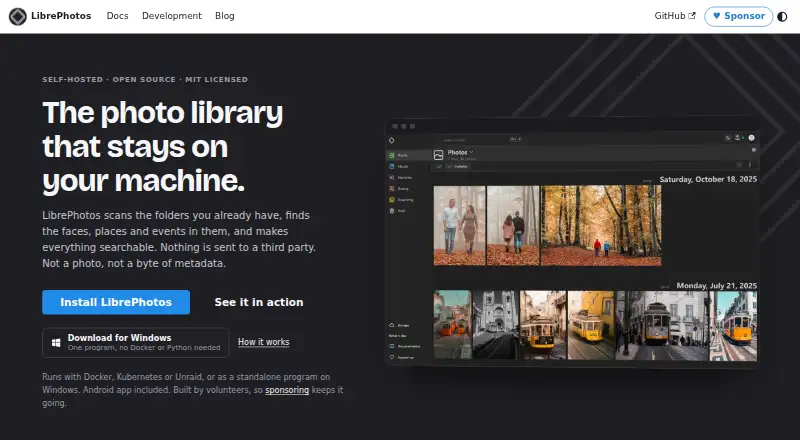
LibrePhotos is a self-hosted photo manager that scans existing folders and makes their contents searchable. It can identify faces, places and events, while its timeline organizes images by date and separate views cover faces, places, events and albums. Search can include people, places, objects, captions and metadata, with optional AI semantic search. The format list includes RAW, HEIC and JPEG XL images, videos and live photos. Users can create shared albums and public links, and connect an external Nextcloud instance to copy images, videos, RAW files and XMP sidecars into the local library. The Android and iOS app keeps a local library copy for offline browsing and can back up a camera roll. LibrePhotos supports OpenID Connect sign-in and is listed as sending nothing to third parties, with zero trackers or phone-home behavior. It is MIT licensed, volunteer maintained and has no paid tier. Deployment options include Docker, Kubernetes, Unraid and a standalone Windows program. The standalone Windows build is intended for one person's library; shared-server use is directed to Docker.
Who it suits
LibrePhotos suits people who want to organize and search a self-hosted photo library, including those who want mobile offline browsing or camera-roll backup. Shared-server users should consider the Docker deployment rather than the standalone Windows build.
What it does well
- Searches faces, places, objects, captions and metadata
- Supports RAW, HEIC, JPEG XL, videos and live photos
- Mobile apps support offline browsing and camera-roll backup
- Shared albums and public links are included
- MIT licensed with no paid tier
What to know first
- Standalone Windows build is intended for one person's library
- Single-container image is CPU-only
- Shared-server users are directed to Docker deployments
Limits
The standalone Windows program is intended for one person's library on their own PC; shared-server users are directed to Docker. The single-container image is CPU-only, and NVIDIA GPU acceleration requires the standard Docker setup.
Plans
| Plan | Billed and limits | Price |
|---|---|---|
| Free | MIT licensed · no paid tier · self-hosted | Free |
As docs.librephotos.com lists them, read 11 Oct 2026. The maker's own page has the final word.
Getting started
- Open the LibrePhotos documentation website.
- Choose a deployment option: Docker, Kubernetes, Unraid or the standalone Windows program.
- Use Docker for shared-server deployment; the Windows program is intended for one person's library.
- For NVIDIA GPU acceleration, use the standard Docker setup instead of the single-container image.
- Install the Android or iOS app if you want offline browsing or camera-roll backup.
LibrePhotos is a self-hosted photo library manager that builds searchable collections from folders you already have. It is best for people who want rich photo discovery and mobile access while keeping their library on their own infrastructure. Its breadth is appealing, but the deployment choices matter: the Windows program is for one person, and the single-container image does not use an NVIDIA GPU.
Overview
LibrePhotos combines organization, search, sharing and phone backup in a free, MIT-licensed project maintained by volunteers. It can suit a personal library or a shared setup, but those uses call for different deployment choices. Users who want a hosted service with storage handled for them should look elsewhere; LibrePhotos is self-hosted.
Key features
LibrePhotos scans existing photo folders and identifies faces, places and events. A date-based timeline and separate views for faces, places, events and albums give a large collection several useful routes in. Search spans people, places, objects, captions and metadata, with optional AI semantic search. That makes it more compelling than a simple folder browser when users remember what a photo shows but not where they saved it.
Support for RAW, HEIC and JPEG XL, as well as videos and live photos, accommodates mixed libraries. Users can connect an external Nextcloud instance and copy its images, videos, RAW files and XMP sidecars into the local library. That helps consolidate an existing collection, though the stated workflow copies files rather than keeping a live connection.
Multiple users, shared albums and public links cover common sharing needs, while OpenID Connect supports single sign-on. The Android and iOS apps keep a local copy for offline browsing and can back up a phone's camera roll to the server. The project says it sends nothing to third parties and has no trackers or phone-home behavior, a meaningful draw for users prioritizing privacy.
Pricing
LibrePhotos is free: the Free plan costs nothing and includes self-hosting under the MIT license. Original-quality storage, face search and shared albums are included, and there is no paid tier. There is no free trial because the software is already free. This is a strong fit for users willing to provide their own hosting and manage deployment; it is not a storage subscription with a provider-managed library. The project is volunteer maintained, with questions and user discussion directed to Discord.
Platforms
LibrePhotos supports web, Linux, Windows, Android, iOS and self-hosted use, with an API platform also listed. Deployment options include Docker, Kubernetes, Unraid and a standalone Windows program. The Windows build is intended for one person's library on their own PC; shared-server users are directed to Docker. The single-container image is CPU-only, so users seeking NVIDIA GPU acceleration should choose the standard Docker setup instead. The desktop app is not included in the Free plan.
Who it's for
Choose LibrePhotos if you want to keep control of your photo storage while gaining face, place and object search, shared albums and mobile camera-roll backup. It is especially suitable for people with an existing folder-based library or Nextcloud collection. It is a weaker fit if you need a hosted service, want a shared Windows server deployment, or expect GPU acceleration from the single-container image.
Pros and cons
- Pros: Search spans people, places, objects, captions and metadata, with optional semantic search, making varied libraries easier to explore.
- Pros: Broad media support includes RAW, HEIC, JPEG XL, videos and live photos.
- Pros: Shared albums, public links and mobile backup add practical ways to use the library across people and devices.
- Pros: The software is free, MIT-licensed and designed without third-party transfers, trackers or phone-home behavior.
- Cons: Users must self-host and manage deployment rather than relying on included provider storage.
- Cons: The standalone Windows build is limited to one person's library on their PC.
- Cons: NVIDIA GPU acceleration requires the standard Docker setup, not the single-container image.
Alternatives
PhotoPrism is worth considering for a self-hosted alternative with a free Community plan that includes unlimited storage and instances, alongside a paid Essentials plan. For a sharing-first option, PixShare has a free plan capped at one album and 50 images, with paid plans available. Flickr may suit users who prefer a hosted service: its free plan allows 1,000 public photo and video uploads and shows ads, while Pro is listed at $8 a month, billed annually. 23snaps offers unlimited photo and video uploads on its free plan and supports Android, iOS and web. EventPics, Pic-Time, Picflow and CloudSpot are other options to compare. Browse more in Photo Management Software, Photo Sharing Software and Photo Storage Services.
Verdict
LibrePhotos is a strong choice for people who want a free, self-hosted library with broad search, varied format support and useful mobile access. Its main advantage is bringing organization and discovery features together without a paid tier; its main drawback is that users must match deployment to their sharing and hardware needs. Choose it if you are comfortable running your own service, and look elsewhere if you want managed hosting or a shared Windows installation.
Verdict
LibrePhotos brings searchable organization, sharing and mobile backup to a self-hosted library. Check its Windows and CPU-only deployment limits against how you plan to run it.
Questions
How much does LibrePhotos cost?
The free plan costs nothing. LibrePhotos has no paid tier.
Is LibrePhotos self-hosted?
Yes. Deployment options include Docker, Kubernetes, Unraid and a standalone Windows program.
Which platforms does it support?
The listed platforms are Android, API, iOS, Linux, self-hosted, web and Windows.
Does LibrePhotos have mobile apps?
Its official app supports Android and iOS, keeps a local library copy for offline browsing, and can back up the camera roll to the server.
Is LibrePhotos open source?
It is MIT licensed and volunteer maintained.
Can I use it with Nextcloud?
Yes. You can connect an external Nextcloud instance and copy images, videos, RAW files and XMP sidecars into the local library.
Facts from LibrePhotos's own pages
- Browsing
- The timeline groups photos by date, and the interface includes views for faces, places, events and albums. · docs.librephotos.com, 11 Oct 2026
- Deployment
- Deployment options include Docker, Kubernetes, Unraid and a standalone Windows program. · docs.librephotos.com, 11 Oct 2026
- Formats
- LibrePhotos supports common photo formats including RAW, HEIC and JPEG XL, as well as videos and live photos. · github.com, 11 Oct 2026
- Hardware limit
- The single-container image is CPU-only; the docs direct users who want NVIDIA GPU acceleration to the standard Docker setup. · docs.librephotos.com, 11 Oct 2026
- Integration
- Users can connect an external Nextcloud instance and copy its images, videos, RAW files and XMP sidecars into the local library. · docs.librephotos.com, 11 Oct 2026
- License and pricing
- LibrePhotos is MIT licensed, volunteer maintained, and has no paid tier. · docs.librephotos.com, 11 Oct 2026
- Mobile
- The official mobile app supports Android and iOS, keeps a local copy of the library for offline browsing, and can back up the camera roll to the server. · docs.librephotos.com, 11 Oct 2026
- Photo management
- LibrePhotos scans existing photo folders, identifies faces, places and events, and makes the library searchable. · docs.librephotos.com, 11 Oct 2026
- Privacy
- The official site says nothing is sent to a third party and lists zero trackers or phone-home behavior. · docs.librephotos.com, 11 Oct 2026
- Search
- Search supports people, places, objects, captions and metadata, with optional AI semantic search. · docs.librephotos.com, 11 Oct 2026
- Sharing
- The feature list includes multiple users, shared albums and public links. · github.com, 11 Oct 2026
- Sign-in integration
- The feature list says LibrePhotos supports single sign-on through OpenID Connect. · github.com, 11 Oct 2026
- Support
- The project points users to Discord to ask questions and talk with other users. · docs.librephotos.com, 11 Oct 2026
- Windows limit
- The standalone Windows build is intended for one person's library on their own PC; the docs direct shared-server users to Docker deployments. · docs.librephotos.com, 11 Oct 2026
Where LibrePhotos stands on Freedom251
- Photography Software#5 of 28
- Photo Storage Services#19 of 71
- Photo Management Software#11 of 37
- Photo Sharing Software#13 of 34