Freedom251 › Photo Sharing Software

PixShare
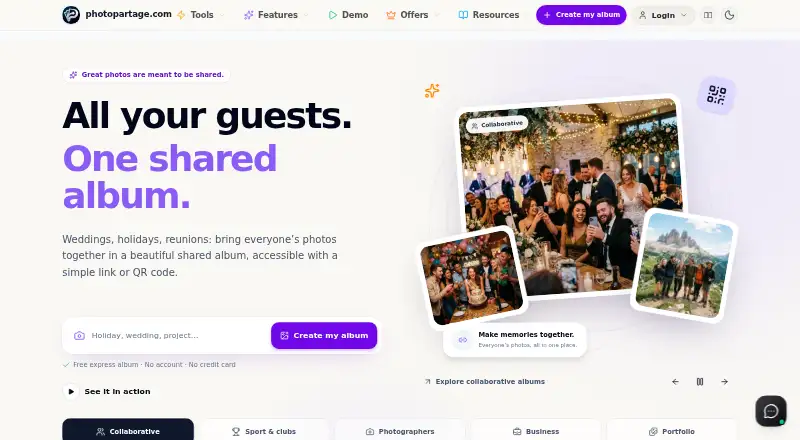
What PixShare is
PixShare provides photo and video albums for sharing, organizing, and presenting media, including professional galleries for photographers and businesses. Users can create an express album in a browser without an account and share it with a private link. Guests can contribute to collaborative albums through a link or QR code without installing an app. Gallery tools include likes, comments, contact forms, custom social preview images, visit analytics, and video transcoding with adaptive streaming. Professional galleries support custom logos, colors, and share pages, plus album expiry options. Albums can be embedded on websites; PixShare also lists a WordPress plugin and an API that accepts JSON or XML and supports webhooks in its example request. Users can export albums and photos as high-quality ZIP files. The free plan costs 0.00 EUR and includes one album and 50 images. Paid plans start at €4.99 a month. Lite's image allowance is inconsistent in the listed details: the comparison table gives 1,000 images, while the plan card says 500. PixShare says connections use TLS 1.3 and data and backups are hosted in Europe under GDPR standards.
Who it suits
PixShare suits photographers, businesses, families, clubs, and other groups sharing photo or video albums. Its collaborative albums and professional gallery branding address different sharing needs.
What it does well
- Create an express album without an account.
- Guests can add photos by link or QR code.
- Offers a WordPress plugin and an API.
- Albums and photos can be exported as ZIP files.
- Free plan includes one album and 50 images.
What to know first
- Lite image allowance is listed as both 1,000 and 500.
- Free plan is limited to one album.
- Lite costs €4.99 a month.
Limits
The Free plan is limited to one album and 50 images, with public sharing by unique link. Lite is listed for €4.99/mo and allows up to five albums, but its image limit appears as 1,000 in the comparison table and 500 on the plan card.
Plans
| Plan | Billed and limits | Price |
|---|---|---|
| Free | 0€ /forever · 1 album · 50 images · public sharing by unique link | Free |
| Premium | 14,99€ /per month · Unlimited albums · 10,000 images · unlimited collaborative albums | €14.99 a month |
| Enterprise | 49€ /per month · Unlimited albums · 100,000 images · 1 TB private RAW storage · unlimited embed galleries | €49 a month |
| Lite | 4,99€ /per month · Up to 5 albums · comparison table lists 1,000 images · 1 collaborative album · client proofing | €4.99 a month |
| Starter | 7,99€ /per month · Up to 20 albums · 5,000 images · 5 collaborative albums | €7.99 a month |
As photopartage.com lists them, read 30 Sept 2026. The maker's own page has the final word.
Getting started
- Open the PixShare website.
- Create an express album in a browser without an account, or sign up for a plan.
- Add photos or videos and choose album access using a private link, unique access key, or optional password.
- Share the album link or QR code, or embed it on a website.
- Use the Android, iOS, macOS, or Windows platform, or connect through the API.
PixShare is an album-sharing service that also supports branded galleries for professional photo work. It is best suited to photographers, event organizers and groups that want people to contribute without installing an app. Its range of sharing and gallery tools is a strength, though the free tier is small and the Lite image allowance needs careful checking.
Overview
Albums can be created in a browser without an account and shared by private link. Guests can add photos through a link or QR code, also without installing an app. That makes PixShare practical for collecting images from events and groups, while public galleries and download controls give owners ways to present and manage photos beyond a private exchange.
For professional use, galleries can carry custom logos, colors and share pages, with contact forms, analytics and expiry options. Likes, comments and custom social previews help make a gallery more than a static album. Video support includes transcoding and adaptive streaming. High-quality ZIP exports let users keep copies of albums and photos outside the service.
Key features
- Low-friction sharing: Express albums and guest contributions work through a browser link, with QR codes available for collaborative albums. This is useful for event teams and families collecting contributions from people who may not want another app.
- Client-facing galleries: Branding, contact forms, analytics and expiry options make the professional tools more relevant to photographers and businesses presenting work or gathering client responses. These tools are more than a casual family album needs.
- Website and developer options: Albums can be embedded with an HTML snippet; an official WordPress plugin provides a shortcode and album manager. The API accepts JSON or XML for album creation and access configuration, and its example request supports webhooks. This gives site owners and developers ways to incorporate albums into existing workflows.
- Privacy and infrastructure: Albums can use unique access keys or optional passwords, and connections use TLS 1.3. The maker says data and backups are hosted in Europe under GDPR standards, with infrastructure using European operators and data centers certified to ISO 27001 and HDS. These are useful assurances for users weighing where galleries are hosted, not a substitute for choosing suitable access settings.
Pricing
PixShare has a free plan and paid plans starting at €4.99/mo. The Free plan costs nothing, billed 0€ /forever, and includes one album, 50 images and public sharing by unique link. It is suitable for a small, occasional album, but its image and album caps make it a poor fit for recurring events or a professional archive.
Lite costs €4.99 a month, billed 4,99€ /per month. It allows up to five albums, one collaborative album and client proofing. Its image allowance is inconsistent: the plan card says 500 images, while the comparison table says 1,000. Confirm the cap before choosing it, especially if image volume is the reason to upgrade.
Starter costs €7.99 a month, billed 7,99€ /per month, and raises the limits to 20 albums, 5,000 images and five collaborative albums. It is a more practical step for photographers or groups managing several active collections, though collaboration remains capped.
Premium costs €14.99 a month, billed 14,99€ /per month, with unlimited albums and collaborative albums and a 10,000-image allowance. It suits heavier multi-album use, but the image cap still applies. Enterprise costs €49 a month, billed 49€ /per month, and includes unlimited albums, 100,000 images, 1 TB private RAW storage and unlimited embed galleries. That tier is the clearest fit for businesses with large libraries or extensive embedding needs.
Platforms
PixShare is available on Android, iOS, macOS, Windows and the web, with API access. Its browser-based album creation and app-free guest contributions are particularly useful when contributors use different devices.
Who it's for
Photographers and businesses get the strongest case from branded galleries, client proofing on Lite, analytics, contact forms and website embedding. Families, nonprofits, schools, clubs and event teams can use collaborative albums to collect contributions without asking guests to install software. Users who need only a tiny, one-off album can start free; those maintaining larger or repeated collections should compare the paid image and album limits with their needs.
Pros and cons
- Pros: Guests can contribute by link or QR code without an app, reducing friction for mixed groups.
- Pros: Branded galleries, client proofing, website embedding and API support cover professional presentation as well as sharing.
- Pros: High-quality ZIP export gives users a way to retain their albums and photos independently.
- Cons: The free plan allows just one album and 50 images, which is limiting for regular use.
- Cons: Lite's image cap differs between the plan card and comparison table, making a central upgrade decision uncertain.
- Cons: Premium still limits images to 10,000, so larger libraries point toward Enterprise.
Alternatives
For a broader comparison, browse the Photo Sharing Software directory. EventPics is another freemium option with a free plan and the same listed platform range, including mobile, desktop, web and API. Choose Flickr instead if its free allowance of 1,000 public photo and video uploads suits you, or consider Flickr Pro at $8 a month, billed annually, for unlimited uploads.
Pic-Time may suit photographers who want client galleries alongside a print store: its free plan includes 10GB photo storage, reduced to 3GB after 6 months, and 1GB video storage. Picflow is worth comparing for collaborative workflows, with a free plan offering 2 GB storage, 50 workflow credits, one included seat, and unlimited galleries and collaborators. Piwigo is an alternative for users who want a self-hosted free option with all features, themes and plugins.
Pixieset Website is a better point of comparison when the priority is a website: its free plan includes 15 pages, 100 photos, five blog posts, unlimited bandwidth, SSL security and a mobile-optimized site. SYNC is another free-plan option, with up to seven guests. VSCO may appeal to users looking for presets, with 15 on its free Starter plan and 200+ on Plus at $29.99 a year.
Verdict
Choose PixShare if you need more than a place to store images: its app-free collaborative albums, client-facing gallery tools and embedding options serve both event sharing and professional presentation. The main reasons to look elsewhere are the Free plan's tight limits and the uncertain Lite image cap; check that allowance before paying, or compare higher tiers if you need room for a larger library.
Verdict
PixShare combines private and collaborative albums with tools for professional galleries and website embedding. Check the Lite image allowance before selecting that tier, since its listed details conflict.
Questions
Is PixShare free?
Yes. The Free plan costs nothing and is billed at 0€ forever. It includes one album and 50 images.
What do the paid plans cost?
Lite costs €4.99/mo, Starter €7.99/mo, Premium €14.99/mo, and Enterprise €49.00/mo.
Which platforms does PixShare support?
PixShare supports Android, iOS, macOS, Windows, web, and API.
Can people add photos without installing an app?
Yes. Guests can add photos to a collaborative album through a link or QR code without installing an app.
Can PixShare albums be added to a website?
Yes. Albums can be embedded using an HTML snippet, and an official WordPress plugin includes a shortcode and album manager.
How many images does Lite include?
The comparison table lists 1,000 images, while the Lite plan card lists 500.
Facts from PixShare's own pages
- API
- The API accepts JSON or XML to create albums and configure access, and supports webhooks in its example request. · photopartage.com, 30 Sept 2026
- Audience
- The maker presents the service for photographers, businesses, creatives, families, nonprofits, schools, clubs, and event teams. · photopartage.com, 30 Sept 2026
- Collaborative albums
- Guests can add photos to a shared album through a link or QR code without installing an app. · photopartage.com, 30 Sept 2026
- Data export
- Users can export albums and photos in high-quality ZIP format at any time. · photopartage.com, 30 Sept 2026
- Express albums
- Users can create an album in a browser without an account and share it with a private link. · photopartage.com, 30 Sept 2026
- Gallery tools
- The product includes likes and comments, contact forms, custom social preview images, visit analytics, and a video player with transcoding and adaptive streaming. · photopartage.com, 30 Sept 2026
- Hosting certifications
- The maker states that its infrastructure uses European operators and data centers certified to ISO 27001 and HDS standards. · photopartage.com, 30 Sept 2026
- Notable plan limit
- The Free plan includes one album and 50 images; the pricing comparison lists 1,000 images for Lite, although its plan card says 500 images. · photopartage.com, 30 Sept 2026
- Professional branding
- Professional galleries support custom logos, colors, and share pages, with contact forms, analytics, and album expiry options. · photopartage.com, 30 Sept 2026
- Purpose
- PixShare offers photo albums for sharing, organizing, and presenting photos and videos, including professional galleries for photographers and businesses. · photopartage.com, 30 Sept 2026
- Security and privacy
- The maker says albums can use unique access keys or optional passwords, connections use TLS 1.3, and European-hosted data and backups follow GDPR standards. · photopartage.com, 30 Sept 2026
- Support and location
- The maker describes PhotoPartage as a project crafted in Alsace and lists its location as Strasbourg, Alsace; its about page says the creator personally answers messages and suggestions. · photopartage.com, 30 Sept 2026
- Website integrations
- Albums can be embedded on websites using an HTML snippet, and the maker lists an official WordPress plugin with a shortcode and album manager. · photopartage.com, 30 Sept 2026
Where PixShare stands on Freedom251
- Photo Sharing Software#20 of 34