Freedom251 › Photo Backup Software

Pho
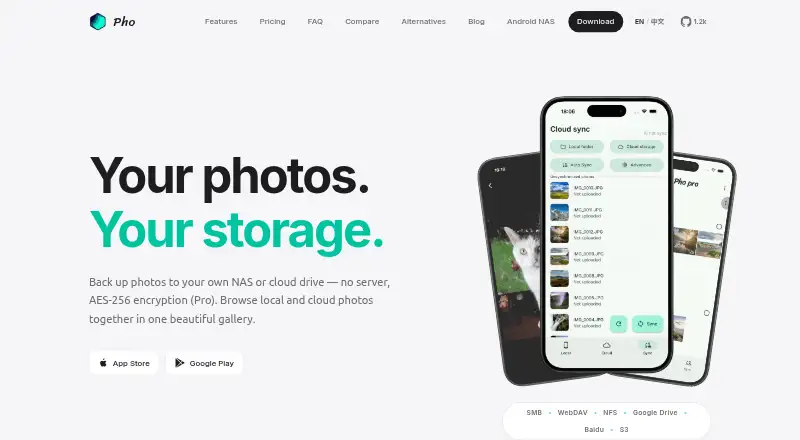
What Pho is
Pho is a photo backup and gallery app for Android, iOS, and macOS. It watches a phone's camera roll and uploads original-quality photos in the background to storage chosen by the user, then displays local and remote images in one timeline. Supported storage includes SMB, WebDAV, NFS, Google Drive, Baidu Netdisk, and S3-compatible options such as AWS S3, Backblaze B2, Cloudflare R2, and MinIO. Pho says photos go directly to user-controlled storage rather than through its servers, and that it has no central database, analytics pipeline, or ads. The sync engine is built into the app, without requiring a separate Docker container, database, or reverse proxy. Photos are organized in date-based directories that can be browsed with a file manager. The free plan costs nothing and includes local gallery and basic cloud sync for personal use. Pro (Annual) costs $19.99 a year and adds AES-256 encryption, custom sync filters, multi-threaded sync, directory options, theme colors, a Release Space tool, and priority support.
Who it suits
Pho suits people who want to back up mobile photos to storage they control and see local and remote images in one gallery. Its free plan is described for personal use; Pro adds encryption and additional sync controls.
What it does well
- Free plan includes local gallery and basic cloud sync.
- Supports several self-managed and cloud storage options.
- Photos go directly to user-controlled storage.
- Pro adds AES-256 encryption.
- Originals can be shared from the iOS app.
What to know first
- Free plan is intended for personal use.
- AES-256 encryption is a Pro feature.
- Pro Annual costs $19.99 a year.
Limits
The free plan is for personal use and includes a local gallery and basic cloud sync. AES-256 encryption, custom sync filters, multi-threaded sync, multiple directory structures, custom theme colors, Release Space, and priority support are listed with the $19.99-per-year Pro plan.
Plans
| Plan | Billed and limits | Price |
|---|---|---|
| Free | $0 forever · Local gallery · Basic cloud sync · Personal use | Free |
| Pro (Annual) | $19.99 / year · AES Encryption · Custom Sync Filters · Multi-threaded Sync · Multiple Directory Structures · Custom Theme Colors · Release Space tool · Priority support | $19.99 a year |
As pho.tools lists them, read 3 Oct 2026. The maker's own page has the final word.
Getting started
- Visit the Pho website.
- Install Pho on Android, iOS, or macOS.
- Choose a supported storage destination, such as SMB, WebDAV, NFS, Google Drive, Baidu Netdisk, or S3-compatible storage.
- Use the free plan for personal use or choose Pro at $19.99 per year for its additional features.
- On iOS, share or export originals through the app’s sharing options.
Verdict
Pho pairs background camera-roll backup with a gallery view and a range of user-selected storage options. The free plan covers personal use, while encryption and additional sync features are part of the annual Pro plan.
Questions
Is Pho free?
Yes. The Free plan costs nothing and is billed at $0 forever. It includes a local gallery and basic cloud sync for personal use.
How much is Pho Pro?
The Pro (Annual) plan is listed at $19.99 a year, billed $19.99 per year.
Which platforms does Pho support?
Pho is available for Android, iOS, and macOS.
Which storage services can Pho use?
Pho lists SMB, WebDAV, NFS, Google Drive, Baidu Netdisk, and S3-compatible storage, including AWS S3, Backblaze B2, Cloudflare R2, and MinIO.
Is Pho open source?
Pho says its core sync engine is open source on GitHub, while Pro features extend that open core.
What does Pro add?
Pro includes AES encryption, custom sync filters, multi-threaded sync, multiple directory structures, custom theme colors, a Release Space tool, and priority support.
Facts from Pho's own pages
- Background backup
- Pho watches the camera roll and uploads original-quality photos in the background. · pho.tools, 3 Oct 2026
- Encryption
- AES encryption is a Pro feature, and the product page specifies AES-256 encryption. · pho.tools, 3 Oct 2026
- File access
- Photos are stored in a transparent date-based directory structure and can be browsed directly with a file manager. · pho.tools, 3 Oct 2026
- Headquarters
- Chengdu, Sichuan, China · pho.tools, 28 Sept 2026
- Intended users
- Pho describes its free tier as intended for personal use and positions the app for people backing up photos to storage they own. · pho.tools, 3 Oct 2026
- Open source
- Pho says its core sync engine is open source on GitHub, while Pro features extend that open core. · pho.tools, 3 Oct 2026
- Privacy
- Pho says photos go directly to user-controlled storage and do not pass through its servers; it also says it has no central database, analytics pipeline, or ads. · pho.tools, 3 Oct 2026
- Pro features
- The Pro plan lists custom sync filters, multi-threaded sync, multiple directory structures, custom theme colors, a Release Space tool, and priority support. · pho.tools, 3 Oct 2026
- Purpose
- Pho is a photo backup and gallery app that syncs mobile camera-roll photos to storage chosen by the user. · pho.tools, 3 Oct 2026
- Serverless design
- Pho says its sync engine is embedded in the app and requires no separate Docker container, database, or reverse proxy. · pho.tools, 3 Oct 2026
- Sharing
- The iOS app can share originals through the native share sheet without compression or watermarks and export originals to the camera roll or other apps. · pho.tools, 3 Oct 2026
- Storage integrations
- Pho lists SMB, WebDAV, NFS, Google Drive, Baidu Netdisk, and S3-compatible storage including AWS S3, Backblaze B2, Cloudflare R2, and MinIO. · pho.tools, 3 Oct 2026
- Unified gallery
- The app displays local and remote photos together in a single timeline with pinch-to-zoom and full-screen viewing. · pho.tools, 3 Oct 2026
Where Pho stands on Freedom251
- Photo Backup Software#10 of 25