Freedom251 › Photo Management Software

KPhotoAlbum
What KPhotoAlbum is
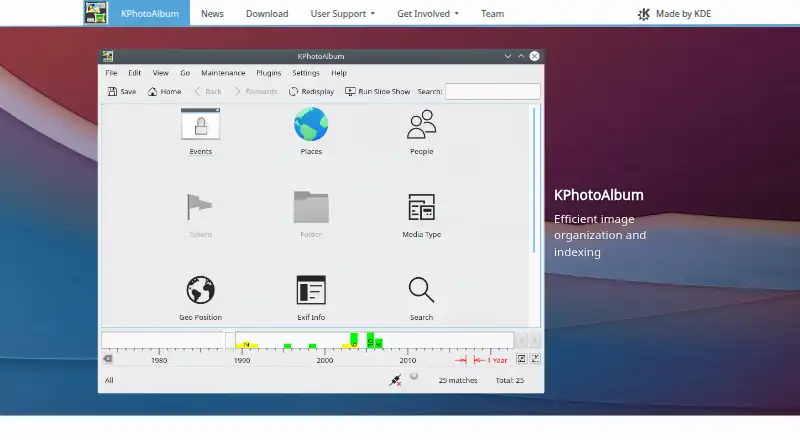
KPhotoAlbum is a free, open-source Linux application for tagging and managing photo collections so they can be searched. It is intended for people organizing hundreds or thousands of images stored on a hard drive. Its annotation dialog can tag a single image or a group, with quick tagging as a design goal. The default browser categories are Event, Places, People, and Token; users can add or remove categories in settings. Browse by category tags or narrow images to a chosen date range. KPhotoAlbum supports RAW photos and metadata tools, but does not offer face recognition. Release 6.2.0 added a QtMultimedia video backend. Most Linux distributions include it, and it can generally be installed through a graphical software center or package manager. The project provides a quick start page, a short tour, and online and PDF documentation. Questions and bug reports can be directed to its Matrix chat, mailing list, or Bugzilla. The listed license is GPL-3.0.
Who it suits
KPhotoAlbum suits Linux users managing large image collections on a hard drive who want to organize photos with tags and date filters.
What it does well
- Tags can be applied to one image or a group.
- Users can add or remove browser categories.
- Results can be narrowed to a date range.
- Supports RAW photos and metadata tools.
What to know first
- Available on Linux, not other listed platforms.
- Does not include face recognition.
- Exported .kim files are limited to 4 GB.
Plans
| Plan | Billed and limits | Price |
|---|---|---|
| KPhotoAlbum | Free, open-source Linux photo management application | Free |
As kphotoalbum.org lists them, read 11 Oct 2026. The maker's own page has the final word.
Verdict
KPhotoAlbum offers collection management through quick annotations, categories, and date filtering. Linux users who need face recognition should note that it is not included.
Facts from KPhotoAlbum's own pages
- Browsing and filtering
- Users can browse images by category tags and narrow results to a selected date range. · kphotoalbum.org, 11 Oct 2026
- Categories
- Default browser categories include Event, Places, People, and Token, and users can add or remove categories in settings. · kphotoalbum.org, 11 Oct 2026
- Documentation
- The project provides a quick start page, a three-minute tour, and links to online and PDF documentation. · kphotoalbum.org, 11 Oct 2026
- Extensions
- The KDE Applications page lists KIPI Plugins, described as plugins for KDE applications to export images. · apps.kde.org, 11 Oct 2026
- Intended use
- The project describes KPhotoAlbum as a tool for people organizing hundreds or thousands of images on a hard drive. · kphotoalbum.org, 11 Oct 2026
- License
- The KDE Applications page lists KPhotoAlbum under the GPL-3.0 license. · apps.kde.org, 11 Oct 2026
- Linux installation
- KPhotoAlbum is included in most Linux distributions and can generally be installed through a graphical software center or package manager. · kphotoalbum.org, 11 Oct 2026
- Notable limit
- The 6.2.0 release notes say exported .kim files are prevented from exceeding 4 GB. · kphotoalbum.org, 11 Oct 2026
- Privacy and security
- The pages opened for this research did not state a security certification or compliance claim. · kphotoalbum.org, 11 Oct 2026
- Purpose
- KPhotoAlbum tags and manages a photo collection so it can be searched. · apps.kde.org, 11 Oct 2026
- Support
- The project lists Matrix chat, a mailing list, and Bugzilla for questions, discussion, bug reports, and feature requests. · kphotoalbum.org, 11 Oct 2026
- Tagging
- Its annotation dialog supports annotating one image or a set of images, and the project says it is optimized for quick tagging. · kphotoalbum.org, 11 Oct 2026
- Video support
- The 6.2.0 release added support for a QtMultimedia video backend. · kphotoalbum.org, 11 Oct 2026
Where KPhotoAlbum stands on Freedom251
- Photo Management Software#20 of 36