Freedom251 › Pomodoro Timer Apps
Tomatoid
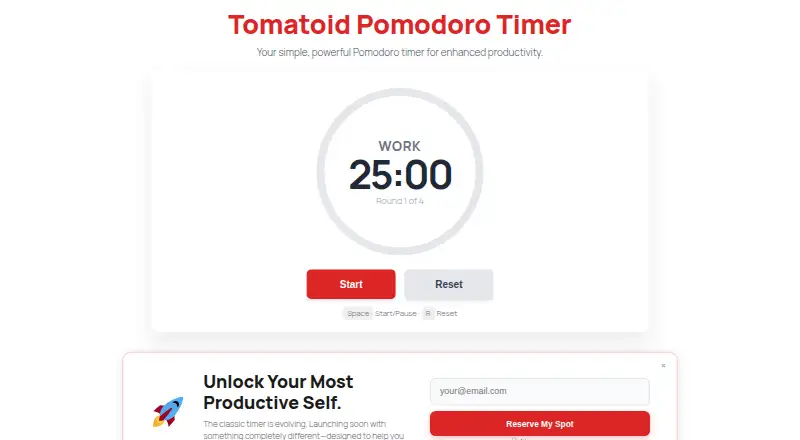
What Tomatoid is
Tomatoid is a free web app Pomodoro timer for organizing work periods and breaks. A session begins with 25 minutes of work followed by a five-minute break; after four rounds, the timer provides a 30-minute break. You can play, pause, or reset it at any time. The site describes the design as minimalist and intended to reduce distractions. No account is required, and Tomatoid says it does not collect personal information from timer users. Once the page has loaded, the timer can work offline as long as it remains open in the browser. The web app is described as accessible on Windows, macOS, and Linux desktop or laptop computers, and in mobile browsers on iOS and Android. It can be added to a device's home screen. Tomatoid is optimized for Chrome, Firefox, Edge, and Safari and is said to work in most modern browsers. It is not available in the iOS App Store or Google Play Store. The listed plan is free, and the site says the service will always be free.
Who it suits
Tomatoid suits people who want a simple timer for alternating focused work and breaks without creating an account. It can be used in desktop or mobile browsers, including after loading when offline if the page stays open.
What it does well
- Starts with a 25-minute work session.
- Provides a 30-minute break after four rounds.
- No account is required.
- Can work offline after loading while kept open.
- Listed as free.
What to know first
- Not available in the iOS App Store or Google Play Store.
- Offline use requires the page to remain open.
- Use is through a web app and browser.
Limits
The service is free, and no paid plan is described. Offline use works after the page has loaded only while it remains open in the browser.
Plans
| Plan | Billed and limits | Price |
|---|---|---|
| Free | Pomodoro timer · no account required | Free |
As tomatoid.com lists them, read 4 Oct 2026. The maker's own page has the final word.
Getting started
- Open https://tomatoid.com/ in a supported browser.
- Start using the timer; no account is required.
- Use the web app on a desktop or laptop, or in a mobile browser.
- Add it to a mobile device’s home screen if desired.
- Keep the page open after it loads to use the timer offline.
Tomatoid is a free Pomodoro timer for people who want a browser-based way to keep a steady focus routine without signing up. It suits users happy with standard intervals, but its narrow scope is a drawback if you want to customize sessions or use a native app.
Overview
Tomatoid keeps its job simple: it guides you through a set sequence of work and rest without asking for an account. The uncluttered design is meant to limit distractions, and the timer can work offline after the page loads, as long as you keep it open in your browser. That makes it practical when connectivity drops, but not a substitute for an installed app that works independently of a browser tab.
Key features
- Fixed work-and-break cycle: Each round begins with 25 minutes of work and a 5-minute break; after four rounds, Tomatoid gives you a 30-minute break. This suits people who want a familiar rhythm without having to plan intervals. There is no stated way to change the durations, so users with a different cadence may find it restrictive.
- Basic timer controls: Play, pause, and reset let you manage the current session, but do not add scheduling or task-management tools.
- Minimalist, account-free use: Tomatoid says it does not collect personal information from timer users and requires no account. That is a low-friction setup for a simple timer, though it is not a broader privacy or data-handling claim.
Pricing
The Free plan costs nothing and includes the Pomodoro timer, with no account required. Tomatoid says it is completely free, has no hidden fees, and will always be free; there is no free trial because there is no paid plan to try. This is a straightforward fit for anyone who only needs the timer, but the free offer is also the whole product rather than an entry point to additional capabilities.
Platforms
Tomatoid is a web app accessible on desktop and laptop computers running Windows, macOS, and Linux, as well as mobile browsers on iOS and Android. It is optimized for Chrome, Firefox, Edge, and Safari and should work in most modern browsers. You can add it to a device's home screen, but it is not available in the iOS App Store or Google Play Store. Its offline use depends on loading the page first and keeping it open.
Who it's for
Tomatoid is a sensible choice for people who want a no-cost, no-account timer with a familiar schedule and few distractions. It is less suitable for users who need custom focus durations, integrated task tools, or an app-store installation.
Pros and cons
- Pro: The 25/5-minute rounds and 30-minute break after four rounds provide a clear routine without manual setup.
- Pro: No account is needed, and the timer can keep working offline once loaded if its page remains open.
- Con: The intervals are fixed, limiting its usefulness for people whose work calls for shorter or longer sessions.
- Con: It is browser-only rather than a native iOS or Android app, and offline use requires an open, previously loaded page.
Alternatives
For a wider selection, browse Pomodoro Timer Apps. Choose Pomodoist if open-source licensing matters or you want a freemium option with a free trial and broader platform coverage. Focus To-Do is another freemium choice across desktop, mobile, and browser extension platforms; its 3 Months plan costs $3.99 a month, billed 3 Months. Pick Pomofocus if you want a free timer with estimate finish time, templates, visual reports, and custom settings, or paid features such as projects and yearly reports. Tomato Timer is worth considering for a free web timer with a built-in todo list and custom focus durations, or a paid macOS app. If you prefer a desktop app with no subscriptions or paid features, Flowkeeper is free for Linux, macOS, and Windows. Forest offers free core focus features with occasional ads on mobile, web, and browser extension platforms. Goodtime is an open-source Android and iOS alternative with basic free functionality. For task boards and productivity tracking alongside a timer, Pomello has a free Basic plan with boards, lists, tracking, checklists, custom sounds, and data export.
Verdict
Choose Tomatoid if you want a free, account-free browser timer that follows the standard Pomodoro rhythm and stays usable offline while its page remains open. Look elsewhere if you need adjustable intervals, task-management features, or a native mobile app.
Verdict
Tomatoid provides a straightforward work-and-break schedule with basic timer controls and browser access across desktop and mobile. Its offline use depends on loading the page first and keeping it open.
Questions
Is Tomatoid free?
Yes. Tomatoid describes itself as completely free, with no hidden fees, and says it will always be free.
Do I need an account?
No account is required to use the timer.
Which devices can run Tomatoid?
It runs in web browsers on Windows, macOS, and Linux computers, and in mobile browsers on iOS and Android.
Is there an iOS or Android app?
Tomatoid says it is not available in the iOS App Store or Google Play Store. The web app can be added to a mobile device’s home screen.
Can Tomatoid work offline?
Yes. After the page loads, the timer can be used offline if the page remains open in the browser.
How does the timer schedule breaks?
It starts with 25 minutes of work followed by a 5-minute break. After four rounds, it provides a 30-minute break.
Facts from Tomatoid's own pages
- Account
- An account is not required to use the timer. · tomatoid.com, 4 Oct 2026
- Browser support
- The site says Tomatoid is optimized for Chrome, Firefox, Edge, and Safari and should work in most modern browsers. · tomatoid.com, 4 Oct 2026
- Cost
- The site says Tomatoid is completely free, with no hidden fees, and will always be free. · tomatoid.com, 4 Oct 2026
- Desktop platforms
- The web app is described as accessible on desktop and laptop computers running Windows, macOS, and Linux. · tomatoid.com, 4 Oct 2026
- Long break
- After four rounds, the timer provides a 30-minute break. · tomatoid.com, 4 Oct 2026
- Minimal design
- The site describes Tomatoid as simple and minimalist, with a focus on reducing distractions. · tomatoid.com, 4 Oct 2026
- Mobile platforms
- The web app works in mobile browsers on iOS and Android, and can be added to a device's home screen. · tomatoid.com, 4 Oct 2026
- Native apps
- The site says Tomatoid is not available in the iOS App Store or Google Play Store. · tomatoid.com, 4 Oct 2026
- Offline use
- The timer can be used offline after the page has loaded, if it remains open in the browser. · tomatoid.com, 4 Oct 2026
- Privacy
- The site says it does not collect personal information from timer users. · tomatoid.com, 4 Oct 2026
- Purpose
- Tomatoid is a free web app Pomodoro timer designed to help users focus and be productive. · tomatoid.com, 4 Oct 2026
- Support and integrations
- The opened site pages do not state support channels or integrations. · tomatoid.com, 4 Oct 2026
- Timer controls
- Users can play, pause, or reset the timer at any time. · tomatoid.com, 4 Oct 2026
- Work interval
- The timer starts with a 25-minute work session followed by a 5-minute break. · tomatoid.com, 4 Oct 2026
Where Tomatoid stands on Freedom251
- Pomodoro Timer Apps#19 of 28